
Why Do Datacenter Proxies Get Blocked? Causes, Fixes, and Prevention
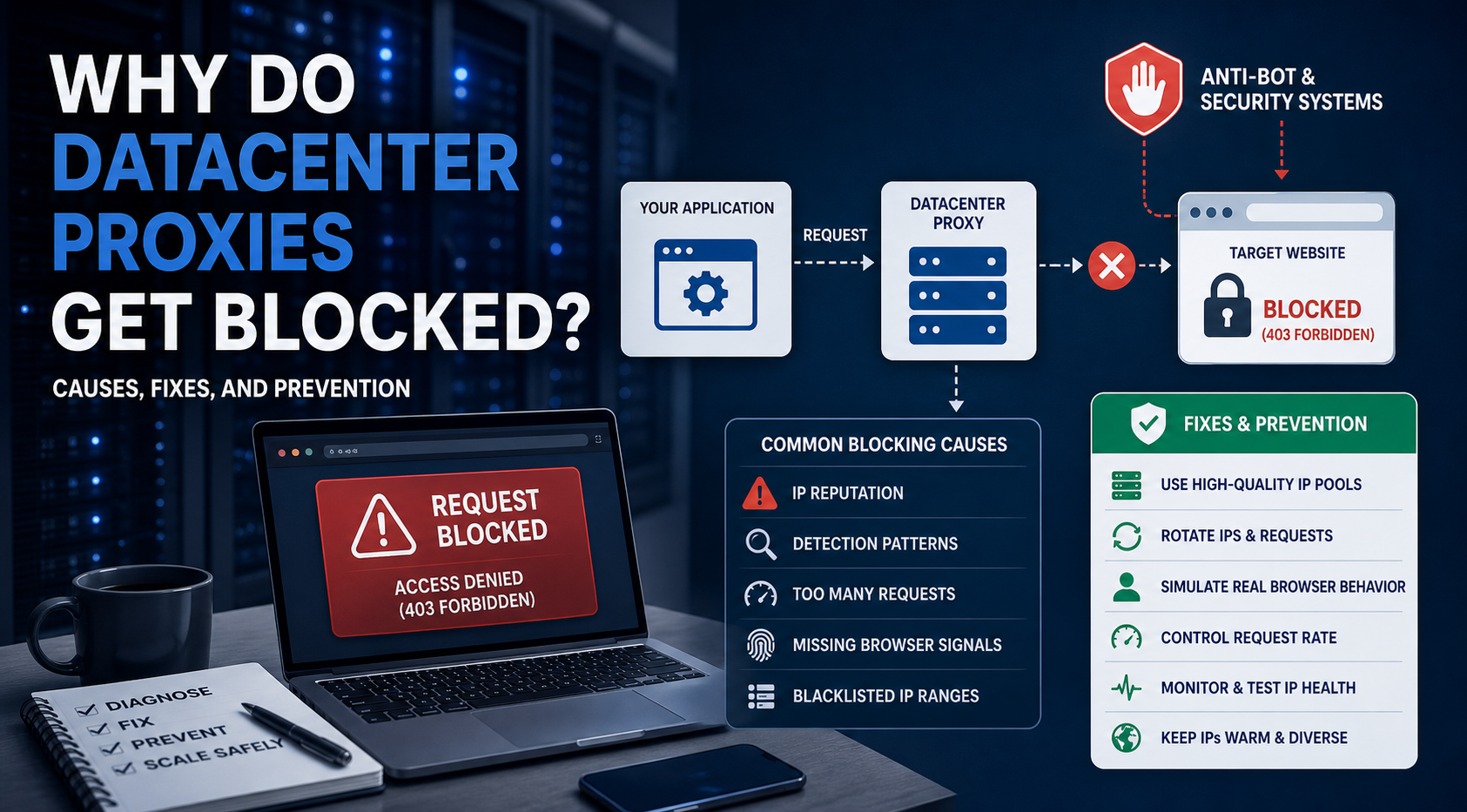
Datacenter proxies get blocked when a target website sees risk signals from the IP address, request pattern, browser fingerprint, session behavior, or the workflow itself. The proxy IP matters, but it is only one part of the full detection picture.
Datacenter proxies get blocked when a target website sees risk signals from the IP address, request pattern, browser fingerprint, session behavior, or the workflow itself. The proxy IP matters, but it is only one part of the full detection picture.
If your team is seeing 403 errors, CAPTCHA pages, proxy IP banned messages, failed requests, or low proxy success rates, do not rush to blame the provider first. A proxy can be clean and still fail if the target blocks data center networks, your scraper sends unnatural requests, or your session design changes IPs too aggressively.
In this guide, you will learn:
- Why datacenter proxies get blocked
- How to tell if the proxy IP is the real problem
- What request patterns trigger blocks
- How browser fingerprints affect proxy success
- What a 403 proxy error usually means
- How to diagnose proxy failure step by step
- When to switch to residential, ISP, or API-based options
Why do datacenter proxies get blocked?
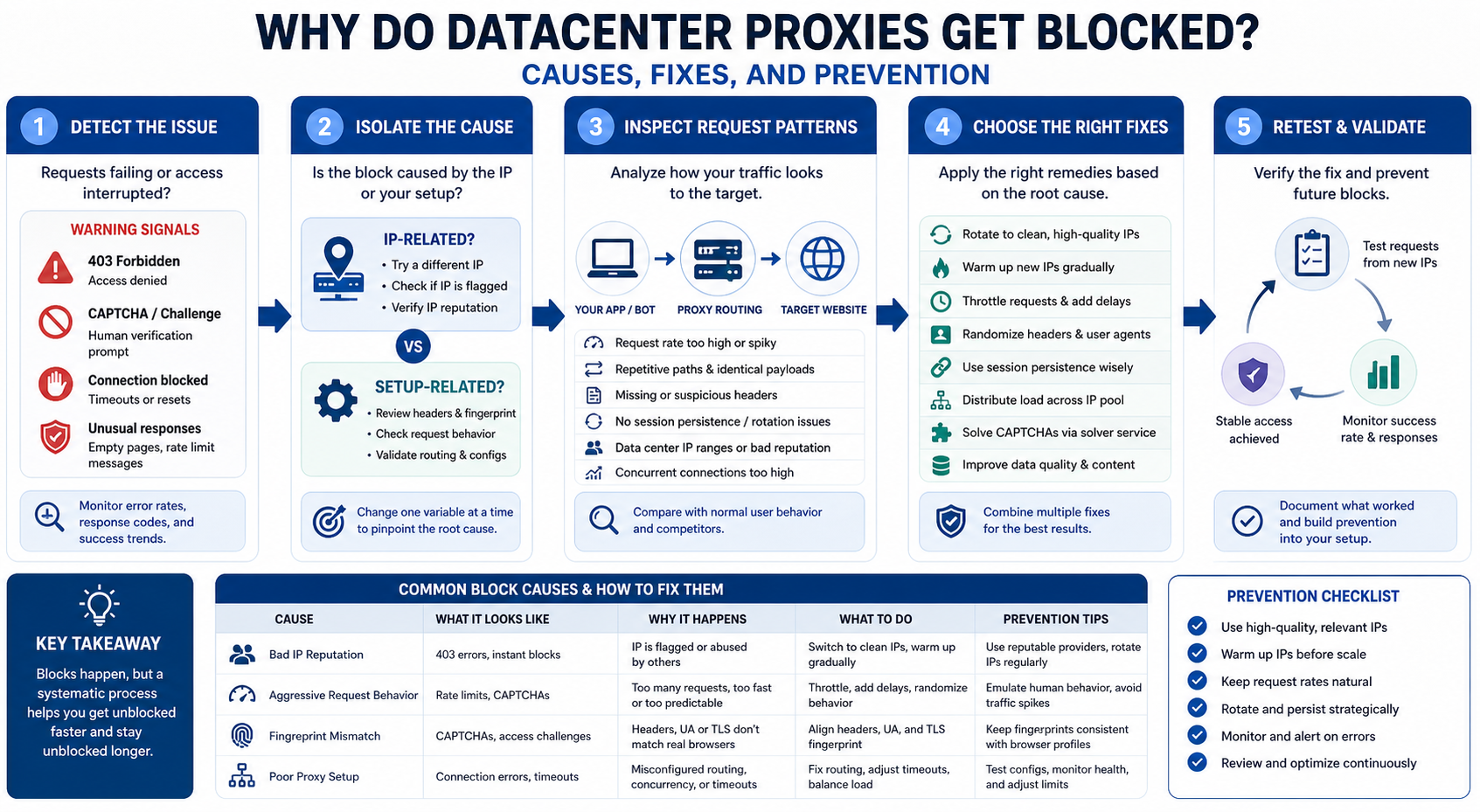
Datacenter proxies get blocked because websites may detect weak IP reputation, suspicious traffic patterns, fingerprint mismatches, target rule violations, abuse history, or poor session design.
Many teams think a proxy blocked error means the proxy provider failed. Sometimes that is true, but not always. A target can reject traffic for several reasons:
- The IP belongs to a known data center or hosting network
- Too many requests arrive too quickly
- The same URL pattern repeats unnaturally
- The browser fingerprint does not match normal user behavior
- Cookies, headers, and sessions are inconsistent
- The IP pool has been overused by other customers
- The target does not allow automated access
- The workflow triggers anti-bot proxy detection
A datacenter proxy is usually fast and cost-efficient, but it does not automatically look like normal residential user traffic. That makes it useful for many scraping, SEO, monitoring, and automation workflows, but less reliable on targets that treat hosted IPs as high risk.
The practical rule is simple: diagnose the full request chain before replacing the proxy.
For the LycheeIP implementation details behind this step, review rotating residential proxies.
Is the proxy IP the real problem?
The proxy IP is the real problem only when clean tests show that the IP range, pool reputation, or provider routing consistently causes failures across otherwise healthy workflows.
Check if the IP range is flagged
Start by checking whether the IP belongs to a data center, hosting provider, or cloud network. Some websites score these ranges differently from residential or ISP networks.
Signs the IP range may be the issue include:
- Many 403 errors across multiple URLs
- Blocks that appear immediately before any high-volume behavior
- Better results when testing residential or ISP proxies
- Similar failures across multiple IPs from the same range
- Target pages that load normally from a direct connection
This does not always mean the provider is bad. It may mean the target simply does not trust data center traffic.
Check if the target blocks data center networks
Some targets block or challenge most data center IPs by default. In this case, even a high-quality datacenter proxy may struggle.
You can test this by comparing:
- Direct connection where allowed
- Datacenter proxy
- Residential proxy
- ISP proxy
- Different proxy locations
- Different IP ranges from the same provider
If residential or ISP proxies work while datacenter proxies fail repeatedly, the target may be sensitive to hosting IPs.
Check if the IP pool is shared or overused
Shared IP pools can become noisy if many users send high-volume or risky traffic through the same IPs. This can lead to weaker proxy IP reputation.
Warning signs include:
- The proxy IP banned quickly after low usage
- Blocks happen before your workload reaches normal volume
- Many IPs in the same pool behave poorly
- Performance improves with dedicated IPs
- Replacement IPs show similar problems
If the pool is shared, ask whether dedicated datacenter IPs are available for your workload.
Check if replacement IPs perform better
IP replacement is a useful test. If fresh IPs perform much better, the issue may be IP reputation. If fresh IPs fail the same way, the issue may be target rules, proxy type, scraper behavior, or fingerprinting.
Do not replace IPs blindly. Record the result before and after replacement so you can identify the real pattern.
How do request patterns trigger proxy blocks?
Request patterns trigger proxy blocks when the traffic looks automated, repetitive, too fast, or different from how real users move through the site.
For the official technical reference behind this point, see MDN HTTP overview.
Common request-pattern problems include:
- Too many requests in a short time
- No pause between requests
- Repeating the same URL structure
- Hitting pages in a sequence real users would not follow
- Retrying failed requests too quickly
- Requesting only high-value pages and skipping normal navigation
- Sending traffic at the same rate every minute
- Running many sessions from the same IP at once
A target may not block the first request. It may block after the pattern becomes clear.
For example, a scraper that requests thousands of category pages in perfect alphabetical order may look unnatural. A rank tracking workflow that hits search result pages too quickly from the same proxy range may trigger rate limits. An ad verification task that repeats the same region, device, and landing page pattern may get challenged.
A better approach is to design traffic around the target’s rules, your legitimate use case, and reasonable request limits. Slowing down often improves proxy success rate more than switching providers.
How do browser fingerprints affect proxy success?
Browser fingerprints affect proxy success because websites can evaluate more than the IP address.
A proxy changes the route of the request, but it does not automatically make the browser, script, or automation environment look natural. Many targets also evaluate technical and behavioral signals such as:
- Headers
- Cookies
- TLS and connection signals
- Browser version
- Device consistency
- JavaScript behavior
- Rendering environment
- Screen and language settings
- Session continuity
- Navigation patterns
If these signals conflict, the target may challenge or block the request.
For example, your proxy may show a US IP, but your headers may suggest another region. Your session may change IPs while keeping the same cookies. Your automation may request pages without loading assets that normal browsers would request. Your browser environment may expose signals that do not match a typical user device.
This is why proxies alone do not make automation look natural. A good proxy setup still needs consistent sessions, correct headers, reasonable request rates, and a workflow that respects the target’s access rules.
For the LycheeIP implementation details behind this step, review LycheeIP proxy infrastructure.
For the LycheeIP implementation details behind this step, review static residential proxies.
For the LycheeIP implementation details behind this step, review AI-powered browser automation hub.
Why do CAPTCHAs appear even when proxies work?
CAPTCHAs appear when the target sees enough risk signals to challenge the request, even if the proxy can still connect.
A CAPTCHA proxy issue is not always a full block. It is often a warning sign. The target may be saying, “This request might be automated, so prove you are human or reduce risk.”
CAPTCHAs can be triggered by:
- Weak IP reputation
- High request volume
- Repeated URL patterns
- Suspicious browser fingerprint
- Missing cookies
- Inconsistent sessions
- Too many users on a shared IP
- Location mismatch
- Previous abuse from the IP range
Repeated CAPTCHA events should be treated as a quality signal. If CAPTCHAs rise as concurrency increases, your request rate may be too aggressive. If CAPTCHAs appear immediately across many IPs, the target may distrust the IP type. If only some sessions trigger CAPTCHAs, your session handling or rotation may be inconsistent.
Do not treat CAPTCHA solving as the first solution. First diagnose why the challenge appears.
What does a 403 proxy error usually mean?
A 403 proxy error usually means the target server understood the request but refused access.
A 403 error can happen for several reasons:
A 403 does not always mean the proxy is dead. It can mean the target rejected your request type, workflow, or access pattern.
To diagnose it, compare the same request across direct access where allowed, datacenter proxies, residential proxies, ISP proxies, and lower request rates. If the 403 disappears when rate slows down, the issue may be behavior. If it disappears with residential IPs, the issue may be IP type. If it remains everywhere, the target may restrict access or require a different approach.
How do you diagnose proxy failure step by step?
You diagnose proxy failure by isolating the connection, target, proxy type, request pattern, session design, and policy layer one by one.
For the official technical reference behind this point, see Anthropic documentation.
Use this workflow:
Step 1: Test direct connection
Where allowed, test the target without a proxy. Confirm whether the page loads normally, what status code it returns, and what content appears.
If direct access fails too, the problem may not be the proxy.
Step 2: Test proxy on a neutral target
Use a neutral test page to confirm that the proxy connects, authenticates, and routes traffic.
This test only proves that the proxy works at a basic level. It does not prove target compatibility.
Step 3: Test proxy on the real target
Run a small test against the actual URLs, pages, or workflows you need.
Track:
- Status code
- Page content
- CAPTCHA rate
- Redirects
- Timeouts
- Latency
- Soft blocks
- Region accuracy
Step 4: Compare IP types
Test datacenter, residential, and ISP proxies under the same conditions.
If only datacenter proxies fail, the target may reject hosting IPs. If all proxy types fail, the issue may be request behavior, target policy, authentication, or browser fingerprint.
Step 5: Lower request rate
Reduce concurrency, add longer delays, and stop aggressive retries.
If performance improves, the block was likely connected to traffic pattern or rate limiting.
Step 6: Check headers and sessions
Review whether headers, cookies, region, browser behavior, and IP rotation make sense together.
A session should not randomly change identity in a way that a normal user would not. If you use sticky sessions, confirm the proxy keeps the same IP long enough.
Step 7: Review target policy
Check whether the target allows your type of automated access. Some targets prohibit scraping, account automation, or repeated access to certain pages.
If the target clearly disallows the workflow, do not try to force access with more proxy rotation.
Step 8: Contact the provider if IP quality appears poor
If clean tests show that the IP pool is the main issue, contact the provider. Share logs, timestamps, affected IPs, status codes, and target behavior.
Useful evidence includes:
- Error rates by IP
- Error rates by location
- Test volume
- Time of test
- Target pages
- Comparison against other proxy types
- Replacement IP results
Good support teams can help identify routing issues, overloaded pools, location mismatches, or better proxy products for the workload.
What are the best fixes for blocked datacenter proxies?
The best fix depends on the root cause, but common solutions include reducing request rate, using dedicated IPs, improving session consistency, changing proxy type, or replacing burned IPs.
Use this fix table:
The most reliable prevention strategy is to test before scaling. Do not start with maximum concurrency. Do not assume unlimited bandwidth means unlimited successful access. Do not use the same proxy type for every target.
When should you stop using datacenter proxies for a target?
You should stop using datacenter proxies for a target when clean tests show persistent blocking, high account risk, policy restrictions, or poor cost per successful request.
Stop or switch strategy when:
- Fresh datacenter IPs are blocked repeatedly
- Residential or ISP proxies perform much better under the same conditions
- The target clearly disallows automated access
- CAPTCHA and 403 rates remain high after reducing request volume
- Your workflow involves sensitive account activity
- Legal or compliance approval is unclear
- The cost per successful request becomes too high
- Data quality becomes unreliable
Stopping does not always mean abandoning the project. It may mean using a different access method, reducing scope, using official APIs, requesting permission, switching to ISP or residential proxies, or redesigning the workflow.
A good proxy strategy is not about forcing access at all costs. It is about reliable, compliant, and measurable data delivery.
How can LycheeIP users reduce proxy block rates?
LycheeIP users can reduce proxy block rates by matching proxy type to target difficulty, starting with conservative concurrency, and testing session behavior before scaling.
Reduce Datacenter Proxy Blocks with LycheeIP
A practical LycheeIP workflow can look like this:
- Start with a small real-target test.
- Use datacenter proxies for speed-focused, lower-risk tasks.
- Measure proxy success rate, 403 rate, CAPTCHA rate, and content quality.
- Reduce concurrency before assuming the IP pool is bad.
- Use sticky sessions when the workflow needs continuity.
- Compare datacenter performance against residential or ISP-style options.
- Replace IPs only after confirming the IP is the real issue.
- Scale gradually after results remain stable.
For example, SEO crawling and basic public page monitoring may perform well on datacenter proxies. Harder scraping targets, sensitive localized checks, or account workflows may need residential, static residential, or ISP-style options.
The best LycheeIP setup is the one that works on your real target, at your expected volume, with your acceptable risk level.
Frequently Asked Questions
Why do datacenter proxies get blocked so easily?
Datacenter proxies can get blocked because many websites can identify hosting or data center IP ranges. They may also get blocked because of high request volume, poor session design, suspicious headers, or previous abuse from the same IP pool.
What does proxy blocked mean?
Proxy blocked means the target refused, challenged, limited, or changed the response because of the proxy IP or the behavior of the request. It can appear as a 403 error, CAPTCHA, timeout, soft block, redirect, or empty page.
What causes a 403 proxy error?
A 403 proxy error usually means the target understood the request but refused access. Common causes include blocked IP ranges, missing headers, target restrictions, authentication issues, bot detection, or region mismatch.
How do I know if my proxy IP is banned?
Your proxy IP may be banned if it consistently fails on the same target while other clean IPs or proxy types still work. Look for repeated 403 errors, CAPTCHAs, soft blocks, or blocked messages from the same IP.
Can rotating proxies prevent blocks?
Rotating proxies can reduce repeated traffic from one IP, but they do not guarantee success. If your request pattern, fingerprint, or target policy is the real issue, rotation alone may not fix the problem.
Why do I get CAPTCHA pages even with proxies?
CAPTCHAs appear when the target sees risk signals. The signal may come from IP reputation, request rate, browser fingerprint, missing cookies, repeated behavior, or inconsistent sessions.
Are residential proxies better for blocked targets?
Residential proxies can perform better on targets that distrust data center IPs. However, they still need proper session handling, reasonable request rates, and compliance with target rules.
Should I replace my proxy provider if I get blocked?
Not immediately. First test direct access, neutral targets, real targets, request rate, headers, session behavior, and different proxy types. Replace the provider only when evidence shows the IP pool or routing quality is the main issue.
Can LycheeIP help reduce datacenter proxy blocks?
LycheeIP can be tested as part of a mixed proxy stack. Start with datacenter proxies for speed-focused tasks, then compare residential or ISP-style options if the target is more sensitive.
When should I stop using datacenter proxies?
Stop using datacenter proxies when clean tests show persistent blocking, poor cost per success, sensitive account risk, or target rules that make the workflow unsuitable. In those cases, consider residential, ISP, official API, or permission-based access options.
Related LycheeIP Guides and Resources

Recommended Articles

DataDome Bypass for Web Scraping
DataDome Bypass for Web Scraping
View Details
Web Scraping Rate Limiting: How to Handle 429s, Backoff, and Concurrency
Web scraping rate limiting is the engineering discipline of keeping an authorized collection workload inside a target service's acceptable request envelope. When that envelope is exceeded, a server may respond with HTTP 429 Too Many Requests, delay responses, or apply other controls.
View Details
reCAPTCHA vs hCaptcha vs Cloudflare Turnstile: What Scraping Teams Need to Know
If an authorized data-collection workflow suddenly stops at a verification screen, identifying the protection system matters before you change code, browser settings, or proxy infrastructure. reCAPTCHA vs hCaptcha vs Turnstile is not simply a branding comparison. The three systems can expose different browser flows, token models, risk decisions, and failure symptoms.
View Details
Browser Automation Proxies: IPs, Geo-Targeting, Sessions, and AI Agents
A browser automation proxy belongs to the network layer of Playwright, Selenium, cloud-browser, and AI-agent workflows. It changes how browser traffic is routed and can affect the source IP address, geographic egress, and session continuity seen by a destination site. It does not improve an AI model's reasoning, repair browser logic, or guarantee that a website will accept the session.
View Details
SERP Scraping: Methods, APIs, Workflows, and Best Practices
SERP scraping is the automated collection of information from search engine results pages. A SERP scraper can capture organic rankings, advertisements, featured snippets, People Also Ask questions, local results, shopping listings, images, and other search features, then convert them into structured data for analysis.
View Details