
How to Test Proxy Quality Before Scaling a Scraping or SEO Workflow
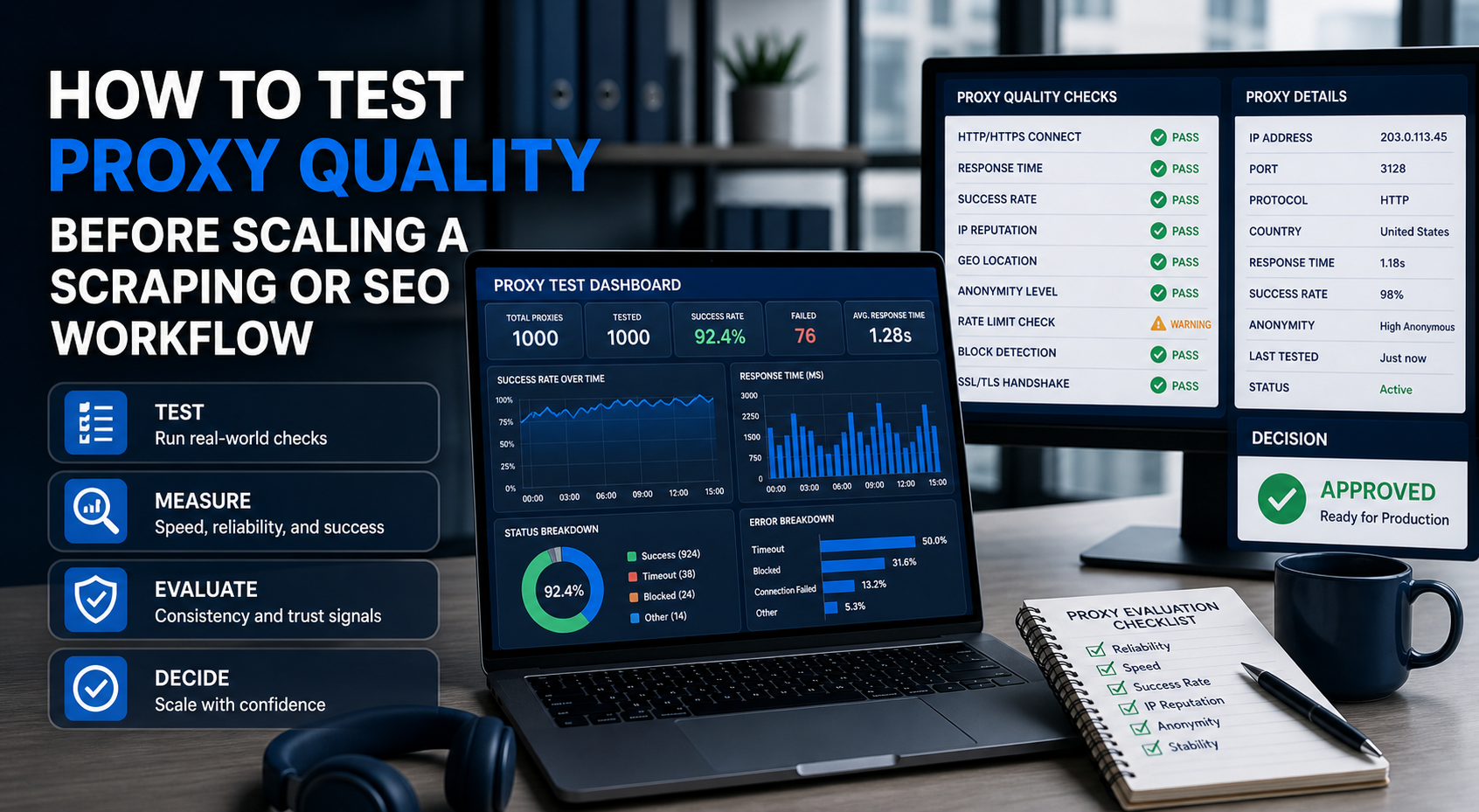
Learning **how to test proxies** before scaling can save your team from slow crawls, blocked IPs, wasted proxy spend, incomplete data, and false confidence. A proxy can work on a basic IP-check page and still fail on your actual scraping, SEO monitoring, ad verification, or automation workflow.
Learning how to test proxies before scaling can save your team from slow crawls, blocked IPs, wasted proxy spend, incomplete data, and false confidence. A proxy can work on a basic IP-check page and still fail on your actual scraping, SEO monitoring, ad verification, or automation workflow.
The goal is not just to confirm that the proxy connects. The goal is to confirm that the proxy works for your target, at your expected volume, with your session rules, and within your acceptable error rate.
In this guide, you will get:
- A practical proxy testing checklist
- The quality metrics that matter before production
- A step-by-step test workflow
- A diagnostic table for common proxy test results
- A simple way to calculate real proxy cost
- A LycheeIP testing approach for real workloads
For the LycheeIP implementation details behind this step, review static residential proxies.
Why should you test proxies before buying or scaling?
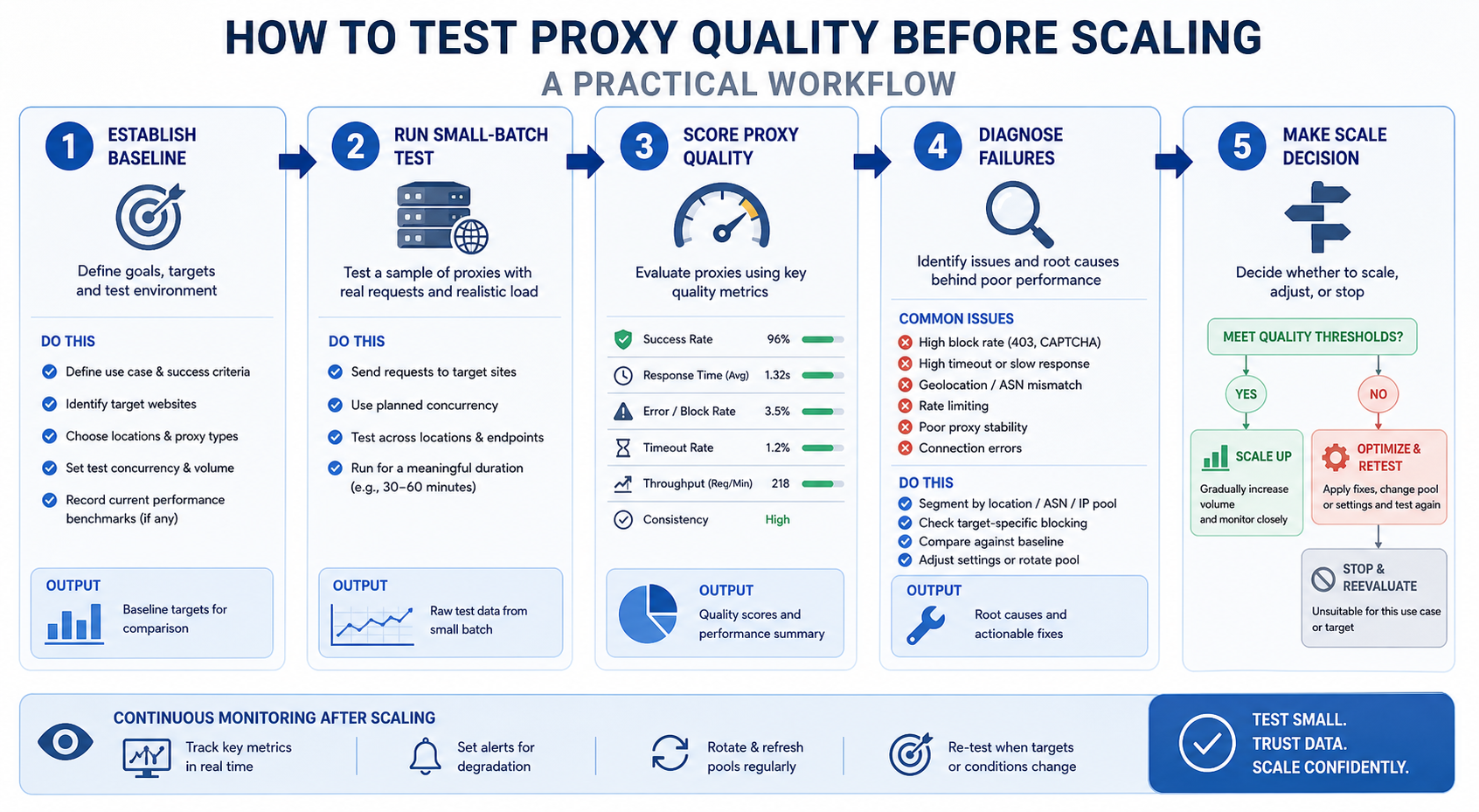
You should test proxies before buying or scaling because a working proxy is not the same as a production-ready proxy.
Many teams make the mistake of testing proxies only with an IP-check page. That confirms the proxy can route traffic, but it does not confirm target success. Your real target may respond differently because of IP reputation, request rate, headers, cookies, browser fingerprint, geo-location, session behavior, or platform rules.
There are three levels of proxy testing:
- Connection test: Does the proxy connect?
- Target test: Does the proxy access the pages or workflow you actually need?
- Scale test: Does the proxy still perform when you increase volume, concurrency, and duration?
The most important metric is proxy success rate. A proxy with high speed but low success rate can still be a bad choice. A proxy with moderate speed and reliable target completion may be better for production.
A simple definition:
**Proxy success rate \= successful usable responses ÷ total attempted requests**
A successful response is not always a 200 status code. It should be a usable page, API response, SERP result, screenshot, or workflow output that meets your data quality requirements.
For the official technical reference behind this point, see MDN HTTP overview.
What proxy quality metrics should you measure?
You should measure connection success, latency, status codes, CAPTCHA frequency, geo accuracy, session stability, IP replacement speed, and cost per successful request.
Connection success rate
Connection success rate tells you whether the proxy can complete basic network requests without timeouts, authentication failures, or connection errors.
Track:
- Total requests
- Successful connections
- Failed connections
- Proxy authentication errors
- Timeout errors
- DNS or handshake issues
A low connection success rate usually points to proxy instability, wrong credentials, bad endpoint formatting, network issues, or overloaded infrastructure.
Response time and latency
Proxy latency measures how long requests take through the proxy.
Track:
- Average response time
- Median response time
- Slowest response time
- Timeout frequency
- Response time under concurrency
Do not judge latency only with one request. Test across different times, locations, and concurrency levels. A proxy that feels fast at low volume can become unstable when the workload increases.
HTTP status codes
HTTP status codes help you understand how the target responds.
Watch for:
- 200 responses that contain usable content
- 301 or 302 redirects that change the expected page
- 403 errors that may indicate blocking or access denial
- 407 errors that may indicate proxy authentication problems
- 429 errors that may indicate rate limiting
- 5xx errors that may indicate server or routing instability
Status codes alone are not enough. A page can return 200 but still show a CAPTCHA, empty content, blocked message, or soft error.
CAPTCHA frequency
CAPTCHA frequency shows how often your traffic triggers challenge pages.
A CAPTCHA proxy problem may come from IP reputation, request behavior, browser fingerprint, cookies, or repeated access patterns. It does not always mean the proxy provider is bad. Sometimes the scraper or automation setup is the main issue.
Track CAPTCHA rate by:
- Proxy type
- Location
- Target page type
- Request speed
- Session duration
- Headers and browser environment
Geo-location accuracy
Geo accuracy matters when you need US datacenter proxies, city-level residential access, localized SERPs, regional pricing, or location-specific ad verification.
Check whether the target sees the proxy in the expected country, region, language, and market. Also check whether the page content actually changes as expected.
A proxy can appear to be in the right country on an IP lookup tool and still produce inconsistent target behavior.
Session stability
Session stability measures whether the proxy keeps a usable identity across repeated requests.
This matters for:
- Logged-in workflows
- Cart or checkout testing
- Account dashboards
- SERP tracking sessions
- Multi-step scraping flows
- Tools that require cookies or state
For rotating proxies, test whether rotation happens too quickly or too slowly. For sticky sessions, test whether the IP remains stable for the promised duration.
IP replacement speed
IP replacement speed matters when IPs become blocked, burned, slow, or misclassified.
Track:
- How often IPs fail
- How quickly replacements become available
- Whether replacements perform better
- Whether replacement rules differ by proxy type
- Whether support is required to replace IPs
This is especially important for datacenter proxy pools, shared proxies, and high-volume workflows.
How to measure cost per successful request
Cost per successful request is the metric that connects proxy quality to business value.
Use this formula:
**Cost per successful request \= total proxy cost ÷ successful usable responses**
For SEO teams, you can adapt it:
**Cost per usable SERP \= proxy cost ÷ valid SERP captures**
For scraping teams:
For the LycheeIP implementation details behind this step, review rotating residential proxies.
**Cost per usable page \= proxy cost ÷ complete pages collected**
For automation teams:
For the LycheeIP implementation details behind this step, review AI-powered browser automation hub.
For the official technical reference behind this point, see Playwright documentation.
**Cost per completed workflow \= proxy cost ÷ successful workflow runs**
This prevents bad buying decisions. A cheap proxy with a low success rate can be more expensive than a premium proxy that completes the job reliably.
How do you build a proxy testing checklist?
You build a proxy testing checklist by defining your target pages, success criteria, limits, failure rules, and production expectations before running the test.
Use this checklist before testing any provider:
A strong proxy testing checklist should answer one question:
Can this proxy setup complete my real workflow at production conditions without unacceptable failure, cost, or risk?
How should you run a small proxy test?
You should run a small proxy test in stages, starting with a clean baseline and gradually increasing target difficulty, volume, and concurrency.
Step 1: Create a baseline without proxies where allowed
Start by understanding normal behavior. Where permitted, test your target without proxies so you can compare:
- Normal response time
- Expected status codes
- Page structure
- Redirect behavior
- Language or geo behavior
- CAPTCHA or block behavior
This helps you separate proxy problems from target problems.
Step 2: Test one proxy endpoint at low volume
Next, test one proxy endpoint with a small number of requests. Confirm that credentials, IP whitelisting, ports, and protocol settings work.
Track:
- Connection success
- Response code
- Page completeness
- Latency
- Authentication errors
- Target response
At this stage, do not scale. You are only confirming basic compatibility.
Step 3: Test multiple IPs across locations
After the first endpoint works, test multiple IPs or locations.
This helps you find location-specific or pool-specific issues. For example, one region may work well while another produces more blocks. One IP range may be clean while another has weaker reputation.
For location-sensitive workflows, compare the target output, not just the IP lookup result.
Step 4: Increase concurrency gradually
Do not jump from 10 requests to production volume immediately. Increase concurrency in stages.
Example progression:
- 1 thread
- 5 threads
- 10 threads
- 25 threads
- 50 threads
- Expected production level
At each stage, track success rate, latency, status codes, CAPTCHAs, and timeouts. Many proxy setups look good at low volume but fail under real load.
Step 5: Track blocks and incomplete pages
A failed request is not always obvious.
Count these as failures:
- 403 pages
- 429 rate limits
- CAPTCHA pages
- Login walls where none should appear
- Empty HTML
- Incomplete rendered content
- Redirects to unrelated pages
- Soft-block messages
- Wrong-region content
- Broken session state
This is why content validation matters. Your script should check whether the page is actually useful, not just whether it returned a response.
Step 6: Repeat with real target pages
Do not rely only on test websites or IP checkers.
A proxy may pass basic tests and still fail on your actual workflow. Test the exact page types you care about:
- Search result pages
- Product pages
- Category pages
- Listing pages
- Account pages where permitted
- Localized pages
- Pages with JavaScript rendering
- Redirect-heavy URLs
For SEO monitoring, test actual SERP or page monitoring workflows. For scraping, test real pages with the same parser you plan to use in production.
Step 7: Compare provider results
Compare providers using the same target, same volume, same schedule, and same success criteria.
Do not compare one provider on easy pages and another on difficult pages. Keep the test fair.
Your comparison table should include:
Use N/A until your own test data is available. Do not guess performance numbers.
How do you test datacenter proxies differently from residential proxies?
You test datacenter proxies by stressing speed, concurrency, and IP reputation, while residential and ISP proxy tests should focus more on rotation quality, location matching, and session behavior.
For a **datacenter proxy**, test:
- High-volume requests
- Concurrency limits
- 403 and 429 rates
- Speed consistency
- IP replacement policy
- Dedicated vs shared pool performance
- Target sensitivity to hosted IPs
For the LycheeIP implementation details behind this step, review LycheeIP proxy infrastructure.
For a **residential proxy**, test:
- Rotation behavior
- Location accuracy
- Sticky-session options
- CAPTCHA rate
- IP availability by region
- Speed variation
- Ethical sourcing and usage rules
For an **ISP proxy**, test:
- Session duration
- Account consistency
- Repeat access from the same IP
- Login or dashboard stability where permitted
- Speed over long sessions
- Region consistency
- Whether the target treats it better than datacenter IPs
The goal is not to declare one proxy type as universally better. The goal is to identify which proxy type completes your workflow with the least waste.
What common proxy test results mean
Common proxy test results usually point to either proxy quality, target sensitivity, scraper behavior, or a mismatch between proxy type and workload.
Use this diagnostic table:
The best proxy test logs should show both technical results and business results. Technical success means requests complete. Business success means the returned data is accurate, complete, and useful.
How do you calculate real proxy cost?
You calculate real proxy cost by measuring what the proxy helps you complete, not only what the plan costs.
A proxy plan may look cheap because the monthly price is low. It may also look attractive because it offers unlimited bandwidth. But if the success rate is poor, the real cost can still be high.
Use these formulas:
**Cost per successful request \= proxy cost ÷ successful usable requests**
**Cost per usable page \= proxy cost ÷ complete pages collected**
**Cost per valid SERP \= proxy cost ÷ SERP results captured correctly**
**Cost per completed workflow \= proxy cost ÷ successful end-to-end runs**
For example, if one proxy setup costs less but produces many blocks, retries, and incomplete pages, your team may spend more on engineering time, failed jobs, and cleanup. Another setup may cost more upfront but deliver better usable output.
This is why unlimited bandwidth does not automatically mean better value. Unlimited traffic only helps when the traffic produces successful results.
What mistakes should you avoid when testing proxies?
You should avoid testing proxies in ways that do not reflect real production conditions.
Common mistakes include:
- Testing only with IP-check tools
- Testing too few URLs
- Testing only easy pages
- Ignoring CAPTCHA pages and soft blocks
- Treating every 200 response as success
- Ignoring headers, cookies, and browser fingerprints
- Scaling too quickly
- Testing without concurrency
- Not separating proxy issues from scraper issues
- Ignoring provider usage rules
- Not checking geo accuracy on the real target
- Not calculating cost per successful request
The biggest mistake is blaming the proxy for every failure. Sometimes the issue is the scraper. Sometimes the target blocks automation. Sometimes the proxy type is wrong for the task. Sometimes the request rate is too aggressive.
A good testing process isolates the cause before changing providers.
How can LycheeIP users test proxy performance?
LycheeIP users can test proxy performance by starting with a controlled batch, measuring real target success, and comparing datacenter performance against residential or ISP fallback where needed.
A practical LycheeIP test can follow this structure:
- Select one real workflow, such as SEO monitoring, public scraping, ad verification, or QA testing.
- Choose a small batch of target URLs.
- Test datacenter proxies first if speed and cost control are important.
- Measure success rate, latency, 403s, CAPTCHAs, and content accuracy.
- Test residential or static residential options if datacenter traffic struggles.
- Use sticky sessions where the workflow needs continuity.
- Compare cost per successful request across proxy types.
- Scale only after the test results remain stable under expected concurrency.
The point is not to test LycheeIP on a generic IP-check page only. The point is to test LycheeIP against your real targets, your real request pattern, and your real success criteria.
For many teams, the best stack is mixed. Datacenter proxies can handle fast, lower-risk traffic. Residential proxies can support harder or location-sensitive targets. ISP-style or static residential options can support workflows where stable sessions matter.
Test LycheeIP Proxy Quality Before You Scale
##
Frequently Asked Questions
How do I test if a proxy is working?
Start with a basic connection test to confirm that the proxy routes traffic and authenticates correctly. Then test the proxy on your real target pages to confirm that it returns usable content, not just a successful status code.
What is a good proxy success rate?
A good proxy success rate depends on the target, workload, request volume, and proxy type. Instead of using a universal benchmark, define your acceptable success rate before testing and compare providers against the same target conditions.
How do I measure proxy latency?
Measure proxy latency by tracking the time from request start to completed response. Use average, median, and slowest response time because one fast request does not prove stable performance.
Why does my proxy work on an IP-check site but fail on my target?
IP-check sites only confirm basic routing and location. Your real target may evaluate IP reputation, request rate, headers, cookies, JavaScript behavior, browser fingerprint, and session patterns.
What does it mean when a proxy gets a 403 error?
A 403 error usually means the target denied access. The cause may be IP reputation, target rules, missing headers, region mismatch, blocked proxy ranges, or behavior that looks automated.
How do I know if a proxy IP is banned?
A proxy IP may be banned if it consistently returns blocks, CAPTCHAs, 403 responses, or soft-block pages on a target where other clean IPs still work. Test several IPs and compare results before concluding that the entire provider is bad.
Should I test proxies with real target pages?
Yes. Real target testing is essential because proxy quality depends on the workflow. A proxy that works for one website, region, or task may fail on another.
How many proxy requests should I run before scaling?
Start small, then increase gradually. Run enough requests to test connection stability, success rate, latency, target response, geo behavior, and concurrency before moving to production volume.
How do I calculate proxy cost accurately?
Calculate proxy cost by dividing total proxy spend by successful usable responses, valid pages, or completed workflows. This gives a more accurate cost picture than plan price or bandwidth alone.
Can LycheeIP be tested with this proxy testing checklist?
Yes. The checklist can be used to evaluate LycheeIP against real scraping, SEO, ad verification, or automation workflows. Test datacenter, residential, or static options based on the workload, then compare success rate and cost per successful request.
Related LycheeIP Guides and Resources

Recommended Articles

DataDome Bypass for Web Scraping
DataDome Bypass for Web Scraping
View Details
Web Scraping Rate Limiting: How to Handle 429s, Backoff, and Concurrency
Web scraping rate limiting is the engineering discipline of keeping an authorized collection workload inside a target service's acceptable request envelope. When that envelope is exceeded, a server may respond with HTTP 429 Too Many Requests, delay responses, or apply other controls.
View Details
reCAPTCHA vs hCaptcha vs Cloudflare Turnstile: What Scraping Teams Need to Know
If an authorized data-collection workflow suddenly stops at a verification screen, identifying the protection system matters before you change code, browser settings, or proxy infrastructure. reCAPTCHA vs hCaptcha vs Turnstile is not simply a branding comparison. The three systems can expose different browser flows, token models, risk decisions, and failure symptoms.
View Details
Browser Automation Proxies: IPs, Geo-Targeting, Sessions, and AI Agents
A browser automation proxy belongs to the network layer of Playwright, Selenium, cloud-browser, and AI-agent workflows. It changes how browser traffic is routed and can affect the source IP address, geographic egress, and session continuity seen by a destination site. It does not improve an AI model's reasoning, repair browser logic, or guarantee that a website will accept the session.
View Details
SERP Scraping: Methods, APIs, Workflows, and Best Practices
SERP scraping is the automated collection of information from search engine results pages. A SERP scraper can capture organic rankings, advertisements, featured snippets, People Also Ask questions, local results, shopping listings, images, and other search features, then convert them into structured data for analysis.
View Details