
Web Scraping Rate Limiting: How to Handle 429s, Backoff, and Concurrency

Web scraping rate limiting is the engineering discipline of keeping an authorized collection workload inside a target service's acceptable request envelope. When that envelope is exceeded, a server may respond with HTTP 429 Too Many Requests, delay responses, or apply other controls.
The correct response to 429 is usually not to send the same request again immediately. A resilient scraper identifies the rate limit, reads Retry-After when it is provided, reduces request pressure, coordinates workers, applies bounded backoff with jitter where appropriate, and validates that the target has recovered before returning to normal throughput.
This article focuses on request control and recovery for permitted collection. It does not present IP rotation as a method for evading a website's limits or access policies.
What Does HTTP 429 Mean in Web Scraping?
The standards definition in RFC 6585 says HTTP 429 indicates that the user has sent too many requests in a given amount of time. The response may include a Retry-After header telling the client how long to wait before making another request.
The standard deliberately does not define exactly how a server must count requests or identify the client. A rate limit may be applied per resource, per account, per cookie, per IP, across an entire service, or through another server-defined policy.
That is why a 429 should be treated as a service instruction to reduce request pressure, not as evidence that one specific network component is broken.
For the LycheeIP implementation details behind this step, review LycheeIP proxy infrastructure.
For the LycheeIP implementation details behind this step, review rotating residential proxies.
For the LycheeIP implementation details behind this step, review static residential proxies.
For the LycheeIP implementation details behind this step, review datacenter proxies.
For the official technical reference behind this point, see MDN HTTP overview.
For the official technical reference behind this point, see HTTP Semantics standard.
Rate Limiting vs CAPTCHA vs HTTP 403
Do not collapse these signals into one generic "blocked" error. They require different recovery behavior.
How Rate Limits Can Be Applied
A scraper can exceed a limit even when each individual worker appears conservative. The effective limit may be calculated across several dimensions.
- Per IP address or network identity.
- Per authenticated user, API key, or account.
- Per cookie or session.
- Per endpoint or resource.
- Per hostname or application.
- Across a distributed service or group of servers.
- Across a rolling time window or burst threshold.
This matters when you scale horizontally. Ten workers each sending a modest rate can collectively exceed one shared account or service quota.
Read Retry-After Before Retrying
The Retry-After header reference documents two common forms: a delay in seconds or an HTTP date after which the client may retry.
When a server provides Retry-After, treat it as stronger guidance than a locally invented retry interval. Your client still needs an overall retry budget and a way to stop if repeated attempts remain unsuccessful.
Also remember that not every server sends Retry-After. The absence of the header does not mean immediate retry is safe.
Why Immediate Retries Make Rate Limiting Worse
An immediate retry assumes the limiting condition disappeared between two consecutive requests. In practice, it often creates more load exactly when the server has asked the client to reduce load.
- A worker receives 429 and retries immediately.
- Multiple workers make the same decision at nearly the same time.
- The service sees a new burst before capacity or the quota window recovers.
- The retry attempts are also limited.
- The queue grows while useful throughput falls.
This pattern is especially costly in distributed scraping because a local retry loop can be multiplied across many processes.
Design a Responsible Backoff Strategy
Backoff means increasing the delay between retry attempts so the service has time to recover and the client avoids creating a retry storm.
Fixed delay
A fixed delay is simple but can synchronize many workers into repeated bursts if they all fail at the same time.
Exponential backoff
Exponential backoff increases the delay after repeated failures. It is widely used for transient network and throttling errors, but it should still have a cap and a maximum retry budget.
Jitter
AWS documents exponential backoff with full jitter in its standard retry behavior. Randomizing the wait within a backoff window spreads clients out instead of having them retry in lockstep.
Retry budget
A retry budget limits how many additional requests a failed operation can create. It prevents one unstable endpoint from consuming all worker capacity.
Idempotency awareness
Google Cloud's retry strategy documentation emphasizes that whether an operation is safe to retry depends on both the response and the idempotency of the operation. This principle matters for browser or API workflows that can create side effects.
Concurrency Is Different From Request Rate
Concurrency is how many operations can be in flight at once. Request rate is how many requests are started in a given period. A scraper can have low concurrency and still send bursts, or high concurrency with long-running requests and a modest start rate.
Build an Adaptive Scraping Request Budget
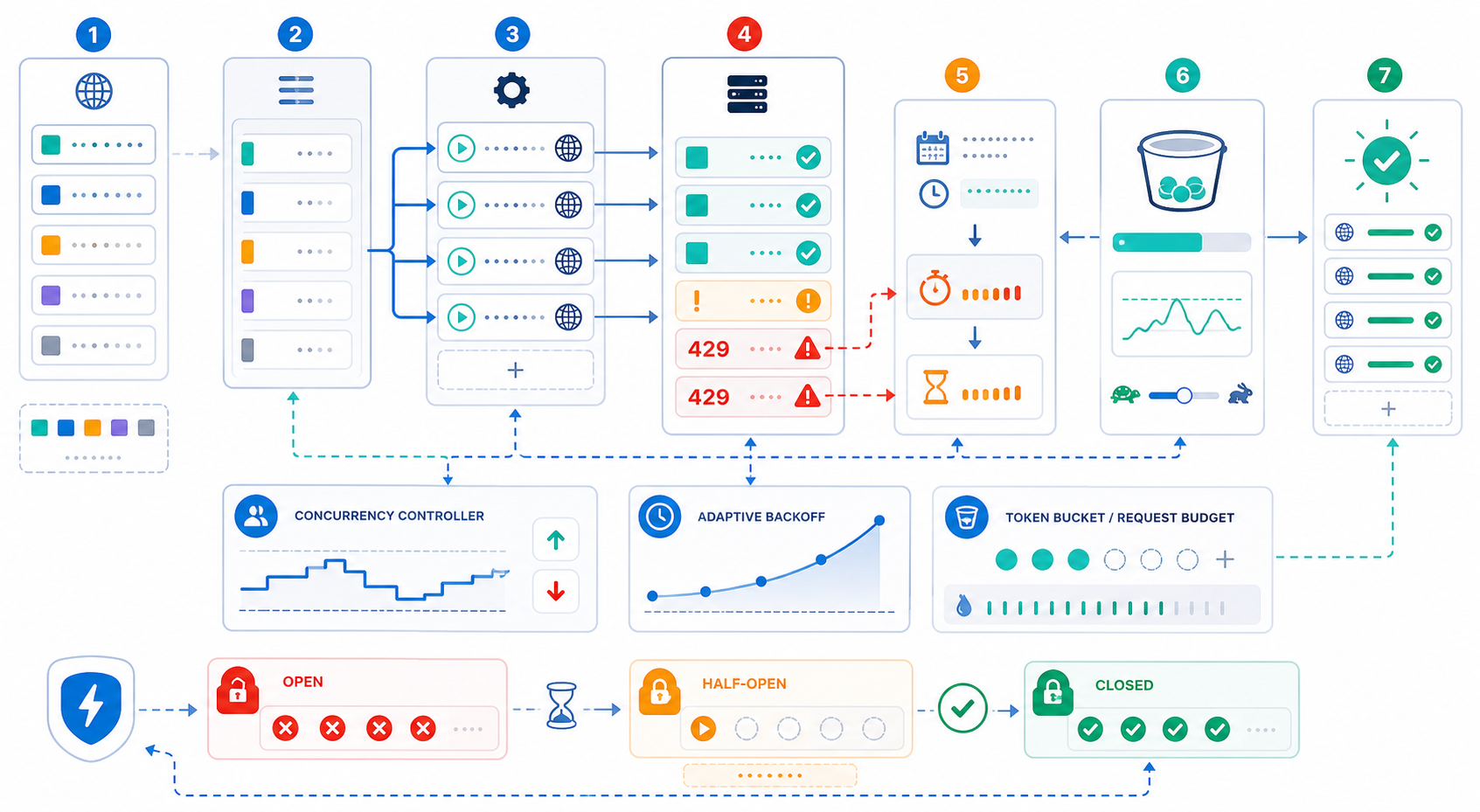
A request budget is a controlled envelope for how much traffic a workload may create. It should be based on the target's published guidance when available and on conservative observation when explicit limits are not published.
- Start with a small request rate and worker count.
- Measure success, latency, 429s, challenges, and server errors.
- Increase gradually only while reliability remains stable and the activity remains permitted.
- When 429s or challenge rates rise, reduce pressure rather than increasing retries.
- Establish a steady operating range and revisit it after target, code, or infrastructure changes.
Do not convert this into a universal requests-per-second recommendation. Different targets, endpoints, accounts, and use cases have different limits and costs.
Cache Before You Scale
The most respectful request is often the request you do not need to send.
- Cache pages or records that do not need immediate refresh.
- Use incremental collection instead of full recrawls where possible.
- Deduplicate URLs before they enter the request queue.
- Separate fast-changing resources from stable resources.
- Use conditional requests when the target supports them and the workflow is appropriate.
- Avoid re-requesting failed pages from multiple workers at the same time.
Coordinate Rate Limits Across Multiple Workers
Distributed workers need shared control. Per-process limits are not enough when every process contributes to one target or account quota.
- Use a central or distributed rate limiter keyed by target and, where relevant, endpoint or account.
- Share backoff state so one worker's 429 can reduce pressure from other workers.
- Deduplicate queued work before sending it.
- Prioritize high-value or freshness-sensitive requests when capacity is limited.
- Keep retry attempts inside the same global budget as original requests.
- Separate independent targets so one throttled domain does not freeze unrelated workloads.
Use a Rate-Limit Circuit Breaker
A circuit breaker stops a failing target from absorbing endless retries. One simple state model is Normal, Degraded, Throttled, Paused, Probing, and Recovered.
Why More Proxies Are Not a Rate-Limit Strategy
A proxy changes the network route and source IP. It does not change the fact that a target may apply limits per account, cookie, endpoint, organization, or service-wide policy. It also does not make an excessive request pattern acceptable.
Proxy infrastructure is useful when the authorized use case genuinely requires geographic routing, session separation, or another network-layer property. It should not be used as a substitute for rate control.
For workloads with legitimate network-layer requirements, LycheeIP dynamic residential proxies provide rotating and sticky residential session options, while LycheeIP static residential proxies and static datacenter proxies provide stable routes. Whichever network type you use, keep one shared request budget for the actual target and workload.
Rate Limiting by Target and Endpoint
One global limit for an entire scraping platform is usually too coarse. Different targets and endpoints can have different capacities, published policies, or business value.
- Apply independent budgets by hostname.
- Use stricter limits for expensive or sensitive endpoints.
- Keep authenticated and public workloads separate when their quotas differ.
- Track burst behavior as well as averages.
- Reset or adjust limits only when evidence shows the target has recovered.
What to Monitor
A Safe 429 Recovery Workflow
- Classify the response as rate limited, not generic failure.
- Read Retry-After when provided.
- Pause or reduce the affected target's request budget.
- Cancel or coalesce duplicate retries already in the queue.
- Apply bounded exponential backoff with jitter when server guidance is absent or additional retry scheduling is needed.
- Respect idempotency and avoid replaying operations that can create side effects.
- Probe recovery with a small number of requests.
- Restore throughput gradually and continue monitoring.
Control scraping throughput with LycheeIP proxy infrastructure
When Not to Keep Retrying
Stop retrying when the error is not transient, the activity is not authorized, the target explicitly prohibits the workflow, a supported API should be used instead, or the retries no longer have a reasonable chance of success.
Also stop when retry cost exceeds the value of the data. A scraper that spends most of its capacity waiting, retrying, and revalidating may need a different data source or collection design.
Frequently Asked Questions
What does HTTP 429 mean in web scraping?
It means the server is rate limiting the client or workload because too many requests were sent in a given period according to the server's rules. Slow down and inspect Retry-After if it is present.
How long should a scraper wait after a 429?
Use the server's Retry-After guidance when available. If it is absent, apply a bounded retry policy such as exponential backoff with jitter and a maximum retry budget rather than retrying immediately.
What is Retry-After?
Retry-After is an HTTP response header that can tell a client how long to wait before making another request. It can be expressed as a delay in seconds or as an HTTP date.
Should I use exponential backoff for scraping?
It can be appropriate for transient failures and throttling when retries are permitted, especially when combined with jitter and retry limits. It is not a reason to keep retrying permanent authorization or policy errors.
Does rotating proxies fix HTTP 429?
Not necessarily. A service can rate limit by account, cookie, endpoint, or other identity, and adding IPs does not make excessive traffic responsible. Rate control should remain the primary response.
How many concurrent scraper requests should I use?
There is no universal safe number. Start small, follow published limits, measure success and 429 rates, and scale gradually while the target remains stable and the workflow remains authorized.
What is the difference between concurrency and requests per second?
Concurrency is the number of in-flight operations. Requests per second measures how quickly new requests start. Both can contribute to server pressure, but they describe different workload properties.
Can a 429 lead to CAPTCHA challenges?
Some sites combine rate limiting with broader anti-automation systems, but a 429 itself should first be handled as a rate-limit signal. Keep challenge detection and rate-limit recovery as separate operational paths. Before adding more workers or network routes, build a shared request budget, 429 classifier, Retry-After support, bounded backoff, and monitoring. If the authorized use case also needs geographic or session-routing control, evaluate LycheeIP proxy types separately from the rate-limit strategy. RFC 6585: Standards definition of HTTP 429 and Retry-After support. MDN: 429 Too Many Requests: Practical HTTP 429 reference. MDN: Retry-After: Retry-After formats and usage. AWS SDK retry behavior: Exponential backoff with full jitter and retry quotas. Google Cloud retry strategy: Retry safety, idempotency, exponential backoff, and retry anti-patterns. LycheeIP dynamic residential proxies: Network-layer option for rotating or sticky residential sessions. LycheeIP static residential proxies: Stable residential network routing. LycheeIP static datacenter proxies: Stable dedicated datacenter routing.
Related LycheeIP Guides and Resources

Recommended Articles

DataDome Bypass for Web Scraping
DataDome Bypass for Web Scraping
View Details
reCAPTCHA vs hCaptcha vs Cloudflare Turnstile: What Scraping Teams Need to Know
If an authorized data-collection workflow suddenly stops at a verification screen, identifying the protection system matters before you change code, browser settings, or proxy infrastructure. reCAPTCHA vs hCaptcha vs Turnstile is not simply a branding comparison. The three systems can expose different browser flows, token models, risk decisions, and failure symptoms.
View Details
Browser Automation Proxies: IPs, Geo-Targeting, Sessions, and AI Agents
A browser automation proxy belongs to the network layer of Playwright, Selenium, cloud-browser, and AI-agent workflows. It changes how browser traffic is routed and can affect the source IP address, geographic egress, and session continuity seen by a destination site. It does not improve an AI model's reasoning, repair browser logic, or guarantee that a website will accept the session.
View Details
SERP Scraping: Methods, APIs, Workflows, and Best Practices
SERP scraping is the automated collection of information from search engine results pages. A SERP scraper can capture organic rankings, advertisements, featured snippets, People Also Ask questions, local results, shopping listings, images, and other search features, then convert them into structured data for analysis.
View Details
Ecommerce Web Scraping: How to Collect Reliable Product Data
Ecommerce web scraping is the automated collection of publicly accessible product information from online stores. Teams use it to gather prices, availability, variants, ratings, seller details, and catalog changes for legitimate tasks such as competitive research, assortment monitoring, brand protection, and data quality checks.
View Details