
Browser Automation Proxies: IPs, Geo-Targeting, Sessions, and AI Agents

That distinction is the foundation of good browser-agent network design.
A browser automation proxy belongs to the network layer of Playwright, Selenium, cloud-browser, and AI-agent workflows. It changes how browser traffic is routed and can affect the source IP address, geographic egress, and session continuity seen by a destination site. It does not improve an AI model's reasoning, repair browser logic, or guarantee that a website will accept the session.
For legitimate workflows such as localization testing, ad verification, public-web research, regional quality assurance, and authorized data collection, the browser may need traffic to originate from a specific region or use a stable network identity across several steps. In those cases, proxy type, rotation, session length, authentication, and browser state must be designed together.
Modern browser automation platforms treat proxies as browser or session configuration, not as part of model reasoning. Playwright supports HTTP(S) and SOCKS5 proxy configuration globally or per browser context, while Amazon Bedrock AgentCore Browser added customer-provided browser proxies in 2026 for use cases such as geo-targeting, regional validation, and controlled enterprise egress.
Separate the Agent Layer From the Network Layer
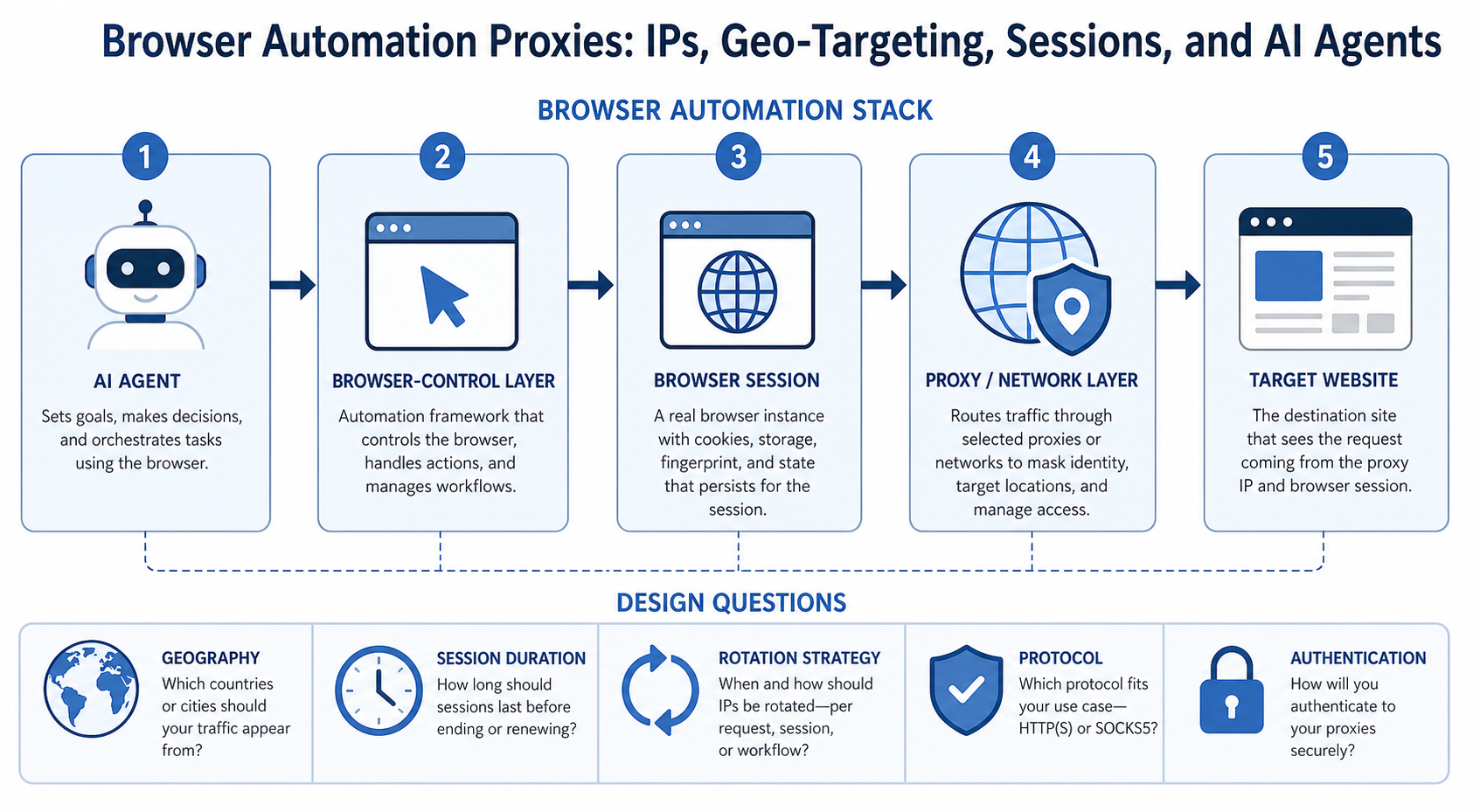
A useful browser automation stack looks like this:
User
goal ->
AI
agent ->
browser-control
layer ->
browser
and
session ->
proxy
or
direct
network
route -> target website
Each layer solves a different problem.
AI agent
Interprets the task and decides what it wants the browser to do.
Browser-control layer
Turns the selected action into browser operations such as navigation, clicking, typing, or reading page state.
Browser and session
Maintain cookies, tabs, local storage, authentication state, language, viewport, and browser configuration.
Proxy and network layer
Route traffic through a selected network path and source IP.
Target website
Returns content and may apply its own security, localization, account, and policy logic.
If the agent clicks the wrong button, changing the proxy is irrelevant.
If the browser shows the wrong geographic version of a page because the network exits in the wrong country, rewriting the prompt may not fix the network requirement.
Troubleshoot the layer where the problem originates.
How Modern Browser Automation Platforms Use Proxies
Playwright
Playwright can apply a proxy to the whole browser or to an individual browser context. Its current network documentation supports HTTP(S) and SOCKS5 proxy servers, optional username and password authentication, and bypass rules. This makes proxy assignment a browser configuration decision that can be kept separate from test or agent logic.
Cloud and agent browser runtimes
Amazon Bedrock AgentCore Browser added customer-provided proxy configuration in 2026. Its documentation applies the proxy when the browser session starts and routes browser traffic through the configured server, with credentials retrievable through AWS Secrets Manager when authentication is required.
The design principle is the same across these systems: configure network routing at the browser or session layer, keep credentials outside model prompts, and validate the outbound IP before the automation performs real work.
When Does Browser Automation Actually Need a Proxy?
Browser automation does not need a proxy by default, whether the workflow uses Playwright, Selenium, a cloud browser, or an AI agent.
Use one only when the authorized workflow has a real network-layer requirement.
For the LycheeIP implementation details behind this step, review LycheeIP proxy infrastructure.
Geographic quality assurance
A team may need to verify how a website appears from different countries or regions.
Examples include:
- language and localization QA
- regional landing-page checks
- local search verification
- location-specific product availability
- permitted regional price verification
The proxy supplies a regional network exit. The browser still needs its locale, account, and application settings configured appropriately.
Ad verification
Authorized ad-verification teams may need to confirm whether advertising appears in the intended region and placement.
A regional IP can be one input in that test environment.
Stable session routing
A multi-page workflow may need to maintain the same network identity while it moves through several pages.
This is a session-design problem, not a reason to rotate IP addresses aggressively.
Distributed public-web research
Teams collecting permitted public information across several regions may need geographically distributed network routes.
The required routing should be defined by the research design, not used as a generic attempt to defeat access controls.
When You Do Not Need a Proxy
Do not add a proxy when:
- the website is already accessible from the required network
- geography does not affect the result
- an official API provides the data
- the task is local browser testing
- the problem is a broken selector or browser action
- the agent is hallucinating or misreading content
- authentication is failing for account-related reasons
- the selected tool does not support the proxy configuration correctly
Unnecessary network complexity creates more failure points.
Define Network Requirements Before Choosing a Proxy Type
Before selecting residential, static residential, or datacenter proxies, document the actual requirement.
Geography
Ask:
- Which country or region is required?
- Is country-level targeting enough?
- Does city or administrative-region targeting matter?
- Must multiple regions be tested in parallel?
Session duration
Determine whether one task lasts:
- one request
- several page loads
- several minutes
- a long authenticated session
Rotation
Decide when an IP should change.
Possible policies include:
- every request
- every new task
- after a defined session expires
- only after a network failure
- never during the assigned workflow
Traffic and concurrency
Estimate:
- concurrent browser sessions
- pages per task
- data transferred
- peak versus normal load
- expected retry volume
Protocol
Confirm what the browser environment supports.
Common proxy protocols include HTTP, HTTPS, and SOCKS5.
Authentication
Determine whether the environment works better with:
- username and password
- IP allowlisting
- provider-specific tokens
- managed browser configuration
The right proxy is the one that fits these requirements with the least unnecessary complexity.
Dynamic Residential vs Static Residential vs Datacenter Proxies
The three categories solve different network problems.
Dynamic Residential Proxies for Rotating or Regionally Distributed Tasks
Dynamic residential proxies use IPs associated with residential networks and can support rotation across a pool.
LycheeIP's current dynamic residential proxy page states that the service supports HTTP, HTTPS, and SOCKS5, rotating and sticky sessions, unrestricted concurrent sessions, and coverage across more than 200 countries and regions.
For browser automation, dynamic residential routing may fit authorized tasks that require:
- multiple geographic exits
- different IPs between independent tasks
- short-lived public-web research sessions
- region-specific QA at scale
The key design decision is not "residential or not." It is whether the task needs rotation.
For the official technical reference behind this point, see Playwright documentation.
Do not rotate in the middle of a workflow without a reason
A browser session may contain cookies and server-side state tied to the earlier network context. Changing IP mid-session can introduce inconsistency.
For multi-step tasks, it is often cleaner to assign one network identity to one task and rotate between tasks.
Static Residential Proxies for Long-Lived Network Identity
Static residential proxies provide a fixed IP associated with residential or ISP-origin network attributes.
LycheeIP's current static residential proxy page states that its product uses fixed residential IPs, supports HTTP, HTTPS, and SOCKS5, and is available across more than 80 countries and regions.
A static residential route may fit:
- longer browser sessions
- repeated QA from the same network location
- workflows where IP continuity matters
- permitted account-based operations that require a consistent network route
Do not interpret a stable IP as a guarantee that a website will accept an account or session. Account history, cookies, browser state, authentication, behavior, and target-site controls remain separate factors.
Datacenter Proxies for Stable Hosted Routing
Datacenter proxies use IPs associated with hosted infrastructure rather than a normal household connection.
They may fit browser automation workflows where:
- residential network attribution is unnecessary
- stable routing matters
- cost and infrastructure simplicity matter
- the target permits the traffic
- geographic requirements can be met through datacenter locations
LycheeIP maintains a static datacenter proxy product alongside its residential products.
Do not assume a datacenter proxy is automatically wrong for browser automation. If the target and use case do not require residential-origin routing, adding residential infrastructure may provide no meaningful benefit.
For the LycheeIP implementation details behind this step, review AI-powered browser automation hub.
For the LycheeIP implementation details behind this step, review scaling lead scraping with n8n.
For the LycheeIP implementation details behind this step, review AI browser automation setup guide.
Rotation and Session Continuity for Browser Automation
Rotation is one of the most frequently misunderstood parts of browser-agent proxy design.
The core question is:
What should remain consistent during one logical task?
One request, one IP
This pattern can work for stateless requests, but it is often a poor fit for a browser workflow that spans several page loads.
For the official technical reference behind this point, see MDN HTTP overview.
One browser task, one IP
This is a useful default for many multi-page agent workflows.
The browser can maintain:
- cookies
- session identifiers
- selected region
- navigation state
- consistent network origin
Then the next independent task can receive a different IP if rotation is required.
One account, one stable route
For authorized account-based QA or operational testing, frequent network changes may create confusing results.
If the purpose is to test one account from one defined network location, a fixed route is usually easier to interpret.
Rotation between independent tasks
This separates task state cleanly.
For example:
Task 1 ->
browser
session
A ->
proxy
IP
A
Task 2 ->
browser
session
B ->
proxy
IP
B
Task 3 ->
browser
session C -> proxy IP C
Each task can be logged and reproduced with its assigned geography and network configuration.
Align Network Geography With Browser Context
An IP address is only one source of geographic context.
A website may also use:
- browser language
- application locale
- timezone
- account country
- shipping address
- stored location preference
- cookies
- GPS or device location when permission is granted
- previous session history
This means a US proxy does not automatically make the entire browser context "US."
Build a geography profile
For controlled QA, record:
- proxy country
- proxy city if relevant
- browser language
- browser locale
- timezone
- account region
- application settings
If results do not match expectations, compare these dimensions before blaming the proxy.
Proxy Authentication Patterns for Browser Automation
Authentication must work with the browser environment you actually use.
Username and password
Many proxy services provide:
host port username password
Store credentials in secret management or protected environment configuration.
Do not embed live credentials in agent prompts or logs.
IP allowlisting
Some proxy services allow traffic only from approved source IPs.
LycheeIP's supplied product information includes IP-whitelisting support for certain static products. Verify the current account and product documentation before designing around a specific limit.
Managed browser configuration
Some cloud browser platforms accept a proxy object when the browser session is created.
Browser Use's browser session API, for example, includes fields for proxy country selection and custom proxy host, port, username, and password.
Keep network credentials separate from model reasoning
The agent needs a working browser. It usually does not need to know the proxy password.
Configure networking outside the prompt whenever possible.
Validate the Proxy Before the Agent Starts Real Work
A successful browser launch does not prove that the intended network configuration is active.
Validate the environment before the task.
- Confirm the outbound IP
Use an approved diagnostic endpoint and record the visible IP address.
- Confirm geography
Check the location returned for that IP.
Geolocation databases can disagree, so use the level of precision the task actually requires.
- Confirm protocol and authentication
Verify that the browser can connect through the configured proxy without leaking credentials into logs.
- Confirm browser-session continuity
Navigate across several pages and verify that the proxy assignment remains stable for a sticky or static task.
- Confirm target behavior
Test a small authorized workflow.
A proxy can connect successfully while the target still returns a challenge, error, unexpected localization, or different application state.
- Record the network configuration
Log:
- proxy type
- session identifier
- assigned geography
- protocol
- task identifier
- start and end time
- notable failures
This makes troubleshooting much easier.
Troubleshooting Browser Automation and Proxy Failures
Authentication rejected
Likely network-layer causes:
- incorrect username or password
- expired credentials
- allowlist mismatch
- wrong host or port
First check: test the proxy outside the agent with the same credentials.
Recommended next step: fix authentication before debugging browser logic.
Wrong country or region
Likely causes:
- wrong proxy endpoint
- geolocation mismatch
- account or cookie localization
- browser locale conflict
First check: verify the outbound IP and compare browser/account settings.
Recommended next step: isolate network geography from application-level personalization.
Session resets during a workflow
Likely causes:
- aggressive rotation
- browser session recreation
- cookie loss
- proxy connection changes
First check: confirm whether the assigned IP changes between page loads.
Recommended next step: use a sticky or static session when continuity is required.
Browser works without the proxy but fails with it
Likely causes:
- browser proxy configuration
- unsupported protocol
- DNS or TLS issue
- proxy authentication failure
- target response to the network route
First check: verify the same proxy with a simple browser or diagnostic request.
Recommended next step: identify whether the failure occurs before connection, during browser startup, or at the target site.
Results differ between runs
Likely causes:
- changing IP location
- rotation
- cookies
- account state
- target-site personalization
- browser locale
First check: compare the full environment, not just the IP.
Recommended next step: standardize the variables required for reproducible testing.
High latency or timeouts
Possible causes include:
- distant routing
- overloaded endpoint
- target response time
- browser resource use
- too much concurrency
First check: measure proxy connection latency separately from page-processing time.
Recommended next step: tune concurrency and choose a region appropriate to the task.
Design Proxy Sessions for Scale
Scaling browser automation requires a task-to-network assignment strategy.
Give every task a network identity
Record which proxy session belongs to which browser task.
Avoid a shared pool that changes unpredictably inside active sessions unless the workload is explicitly designed for that.
Separate geographic pools
If your team tests the US, UK, Germany, and Japan, keep region selection explicit in the job definition.
Limit concurrency deliberately
A provider may allow high concurrency, but the safe workload also depends on:
- target-site policies
- browser compute
- task complexity
- bandwidth
- error rate
- application limits
Unlimited provider concurrency does not mean unlimited responsible request volume.
Retry the right layer
If the agent misreads a page, rotating the proxy may do nothing.
If the proxy connection times out, asking the model to "try harder" is not useful.
Classify failures before retrying.
Observe network performance separately
Track:
- connection failures
- authentication errors
- assigned region
- proxy latency
- page latency
- IP changes
- bytes transferred
- task success
This separates network quality from agent quality.
What a Proxy Cannot Fix in Browser Automation
A proxy cannot repair:
- hallucinated conclusions
- prompt injection
- incorrect page interpretation
- bad browser selectors
- broken automation code
- missing data validation
- expired account credentials
- unsupported browser actions
- unsafe permissions
- poor retry logic
- target-site policy violations
It also cannot guarantee access, anonymity, undetectability, or successful scraping.
Use a proxy only for a network requirement.
If the failure is in the agent, browser control, account state, parsing, or governance layer, fix that layer.
How LycheeIP Fits Into Browser Automation Infrastructure
LycheeIP can fit the network layer when an authorized browser workflow needs proxy routing.
Relevant current product categories include:
- dynamic residential proxies for rotating or sticky residential routing and broad geographic coverage
- static residential proxies for fixed residential network identity
- static datacenter proxies for fixed hosted network routing
The current product pages state support for mainstream protocols including HTTP, HTTPS, and SOCKS5 on residential products. Dynamic residential proxies also advertise rotating and sticky sessions and coverage across more than 200 countries and regions.
The correct LycheeIP option depends on the workflow's network requirement.
Do not choose a residential product simply because the browser is AI-driven. The model does not change the underlying networking decision.
Network Architecture Checklist Before Production
Before scaling, confirm:
- The use case is authorized.
- The reason a proxy is needed is documented.
- Proxy type matches the required network identity.
- Rotation policy is explicit.
- One task does not unexpectedly change IP mid-session.
- Required geography is verified.
- Browser locale and account region are documented.
- Proxy credentials are stored outside the model prompt.
- Authentication has been tested independently.
- Outbound IP is validated before the task.
- Network failures are logged separately from agent failures.
- Retries do not rotate sessions unnecessarily.
- Concurrency respects target and provider constraints.
- The workflow has been tested on a small sample.
- Proxies are not being treated as a security-bypass mechanism.
Match browser automation proxies with LycheeIP infrastructure
Design the Network Layer Around the Task
A good browser automation proxy architecture starts with the task's actual requirements.
If the task needs a consistent regional browser session, keep the network identity stable.
If independent tasks need distributed geographic representation, rotate between tasks.
If residential routing is unnecessary, consider whether datacenter infrastructure is simpler.
And if the problem is not network-related, do not add a proxy at all.
For teams evaluating LycheeIP, start by defining geography, session duration, concurrency, protocol, and rotation requirements. Then compare the relevant proxy category against those requirements and test a small authorized browser workflow before increasing scale.
Frequently Asked Questions
Does browser automation need proxies?
No. Browser automation needs a proxy only when the workflow has a network-layer requirement such as geographic routing, stable external IP assignment, controlled egress, or distributed authorized research.
What proxy type is best for browser automation?
There is no universal best type. Dynamic residential proxies may fit rotating or geographically distributed tasks, static residential proxies may fit longer-lived residential sessions, and datacenter proxies may fit stable hosted routing where residential attribution is unnecessary.
Should a proxy rotate on every browser page?
Usually not for a multi-page stateful workflow. Frequent IP changes can make session behavior harder to interpret. A common design is one network identity per logical task, with rotation between independent tasks when required.
Can a proxy make a browser agent undetectable?
No. A proxy changes the network route and source IP. It does not automatically change every browser signal, account state, cookie, interaction pattern, or target-site security decision.
Why does my browser show the wrong location even with a proxy?
Websites may use signals beyond IP geolocation, including account region, cookies, browser language, timezone, application preferences, or device location permissions. Check the full environment.
Can I use a residential proxy for AI web scraping?
It may be appropriate for authorized workflows where residential-origin routing or geographic representation is genuinely required. It should not be used as a substitute for permission, rate control, validation, or compliant collection practices.
How do I know whether a proxy is working in browser automation?
Verify the outbound IP and geography, confirm authentication, test session continuity, then run a small target workflow. A successful proxy connection does not prove that the entire browser automation workflow is correct.
Related LycheeIP Guides and Resources

Recommended Articles

DataDome Bypass for Web Scraping
DataDome Bypass for Web Scraping
View Details
Web Scraping Rate Limiting: How to Handle 429s, Backoff, and Concurrency
Web scraping rate limiting is the engineering discipline of keeping an authorized collection workload inside a target service's acceptable request envelope. When that envelope is exceeded, a server may respond with HTTP 429 Too Many Requests, delay responses, or apply other controls.
View Details
reCAPTCHA vs hCaptcha vs Cloudflare Turnstile: What Scraping Teams Need to Know
If an authorized data-collection workflow suddenly stops at a verification screen, identifying the protection system matters before you change code, browser settings, or proxy infrastructure. reCAPTCHA vs hCaptcha vs Turnstile is not simply a branding comparison. The three systems can expose different browser flows, token models, risk decisions, and failure symptoms.
View Details
SERP Scraping: Methods, APIs, Workflows, and Best Practices
SERP scraping is the automated collection of information from search engine results pages. A SERP scraper can capture organic rankings, advertisements, featured snippets, People Also Ask questions, local results, shopping listings, images, and other search features, then convert them into structured data for analysis.
View Details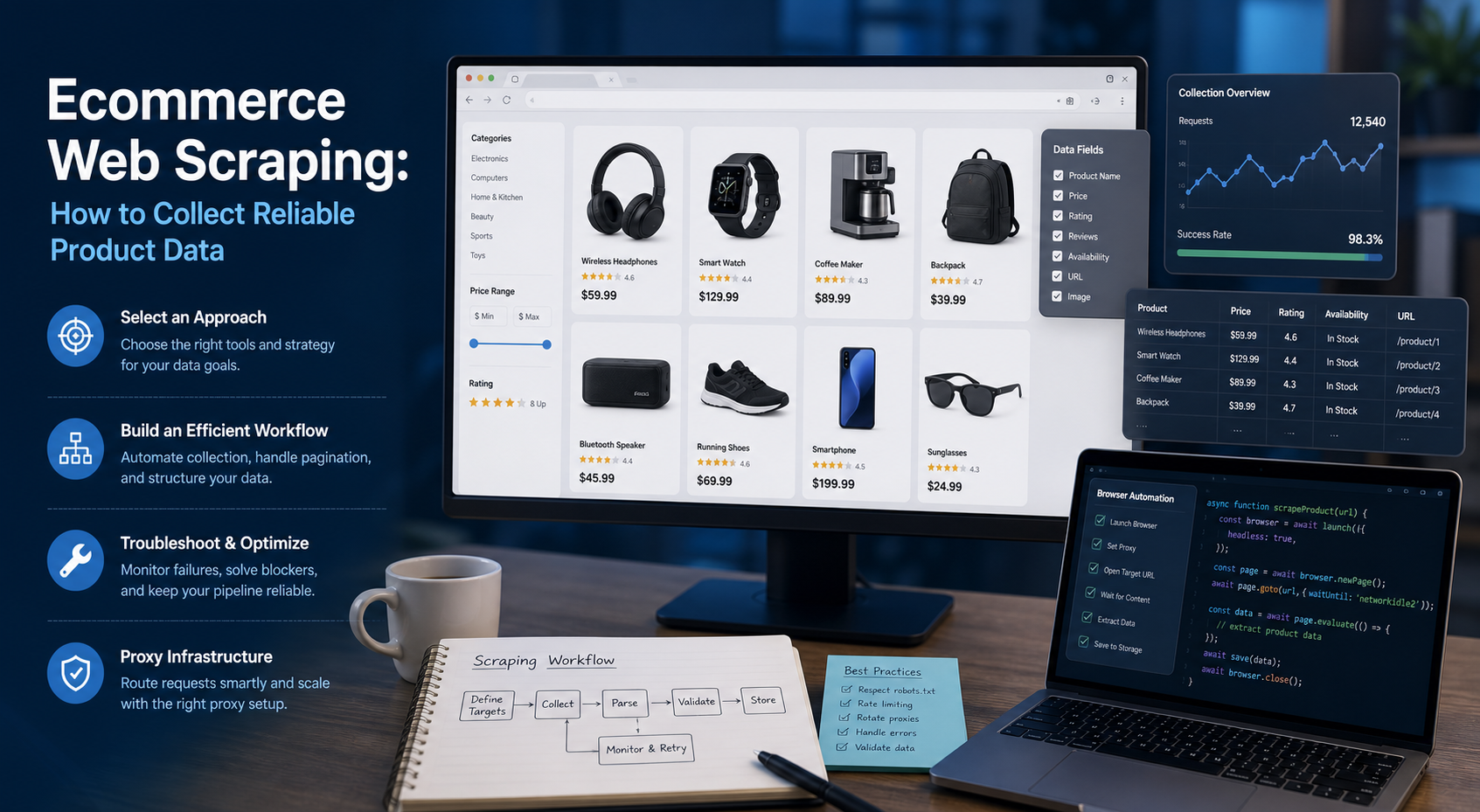
Ecommerce Web Scraping: How to Collect Reliable Product Data
Ecommerce web scraping is the automated collection of publicly accessible product information from online stores. Teams use it to gather prices, availability, variants, ratings, seller details, and catalog changes for legitimate tasks such as competitive research, assortment monitoring, brand protection, and data quality checks.
View Details