
AI Web Scraping with Browser Agents: Architecture, Extraction, and Data Validation

That distinction matters because an agent can successfully browse a site and still return incomplete, duplicated, incorrectly normalized, or unsupported data.
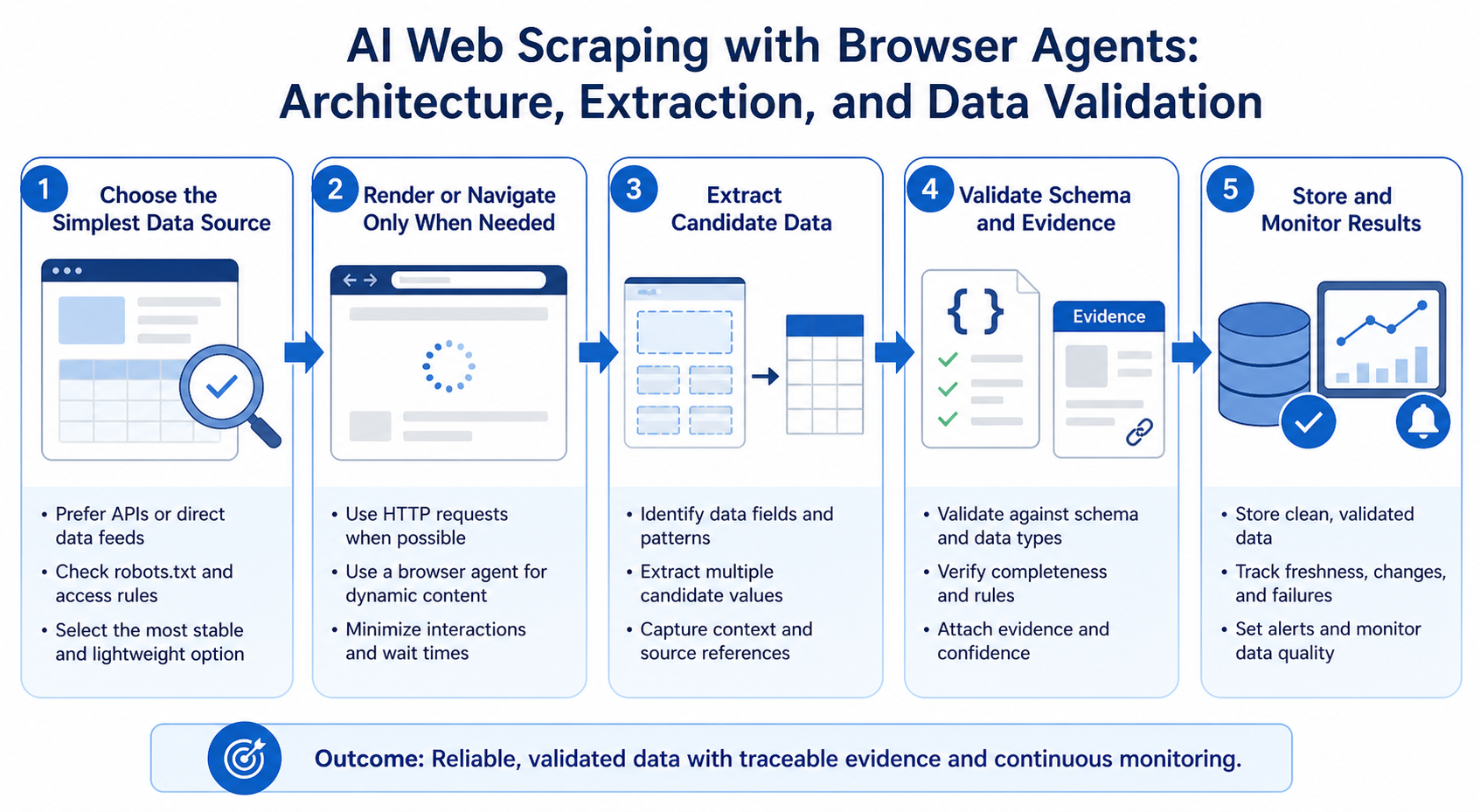
AI web scraping uses AI to help discover, navigate, interpret, or extract information from websites. Browser agents are one implementation option when page interaction, rendering, or layout variation makes a simple scraper too brittle, but the agent should not become the entire data pipeline.
The strongest architecture separates responsibilities. The agent handles page discovery, navigation, and ambiguous interactions. A parser and schema layer determine what data is accepted. Validation checks completeness and consistency. Storage and monitoring remain deterministic.
Official Browser Use documentation shows browser agents being used for data extraction, research, monitoring, and multi-step workflows. Its API also supports structured output schemas, persistent sessions, and browser profiles. Those capabilities are useful, but production data quality still depends on the architecture around the agent.
Start by Choosing the Simplest Reliable Data Source
Do not begin with a browser agent. Begin with the data requirement.
A practical escalation order is:
- Official API or licensed feed
- Direct HTTP retrieval
- Rendered-page extraction
- Deterministic browser automation
- AI browser agent
Each step adds complexity.
Use an API when the source provides one
An API is usually easier to monitor, validate, and scale than a browser workflow because it returns structured data directly.
An API may also provide clearer rate limits, stable identifiers, explicit authentication, and documented schemas.
Use direct HTTP retrieval when interaction is unnecessary
If the required information is present in a server response and the page does not require browser state, a conventional request-and-parse workflow is usually simpler than launching a browser.
Use browser rendering when JavaScript is necessary
Some pages load information client-side. A browser or rendering service may be required to produce the final document state.
Rendering alone does not mean you need an AI agent.
For the official technical reference behind this point, see Playwright documentation.
Use deterministic browser automation when the path is known
If the workflow is predictable, tools such as Playwright can handle navigation, form interaction, pagination, and extraction while keeping the procedure explicit.
Add an AI browser agent when ambiguity is the real bottleneck
An agent becomes useful when the system must interpret unfamiliar page layouts, identify which controls matter, choose among several navigation paths, or work across websites that do not share a stable interface.
The reason to add an agent should be page variability or semantic judgment, not simply that a browser is involved.
For the LycheeIP implementation details behind this step, review AI-powered browser automation hub.
Where a Browser Agent Fits in an AI Web-Scraping Pipeline
A browser agent is best treated as one component in a larger system.
For the LycheeIP implementation details behind this step, review LycheeIP proxy infrastructure.
For the LycheeIP implementation details behind this step, review rotating residential proxies.
For the official technical reference behind this point, see MDN HTTP overview.
A useful reference architecture is:
Scheduler ->
task
controller ->
browser
agent ->
browser
session ->
target
website ->
extraction
layer ->
schema
validator ->
deduplication ->
storage -> monitoring
Each component should have one primary responsibility.
Scheduler
Determines when a collection job should run.
Task controller
Defines the approved target, requested fields, output schema, limits, and stop conditions.
Browser agent
Handles ambiguous navigation and interaction.
Browser session
Maintains tabs, cookies, local storage, rendering state, and other browser context.
For the LycheeIP implementation details behind this step, review static residential proxies.
Network layer
Controls connectivity, routing, and geographic egress when the authorized use case requires it.
Extraction layer
Converts page content into candidate records.
Schema validator
Checks whether those records match the required structure and data types.
Deduplication
Prevents repeated pages, retries, or overlapping discovery paths from creating duplicate records.
Storage
Persists accepted records separately from raw browser output.
Monitoring
Tracks completion, failure categories, field quality, latency, retry rates, and changes in page behavior.
The important principle is separation. The same language model that decides where to click should not be the only system deciding whether the resulting dataset is correct.
Use the Agent for Discovery and Navigation, Not Data Truth
Browser agents are good at answering questions such as:
- Which product cards are visible on this page?
- Which control changes the date range?
- Where is the next page?
- Does this site use tabs, filters, or an expandable table?
- Which page appears to contain the required information?
- Has the workflow reached the intended detail page?
Those tasks involve context.
Data acceptance involves a different set of questions:
- Are all required fields present?
- Is the value the correct data type?
- Does this date use the expected format?
- Is the currency explicit?
- Is this record a duplicate?
- Does the source actually support the extracted claim?
- Did the agent capture every required row?
Those questions should be answered with deterministic validation wherever possible.
Design the Output Schema Before the Agent Runs
One of the easiest ways to improve agent-assisted extraction is to define the expected data structure before browsing begins.
For example, a product-monitoring task might require:
- source_url
- product_name
- listed_price
- currency
- availability
- seller_name
- observed_at
- evidence_text
Do not ask the agent to "collect everything useful." That produces inconsistent output and makes completeness impossible to measure.
Define required and optional fields
A missing required field should trigger a validation failure or manual review.
An optional field can be null without invalidating the record.
Define data types
Specify whether a value must be:
- string
- integer
- decimal
- boolean
- date
- enumerated category
- URL
This prevents downstream systems from relying on free-form model output.
Preserve the source location
Store the source URL or stable page identifier with every record.
For sensitive or important datasets, also retain the relevant source excerpt or snapshot reference so the record can be audited.
Separate evidence from interpretation
If a page says "Ships in 2 to 3 days," keep that source text separate from any normalized field such as:
estimated_shipping_days_min = 2
estimated_shipping_days_max = 3
The model's transformation should not replace the evidence.
Structured Output Helps, but It Is Not Validation
Some browser-agent platforms support output schemas. Browser Use, for example, allows a task to request structured output through an output schema in its session API.
That is valuable because it constrains the response format.
But a structurally valid object can still contain the wrong value.
A record such as:
price = 29.99
currency = "USD"
may pass schema validation even if the page actually showed EUR 29.99.
You therefore need at least two layers:
- Structural validation: Is the response in the expected shape?
- Semantic validation: Does the value match the source?
Handling Dynamic and Stateful Websites
Agent-assisted extraction becomes most useful when page state matters.
Filters and sort controls
An agent may need to interpret which control corresponds to a user requirement, especially when labels differ between sites.
The controller should still record which filter was applied.
Pagination
Pagination is a common source of incomplete datasets.
Define a stop condition such as:
- no next-page control exists
- page number reaches an expected maximum
- returned record IDs repeat
- no new records are found
- a configured page limit is reached
Do not rely on the agent simply deciding that it has seen "enough."
Infinite scroll
Track record count or unique IDs as the page scrolls.
Stop when:
- repeated scrolls produce no new records
- a known end marker appears
- a configured safety limit is reached
Expandable content
If fields are hidden inside accordions, modals, or tabs, make the required field list explicit so the agent knows which sections must be inspected.
Authentication
Use authenticated collection only when the workflow is authorized.
Separate account credentials from the model where possible, and do not assume that access through a logged-in browser automatically grants permission to collect or reuse the data.
Browser Sessions Are Data-Collection State
A browser session is not just a technical detail. It can change the data returned.
Session state may include:
- cookies
- language
- account preferences
- previous navigation
- selected location
- personalization
- authentication
- local storage
Browser Use's session documentation shows that multiple tasks can reuse the same browser state while separate agents perform follow-up work. Its profile documentation also describes persistent cookies and local storage across sessions.
For data teams, this means every collection run should decide whether state should persist or be isolated.
Use isolated sessions when comparability matters
If you are comparing the same page across locations or accounts, persistent cookies may contaminate the result.
Use persistent sessions when continuity is required
A multi-page authenticated workflow may need the same login and browser state throughout the task.
Record session assumptions
Document:
- account used
- target geography
- language
- profile type
- session reuse
- authentication state
This makes later discrepancies easier to diagnose.
How to Validate Agent-Extracted Data
Validation should be a separate stage, not an afterthought.
- Check schema compliance
Reject or quarantine records with missing required fields or invalid data types.
- Check source evidence
For important values, compare the extracted field against the source text or page element from which it came.
- Check ranges and allowed values
Examples:
- quantity cannot be negative
- currency must be from an allowed set
- percentages should fall within an expected range
- category must match a controlled vocabulary
- Check duplicates
Use stable identifiers when available.
Otherwise create a compound key from fields such as source URL, product ID, listing ID, or normalized title.
- Check coverage
If the page says "120 results" and the pipeline returns 83 unique records, the browser reaching the last page does not prove success.
Track expected versus collected counts whenever the site exposes them.
- Perform manual sample audits
Review a sample of records against the source pages.
Sample different:
- page types
- categories
- regions
- error cases
- low-confidence records
- Monitor drift
A sudden increase in null fields or extraction errors often indicates a page change.
Track field-level completeness over time.
Common Failure Patterns in Agentic Web Extraction
The agent skips pages
Consequence: incomplete dataset.
First check: pagination logic and stop conditions.
Recommended response: make pagination state explicit and count unique records.
The agent extracts visible examples instead of every record
Consequence: biased sample presented as a complete dataset.
First check: whether the task specifies coverage requirements.
Recommended response: define expected count, pagination, and completion rules.
The agent normalizes a value incorrectly
Consequence: valid-looking but wrong structured data.
First check: source evidence and transformation logic.
Recommended response: preserve raw values and normalize deterministically.
Retries create duplicates
Consequence: inflated counts and repeated records.
First check: retry logs and stable identifiers.
Recommended response: make collection idempotent and deduplicate before storage.
Session state changes results
Consequence: inconsistent prices, language, availability, or regional content.
First check: cookies, account, geography, locale, and profile reuse.
Recommended response: isolate or deliberately standardize session state.
A page redesign silently changes field meaning
Consequence: data is mapped into the wrong schema field.
First check: field-level quality metrics and source snapshots.
Recommended response: trigger manual review when extraction patterns drift.
Use Browser Telemetry to Explain Data Errors
When a data pipeline fails, you need more than the final JSON.
Capture enough browser evidence to determine what the agent actually saw and did.
Useful telemetry includes:
- page URL
- navigation history
- relevant screenshots
- accessibility snapshot or DOM evidence
- selected controls
- page number
- filters applied
- error messages
- retries
- session ID
- extraction timestamp
Playwright's MCP snapshots demonstrate one useful pattern: represent browser state as structured accessible elements with stable references for interaction.
The exact technology can vary. The principle is that the browser state should be inspectable after the run.
Scaling AI-Assisted Collection Without Scaling Errors
A workflow that succeeds on 20 pages can fail differently on 20,000.
Scale the validation system at the same time as the browser system.
Control concurrency
More browser sessions increase throughput but may also increase:
- rate pressure on the target
- session inconsistency
- memory and compute use
- proxy requirements
- retry storms
- model cost
Scale gradually and respect target-site limits and applicable policies.
Separate retry categories
Do not retry every error the same way.
Useful categories include:
- transient network error
- browser crash
- authentication failure
- validation failure
- target page changed
- rate limit
- agent could not complete task
A validation failure should not automatically trigger the same action as a network timeout.
Make writes idempotent
If a task is rerun, the pipeline should not create duplicate records or repeat external actions.
Use stable keys and upsert logic where appropriate.
Track cost per accepted record
For agentic collection, operational cost can include model usage, browser runtime, network traffic, retries, and human review.
Measure cost against validated output, not attempted pages.
When to Replace the Agent With Deterministic Extraction
Agentic exploration can reveal stable patterns.
Once a workflow becomes predictable, move repeated behavior into code.
A useful maturity path is:
Agent
exploration ->
observed
successful
patterns ->
deterministic
extraction -> agent retained for exceptions
Signals that a workflow is ready to become deterministic
- the same page templates repeat
- required controls are stable
- extraction fields are well defined
- exceptions are rare
- volume is increasing
- model cost dominates
- reproducibility matters more than flexibility
At that point, Playwright, direct HTTP extraction, or an API may be a better production engine.
The agent can still handle previously unseen layouts or route hard cases to manual review.
Where AI Web Scraping Is Genuinely Useful
AI-assisted browsing is most useful when the difficulty is interpretation rather than raw page retrieval.
Multi-site product and price research
When several permitted public sites expose similar information through different layouts, an agent can help identify the right controls and pages while a separate validator normalizes the output.
Regional and localization checks
Teams can compare authorized public information across markets when browser state, locale, and approved network geography are controlled and recorded. Treat geographic routing as a separate network-layer decision.
Long-tail sources with high selector-maintenance cost
If a small number of irregular sources constantly break rigid selectors, an agent can handle the ambiguous navigation while stable extraction, validation, and storage remain deterministic.
Responsible and Authorized Data Collection
Technical ability does not establish permission.
Before collecting web data, teams should consider:
- website terms
- robots directives
- rate limits
- data licensing
- copyright
- privacy requirements
- contractual restrictions
- authentication and access controls
- applicable laws and regulations
Prefer official APIs or licensed sources when they meet the requirement.
For public-web collection, minimize unnecessary requests, avoid overwhelming websites, and collect only the data needed for the authorized purpose.
Implementation Checklist for Data Teams
Before production, confirm:
- The source-selection hierarchy has been documented.
- The reason for using an AI browser agent is clear.
- Required fields are defined before collection.
- Every record retains a source reference.
- Raw evidence is separated from model interpretation.
- Schema validation runs outside the agent.
- Duplicate handling is deterministic.
- Pagination and completion rules are explicit.
- Session state is controlled.
- Geographic assumptions are recorded when relevant.
- Authentication is authorized and isolated.
- Retry categories are defined.
- Validation failures do not silently pass.
- Sample audits are scheduled.
- Field completeness is monitored over time.
- The workflow can fall back to deterministic extraction or manual review.
Use the Agent Where Ambiguity Exists, Then Validate Everything That Matters
AI browser agents are most valuable when the web interface is variable and the route to the data cannot be fully specified in advance.
They are least valuable when they replace simple, stable extraction with a more expensive and less predictable process.
A durable architecture keeps the agent narrow:
- discover
- navigate
- interpret page state
- return candidate data
Run reliable AI scraping pipelines on LycheeIP proxy infrastructure
Then deterministic systems:
- validate
- normalize
- deduplicate
- store
- monitor
When network geography, IP routing, or session-level egress becomes part of the requirement, handle that as a separate infrastructure layer rather than treating it as an AI capability. This keeps network troubleshooting separate from agent reasoning and data validation.
Frequently Asked Questions
What is AI web scraping?
AI web scraping uses AI to assist with tasks such as page discovery, navigation, interpretation, or extraction. Browser agents can be useful when workflows vary, but technical capability does not establish authorization and the resulting data still needs independent validation.
Are browser agents better than traditional scrapers?
Not when the page structure and extraction path are stable. Traditional HTTP extraction or deterministic browser automation is usually simpler and more repeatable. Agents are most useful when navigation or page interpretation varies.
Should an LLM normalize scraped data?
It can propose a normalization, but important transformations should be validated or implemented deterministically. Preserve the raw source value so the transformation can be audited.
How do I prevent duplicate records from agent retries?
Use stable record identifiers or a deterministic compound key, make writes idempotent, and deduplicate before final storage. Do not rely on the agent to remember which records were already persisted.
What should I monitor in an agentic scraping pipeline?
Track completion rate, unique records collected, required-field coverage, validation failures, duplicates, retries, browser errors, model cost, and changes in page structure.
Do AI browser agents need persistent sessions?
Only when the workflow requires continuity, such as authorized authenticated navigation. For comparable public-page collection, isolated sessions may produce cleaner and more reproducible results.
When should I switch from an agent to Playwright?
Switch repeated steps to Playwright or another deterministic method once page templates and workflow branches are stable enough to encode reliably. Keep the agent for genuinely ambiguous exceptions.
Related LycheeIP Guides and Resources

Recommended Articles

AI Search API for AI Agents: How to Ground LLMs With Live Search Data
An AI search API gives an application or agent programmatic access to current search results. Its most useful role is discovery: the agent can find candidate sources, identify fresh information, and decide what to retrieve next instead of relying only on model memory.
View Details
AI Browser Automation: Browser Agents vs Playwright vs Selenium
A browser agent interprets a goal and decides what browser action to take next. Playwright and Selenium can execute explicit, testable browser logic defined by developers. In 2026, however, Playwright also provides official MCP and agent-oriented workflows, so Playwright is no longer just the deterministic alternative to agentic automation. It can also serve as the browser-control layer inside an agent system.
View Details
Agentic Browser Security: Prompt Injection, Permissions, and Safe Deployment
That combination creates risks that are different from ordinary browsing and traditional automation. The most important is indirect prompt injection, where hostile instructions hidden in web content attempt to redirect the agent away from the user's goal. Google describes indirect prompt injection as a primary new threat for agentic browsing and has introduced layered defenses that include origin constraints, independent action checks, threat detection, and user confirmation for sensitive actions. Google's Chrome security architecture is a useful reference for how browser-agent defenses are evolving.
View Details
How to Give AI Agents Reliable Real-Time Web Data
A production-ready solution therefore needs more than a web scraper. It needs a web data layer that connects acquisition, validation, storage, retrieval, security, and observability. This guide explains how to design that layer.
View Details
Agentic Browser: How AI Browsers Work, Where They Help, and What Can Go Wrong
An **agentic browser** is a web browser or browser-based system that uses an AI agent to interpret a goal, plan the necessary steps, navigate websites, and take actions on the user’s behalf. Instead of manually opening tabs, comparing information, clicking buttons, and filling in forms, the user describes the desired outcome and supervises the agent as it works.
View Details