
AI Browser Automation: Browser Agents vs Playwright vs Selenium

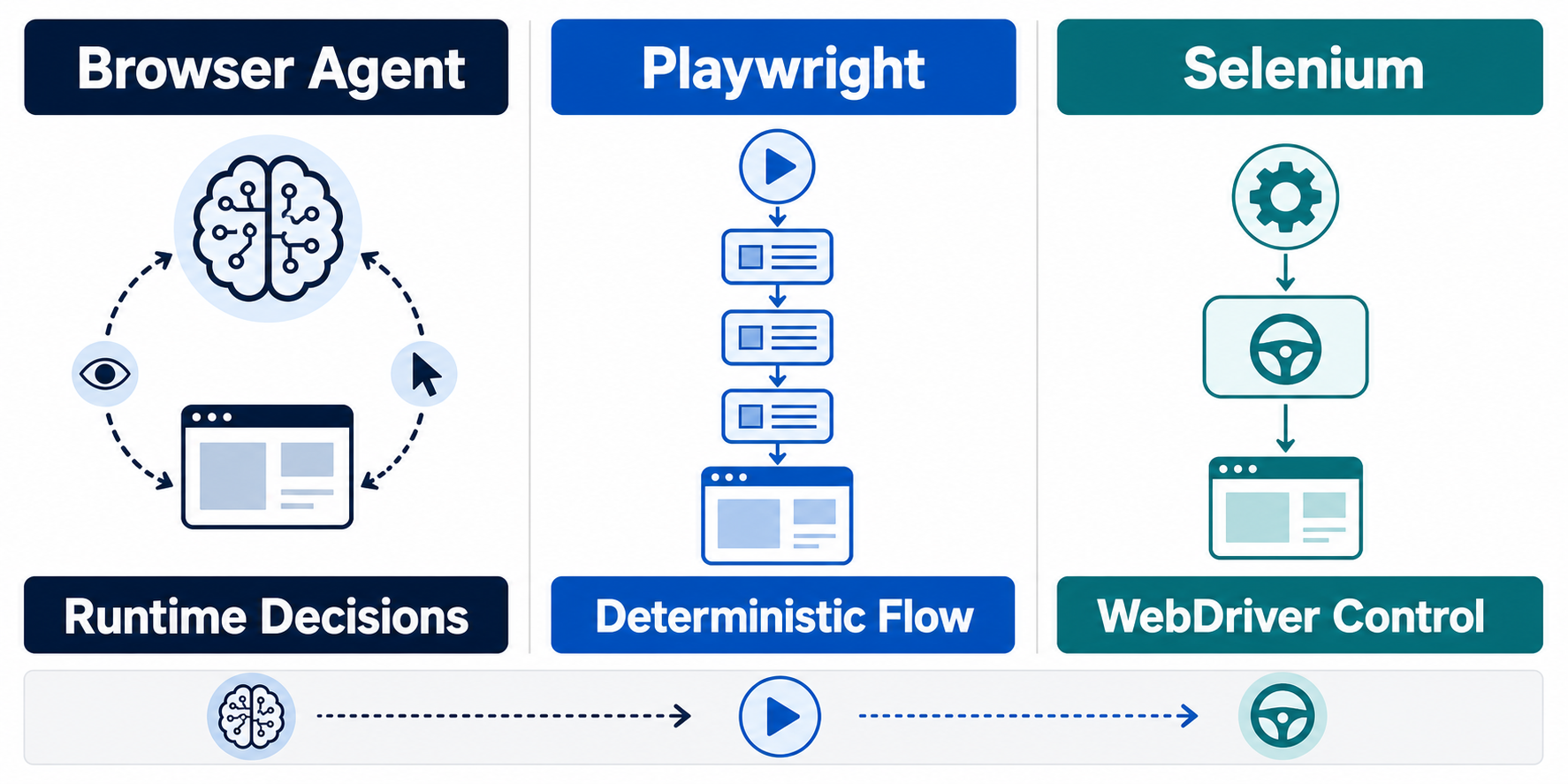
AI browser automation now spans two execution models: LLM-driven browser agents that decide actions at runtime, and deterministic frameworks that execute coded browser logic. The practical question is not simply which tool is newer. It is where you want decision-making to live.
A browser agent interprets a goal and decides what browser action to take next. Playwright and Selenium can execute explicit, testable browser logic defined by developers. In 2026, however, Playwright also provides official MCP and agent-oriented workflows, so Playwright is no longer just the deterministic alternative to agentic automation. It can also serve as the browser-control layer inside an agent system.
That makes the real comparison about architecture. Use agentic decision-making where page variation and semantic interpretation are the hard part. Use deterministic code where assertions, repeatability, cost control, and exact failure behavior matter. Combine both when an agent needs flexibility but production actions still require explicit controls.
This guide compares those execution models directly and shows when a browser agent, Playwright, Selenium, or a hybrid stack is the most practical choice.
Three Automation Models, Three Different Control Systems
Browser agents, Playwright, and Selenium all control browsers, but they do not make decisions in the same way.
For the official technical reference behind this point, see Gemini API documentation.
Browser agents are goal-driven
For the LycheeIP implementation details behind this step, review LycheeIP proxy infrastructure.
For the LycheeIP implementation details behind this step, review static residential proxies.
A browser agent receives a natural-language objective such as:
"Compare the pricing and core features of these three project-management tools and return the differences."
The agent observes a page, decides what information or action is needed, interacts with the browser, evaluates the result, and repeats the process.
Official Browser Use documentation illustrates this pattern: the user supplies a task, while the agent handles navigation, extraction, multi-step workflows, and other browser actions.
The advantage is flexibility. The tradeoff is that the exact trajectory can vary.
Playwright can be deterministic or agent-controlled
In a conventional Playwright script or test, the developer specifies what to open, which element to locate, what action to perform, and what condition indicates success.
Current Playwright documentation positions the framework across testing, scripting, and AI-agent workflows. Playwright Test provides deterministic features such as auto-waiting, assertions, tracing, and parallel execution, while Playwright MCP exposes browser control to LLMs through structured accessibility snapshots.
The key distinction is therefore not whether Playwright can work with AI. It can. The distinction is whether the model is choosing the next browser action or deterministic code is enforcing a predefined path.
Selenium is WebDriver-based browser automation
Selenium WebDriver exposes a language-neutral browser-control model through browser-specific drivers. The Selenium WebDriver documentation describes native browser control locally or through a remote Selenium server.
Selenium remains particularly relevant when teams need broad language support, mature enterprise ecosystems, Grid-based distribution, or existing WebDriver infrastructure.
For the LycheeIP implementation details behind this step, review AI browser automation setup guide.
Browser Agents and Playwright: Where Does Decision Logic Live?
The central difference is where decision logic lives.
A browser agent follows a loop such as:
Goal \-\> observe page \-\> reason \-\> choose action \-\> observe result \-\> continue
A Playwright workflow follows something closer to:
Code instruction \-\> browser action \-\> programmed check \-\> next instruction
That architectural difference creates most of the practical tradeoffs.
The agent decides at runtime
If a page adds an unexpected step, changes its menu structure, or presents several reasonable paths, an agent may be able to interpret the new situation and continue.
But runtime judgment is probabilistic. The agent may select the wrong element, misinterpret the page, or take an unnecessary path.
Playwright decides at development time
Playwright can react to conditions, branch, retry, and inspect page state, but the developer defines those behaviors.
That makes it easier to answer questions such as:
- Which action should occur?
- What should never occur?
- What indicates success?
- How many retries are allowed?
- What happens after a failure?
The tradeoff is maintenance. A significant UI change may require code updates.
Browser Agent vs Selenium: Where Does Selenium Still Fit?
Selenium and Playwright overlap heavily as deterministic browser automation tools, but Selenium has a different history and ecosystem.
Selenium WebDriver uses the W3C WebDriver model and supports major browsers through their respective drivers. Selenium also includes Grid for distributed execution.
Choose Selenium when:
- your organization already has a large WebDriver test estate
- your team uses languages or enterprise tooling built around Selenium
- distributed cross-browser execution is already standardized around Grid
- migrating mature test infrastructure would create more cost than value
Choose Playwright when:
- you are building a new browser automation stack
- strong built-in tracing and modern test ergonomics are important
- one API across Chromium, Firefox, and WebKit suits the project
- you want browser automation that also integrates naturally into newer AI-agent workflows
Neither framework is inherently "better" for every environment. Existing systems, language requirements, browser coverage, and operational maturity all matter.
Which Approach Adapts Best When Pages Change?
Adaptability is one of the strongest arguments for agentic automation, but it should not be confused with guaranteed resilience.
Browser agents can interpret variation
Suppose a checkout page changes "Continue" to "Review order," moves a button, or introduces an extra information panel.
An agent using page text, accessibility data, or visual context may still infer the intended next action.
Deterministic automation depends on its locator and logic strategy
Playwright and Selenium can remain stable when selectors are well designed. If the script targets durable roles, labels, test IDs, or semantic structure, cosmetic page changes may have little effect.
Poor selectors create brittle automation regardless of framework.
Adaptability can hide silent mistakes
An agent that "keeps going" is not automatically more reliable than a script that fails loudly.
A deterministic failure can be valuable because it signals that assumptions changed. An adaptive agent may complete the task using the wrong interpretation unless the workflow includes strong validation.
For production systems, the important metric is not whether the browser reached the end. It is whether the correct state was reached and independently verified.
Reliability and Repeatability
Deterministic tools are usually easier to reproduce.
If the browser, data, application state, and code are unchanged, a well-designed Playwright or Selenium run should follow the same programmed path.
Browser-agent runs can vary because:
- model output is probabilistic
- page interpretation may change
- context may differ
- the agent may choose different navigation paths
- tool or model versions can change behavior
This makes browser agents useful for open-ended tasks, but more difficult to certify when exact repeatability matters.
What should be deterministic?
Keep these operations deterministic whenever possible:
- financial calculations
- schema validation
- permission checks
- final submission rules
- duplicate prevention
- database writes
- security boundaries
- success criteria
Let an agent handle ambiguity. Do not make the agent the only enforcement layer for requirements that must always hold.
Development Effort and Maintenance Burden
The initial development experience can favor browser agents because natural-language instructions replace some browser code.
That advantage changes as the workflow matures.
Browser-agent development effort
Typical work includes:
- defining task instructions
- selecting the model
- setting browser permissions
- controlling accessible sites
- designing structured output
- configuring session persistence
- validating the result
- monitoring costs
- reviewing failure trajectories
Playwright or Selenium development effort
Typical work includes:
- writing locators
- browser setup
- waits and assertions
- test fixtures
- error handling
- retries
- data setup
- parallelization
- logging and trace capture
Maintenance is different, not absent
Agents reduce some selector maintenance but add prompt, policy, model, and evaluation maintenance.
Scripts require more explicit code changes but are usually easier to reason about once stable.
Debugging Browser Agents vs Debugging Scripts
Debugging is one of the clearest differences between the approaches.
Debugging deterministic automation
With Playwright or Selenium, teams can inspect:
- stack traces
- failing selectors
- browser logs
- network requests
- screenshots
- videos
- traces
- assertion failures
- application state
Playwright's built-in tracing is particularly useful for reconstructing test failures.
Debugging an agent
An agentic workflow adds another layer:
- What did the model believe the page contained?
- Why did it choose that action?
- Which tool result influenced the decision?
- Did untrusted page text change its behavior?
- Did the agent remember a previous step incorrectly?
- Was the output validated after the action?
Useful observability therefore includes both browser telemetry and the agent trajectory.
A simple screenshot of the final page is not enough.
Cost Models Are Different
Do not compare these tools only by software-license price.
Browser-agent cost drivers
Agentic browser workflows may include:
- LLM input and output tokens
- browser-session runtime
- retries
- orchestration
- recordings
- proxy traffic
- human review
Official Browser Use documentation, for example, exposes browser runtime, model usage, and proxy usage as separate operational dimensions.
For the LycheeIP implementation details behind this step, review AI-powered browser automation hub.
Deterministic automation cost drivers
Playwright and Selenium costs are more likely to center on:
- engineering time
- CI infrastructure
- browser compute
- test maintenance
- parallel execution
- remote browser infrastructure
A cheap prototype can become expensive if it is rerun at high volume with a large model. A script that costs more to build may be cheaper to execute repeatedly.
Browser Agent vs Playwright vs Selenium Decision Matrix
Use the workload, not the trend, to choose.
Variable research across unfamiliar sites
Best fit: browser agent.
Why: the task requires interpretation, comparison, and navigation rather than one known path.
Regression testing
Best fit: Playwright or Selenium.
Why: tests need explicit expected behavior, repeatability, assertions, and clear failures.
High-volume repeated browser workflow
Best fit: deterministic automation.
Why: once the path is known, coded execution is easier to optimize, monitor, and cost-control.
Rapid prototype of a new workflow
Best fit: browser agent.
Why: an agent can help determine whether the workflow is feasible before the team invests in stable automation.
Cross-browser enterprise testing with an existing WebDriver stack
Best fit: Selenium.
Why: mature Selenium estates can reuse Grid, language bindings, browser drivers, and existing operational processes.
Modern end-to-end testing for a new application
Best fit: Playwright.
Why: auto-waiting, web-first assertions, tracing, and multi-browser support are built into the modern testing workflow.
Unpredictable workflow with a sensitive final action
Best fit: hybrid architecture.
Why: let the agent interpret the variable part, then hand the consequential step to deterministic code or a human approval gate.
Choose a Browser Agent When the Goal Is More Stable Than the Page
A browser agent is a strong candidate when:
- the desired outcome is clear
- the navigation path varies
- the page layout is not fully known in advance
- some semantic interpretation is required
- the task volume is moderate
- output can be independently validated
- mistakes are reversible or reviewed
Examples include authorized competitive research, multi-source information gathering, internal administrative assistance, and exploratory workflow automation.
Choose Playwright When the Procedure Must Be Reliable
Playwright is a strong candidate when:
- the workflow is known
- assertions matter
- failure must be explicit
- test traces are important
- repeatability matters more than open-ended reasoning
- the same process runs frequently
- your team prefers a modern end-to-end testing stack
Playwright also now offers agent-oriented tooling. Its MCP browser integration exposes structured accessibility snapshots for AI-agent browser interaction. This means the choice is not always "agent or Playwright." Playwright can be the deterministic browser-control layer inside an agent system.
Choose Selenium When Ecosystem Fit Matters Most
Selenium remains a rational choice when existing infrastructure already works.
A rewrite from Selenium to another framework should solve a real problem, not simply follow a newer tooling trend.
Keep Selenium when:
- test coverage is extensive
- team expertise is strong
- Grid infrastructure is mature
- language support matches organizational needs
- current reliability is acceptable
Migration cost is part of the architecture decision.
When a Hybrid Architecture Is Better Than Either One
The most useful pattern for many production systems is:
Agent \-\> interpretation \-\> structured decision \-\> deterministic executor \-\> validator
For example, an agent might inspect a previously unseen supplier portal and determine which of several workflows applies. It can then return a structured instruction such as:
workflow\_type \= "invoice\_download"
account \= "A"
period \= "June"
A deterministic Playwright component executes the approved workflow and validates the expected file.
This separates two different problems:
- AI handles ambiguity.
- Code enforces invariants.
Where to draw the boundary
Good handoff points include:
- after page classification
- before a submission
- before a payment
- before changing account state
- before writing to a database
- after extraction but before data acceptance
The more consequential the action, the stronger the case for a deterministic boundary.
A Practical Migration Path: Prototype With an Agent, Productionize With Code
A browser agent can function as a discovery tool.
Stage 1: Explore
Use an agent to understand the workflow and identify the real page states, decision points, and exceptions.
Stage 2: Observe
Record successful and failed trajectories. Identify which actions are stable and which require judgment.
Stage 3: Extract deterministic steps
Move repeated, predictable sequences into Playwright or Selenium.
Stage 4: Add validation
Define explicit success criteria, schemas, assertions, and duplicate-prevention rules.
Stage 5: Retain the agent for exceptions
Use the agent when the deterministic workflow cannot classify a new page state or when human-like interpretation adds real value.
This reduces model cost and variability without giving up the adaptability that made the prototype useful.
For the official technical reference behind this point, see Anthropic documentation.
Build browser automation stacks on LycheeIP proxy routes
Final Selection Checklist
Before choosing, answer:
- Is the task goal-driven or procedure-driven?
- How often will it run?
- How much page variation exists?
- Can the output be independently verified?
- What happens if the wrong action occurs?
- Does the workflow require strict assertions?
- Which browsers and languages must be supported?
- What observability is required?
- What maintenance skills does the team already have?
- What will model and browser runtime cost at scale?
- Which parts can be deterministic?
- Where should a human approval gate exist?
The correct architecture is usually the least complex one that satisfies the reliability, adaptability, and risk requirements.
Frequently Asked Questions
Is a browser agent better than Playwright?
Not universally. Browser agents are better suited to variable, goal-driven tasks that require interpretation, while Playwright is usually stronger for deterministic testing and repeatable browser automation.
Can AI replace Selenium tests?
AI can help create, maintain, or interpret tests, but replacing a mature Selenium suite with an autonomous agent changes the reliability model. Keep deterministic assertions for behaviors that must be verified consistently.
Does Playwright support AI agents?
Yes. Playwright provides MCP tooling that exposes browser interaction to AI agents through structured accessibility snapshots. That makes Playwright useful both as a standalone automation framework and as a browser-control layer inside agentic systems.
Which is better for web scraping, Playwright or a browser agent?
Use Playwright when the extraction workflow is known and repeatable. Consider a browser agent when navigation or page interpretation changes significantly between sources, then validate and structure the extracted data outside the agent.
Is Selenium outdated?
No. Selenium remains actively maintained and widely used, especially in organizations with established WebDriver infrastructure, multiple language requirements, and distributed cross-browser testing.
What is the safest architecture for sensitive browser automation?
A hybrid architecture is often appropriate: use the agent for interpretation, enforce permissions and critical operations in deterministic code, and require human approval for high-impact actions.
Related LycheeIP Guides and Resources

Recommended Articles

AI Search API for AI Agents: How to Ground LLMs With Live Search Data
An AI search API gives an application or agent programmatic access to current search results. Its most useful role is discovery: the agent can find candidate sources, identify fresh information, and decide what to retrieve next instead of relying only on model memory.
View Details
AI Web Scraping with Browser Agents: Architecture, Extraction, and Data Validation
AI web scraping uses AI to help discover, navigate, interpret, or extract information from websites. Browser agents are one implementation option when page interaction, rendering, or layout variation makes a simple scraper too brittle, but the agent should not become the entire data pipeline.
View Details
Agentic Browser Security: Prompt Injection, Permissions, and Safe Deployment
That combination creates risks that are different from ordinary browsing and traditional automation. The most important is indirect prompt injection, where hostile instructions hidden in web content attempt to redirect the agent away from the user's goal. Google describes indirect prompt injection as a primary new threat for agentic browsing and has introduced layered defenses that include origin constraints, independent action checks, threat detection, and user confirmation for sensitive actions. Google's Chrome security architecture is a useful reference for how browser-agent defenses are evolving.
View Details
How to Give AI Agents Reliable Real-Time Web Data
A production-ready solution therefore needs more than a web scraper. It needs a web data layer that connects acquisition, validation, storage, retrieval, security, and observability. This guide explains how to design that layer.
View Details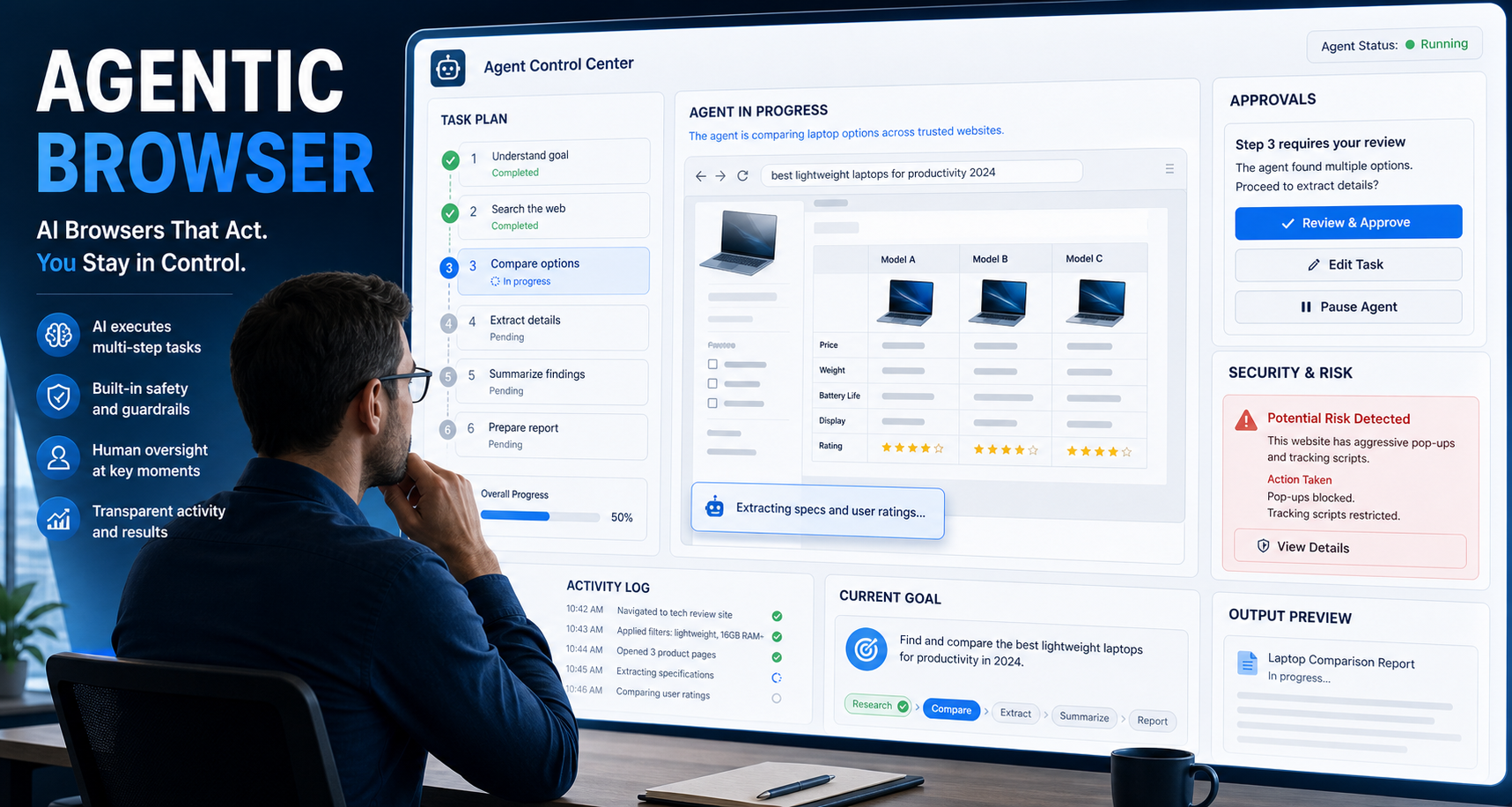
Agentic Browser: How AI Browsers Work, Where They Help, and What Can Go Wrong
An **agentic browser** is a web browser or browser-based system that uses an AI agent to interpret a goal, plan the necessary steps, navigate websites, and take actions on the user’s behalf. Instead of manually opening tabs, comparing information, clicking buttons, and filling in forms, the user describes the desired outcome and supervises the agent as it works.
View Details