
SERP API Python: How to Build a Reliable Search Data Pipeline

A SERP API lets a Python application request search engine results and receive structured data instead of maintaining a complete search-page scraper. The basic request is easy. The production challenge is defining the fields you need, setting location and device parameters consistently, handling errors, normalizing provider-specific JSON, validating results, and storing enough metadata to reproduce a collection run.
This guide shows a provider-neutral workflow for building that pipeline. It does not rank SERP API vendors. Instead, it focuses on the implementation choices that make a Python integration easier to operate, test, and migrate.
What a SERP API Does in a Python Application
A SERP API sits between your application and the search engine results page. Your Python code sends parameters such as a query, search engine, language, location, device, and result depth. The provider retrieves the relevant results and returns a structured response, commonly JSON.
For example, SerpApi’s official Python integration documents a maintained Python package that accepts search parameters and returns a dictionary-like result object. DataForSEO’s SERP API overview documents search results that can be specified by keyword, search engine, language, location, device, and operating-system settings.
The API does not replace your application logic. Your code still decides what to search, how to interpret the response, how to detect bad data, and where to store the output.
For the LycheeIP implementation details behind this step, review datacenter proxies.
For the LycheeIP implementation details behind this step, review static residential proxies.
For the official technical reference behind this point, see MDN HTTP overview.
For the official technical reference behind this point, see HTTP Semantics standard.
Start With a Data Contract, Not With an API Call
Before writing the request, decide what one usable SERP record means for your product. This prevents your database and downstream analytics from becoming tightly coupled to one provider’s response shape.
For the LycheeIP implementation details behind this step, review LycheeIP proxy infrastructure.
Define mandatory fields
A simple organic-ranking workflow may need:
- query
- search engine
- location
- language
- device
- collection timestamp
- result type
- organic position
- title
- URL
- snippet
If local packs, shopping blocks, advertisements, People Also Ask, or AI-generated search features matter, model them as explicit result types rather than squeezing every element into one generic organic-results table.
Separate provider fields from your internal schema
One provider may call a field position, another may expose an absolute rank, and another may nest the same concept inside a result object. Normalize those differences at the boundary of your application.
{

  "query": "best crm for small business",

  "search_engine": "google",

  "location": "Austin, Texas",

  "language": "en",

  "device": "desktop",

  "collected_at": "\<ISO-8601 timestamp>",

  "result_type": "organic",

  "organic_position": 1,

  "title": "Example result",

  "url": "https://example.com",

  "snippet": "Example snippet",

  "provider_request_id": "provider-id"

}
This is an internal normalization example, not a request or response contract for a specific provider.
Set Up the Python Project Safely
Keep API credentials outside source code
Use environment variables or a managed secret store. SerpApi’s Python documentation demonstrates reading an API key from an environment variable rather than hardcoding the credential.
import os
APIKEY = os.environ["SERPAPI_KEY"]
Avoid committing keys to repositories, notebooks, screenshots, or shared configuration files.
Choose an SDK or direct HTTP deliberately
A provider SDK can reduce boilerplate and expose provider-specific errors. Direct HTTP requests give you tighter control over transport settings, timeouts, retry middleware, logging, and dependencies. Use the option that fits the rest of your application rather than assuming an SDK is always required.
Make the First SERP Request
A useful first request should be explicit about the search environment. Relying on defaults can make results difficult to reproduce when location, language, or device affects the SERP.
import os

import serpapi

client = serpapi.Client(api_key=os.environ["SERP_API_KEY"])

results = client.search({

    "engine": "google",

    "q": "coffee shops",

    "location": "Austin, Texas, United States",

    "hl": "en",

    "gl": "us"

})
print(results)
The example follows the current SerpApi client pattern. If you use another provider, adapt the field names to its official documentation rather than assuming parameters are interchangeable.
Extract Organic Results Without Losing Context
Storing only title, URL, and rank creates data that is difficult to audit later. Preserve the query and environment that produced every result. At minimum, attach collection time, location, language, device, provider request identifier when available, and the original result type.
Do not confuse organic rank with absolute position
A result can be the first organic listing while appearing below advertisements, a local pack, or another feature. If your provider supplies both group-specific and absolute positions, preserve both. If it supplies only one, document exactly what the field means.
Treat optional fields as optional
Search result blocks are heterogeneous. A result may not have a snippet, date, image, rating, or other optional property. Use safe access patterns and make mandatory-field failures explicit.
def normalize_organic_result(item, context):

    return {

        "query": context["query"],

        "location": context["location"],

        "device": context["device"],

        "organic_position": item.get("position"),

        "title": item.get("title"),

        "url": item.get("link"),

        "snippet": item.get("snippet"),

    }
Add Pagination Without Creating Duplicate Data
SERP pagination is not simply a database offset. Search engines can vary results between requests, and providers expose page, start, or offset parameters differently.
- Preserve the page or offset parameter with each collection run.
- Keep the provider’s original ranking fields.
- Normalize URLs before using them for deduplication.
- Do not delete repeated URLs until you know whether the repetition represents a different SERP feature.
- Set a maximum collection depth based on the business requirement.
If a rank-tracking product only reports the top 20, collecting much deeper results by default can raise cost and storage without increasing decision value.
Handle Errors as Part of the Data Pipeline
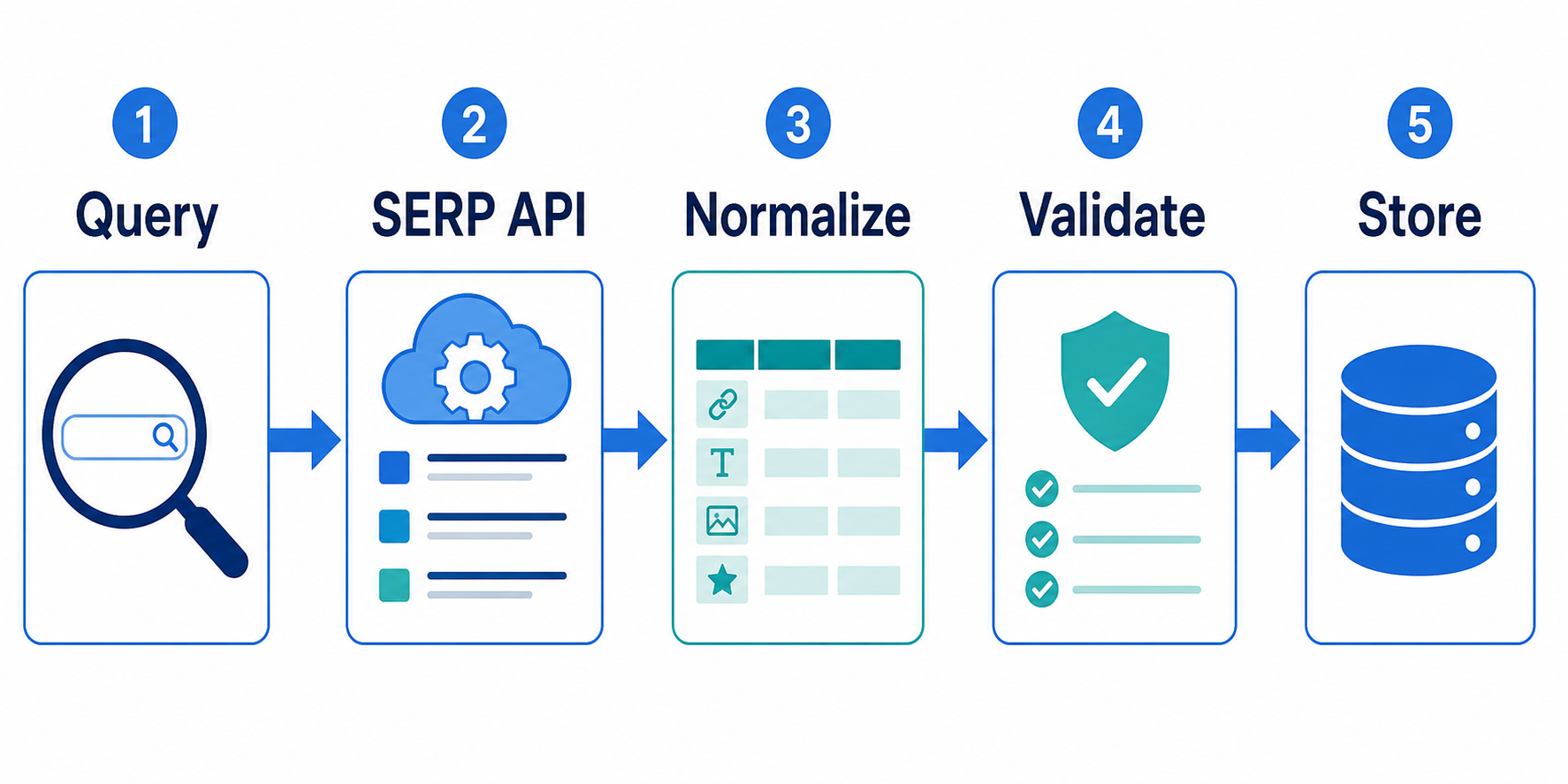
HTTP success is not the same as usable SERP data. SerpApi’s status and error documentation distinguishes request errors from search processing status and notes that a search can be successful while containing empty results.
Classify at least four outcomes:
- transport or timeout failure
- authentication or invalid-request failure
- provider processing failure
- successful response that is empty, incomplete, or fails your own validation
Use bounded retries
Retry only failures that may be temporary, such as selected timeouts or server errors. Do not repeatedly retry invalid credentials, malformed parameters, or a quota condition without changing the cause.
import time

def call_with_retry(fetch, attempts=3):

    delay = 1

    for attempt in range(attempts):

        try:

            return fetch()

        except TimeoutError:

            if attempt == attempts - 1:

                raise

            time.sleep(delay)

            delay *= 2
This illustrates a bounded backoff pattern only. Map the retry conditions to the exact exceptions and status codes documented by your provider.
Validate SERP Data Before Storage
A production pipeline should reject or quarantine responses that technically succeeded but do not meet the data contract.
- returned query matches the intended query or clearly reports a spelling correction
- location and language metadata match the request
- mandatory fields are present
- rank fields are numeric and internally consistent
- URLs can be normalized
- result counts are plausible for the requested page
- duplicate rates have not changed sharply
- trace identifiers and collection time are retained when available
A successful connection proves that the provider responded. It does not prove the full downstream dataset is correct.
Store Raw and Normalized Data Separately
Keep the original provider response for an appropriate retention period and store normalized records separately. Raw responses help diagnose parser changes or disappearing fields. Normalized tables keep analytics stable when the provider schema evolves.
Scale From One Request to a Production Job
- Run one query and validate the complete response.
- Run a representative batch across required locations and devices.
- Measure latency, error classes, field completeness, and cost per usable response.
- Introduce bounded concurrency within documented provider limits.
- Add structured logs and alerts.
- Run a restricted production pilot before expanding volume.
For large scheduled workloads, asynchronous task APIs may be more suitable than many open synchronous requests. DataForSEO’s SERP API overview illustrates why delivery model should be an architectural choice rather than an afterthought.
For the LycheeIP implementation details behind this step, review rotating residential proxies.
Where LycheeIP Fits in a Python SERP Stack
A managed SERP API normally manages its own search retrieval and network routing. Adding another proxy in front of that API endpoint generally does not change the search result geography unless the provider explicitly supports that design.
Proxy infrastructure becomes relevant when your team operates its own authorized search or public-web collection layer. A proxy changes the network route, source IP, geography, and network reputation. It does not fix parsing code, selectors, or data validation.
LycheeIP dynamic residential proxies can support authorized workloads that need rotating residential routes and geographic targeting. Test target-level behavior before scaling because no proxy type guarantees acceptance.
LycheeIP static residential proxies fit workloads that need a more stable network identity over a sequence of requests.
LycheeIP datacenter proxies can fit high-throughput workloads where hosted IP infrastructure is acceptable to the target.
Production Checklist
- credentials stored outside source code
- query, location, language, and device are explicit
- provider output normalized into an internal schema
- raw responses retained where appropriate
- rank meanings documented
- pagination tested for overlap
- timeouts and provider errors classified
- retries bounded and status-aware
- mandatory-field validation runs before storage
- logs contain request context and trace identifiers
- cost measured per usable result
- concurrency raised only after validation
When Not to Build This Pipeline
A custom Python integration is unnecessary when an official API or licensed dataset already provides the exact information you need, when the task is a one-off manual check, or when a scheduled no-code workflow solves the requirement with less maintenance.
It is also the wrong approach if the collection lacks authorization, involves protected or private data, or cannot be operated within applicable terms, privacy requirements, copyright rules, rate limits, and other legal or contractual obligations.
Support Python SERP workflows with LycheeIP proxy infrastructure
Final Takeaway
The Python request is the smallest part of a production SERP integration. Reliability comes from a clear data contract, explicit search context, provider-independent normalization, validation, bounded error handling, traceable storage, and gradual scaling.
Frequently Asked Questions
What is a SERP API in Python?
It is a search-results API called from a Python application to retrieve structured SERP data. Python handles the request, transformation, validation, and storage around the provider response.
Do I need to scrape Google HTML if I use a SERP API?
Usually no. A managed SERP API is designed to retrieve and parse the result page for you. Your application should focus on the request configuration and the quality of the returned data.
Should I use a Python SDK or requests?
Use an SDK when it reduces integration work and provides useful provider-specific handling. Use direct HTTP when your application already standardizes transport, retries, telemetry, or authentication across external APIs.
How do I prevent duplicate SERP results?
Normalize URLs, preserve page and result-type context, and deduplicate only after you understand why the same destination appeared more than once.
How should I handle SERP API timeouts?
Use a finite timeout and retry only errors that may be temporary. Apply bounded backoff and stop after a defined number of attempts.
Do I need proxies with a managed SERP API?
Usually not for the provider’s search retrieval itself. Proxies matter more when your team operates its own authorized collector and needs control over network routing, geography, or session behavior.
Related LycheeIP Guides and Resources

Recommended Articles

SERP API Troubleshooting: Fix Empty, Wrong, or Inconsistent Search Results
SERP API failures are not limited to obvious HTTP errors. A request can return successfully and still produce empty, incomplete, geographically wrong, duplicated, or misinterpreted search data. Production troubleshooting therefore has to separate transport problems from provider processing, SERP differences, and downstream parsing errors.
View Details
SERP Scraping API: How to Choose the Right Provider
Recommended Meta Description: Compare SERP scraping APIs by data coverage, localization, reliability, workflow fit, and cost structure, then choose and validate the right provider.
View Details
Free Web Proxy vs VPN vs Rotating Proxy: Which Should You Use?
Compare free web proxies, VPNs, rotating proxies, static proxies, and datacenter proxies by scope, encryption, IP control, automation, streaming, and account workflows.
View Details
BlockAway Not Working? Fix Common Proxy, Video, and Access Problems
Troubleshoot BlockAway when pages are blocked, YouTube fails, JavaScript breaks, speed drops, sessions expire, or mobile access behaves differently.
View Details
BlockAway vs CroxyProxy: Which Free Web Proxy Is Better?
Compare BlockAway and CroxyProxy by search intent, speed, video support, JavaScript handling, ads, shared IP risk, mobile use, and when to switch tools.
View Details