
Datacenter vs Residential vs ISP Proxies: Which One Should You Use?
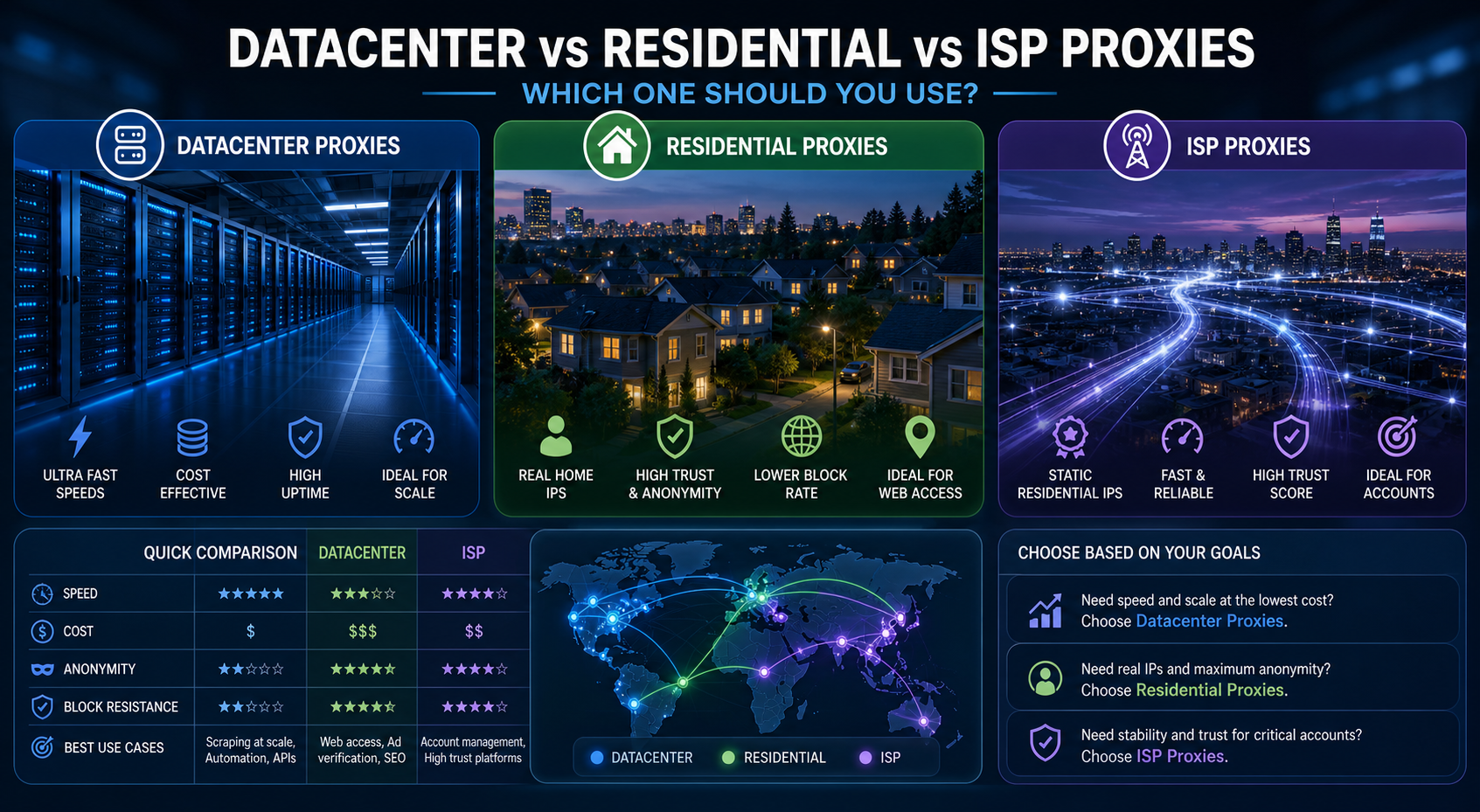
Choosing between **datacenter vs residential proxies** is not really about which proxy type is “best.” It is about which one matches your workload, target sensitivity, budget, session needs, and risk tolerance.
Choosing between datacenter vs residential proxies is not really about which proxy type is “best.” It is about which one matches your workload, target sensitivity, budget, session needs, and risk tolerance.
A datacenter proxy is usually the fastest and most cost-efficient choice. A residential proxy usually offers stronger trust signals because the IP is associated with a real consumer internet connection. An ISP proxy sits between both, offering stronger stability than many rotating residential setups and better trust than typical hosted datacenter IPs.
In this guide, you will learn:
- The main difference between datacenter, residential, and ISP proxies
- Which proxy type fits web scraping, SEO monitoring, ad verification, automation, and account workflows
- When rotating residential proxies are worth the cost
- When static residential proxies or ISP proxies make more sense
- How to build a mixed proxy stack without overpaying
What is the main difference between datacenter, residential, and ISP proxies?
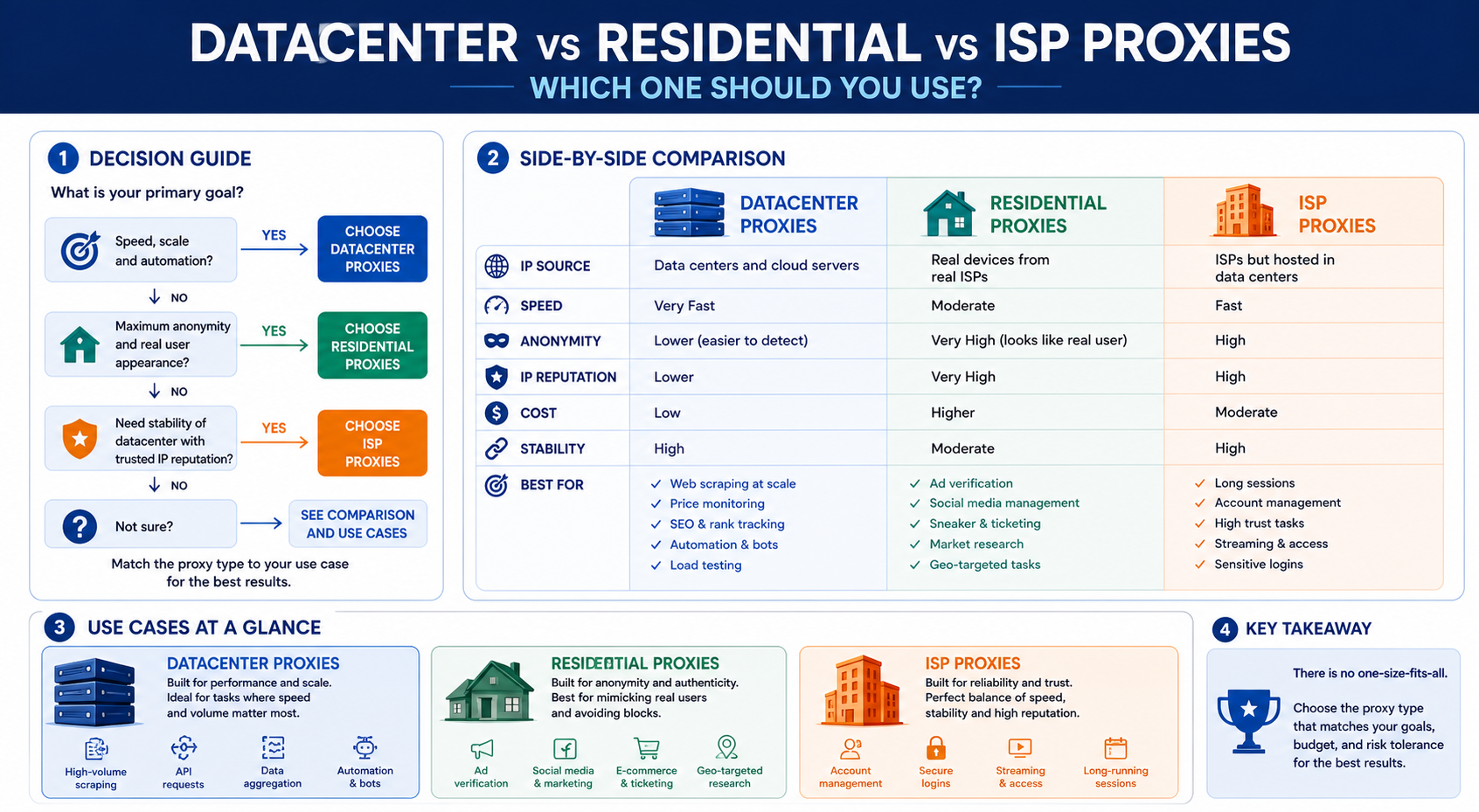
The main difference is where the IP address comes from, and that origin affects speed, cost, trust, detection risk, and session stability.
A datacenter proxy uses an IP address hosted on data center or cloud infrastructure. It is not tied to a normal home internet connection. This makes it fast, scalable, and usually cheaper, but also easier for some sites to identify as hosted traffic.
A residential proxy uses an IP address associated with a real consumer internet connection. Because the IP looks closer to normal user traffic, it may perform better on websites that block or challenge hosting networks. The tradeoff is that residential proxies are often more expensive, more variable in speed, and more dependent on the quality and sourcing of the provider’s network.
An ISP proxy uses an IP address assigned by an internet service provider but is typically hosted on stable server infrastructure. In practice, this gives ISP proxies a useful middle ground: better stability than many residential pools and stronger trust signals than typical datacenter IPs.
For the LycheeIP implementation details behind this step, review rotating residential proxies.
For the LycheeIP implementation details behind this step, review datacenter proxies.
For the official technical reference behind this point, see Anthropic documentation.
Here is the simple way to think about it:
If your target is easy to access and your workload needs speed, start with datacenter proxies. If the target blocks hosting IPs, test residential proxies. If your workflow needs a stable identity over time, consider ISP proxies or static residential proxies.
How do datacenter proxies work?
Datacenter proxies route requests through IP addresses hosted on data center infrastructure.
This makes them useful for teams that need fast, repeatable traffic. Data engineers, SEO teams, ad verification teams, QA teams, and growth teams often start with datacenter proxies because they are easier to scale and usually more predictable than residential pools.
Datacenter proxies are often a good fit for:
- Public web scraping on low to moderate protection targets
- SEO monitoring and technical checks
- SERP sampling where residential trust is not required
- Ad verification and landing page checks
- Market research
- Uptime and availability monitoring
- QA automation across locations
- Bulk tasks that do not require logged-in user behavior
The main limitation is detection. Some websites classify IPs by network ownership, ASN, hosting provider, reputation history, request patterns, and behavioral signals. If a target already treats data center traffic as suspicious, even a clean datacenter proxy can struggle.
That does not mean datacenter proxies are bad. It means they should be matched to the right workload. For many teams, datacenter proxies are the first layer of a proxy stack because they provide speed and cost control. Residential and ISP options can then be added only where the target requires stronger trust.
How do residential proxies work?
Residential proxies route traffic through IP addresses associated with consumer internet networks.
This gives them a stronger appearance of normal user traffic compared with hosted datacenter IPs. For websites that are sensitive to automation, location, or IP reputation, a rotating residential proxy can often perform better than a standard datacenter proxy.
Residential proxies are commonly used for:
- Harder web scraping targets
- Location-sensitive content checks
- Ad verification across real markets
- Marketplace monitoring
- Travel and retail price checks
- Localized SERP analysis
- Workflows where hosted IPs are blocked quickly
The most common version is a rotating residential proxy, where the proxy provider rotates traffic across a pool of residential IPs. This can reduce repeated requests from one IP, but it must be used carefully. Some workflows need a new IP often. Others break when the IP changes too quickly.
Residential proxies have tradeoffs. They may cost more. Speeds can vary. IP availability can change by country, city, or session type. Ethical sourcing also matters. Teams should evaluate whether the provider clearly explains how its residential network is sourced, how users consent, and what usage rules apply.
Residential proxies are not magic. If your scraper sends unnatural requests, ignores cookies, breaks sessions, or violates target rules, a residential IP may still get challenged or blocked.
How do ISP proxies work?
ISP proxies use IP addresses associated with internet service providers while running on more stable hosted infrastructure.
This is why ISP proxies are often described as the middle ground between datacenter and residential proxies. They can offer better trust signals than typical datacenter IPs while keeping the speed and stability teams expect from server-based infrastructure.
ISP proxies are often useful for:
- Long-lived sessions
- Account workflows where stable IP identity matters
- Monitoring tasks that should not rotate too aggressively
- Automation that needs lower IP churn
- Use cases where datacenter IPs are blocked but full residential rotation is unnecessary
For example, if a team needs to check a platform repeatedly from the same region, a rotating residential proxy may change too often. A datacenter proxy may be too easy to flag. An ISP proxy can be a better fit because it keeps the session stable while offering stronger network trust.
The tradeoff is availability and cost. ISP proxies may be more expensive than datacenter proxies, and the pool may be smaller than large residential networks. For many teams, they are best used selectively for workflows where stability matters.
Which proxy type is best for web scraping?
The best proxy type for web scraping depends on the target’s blocking behavior, page complexity, request volume, and how much session consistency you need.
Use datacenter proxies when speed and volume matter
Datacenter proxies are often the right starting point for scraping public pages at scale. They are fast, relatively cost-efficient, and easier to manage in large batches.
For the LycheeIP implementation details behind this step, review LycheeIP proxy infrastructure.
For the official technical reference behind this point, see MDN HTTP overview.
Use them when:
- The target does not aggressively block hosting IPs
- You need high throughput
- You are scraping public pages
- Your workflow is mostly stateless
- You can control request rate and retries
- You want predictable infrastructure costs
For example, a team collecting public product metadata from a low-protection website may not need residential proxies. A clean datacenter proxy pool with careful rate limits may be enough.
Use residential proxies when targets block hosting IPs
Residential proxies are better when targets challenge or block data center traffic quickly. They can help with location-sensitive scraping, retail monitoring, travel data, or websites that treat hosting IPs as suspicious.
Use them when:
- Datacenter IPs return many 403 errors
- CAPTCHAs appear too frequently
- The target varies content by region
- The site is sensitive to IP reputation
- You need rotating residential proxy sessions
Residential proxies should still be tested carefully. A higher-trust IP cannot fix poor scraping logic, broken headers, or aggressive request patterns.
Use ISP proxies when you need stable sessions
ISP proxies are often better for scraping workflows that need continuity. If your session must keep the same IP for longer periods, an ISP proxy can be more reliable than a rotating residential pool.
Use them when:
- You need sticky sessions
- The target reacts badly to frequent IP changes
- You need consistent regional access
- You want stronger trust than datacenter proxies
- The workflow has account, cart, session, or preference continuity
A good scraping stack may use all three types: datacenter for easy bulk pages, residential for harder targets, and ISP proxies for stable sessions.
Which proxy type is best for SEO monitoring?
Datacenter proxies are often enough for basic SEO monitoring, while residential or ISP proxies may be better for sensitive, localized, or personalized checks.
SEO teams use proxies for tasks such as rank tracking, SERP snapshots, technical crawling, page availability monitoring, redirect testing, localization QA, and competitor checks.
Datacenter proxies can work well for:
- Large-scale SERP sampling
- Technical SEO crawling
- Status code checks
- Page rendering checks
- Indexation monitoring
- Competitor page checks
- International page availability testing
Residential or ISP proxies may be better when:
- The SERP changes heavily by location
- The search engine challenges hosted traffic
- You need more realistic local signals
- You need session stability for repeated checks
- You are comparing how content appears from a specific region
SEO teams should be careful with interpretation. Proxy location, language settings, device settings, cookies, personalization, and search engine behavior can all affect results. A proxy can help you see from another location, but it does not guarantee a perfect view of what every real user sees.
Which proxy type is best for account management?
ISP proxies and static residential proxies are usually better for long-lived account workflows, while datacenter proxies are better for low-risk separation and infrastructure tasks.
Account workflows require extra caution. Many platforms have strict rules around automation, multi-account activity, and access patterns. A proxy should not be used to violate platform terms, bypass abuse systems, or hide harmful behavior.
For legitimate account workflows, proxy choice depends on stability and trust.
For the LycheeIP implementation details behind this step, review static residential proxies.
Datacenter proxies may work for:
- Separating low-risk internal tools
- QA testing across accounts you own
- Basic access control testing
- Non-sensitive automation where platform rules allow it
ISP proxies may work better for:
- Stable account sessions
- Long-running dashboards
- Repeated logins from the same region
- Workflows where sudden IP changes create risk
Residential proxies may help when:
- The platform strongly distrusts hosting IPs
- Location realism is important
- The workflow needs a normal consumer-like network profile
The key rule is simple: if the account matters, do not choose only by price. Choose by stability, policy compliance, security, and the risk of losing access.
How should teams choose the right proxy type?
Teams should choose proxy type by scoring speed, cost, trust, rotation, session stability, target difficulty, and compliance risk.
Use this decision matrix:
A practical decision flow looks like this:
- Start with the workload, not the proxy type.
- Check whether the target allows or restricts automated access.
- Test datacenter proxies first for low to moderate difficulty tasks.
- Move to residential proxies if hosted IPs are blocked.
- Use ISP proxies when stable sessions matter.
- Track success rate, not just connection success.
- Compare real cost by completed workflow, not just plan price.
This prevents overbuying. Many teams pay for residential proxies when datacenter proxies would work. Others force datacenter proxies onto targets where residential or ISP options would save time and failed requests.
When should you combine multiple proxy types?
You should combine proxy types when one proxy category cannot reliably support every workload.
A mixed stack gives each task the right routing layer. This is often more efficient than choosing one proxy type for everything.
A common mixed stack looks like this:
The advantage is control. Datacenter proxies handle speed and volume. Residential proxies handle higher-trust access. ISP proxies handle stability. When a workflow fails, you can switch only that workflow instead of rebuilding your entire proxy stack.
This also improves cost control. You do not need premium proxy types for every request. You need the right proxy type for the right job.
How does LycheeIP fit into a mixed proxy stack?
LycheeIP can fit into a mixed proxy stack by giving teams proxy options they can evaluate across different workload types.
For example, a team could use datacenter proxy infrastructure for high-speed public data tasks, dynamic residential options for harder targets, and static residential options where session stability matters. The right configuration depends on the target, request pattern, region, and acceptable risk.
Compare LycheeIP Proxy Types for Your Workflow
A practical LycheeIP evaluation should test:
- Datacenter proxy performance on low to moderate difficulty targets
- Dynamic residential proxy performance on harder or location-sensitive workflows
- Static residential proxy behavior for stable sessions
- Authentication options
- IP replacement process
- Supported locations
- Session control
- Real success rate under expected traffic
The best test is not a generic speed check. The best test is your real workflow, with your target pages, your concurrency, your session rules, and your success criteria.
If your team is also comparing bandwidth-heavy proxy plans, link this article to your datacenter proxies unlimited bandwidth buyer guide. That page should answer the pricing and traffic model question, while this page answers the proxy-type decision question.
Frequently Asked Questions
Are datacenter proxies better than residential proxies?
Datacenter proxies are better for speed, scale, and cost control. Residential proxies are better when the target is sensitive to hosted IPs or requires stronger location and user-like trust signals.
What is the difference between residential vs ISP proxy?
A residential proxy uses an IP associated with a real consumer internet connection. An ISP proxy uses an ISP-associated IP but is usually hosted on more stable server infrastructure, which can make it better for long sessions and consistent performance.
Are ISP proxies better than datacenter proxies?
ISP proxies can be better than datacenter proxies when you need stronger trust and session stability. Datacenter proxies are usually better when you need speed, scale, and lower cost for less sensitive workflows.
When should I use a rotating residential proxy?
Use a rotating residential proxy when the target blocks repeated requests from the same IP or treats hosting IPs as suspicious. Rotation is useful for distributed access, but it can break workflows that need a stable session.
Are static residential proxies good for account management?
Static residential proxies can be useful for approved workflows that need a consistent IP with stronger trust than a typical datacenter proxy. They should still be used carefully and in line with the platform’s rules.
Can datacenter proxies work for web scraping?
Yes, datacenter proxies can work well for web scraping when the target is not heavily protected and the scraper uses responsible request rates. If the target returns many blocks or CAPTCHAs, residential or ISP proxies may perform better.
What is the best proxy type for SEO monitoring?
Datacenter proxies are often enough for basic rank tracking, crawling, and page monitoring. Residential or ISP proxies may be better for localized SERP checks, sensitive search environments, or workflows where hosted IPs produce inconsistent results.
Should I use one proxy type for every task?
No. Many teams get better results with a mixed stack. Use datacenter proxies for scale, residential proxies for difficult targets, and ISP proxies for stable sessions.
Related LycheeIP Guides and Resources

Recommended Articles

DataDome Bypass for Web Scraping
DataDome Bypass for Web Scraping
View Details
Web Scraping Rate Limiting: How to Handle 429s, Backoff, and Concurrency
Web scraping rate limiting is the engineering discipline of keeping an authorized collection workload inside a target service's acceptable request envelope. When that envelope is exceeded, a server may respond with HTTP 429 Too Many Requests, delay responses, or apply other controls.
View Details
reCAPTCHA vs hCaptcha vs Cloudflare Turnstile: What Scraping Teams Need to Know
If an authorized data-collection workflow suddenly stops at a verification screen, identifying the protection system matters before you change code, browser settings, or proxy infrastructure. reCAPTCHA vs hCaptcha vs Turnstile is not simply a branding comparison. The three systems can expose different browser flows, token models, risk decisions, and failure symptoms.
View Details
Browser Automation Proxies: IPs, Geo-Targeting, Sessions, and AI Agents
A browser automation proxy belongs to the network layer of Playwright, Selenium, cloud-browser, and AI-agent workflows. It changes how browser traffic is routed and can affect the source IP address, geographic egress, and session continuity seen by a destination site. It does not improve an AI model's reasoning, repair browser logic, or guarantee that a website will accept the session.
View Details
SERP Scraping: Methods, APIs, Workflows, and Best Practices
SERP scraping is the automated collection of information from search engine results pages. A SERP scraper can capture organic rankings, advertisements, featured snippets, People Also Ask questions, local results, shopping listings, images, and other search features, then convert them into structured data for analysis.
View Details