
Web Scraping CAPTCHA: How to Handle Challenges Safely
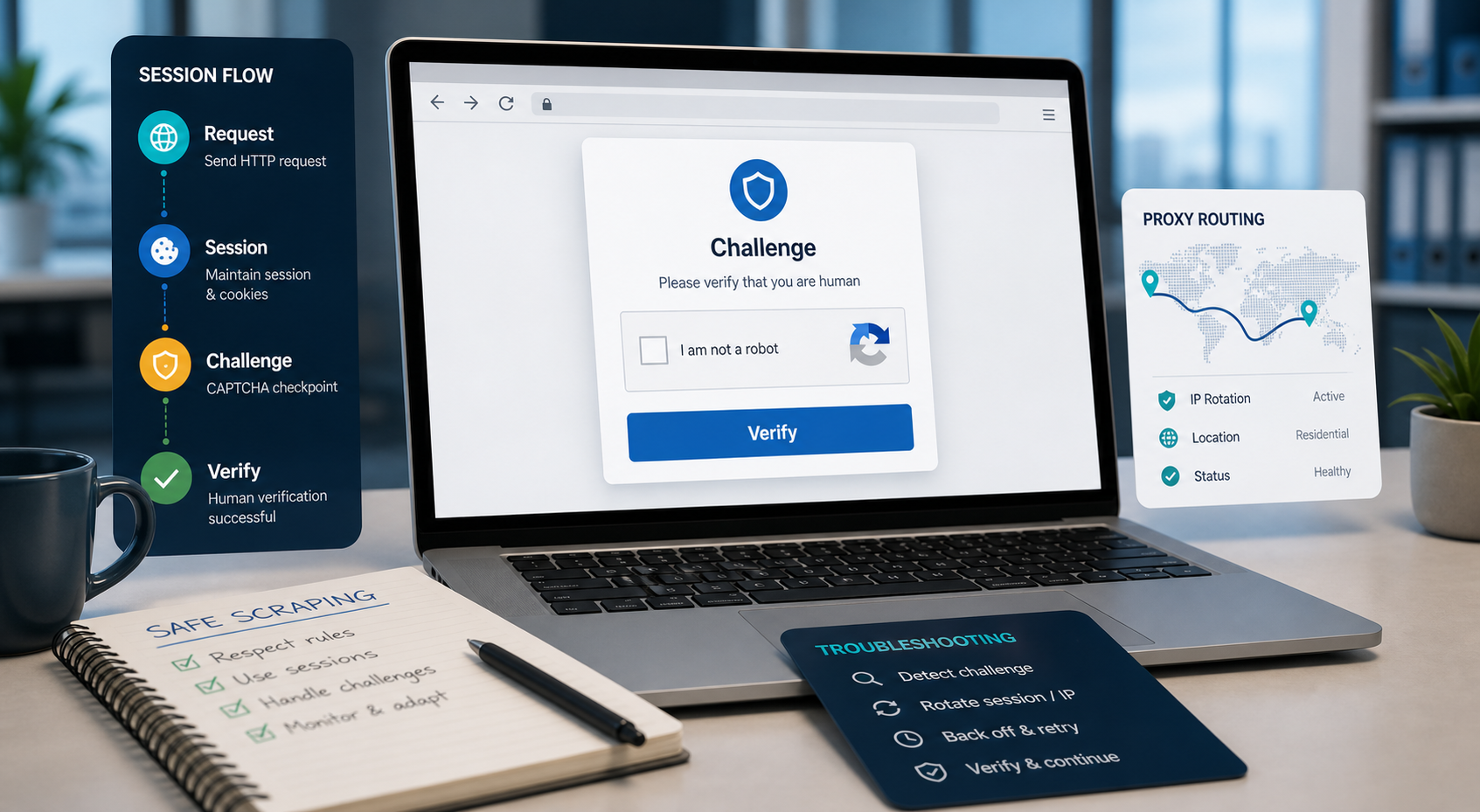
This guide explains:
A web scraping CAPTCHA is a challenge or risk check that a website presents when it suspects a request is automated. It may appear as an image puzzle, checkbox, invisible risk score, JavaScript challenge, or blocked action.
For an authorized scraping project, the best response is not to force your way through the challenge. First determine why it appeared, reduce unnecessary request volume, preserve valid session state, verify that your browser and network configuration match the task, and consider an official API or licensed data source.
A proxy may change the source IP, location, or network reputation of a request, but it cannot repair broken scraper logic, grant permission, or guarantee that a website will accept an automated session.
What Is a Web Scraping CAPTCHA?
A web scraping CAPTCHA is a website security control used to distinguish ordinary visitors from automated or suspicious traffic. Traditional versions ask users to identify text or images, while newer systems may assess browser, network, session, and behavioral signals without showing a visible puzzle.
For example, Google reCAPTCHA v3 returns a risk score without interrupting the user. Cloudflare Turnstile can run non-interactive browser challenges and decide whether user interaction is necessary. hCaptcha also uses a client-side challenge followed by server-side token verification.
This means that a scraper may fail without ever seeing a classic CAPTCHA image. The real symptom may be:
- An unexpected login page
- An empty response
- A challenge page
- An HTTP 403 or 429 response
- Missing product data
- Repeated redirects
- A request that works locally but fails on a server
- A page that loads in a browser but not through an HTTP client
A CAPTCHA is therefore not always a standalone problem. It is often evidence that one or more parts of the collection workflow do not match the target website’s expectations.
For the LycheeIP implementation details behind this step, review LycheeIP proxy infrastructure.
For the LycheeIP implementation details behind this step, review rotating residential proxies.
For the LycheeIP implementation details behind this step, review static residential proxies.
For the official technical reference behind this point, see MDN HTTP overview.
For the official technical reference behind this point, see Playwright documentation.
Common CAPTCHA and Challenge Types
| Challenge type | How it generally works | What the scraper may observe | Important limitation |
|---|---|---|---|
| Text or image CAPTCHA | Requires the visitor to recognize characters or objects | Visible puzzle or blocked form | Solving the puzzle does not grant permission to automate the website |
| Checkbox challenge | Uses the interaction and surrounding signals to evaluate risk | Checkbox followed by approval or a harder challenge | A click alone may not be enough |
| Invisible risk scoring | Evaluates the interaction without showing a puzzle | Request denied, action limited, or additional verification required | There may be no challenge to “solve” |
| JavaScript challenge | Runs browser-side checks before permitting an action | Redirect loop, incomplete page, waiting screen, or token failure | A basic HTTP client may be unable to complete the browser flow |
| Application-specific challenge | Protects login, search, checkout, or form submission | Page loads, but a particular action fails | The restriction may apply only to sensitive actions |
| Rate or abuse control | Limits requests that exceed the site’s thresholds | HTTP 429, temporary blocks, or escalating challenges | Changing IP addresses does not make an excessive request rate responsible |
Modern systems often combine several of these methods. Turnstile, for example, can use non-interactive JavaScript challenges and browser signals before deciding whether to show a checkbox. reCAPTCHA v3 assigns scores that the website can use to allow, limit, or further verify an action.
Why Do CAPTCHAs Appear During Web Scraping?
CAPTCHAs may be triggered by a combination of request, browser, session, network, and policy signals. The exact system and thresholds are controlled by the target website, so no single change will work universally.
1. The request rate is too aggressive
A scraper may make requests faster than an ordinary visitor or exceed a published or unpublished rate limit. Excessive concurrency can make even individually valid requests appear abusive.
The safest response is to reduce concurrency, add controlled delays, cache unchanged pages, and avoid requesting information you have already collected.
2. Too many requests come from one network identity
A large number of requests from one IP address may trigger rate controls or reputation checks. This does not automatically mean that rotating IP addresses is appropriate. First confirm that the collection is authorized and that the volume is reasonable.
3. The browser environment is incomplete
Some websites depend on JavaScript, browser APIs, cookies, local storage, or application-generated tokens. A direct HTTP request may receive different content from a full browser.
In this situation, the problem is not necessarily the IP address. The selected extraction method may simply be incompatible with the page.
4. Cookies and session state are inconsistent
Changing cookies, accounts, browser profiles, geographic locations, or IP addresses during one logical session can look abnormal. A workflow that needs continuity should preserve the required session state rather than treating each request as unrelated.
5. The IP location and application context do not match
A session may begin in one country and continue from another. The website may also observe differences among the account region, language, timezone, delivery market, and source IP.
Geographic consistency matters more than repeatedly switching locations.
6. Authentication has expired
A scraper may mistake an expired login, invalid token, or redirected authentication flow for a CAPTCHA problem. Always inspect the final URL, response body, cookies, and status history before changing network infrastructure.
7. The target website changed
A challenge may appear after the website updates its frontend, bot controls, login process, or API calls. Selectors and parsers can also fail when the page structure changes, even though the network request itself succeeded.
8. The intended activity is restricted
A CAPTCHA can represent a deliberate boundary rather than a technical inconvenience. If the website does not authorize the activity, changing browsers, accounts, or network routes does not resolve the underlying issue.
Teams should review applicable terms, data licences, privacy requirements, copyright considerations, contractual obligations, rate limits, and security controls. The Robots Exclusion Protocol defines how service owners can communicate crawler preferences, but the standard also clarifies that robots.txt is not a form of access authorization.
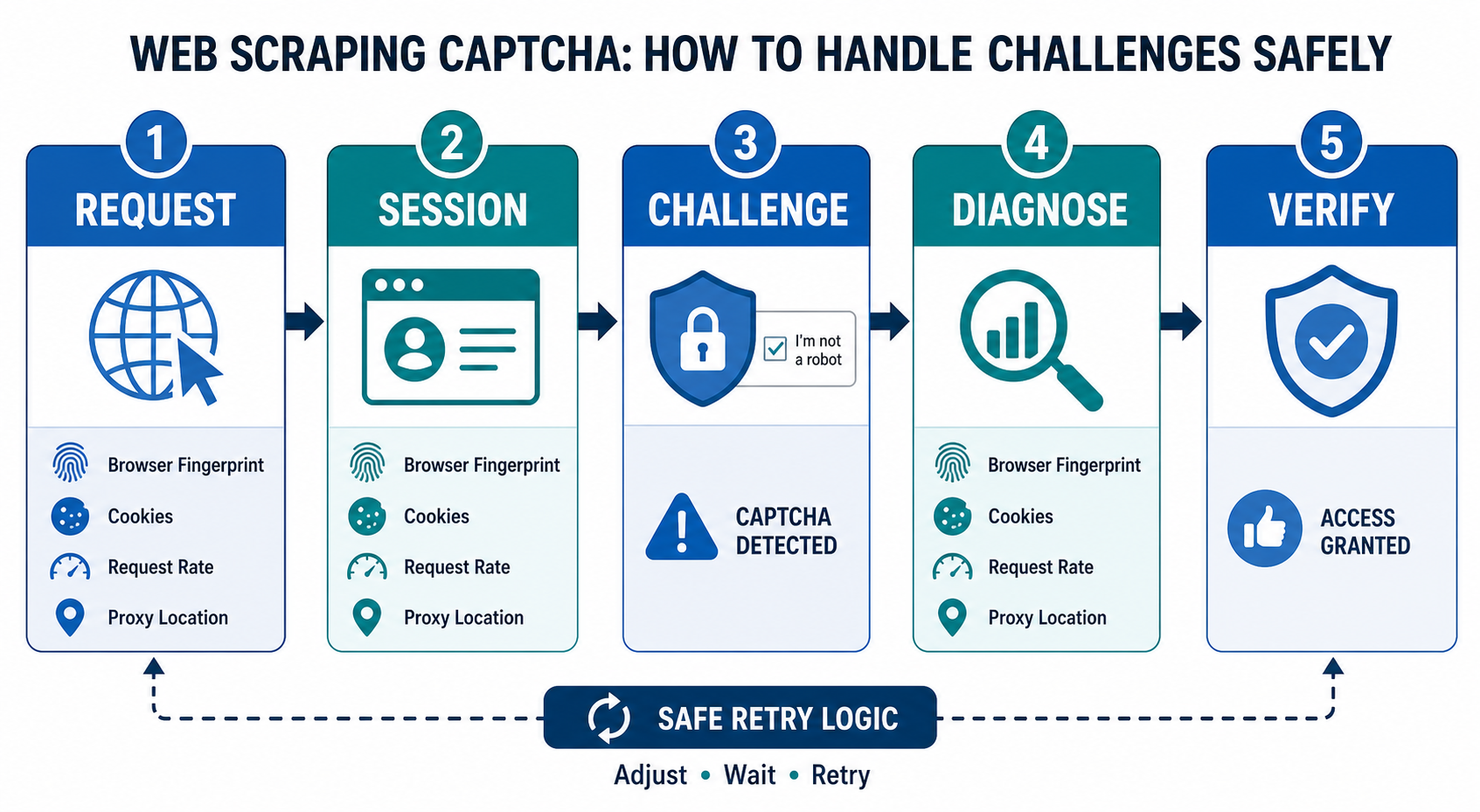
Use a Layer-by-Layer CAPTCHA Diagnostic Model
Before replacing tools or proxies, identify which layer is failing.
| Layer | What it controls | Questions to ask |
|---|---|---|
| Authorization and policy | Whether the collection is permitted | Is the data public? Does the site allow this use? Is an API or licence available? |
| Target application | Pages, forms, APIs, login flows, and security controls | Did the page, endpoint, or authentication process recently change? |
| Scraper logic | URLs, requests, retries, selectors, and pagination | Is the scraper requesting the correct resource? Is it retrying too aggressively? |
| Browser automation | JavaScript execution and browser interaction | Does the page require a real browser environment? Are resources loading correctly? |
| Session and identity | Cookies, accounts, tokens, and local storage | Is the session valid and internally consistent? |
| Network and proxy | Source IP, route, geography, ASN, and protocol | Is the network location appropriate? Is the proxy connection stable? |
| Parsing and validation | Extraction, formatting, and data quality | Did the request succeed but the parser fail? |
| Monitoring | Logs, errors, screenshots, and performance history | Can the team identify exactly when and why failures increased? |
The purpose of this model is to prevent unnecessary changes. A new proxy will not fix an expired login. A browser will not fix an unauthorized use case. A CAPTCHA service will not repair a broken selector.
How to Reduce CAPTCHAs in an Authorized Scraping Workflow
The following process focuses on reducing unnecessary challenge triggers rather than defeating security controls.
Step 1: Confirm authorization and data requirements
Document:
- The business purpose
- The exact data fields required
- Whether the information is public
- How frequently it must be updated
- Whether an official API, feed, export, or licensed dataset is available
- Which policies and contractual obligations apply
Collect only the data required for the legitimate purpose.
Step 2: Establish a small baseline test
Begin with a limited sample. Record:
- Requested URL
- Timestamp
- Response status
- Redirect history
- Final URL
- Response size
- Page title
- Challenge indicators
- Session identifier
- Network route
- Parsing result
Do not scale a workflow that has not passed a controlled baseline test.
Step 3: Reduce unnecessary requests
Cache previously collected pages where appropriate. Use incremental updates, deduplication, conditional requests, and clear stopping rules.
A workflow that repeatedly downloads unchanged content increases cost and places unnecessary load on the target.
Step 4: Match the extraction method to the page
Use direct HTTP collection for stable, server-rendered public pages when permitted. Use browser automation only when browser execution is genuinely required.
Do not add a browser simply to make the scraper look more human. Add it when JavaScript execution, navigation, or user interface interaction is necessary for the authorized task.
Step 5: Preserve legitimate session continuity
If the task requires a session:
- Reuse the appropriate cookie jar
- Keep account state consistent
- Avoid unnecessary geography changes
- Refresh expired credentials through the approved process
- Separate unrelated users or workflows
- Do not share authentication state across projects
Step 6: Apply conservative rate and concurrency controls
Use a small number of concurrent workers and increase capacity gradually. Monitor response codes and challenge rates at every stage.
When challenge frequency rises, reduce volume instead of automatically increasing retries.
Step 7: Verify the network layer
Confirm:
- Proxy authentication
- Protocol and port
- DNS behavior
- Geographic location
- Connection stability
- Session routing
- Timeout settings
- Whether the application and proxy support the same protocol
A successful proxy connection only proves that the connection works. It does not prove that the complete data-collection workflow is permitted, stable, or accurate.
Step 8: Validate the collected data
Compare a sample of extracted records with the visible source. Check required fields, prices, dates, identifiers, duplicates, missing values, and parsing errors.
A scraper that returns data without an error can still return incomplete or inaccurate information.
For the LycheeIP implementation details behind this step, review AI-powered browser automation hub.
Which CAPTCHA Handling Approach Should You Choose?
| Approach | Best suited to | Main benefit | Main limitation |
|---|---|---|---|
| Official API or authorised feed | Structured data that the provider makes available programmatically | Clearer integration and predictable schemas | Access, fields, quotas, or licensing may be limited |
| Direct HTTP extraction | Public, stable, server-rendered pages | Lower resource usage and simpler maintenance | Cannot complete browser-dependent interactions |
| Browser automation | Authorised workflows that genuinely require JavaScript or user-interface interaction | Can reproduce browser-side application behavior | Higher infrastructure and maintenance burden |
| Managed scraping API | Teams that need rendering, extraction, retries, and monitoring in one service | Reduces internal infrastructure work | Does not remove policy, permission, or accuracy obligations |
| Manual escalation | Rare edge cases or quality-review workflows | Keeps sensitive decisions under human control | Not suitable for high-volume unattended collection |
| CAPTCHA-solving service | Explicitly authorised testing or collection where challenge handling is permitted | May handle certain visible challenges | Adds cost, latency, privacy considerations, and no guarantee of acceptance |
Specialized CAPTCHA-solving services may use automated models, human workers, or a combination of both. However, solving a visible challenge does not necessarily satisfy the website’s broader risk checks, and it does not create authorization.
Troubleshooting Web Scraping CAPTCHA Failures
| Symptom | Likely cause | First check | Recommended next step |
|---|---|---|---|
| CAPTCHA appears after a predictable number of requests | Rate or concurrency threshold | Requests per minute and worker count | Reduce concurrency, add caching, and retest with a small sample |
| HTTP 403 with a challenge page | Access policy, browser check, or blocked session | Response body, headers, and final URL | Confirm authorization and determine whether a supported browser or API is required |
| HTTP 429 response | Too many requests | Retry frequency and parallel jobs | Pause, reduce volume, and follow any published retry guidance |
| Page works in a browser but not through an HTTP client | JavaScript or browser-dependent flow | Network calls and rendered HTML | Use authorised browser automation or an official endpoint |
| Works locally but fails on a server | Network reputation, environment, DNS, TLS, or dependency difference | Compare logs and environment configuration | Reproduce one request with identical code and inspect every difference |
| CAPTCHA repeats after successful completion | Session, cookies, token validation, or broader risk check | Cookie persistence and redirect history | Preserve the approved session and verify that the challenge was actually accepted |
| New IP does not solve the problem | Failure is outside the network layer | Authentication, browser, request rate, and parser | Diagnose the responsible layer before changing proxies again |
| Extracted fields suddenly become empty | Page structure or parser changed | Saved HTML and selector matches | Update and test the parser rather than treating it as a CAPTCHA issue |
| Challenge rate rises during scaling | Volume exceeds the stable operating range | Challenge rate by worker and request type | Return to the last stable configuration and scale more gradually |
| Geographic results are inconsistent | Location, language, cookies, or account region are misaligned | Exit IP and session settings | Keep the relevant geography and session context consistent |
Can Proxies Reduce CAPTCHA Interruptions?
A proxy changes the network path between the scraper and the target. Depending on the product and configuration, it may change the source IP, geographic location, session routing, or network reputation.
This can be relevant when an authorized workflow requires geographic testing, distributed public-web collection, or isolation among independent sessions. It does not automatically change browser fingerprints, cookies, accounts, request behavior, or scraper logic.
Choosing the appropriate proxy type
| Proxy type | Consider it when | Main tradeoff |
|---|---|---|
| Dynamic residential proxy | Independent requests need controlled rotation or geographic diversity | Frequent rotation can break workflows that require session continuity |
| Static residential proxy | A permitted workflow needs a stable residential network identity | A single stable IP can still be rate-limited or challenged |
| Static datacenter proxy | Speed, predictable infrastructure, and stable high-volume routing are more important than residential network attributes | Datacenter traffic may be treated differently by some target systems |
| No proxy | The task is low-volume, local, permitted, and does not require geographic testing | Offers no network distribution or alternative geography |
LycheeIP provides dynamic residential proxies, static residential proxies, and static datacenter proxies. Its current product pages state support for HTTP, HTTPS, and SOCKS5 on static offerings, while the dynamic residential page lists rotating and sticky session options with geographic coverage across more than 200 countries and regions. These details should be rechecked before deployment because product capabilities can change.
Do not choose a proxy solely because a CAPTCHA appeared. First determine whether the network layer caused the failure. If the issue is an expired account, unsupported workflow, missing JavaScript, excessive request rate, or broken parser, changing proxies may add complexity without solving the problem.
How Should You Handle an Amazon Scraping CAPTCHA?
An Amazon scraping CAPTCHA should be treated as a signal to pause and review the workflow, not as an invitation to escalate bypass attempts.
Start by checking:
- Whether the required data is available through an authorised Amazon API or feed
- Whether the request volume is necessary and proportionate
- Whether the session, marketplace, language, and geographic settings are consistent
- Whether a login or account token has expired
- Whether the scraper is repeatedly requesting the same pages
- Whether the collection complies with the applicable Amazon agreements and policies
Amazon’s Product Advertising API documentation now states that PA-API was deprecated on May 15, 2026 and directs users to the current Amazon Creators API documentation. Teams relying on old PA-API tutorials should update their integrations and confirm current eligibility, operations, data-use terms, and marketplace support.
Where an official Amazon interface does not provide the required data, the next step should be a policy and data-sourcing review. Do not assume that using a browser, proxy, or CAPTCHA service makes an unsupported collection method acceptable.
Can AI Tools Help With Web Scraping and CAPTCHA Problems?
AI tools can help diagnose scraping failures, but they should not be treated as a universal CAPTCHA bypass.
Useful applications include:
- Classifying saved responses as normal pages, login redirects, rate-limit pages, or challenges
- Comparing successful and failed HTML
- Identifying changed selectors
- Summarising logs
- Detecting unusual increases in challenge rates
- Generating test cases for parser validation
- Suggesting which technical layer should be investigated
AI can also support OCR or image recognition in explicitly authorised environments, such as testing a CAPTCHA implementation owned by your organisation. It does not grant permission to defeat a third party’s access controls, and general-purpose AI systems may not reliably handle modern score-based or browser-signal challenges.
Web Scraping CAPTCHA Validation Checklist
Before declaring the problem solved, verify the complete workflow.
Authorization
- The collection purpose is documented.
- The data source and intended use have been reviewed.
- Applicable terms, licences, and privacy obligations have been considered.
- An official API or licensed source has been evaluated.
Requests and browser
- Request volume is proportionate.
- Concurrency is controlled.
- Required JavaScript and browser features work.
- Redirects and final URLs are logged.
- Challenge pages are not being parsed as normal content.
Session and network
- Authentication is valid.
- Cookies and session state persist correctly.
- The IP location matches the intended market.
- Proxy authentication and protocol settings work.
- Unnecessary IP or geographic changes have been removed.
Data quality
- Required fields are present.
- A sample matches the visible source.
- Duplicate records are handled.
- Empty or malformed values trigger alerts.
- Parser changes are covered by tests.
Monitoring
- HTTP status codes are recorded.
- Challenge frequency is measured.
- Retries are capped.
- Failed pages are retained for diagnosis.
- Scaling stops automatically when failure rates increase.
Legitimate Use Cases
Responsible CAPTCHA-aware scraping architecture can support legitimate activities such as:
Geographic result verification
A business may verify how its public pages, search results, or advertisements appear in markets where it is authorised to perform testing.
Public price and availability monitoring
A retailer may collect public competitor information where the activity and subsequent data use comply with relevant policies and legal requirements.
Website quality assurance
Development teams may test their own websites from different browser, device, session, and network configurations.
Market and brand research
Analysts may collect permitted public information for trend analysis, provided that the collection avoids private data and respects relevant restrictions.
Internal security testing
Security teams may evaluate their own CAPTCHA and bot-protection implementation in a controlled environment using test keys and approved test accounts. hCaptcha, for example, publishes dedicated integration test keys for non-production testing.
When Not to Continue the Scraping Approach
Do not continue with the current approach when:
- The use case lacks authorization
- The data is private, protected, or behind an account you are not entitled to use
- A CAPTCHA is protecting payment, login, subscription, or other access controls
- An official API or licensed dataset already provides a safer route
- The website explicitly prohibits the intended activity
- Request volume would place unreasonable load on the service
- The team cannot adequately secure collected personal data
- The required accuracy cannot be validated
- Repeated challenges show that the workflow is not stable
- The cost of browser infrastructure and maintenance exceeds the value of the data
- Legal or compliance review is required
In these situations, reduce the scope, request permission, negotiate data access, use a licensed source, or discontinue the collection.
Assumptions and Limitations
The frequency and form of web scraping CAPTCHA challenges can vary based on:
- Target website
- Requested action
- Request volume
- Browser and operating-system version
- Automation framework
- Cookies and session history
- Account status
- IP reputation
- Proxy type
- ASN and carrier
- Geographic location
- Protocol
- Server environment
- Website security configuration
- Product and policy changes
No scraper, browser, CAPTCHA service, AI tool, or proxy provider can guarantee access or uninterrupted collection. Any recommendation should be tested on a small, authorised workload and monitored over time.
Use LycheeIP Proxies to Stabilize Authorized Scraping Sessions
A Better Way to Think About CAPTCHA Handling
The correct question is not simply, “How do I bypass a web scraping CAPTCHA?”
A more useful question is:
Why did this authorized collection workflow trigger a challenge, and which technical or policy layer should be corrected?
Start with authorization. Then reduce request volume, select the simplest compatible extraction method, preserve valid session state, verify the network configuration, and validate the resulting data.
Where the network layer genuinely needs geographic routing, stable sessions, or controlled rotation, review the available proxy models on the LycheeIP website. Test with a small workload and measure connection stability, challenge frequency, and data accuracy before increasing volume.
Frequently Asked Questions
1. How do I avoid CAPTCHA in web scraping?
The safest approach is to reduce unnecessary triggers rather than attempt to defeat the challenge. Confirm authorization, limit request volume, preserve valid session state, use an appropriate browser only when required, and evaluate official APIs or licensed data sources.
2. Why does my scraper keep getting CAPTCHA challenges?
Your request rate, IP reputation, browser environment, cookies, authentication state, geography, or account history may be contributing. Inspect logs and saved responses to identify the responsible layer before changing tools.
3. Will rotating proxies prevent every web scraping CAPTCHA?
No. Rotating proxies only change part of the network layer. They do not fix excessive request volume, broken code, missing JavaScript, invalid accounts, inconsistent cookies, or website restrictions.
4. Can AI tools help with web scraping and CAPTCHA bypass?
AI tools can classify challenge pages, analyse logs, compare failed responses, and help identify scraper or parser problems. They should not be used to defeat access controls or automate activity that has not been authorised.
5. What is automatic CAPTCHA solving in web scraping?
Automatic solving uses a specialist service or model to complete certain visible challenges. It may add latency, cost, privacy concerns, and operational failures, and it does not guarantee that the website will accept the broader session.
6. What should I do when Amazon displays a CAPTCHA?
Pause the scraper, reduce volume, inspect session and marketplace consistency, and determine whether the required data is available through Amazon’s current Creators API or another authorised interface. Do not treat the CAPTCHA as permission to escalate bypass measures.
7. Is browser automation always better than direct HTTP scraping?
No. Browser automation is useful when an authorised page genuinely requires JavaScript or user-interface interaction. Direct HTTP extraction is usually simpler and less resource-intensive for permitted server-rendered pages.
8. Does robots.txt determine whether web scraping is legal?
No. Robots.txt communicates crawler preferences under the Robots Exclusion Protocol, but the standard explicitly states that these rules are not access authorization. Website terms, contracts, privacy, copyright, data licensing, and applicable law may also matter.
9. Can a residential proxy fix a CAPTCHA loop?
It may help when the network route, geography, or IP reputation is a material cause, but it cannot fix invalid cookies, an expired login, browser incompatibility, aggressive request patterns, or a blocked use case.
10. How can I tell whether my scraper is working correctly?
Validate more than the connection. Compare extracted records with the visible source, confirm required fields and data types, monitor duplicates and missing values, inspect error rates, and retain failed pages for troubleshooting. Embedded anchor text Destination Placement Reason Dynamic residential proxies LycheeIP dynamic residential product page Proxy selection section Helps readers assess controlled rotation and geographic requirements Static residential proxies LycheeIP static residential product page Proxy selection section Supports stable-session evaluation Static datacenter proxies LycheeIP datacenter product page Proxy selection section Supports speed and infrastructure comparisons LycheeIP website LycheeIP homepage Closing CTA Provides a restrained next step for relevant network requirements Hyperlinked source Claim supported Source type Date accessed Google reCAPTCHA v3 documentation reCAPTCHA v3 uses score-based analysis without interrupting users Official product documentation July 23, 2026 Cloudflare Turnstile documentation Turnstile uses adaptive, often non-interactive browser challenges Official product documentation July 23, 2026 Cloudflare Turnstile challenge documentation Turnstile widgets protect specific actions and require server-side validation Official product documentation July 23, 2026 hCaptcha developer guide hCaptcha client and server verification flow and published test keys Official product documentation July 23, 2026 RFC 9309: Robots Exclusion Protocol robots.txt communicates crawler rules but is not access authorization Internet standard July 23, 2026 Amazon Creators API documentation Current official API documentation for Amazon Associates integrations Official product documentation July 23, 2026 Amazon PA-API documentation notice PA-API deprecation date and migration direction Official legacy documentation July 23, 2026 Firecrawl automatic CAPTCHA solving overview General description and tradeoffs of specialist solving services Competitor technical resource July 23, 2026
Related LycheeIP Guides and Resources

Recommended Articles

DataDome Bypass for Web Scraping
DataDome Bypass for Web Scraping
View Details
Web Scraping Rate Limiting: How to Handle 429s, Backoff, and Concurrency
Web scraping rate limiting is the engineering discipline of keeping an authorized collection workload inside a target service's acceptable request envelope. When that envelope is exceeded, a server may respond with HTTP 429 Too Many Requests, delay responses, or apply other controls.
View Details
reCAPTCHA vs hCaptcha vs Cloudflare Turnstile: What Scraping Teams Need to Know
If an authorized data-collection workflow suddenly stops at a verification screen, identifying the protection system matters before you change code, browser settings, or proxy infrastructure. reCAPTCHA vs hCaptcha vs Turnstile is not simply a branding comparison. The three systems can expose different browser flows, token models, risk decisions, and failure symptoms.
View Details
Browser Automation Proxies: IPs, Geo-Targeting, Sessions, and AI Agents
A browser automation proxy belongs to the network layer of Playwright, Selenium, cloud-browser, and AI-agent workflows. It changes how browser traffic is routed and can affect the source IP address, geographic egress, and session continuity seen by a destination site. It does not improve an AI model's reasoning, repair browser logic, or guarantee that a website will accept the session.
View Details
SERP Scraping: Methods, APIs, Workflows, and Best Practices
SERP scraping is the automated collection of information from search engine results pages. A SERP scraper can capture organic rankings, advertisements, featured snippets, People Also Ask questions, local results, shopping listings, images, and other search features, then convert them into structured data for analysis.
View Details