
IP Reputation: How to Check, Protect, and Improve It

IP reputation is an assessment of how trustworthy an IP address appears based on its history, network ownership, traffic patterns, and associations with abusive or legitimate activity. It can affect whether emails reach an inbox, whether website requests receive CAPTCHAs or blocks, and whether security systems treat a connection as risky.
IP reputation is an assessment of how trustworthy an IP address appears based on its history, network ownership, traffic patterns, and associations with abusive or legitimate activity. It can affect whether emails reach an inbox, whether website requests receive CAPTCHAs or blocks, and whether security systems treat a connection as risky.
The most important point is that IP reputation is not one universal score. Email providers, blocklist operators, websites, content delivery networks, and fraud-prevention systems may evaluate the same IP differently. A clean result in one IP reputation checker therefore does not prove that every platform will accept traffic from that address.
This guide explains how IP address reputation works, how to check it using the right tools, how to diagnose reputation-related failures, and how to protect the network layer of an authorized email, automation, or public-web data workflow.
What Is IP Reputation?
IP reputation is the level of trust that a security system, network, mailbox provider, or website assigns to an IP address based on observed and historical activity. It helps the evaluating system decide whether to allow, monitor, challenge, filter, throttle, or block traffic from that address.
Spamhaus describes IP reputation as an assessment of an IP address’s trustworthiness using information about who operates it, the infrastructure and neighborhood around it, when it was first observed, and how it has been used. Different reputation providers may use machine learning, heuristics, threat intelligence, blocklists, manual investigation, and proprietary traffic data. Spamhaus’s explanation of IP reputation illustrates why results can vary among providers.
IP reputation is dynamic. It can improve or deteriorate as new activity is observed, but recovery is not guaranteed within a specific period.
For the LycheeIP implementation details behind this step, review static residential proxies.
For the LycheeIP implementation details behind this step, review rotating residential proxies.
For the official technical reference behind this point, see MDN HTTP overview.
What Can Affect an IP Address’s Reputation?
The exact formula is usually proprietary, but common signal categories include:
- Previous associations with spam, phishing, malware, botnets, scanning, or account abuse
- The type of network and Autonomous System Number, or ASN, announcing the address
- Whether the address belongs to a residential, mobile, business, hosting, VPN, or proxy network
- The reputation of nearby addresses or the larger IP range
- Request volume, timing, concurrency, and unusual traffic changes
- Email complaints, rejected messages, bounces, and spam-trap activity
- Reverse DNS, mail authentication, and sending configuration
- Whether many unrelated users share the same address
- Whether the IP, account, cookie, browser profile, geography, and request behavior remain reasonably consistent
- Recent compromise of a device, server, router, mailbox, API key, or application
Not every evaluator uses all these signals, and different systems may assign different importance to each one. Cloudflare, for example, documents managed lists for known open proxies, anonymizers, VPNs, malware sources, and botnet infrastructure. Its traffic logs can also categorize visitor IPs according to reputation data available within Cloudflare’s own systems. Cloudflare’s Managed IP Lists provide one example of how a website-security provider can maintain its own IP intelligence.
IP Reputation Is Not the Same as Blocklist Status
A common mistake is treating an IP reputation check as a simple pass-or-fail blacklist test.
| Concept | What it evaluates | What a result tells you | What it does not prove |
|---|---|---|---|
| IP reputation | Trust associated with an IP address | How a particular system may evaluate the address | That every platform uses the same evaluation |
| Blocklist status | Whether an IP appears on one or more published lists | That a specific list has associated the IP with a defined problem | That an unlisted IP has strong reputation everywhere |
| Domain reputation | Trust associated with sending, signing, linking, or website domains | How a domain may be treated independently of its IP | That the underlying IP is trusted |
| IP geolocation | Estimated physical location of an IP | The country, region, or city attributed to the address | Whether the IP is safe or reputable |
| Proxy or VPN classification | Whether an IP appears to belong to intermediary infrastructure | How the network may be categorized | That the activity is abusive |
| Fraud or bot score | Risk assigned to a request, session, device, or identity | Whether the complete interaction appears suspicious | That the IP alone caused the result |
An IP can be absent from public blocklists and still receive extra challenges from a website. It can also be listed by one provider while remaining acceptable to another. A blocklist result is evidence from one source, not a complete reputation certificate.
IP Reputation vs. Domain Reputation
IP reputation belongs to the network address that originates traffic. Domain reputation belongs to a domain used in email authentication, links, websites, or other identity signals.
For email, Gmail’s Postmaster Tools reports IP reputation and domain reputation separately. This means changing a sending IP does not automatically erase problems associated with the sending domain, and changing a domain does not repair a compromised server or poor IP history. Google’s Postmaster Tools dashboards explain that reputation is determined by the behavior associated with the sending domain or IP.
The two reputations may still deteriorate together because the same sending program produces signals for both. For example, unwanted email sent from one IP and authenticated with one domain can generate negative signals for the network address and the domain.
Does IP reputation affect domain reputation?
It can contribute to the same deliverability problem, but the two are not interchangeable.
A low-reputation sending IP may cause filtering even when the domain has a reasonable history. A poorly regarded domain may continue to face filtering after migration to a new IP. Diagnose both before changing infrastructure.
For the LycheeIP implementation details behind this step, review AI-powered browser automation hub.
For the official technical reference behind this point, see Anthropic documentation.
Why IP Reputation Matters
Email deliverability
Mailbox providers use reputation and other signals to decide whether to accept, reject, throttle, place, or filter messages.
Google states that senders should maintain positive IP and domain reputations to improve the likelihood that messages are delivered as expected. Its guidance also warns that activity from other senders on a shared IP can affect everyone using that address. Google’s email sender guidelines cover shared IP reputation, authentication, reverse DNS, spam complaints, and sending practices.
Microsoft provides Smart Network Data Services so IP owners can review Outlook.com traffic data and feedback associated with addresses they control. Microsoft describes reputation maintenance as a long-term responsibility and recommends monitoring IPs for unusual activity.
Website and application access
Websites may use an IP address as one signal when evaluating a request. Depending on their security configuration, they may also examine:
- Request rate
- Headers
- Browser behavior
- Cookies
- Login history
- Account state
- TLS characteristics
- User-agent consistency
- Geographic alignment
- ASN and network category
- Previous activity associated with the IP or session
A poor or uncertain IP reputation may contribute to CAPTCHAs, HTTP 403 responses, temporary throttling, restricted functionality, or additional identity verification. However, these symptoms can also come from rate limits, account rules, application errors, or browser inconsistencies.
Public-web data collection and automation
For an authorized data-collection workflow, IP reputation can affect reliability before parsing or validation begins. Requests from one IP range may receive normal pages while another range receives challenges, incomplete responses, localization differences, or error pages.
Teams should monitor more than whether an HTTP request technically succeeded. A 200 OK response can still contain a challenge page, consent screen, empty template, incorrect region, or incomplete data.
Security and fraud prevention
Security teams use IP reputation to prioritize investigations, restrict known malicious infrastructure, detect compromised systems, and protect authentication flows. Spamhaus identifies filtering, login defense, investigation, blocking, and auditing as common applications of IP reputation data.
How to Check IP Reputation Correctly
A useful IP reputation check starts with the question: Who is evaluating the IP, and for what purpose?
There is little value in checking only email blocklists when the actual problem is a website CAPTCHA. Likewise, a general fraud-intelligence result cannot replace Gmail or Outlook deliverability data.
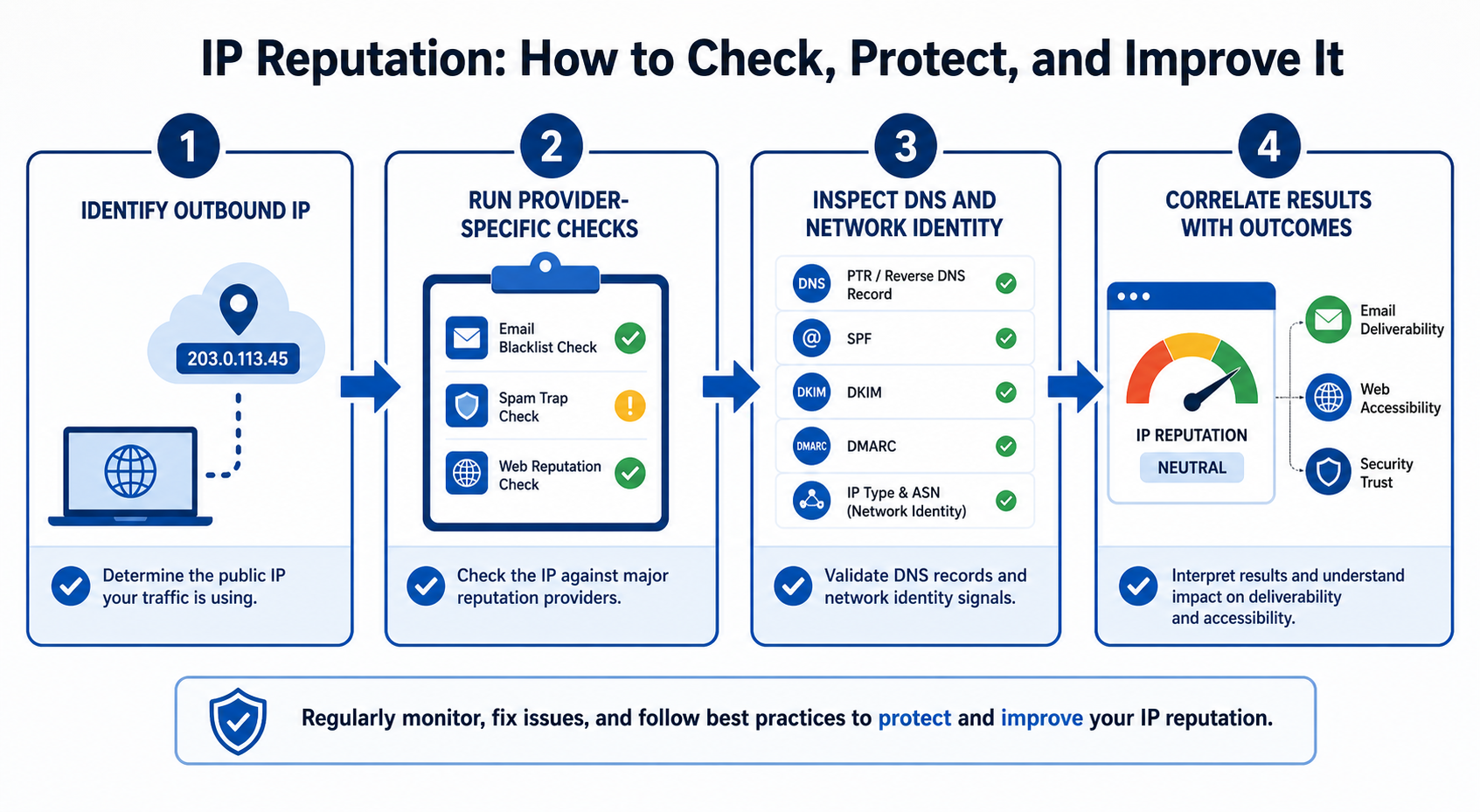
The Four-Layer IP Reputation Check
Use four layers rather than trusting one score.
1. Identify the actual IP address
Confirm the public egress IP used by the affected workload.
For email, identify the IP that opened the SMTP connection. For a proxy workflow, record the proxy IP presented to the destination. For cloud or server traffic, do not assume that the IP shown in your hosting dashboard is the same address used for outbound connections.
Record:
- IPv4 or IPv6 address
- Provider
- ASN
- Country and region
- Whether it is shared or dedicated
- Whether it changes between requests
- The affected domain, account, or workload
2. Check purpose-specific systems
Use the tool closest to the platform experiencing the problem.
| Use case | Best starting point | What to review |
|---|---|---|
| Gmail delivery | Google Postmaster Tools | IP reputation, domain reputation, spam rate, authentication, delivery errors |
| Outlook.com delivery | Microsoft SNDS | IP activity, complaint signals, traffic status, unusual behavior |
| Public blocklist investigation | Spamhaus Reputation Checker | Listings, listing reason, remediation guidance |
| Multi-list email screening | EasyDMARC or another aggregation tool | Which public blocklists report the address |
| Website access | Target-site logs, support responses, WAF events | Status codes, challenge frequency, rate limits, request patterns |
| Proxy or automation reliability | Per-IP telemetry | Success rate, response type, latency, challenge rate, data completeness |
| Security investigation | Threat-intelligence and provider abuse data | Malware, botnet, scanning, proxy, VPN, or abuse associations |
The Spamhaus Reputation Checker checks Spamhaus datasets and may explain why an address was listed. An aggregation tool such as the EasyDMARC IP and Domain Reputation Checker can show results from multiple public blocklists. Neither represents every proprietary reputation system used by websites or mailbox providers.
3. Check DNS and infrastructure identity
For a mail server, review:
- Forward DNS
- Reverse DNS and PTR records
- SPF
- DKIM
- DMARC
- HELO or EHLO identity
- TLS configuration
- Whether the sending IP is authorized for the domain
Google requires valid forward and reverse DNS for sending IPs and expects the PTR hostname to resolve back to the same IP. Authentication and DNS configuration do not create positive reputation by themselves, but incorrect configuration can damage deliverability or prevent a legitimate sender from being evaluated correctly.
For web traffic, review:
- IP geolocation
- ASN classification
- Proxy, VPN, hosting, or residential classification
- Whether the expected country matches the application
- Whether DNS or routing changed
- Whether the IP has recently been reassigned
4. Correlate reputation with actual outcomes
Compare results by IP, domain, target, time, and workload.
Measure:
- Success rate
- HTTP status distribution
- CAPTCHA frequency
- Email bounce and deferral codes
- Spam placement
- Latency and timeout rate
- Response size and content type
- Data completeness
- Account verification events
- Geographic accuracy
A reputation problem becomes more plausible when failures consistently follow a specific IP or range while the same workload succeeds through a controlled comparison address.
A Seven-Step IP Reputation Check Workflow
- Define the affected use case. Separate email, web access, API traffic, automation, fraud monitoring, and security investigations.
- Capture the real outbound IP. Record the IP at the moment the failure occurs.
- Establish a baseline. Note normal success rate, status codes, latency, email placement, or challenge rate.
- Run relevant checks. Use the affected provider’s dashboard first, followed by official blocklist and infrastructure tools.
- Inspect adjacent layers. Review account state, cookies, authentication, browser configuration, request rate, code changes, and target-site changes.
- Test a controlled alternative. Compare another authorized IP while keeping the rest of the environment as similar as possible.
- Fix the root cause and monitor recovery. Do not request blocklist removal or replace an IP until malware, spam, compromised credentials, misconfiguration, or abusive behavior has stopped.
How to Interpret IP Reputation Results
Clean in a checker, but traffic is still blocked
A clean public-blocklist result means only that the checked address was not listed in those databases at that time.
The target may use:
- A private reputation model
- ASN or hosting-provider restrictions
- Rate limits
- Account-risk signals
- Browser or device signals
- Cookie and session history
- Geographic rules
- Request-pattern analysis
- An allowlist requirement
Review target-specific logs and compare the complete request environment.
Listed by one provider, but not another
Different providers collect different evidence, apply different thresholds, and update at different times. Investigate the specific listing, the stated reason, and the provider’s remediation process.
Do not submit repeated delisting requests before correcting the underlying issue.
No reputation data is available
An unknown or missing result does not automatically mean the IP is bad.
Google notes that Postmaster Tools may show incomplete data when email volume is too low. Cloudflare also documents a state where no reputation data is available and no reputation-based action is taken.
A newly allocated or rarely observed IP may need time and consistent legitimate activity to establish history.
How to Improve IP Reputation
There is no universal reset button. The correct remediation depends on why the IP is receiving negative treatment.
1. Stop the behavior causing the problem
Before doing anything else, determine whether the IP is associated with:
- Compromised devices
- Malware
- Open proxy software
- Insecure mail relays
- Stolen credentials
- Spam
- Automated scanning
- Excessive retries
- Uncontrolled scripts
- Unexpected customer or tenant activity
Changing an IP without fixing the source may transfer the same behavior to a new address and damage that address as well.
2. Secure the infrastructure
Patch systems, rotate compromised credentials, remove unauthorized applications, close unnecessary ports, and inspect outbound traffic.
For a shared business network, check whether another device or tenant is generating the unwanted activity. For a proxy or cloud workload, review who can access credentials and whether usage limits are enforced.
3. Improve email-list quality
For email sending:
- Send only to recipients who requested the messages
- Confirm addresses before adding them
- Remove repeated hard bounces
- Process unsubscribes promptly
- Monitor complaints
- Separate transactional and promotional traffic when appropriate
- Avoid sudden changes in volume
- Review delivery-error codes
Google recommends sending only to recipients who want the messages and monitoring user-reported spam, authentication, and reputation through Postmaster Tools.
4. Warm up new email IPs gradually
A new dedicated IP has little or no sending history. Sending a large volume immediately can cause throttling or filtering.
Amazon SES recommends gradually increasing traffic through a new dedicated IP and maintaining predictable sending patterns. Its documentation notes that the time required to establish reputation varies among mailbox providers. Amazon SES’s dedicated IP warm-up guidance is useful even for teams using another sending platform because it explains the operational principle.
5. Separate workloads by risk
Do not allow one high-risk or experimental workflow to affect critical traffic.
Possible separations include:
- Transactional email versus marketing email
- Production APIs versus testing
- Customer traffic versus internal automation
- Low-rate monitoring versus high-volume collection
- Stable authenticated sessions versus stateless requests
- Different brands, domains, regions, or business units
Isolation limits the blast radius when one workload encounters a reputation or compliance problem.
6. Maintain predictable behavior
A stable pattern is easier to diagnose and manage than erratic traffic.
Control:
- Request rate
- Concurrency
- Retry frequency
- Session duration
- Geographic changes
- Sending volume
- Time-of-day spikes
- Account-to-IP relationships
Predictability does not guarantee acceptance, but sudden and unexplained changes can make troubleshooting more difficult and may trigger additional scrutiny.
7. Monitor reputation continuously
Track leading indicators before complete failure occurs.
Useful alerts include:
- Rising CAPTCHA rate
- Increased 403, 429, or 5xx responses
- New email deferrals
- Spam-placement changes
- Blocklist additions
- Geolocation drift
- Unexpected ASN changes
- Response-size changes
- Empty or incomplete datasets
- Login-verification spikes
- Usage from unknown users
Shared vs. Dedicated IP Reputation
| IP model | Main advantage | Main tradeoff | Reputation control |
|---|---|---|---|
| Shared IP | Lower operational burden and pooled traffic history | Other users may affect the address | Limited |
| Dedicated IP | Greater isolation and attribution | You are responsible for maintaining its history | High |
| Rotating pool | Access to multiple addresses and geographic options | Quality and history may vary across the pool | Depends on provider and plan |
| Static proxy IP | Stable source address for longer sessions | A problem persists until the address is remediated or replaced | Moderate to high |
| Dynamic residential IP | Flexible rotation and geographic routing | Rotation alone does not solve behavioral or identity problems | Depends on session controls |
A dedicated IP is not automatically reputable. It gives the operator more control over future activity, but it may be new, previously used, or incorrectly configured.
A shared IP is not automatically poor. A well-managed provider may maintain strong controls, while an unmanaged shared environment may expose customers to activity they cannot influence.
How Proxy Type Relates to IP Reputation
Proxy type affects network origin, stability, cost, and how the address may be categorized. It does not guarantee a particular reputation result.
Datacenter proxies
Datacenter IPs originate from hosted server infrastructure. They are generally appropriate when speed, stable capacity, and straightforward batch management matter more than residential network classification.
LycheeIP’s static datacenter proxies are described as exclusively assigned during the authorized period and support HTTP, HTTPS, and SOCKS5. These characteristics can provide workload isolation, but they do not guarantee that a target website will accept every request.
Static residential proxies
Static residential proxies provide a fixed IP associated with residential or ISP infrastructure. They may suit authorized workflows that require a consistent location and longer session continuity.
LycheeIP’s static residential proxies are presented as fixed, exclusively used addresses with HTTP, HTTPS, and SOCKS5 support. Their stable assignment can help teams keep the network layer consistent while testing other variables.
Dynamic residential proxies
Dynamic residential proxies provide access to a changing pool of residential addresses. They may be useful for authorized public-web collection, localization testing, search-result verification, and other workflows that require multiple regions or controlled rotation.
LycheeIP’s dynamic residential proxy service supports per-request rotation and sticky sessions lasting from 5 to 180 minutes. Select the session model according to the workflow rather than rotating as frequently as possible.
Which proxy type should you choose?
Choose based on the workload:
| Requirement | More suitable starting point |
|---|---|
| High throughput on open public pages | Datacenter proxy |
| Stable location and long authenticated session | Static residential proxy |
| Controlled regional testing across many locations | Dynamic residential proxy |
| Predictable business identity over time | Dedicated or static IP |
| Email sending | Purpose-built mail infrastructure, not a general browsing proxy |
| Official data access is available | API or licensed data source instead of proxy-based collection |
Test a small authorized workload before scaling. Measure successful and valid responses, not merely connection success.
For the LycheeIP implementation details behind this step, review LycheeIP proxy infrastructure.
A Layer-by-Layer Diagnostic Model
An IP change fixes only the network layer. It does not automatically fix problems in other parts of the system.
| Layer | Examples | Can changing the IP fix it? |
|---|---|---|
| Application layer | Target-site rules, endpoint changes, rate limits | Sometimes, but often not |
| Collection layer | Broken code, retries, concurrency, request logic | No |
| Browser layer | User agent, JavaScript behavior, browser profile | Usually not |
| Network layer | IP, ASN, route, geography, proxy type | Potentially |
| Identity layer | Account status, cookies, login history | No |
| Data layer | Selectors, parsing, schema drift, validation | No |
| Monitoring layer | Missing logs, poor alerting, incomplete metrics | No |
| Governance layer | Authorization, terms, privacy, licensing | No |
Before replacing proxy infrastructure, confirm that the failure actually follows the IP.
IP Reputation Troubleshooting Table
| Symptom | Likely cause | First check | Recommended next step |
|---|---|---|---|
| Emails land in spam | Low IP or domain reputation, complaints, authentication problems | Google Postmaster Tools and message headers | Review reputation, SPF, DKIM, DMARC, list quality, and sending patterns |
| Mail is rejected or deferred | Blocklist listing, poor IP history, PTR problem, rapid volume increase | SMTP response code and official provider dashboard | Correct the stated issue before requesting remediation |
| Frequent CAPTCHAs | IP classification, high request rate, session inconsistency, target policy | CAPTCHA rate by IP and target | Lower rate, inspect full session behavior, and compare a controlled IP |
| Repeated 403 responses | Access policy, WAF rule, account state, IP restriction | Response body and target documentation | Identify the specific control rather than rotating blindly |
| Repeated 429 responses | Rate limiting or excessive concurrency | Requests per minute and retry behavior | Reduce rate, honor retry guidance, and add backoff |
| Works locally but fails on a server | Cloud ASN classification, different egress IP, DNS, TLS, or environment | Compare local and server request details | Isolate the changed layer and test one variable at a time |
| Correct status code but incomplete data | Challenge page, localization issue, schema change, restricted response | Response body, size, fields, and expected values | Add content validation and compare by IP and region |
| One checker says clean, but the target blocks | Proprietary target reputation or non-IP signal | Target-specific logs and complete request context | Investigate account, cookies, browser, rate, geography, and ASN |
| Unexpected country or language | Geolocation database mismatch or wrong proxy selection | IP geolocation across multiple sources | Correct routing and verify the target’s own location interpretation |
| New IP performs poorly | Little history, previous use, incorrect setup | Allocation history, DNS, provider data | Start with low-risk traffic and monitor before scaling |
When Not to Blame IP Reputation
IP reputation is probably not the main problem when:
- The same IP works through one application but fails through another with different code
- Every IP fails after a target-site redesign
- Authentication credentials are expired or incorrect
- The account has been suspended
- Cookies or browser profiles are corrupted
- A parser is extracting the wrong fields
- Requests exceed a published rate limit
- The IP is routed through the wrong country
- DNS, TLS, firewall, or proxy authentication is misconfigured
- The target requires an official API or approved partnership
- The activity is prohibited or lacks authorization
Do not use IP rotation to avoid fixing code, access permissions, or compliance problems.
IP Reputation Validation Checklist
After remediation or infrastructure changes, verify:
- The public egress IP is the expected address
- ASN and geolocation are correct
- Proxy authentication succeeds
- DNS and PTR records are correct for mail servers
- SPF, DKIM, and DMARC pass where applicable
- The IP is no longer present on relevant blocklists
- Email complaints and bounce rates are controlled
- HTTP status distribution has returned to baseline
- CAPTCHA frequency has declined
- Valid response content is complete and consistent
- Retry and concurrency limits are respected
- No unknown users or systems are generating traffic
- Results remain stable over several observation periods
- Monitoring can identify which IP, target, account, and workload produced each failure
A successful connection alone does not prove that reputation has recovered. Validate the business outcome, such as inbox delivery, accurate data, correct region, complete fields, or stable sessions.
Assumptions and Limitations
IP reputation outcomes can change according to:
- The evaluator
- Target website or mailbox provider
- IPv4 or IPv6 address
- Provider and ASN
- Shared or dedicated assignment
- Previous IP ownership
- Geographic databases
- Account and cookie history
- Request rate and concurrency
- Email-list quality
- Authentication configuration
- Browser environment
- Target-site security changes
- Blocklist updates
- Provider policies
- Product capabilities
- Legal and contractual requirements
No proxy provider, reputation checker, or remediation process can guarantee inbox placement, unrestricted access, anonymity, or acceptance by every platform.
Responsible Use of IP Infrastructure
Use proxies, automation, and data-collection systems only for legitimate and authorized purposes.
Before operating or scaling a workflow, consider:
- Website terms
- Applicable robots directives
- Rate limits
- Data licensing
- Copyright
- Privacy obligations
- Contractual requirements
- Applicable laws
- Security controls
- Whether an official API or licensed dataset is more appropriate
This article provides technical information, not legal advice. Obtain qualified legal guidance where the intended activity creates material privacy, copyright, contractual, or regulatory questions.
Use LycheeIP Proxies for Reliable Authorized Traffic
Protect IP Reputation as an Infrastructure Asset
IP reputation should be monitored like uptime, authentication, latency, and data quality. The correct approach is not to search for one universal score. It is to identify who is evaluating the IP, measure actual outcomes, inspect the surrounding layers, and correct the underlying behavior.
For email, use mailbox-provider dashboards and sending best practices. For websites and authorized data workflows, correlate IPs with response codes, challenges, session behavior, and content validity. When the network layer is genuinely responsible, select infrastructure based on origin, isolation, geography, session continuity, and workload requirements.
Review LycheeIP’s proxy options to compare dynamic residential, static residential, and datacenter configurations for authorized workflows. Start with a controlled test, monitor results by IP, and scale only after the complete workflow has been validated.
Frequently Asked Questions
What is a good IP reputation?
A good IP reputation means that the systems relevant to your workload generally regard the address as trustworthy. There is no universal rating that proves an IP is good everywhere, so evaluate provider-specific dashboards, blocklist status, and actual traffic outcomes.
How do I check IP reputation?
Identify the actual public IP, define whether the problem concerns email, website access, security, or automation, and use tools designed for that context. Combine official platform dashboards, reputable blocklist checks, DNS and ASN information, and your own per-IP performance logs.
How important is an IP address for a mail server?
The sending IP is an important email-delivery signal because mailbox providers can evaluate its history, sending patterns, complaints, authentication, and DNS configuration. Domain reputation also matters, so a mail server should maintain both healthy IP infrastructure and authenticated sending domains.
Does an IP address affect domain reputation?
IP and domain reputation are evaluated separately, but the same sending behavior can create signals for both. Moving to another IP may resolve an infrastructure problem, but it does not erase negative history attached to the domain.
How can I improve IP reputation?
Stop abusive or compromised traffic, secure the infrastructure, correct DNS and authentication, reduce complaints and bounces, control sending or request volume, separate risky workloads, and monitor results over time. Fix the root cause before requesting delisting or replacing the IP.
How long does IP reputation recovery take?
There is no fixed recovery period. It depends on the evaluator, severity of the problem, remediation quality, and consistency of subsequent activity. New email IP warm-up commonly takes time because providers need enough legitimate traffic to establish a history.
Can a VPN or proxy change my IP reputation?
A VPN or proxy changes the IP address seen by the destination, so traffic is evaluated partly through the intermediary address. It does not remove account history, cookies, request behavior, browser signals, or other risk factors, and the proxy IP may have its own reputation.
Is a dedicated IP always better than a shared IP?
No. A dedicated IP provides greater control and isolation, but the operator must establish and protect its reputation. Shared infrastructure can work well when it is responsibly managed, especially for low-volume workloads that may struggle to maintain consistent history on a dedicated address.
Can rotating IP addresses repair a reputation problem?
Rotation can move requests among addresses, but it does not repair the reputation of an affected IP or correct the behavior that caused the problem. Excessive rotation may also disrupt session continuity and make diagnosis more difficult.
Related LycheeIP Guides and Resources

Recommended Articles

DataDome Bypass for Web Scraping
DataDome Bypass for Web Scraping
View Details
Web Scraping Rate Limiting: How to Handle 429s, Backoff, and Concurrency
Web scraping rate limiting is the engineering discipline of keeping an authorized collection workload inside a target service's acceptable request envelope. When that envelope is exceeded, a server may respond with HTTP 429 Too Many Requests, delay responses, or apply other controls.
View Details
reCAPTCHA vs hCaptcha vs Cloudflare Turnstile: What Scraping Teams Need to Know
If an authorized data-collection workflow suddenly stops at a verification screen, identifying the protection system matters before you change code, browser settings, or proxy infrastructure. reCAPTCHA vs hCaptcha vs Turnstile is not simply a branding comparison. The three systems can expose different browser flows, token models, risk decisions, and failure symptoms.
View Details
Browser Automation Proxies: IPs, Geo-Targeting, Sessions, and AI Agents
A browser automation proxy belongs to the network layer of Playwright, Selenium, cloud-browser, and AI-agent workflows. It changes how browser traffic is routed and can affect the source IP address, geographic egress, and session continuity seen by a destination site. It does not improve an AI model's reasoning, repair browser logic, or guarantee that a website will accept the session.
View Details
SERP Scraping: Methods, APIs, Workflows, and Best Practices
SERP scraping is the automated collection of information from search engine results pages. A SERP scraper can capture organic rankings, advertisements, featured snippets, People Also Ask questions, local results, shopping listings, images, and other search features, then convert them into structured data for analysis.
View Details