
Python Web Scraping With Proxies: How to Rotate IPs, Manage Sessions, and Reduce Failed Requests
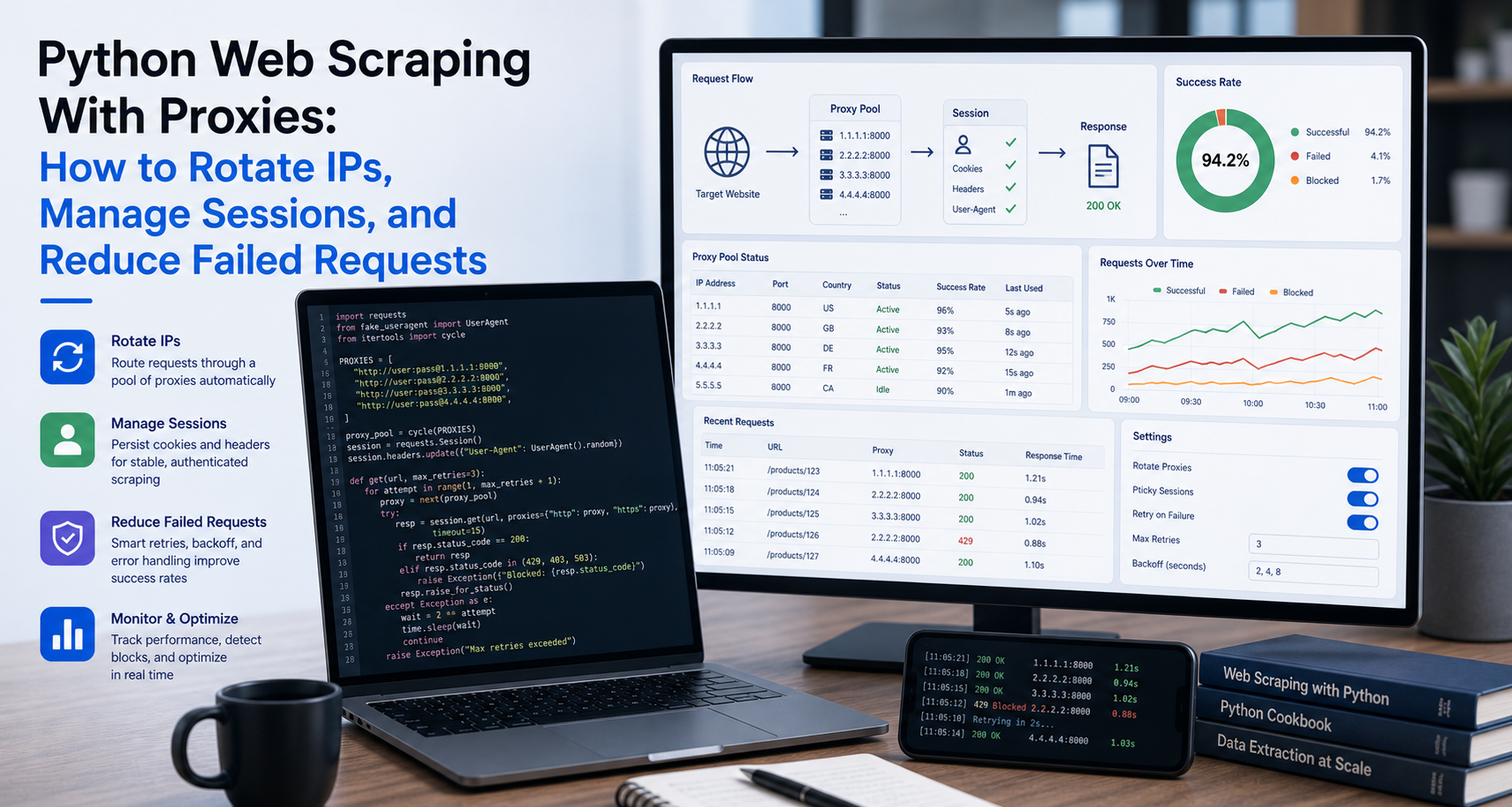
Many Python scrapers work perfectly during testing but start failing when the job becomes larger.
A script may collect data from five pages without any issue, then struggle when it needs to collect data from five thousand pages. Requests may begin timing out. Some pages may return 403 errors. Search results may change by location. Product prices may look different depending on the region. A JavaScript-heavy page may behave differently when accessed repeatedly from the same environment.
This is where proxies become part of the Python web scraping conversation.
A proxy is not a magic fix for bad scraper logic. It does not replace compliance review, data validation, crawl-rate control, or respectful access practices. Instead, a proxy is part of the infrastructure layer. It helps route requests, manage IP usage, support geo-targeted collection, separate environments, and reduce certain request failures when used responsibly.
When Do Python Scrapers Need Proxies?
Not every Python scraper needs proxies.
If you are testing one public page, collecting a small dataset, or learning how BeautifulSoup works, a direct request may be enough. Adding proxies too early can make a simple project harder than necessary.
Proxies become more useful when the scraper has infrastructure needs beyond basic extraction.
For example, Python scrapers may need proxies when collecting many public pages over time, checking region-specific content, monitoring prices across markets, testing localized search results, or separating development traffic from production scraping jobs.
Common use cases include e-commerce price monitoring, SERP tracking, AI data collection, public directory scraping, marketplace research, travel fare monitoring, localized content testing, and RAG source refresh pipelines.
The key point is this: proxies solve routing and access-layer problems. They do not solve selector problems, broken parsing logic, poor data cleaning, or legal uncertainty.
Before adding proxies, ask:
- Is the target data publicly accessible?
- Are we allowed to collect and use this data?
- Is the scraper working correctly without proxies on a small test?
- Are failures caused by network, rate, location, or session issues?
- Do we need geo-specific results?
- Do we need rotating or sticky sessions?
- Are we logging status codes, failed URLs, and response patterns?
If the answer points to routing, scale, localization, or session control, proxies may be useful.
For the official technical reference behind this point, see Playwright documentation.
What a Proxy Does in a Python Scraping Workflow
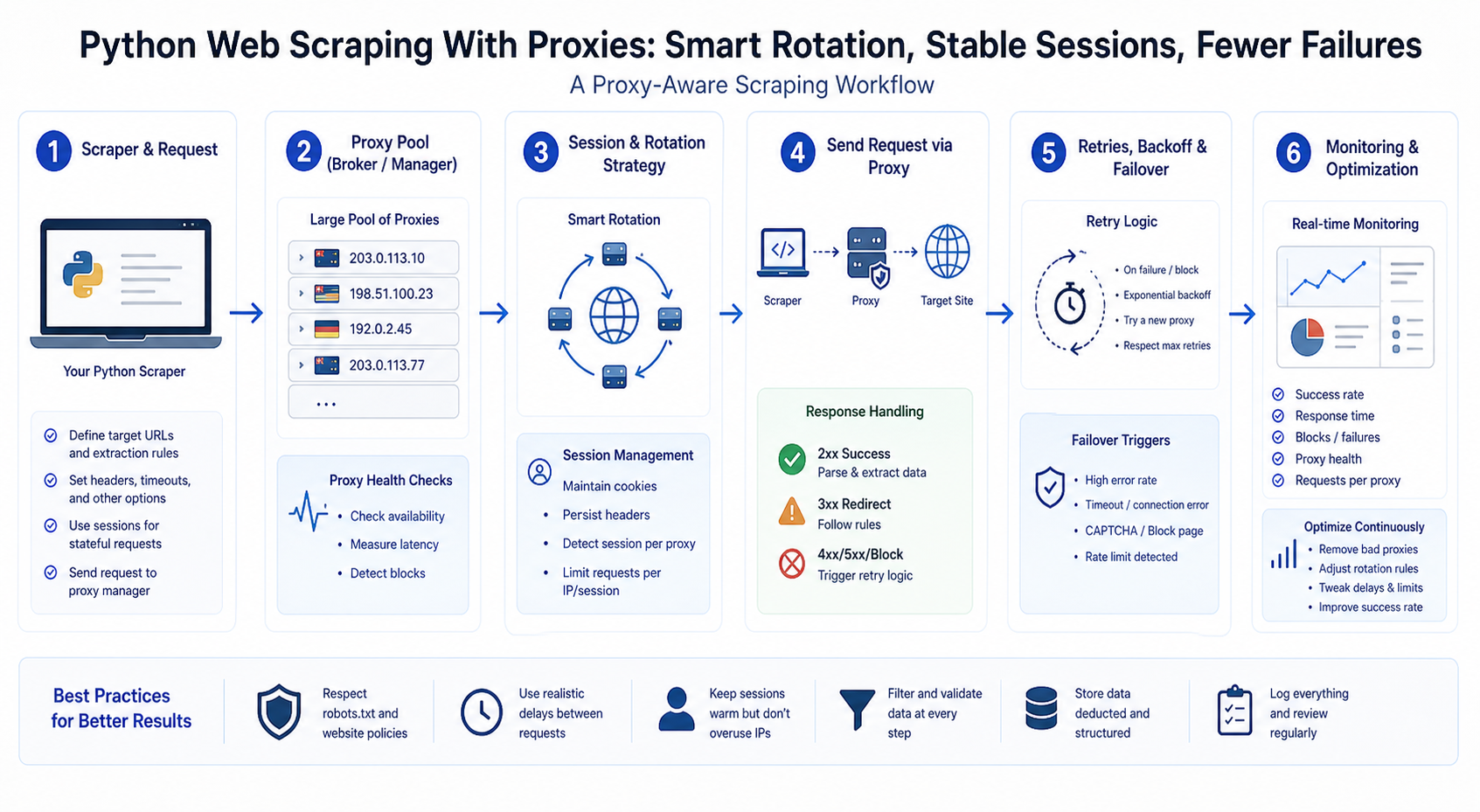
In a normal scraping workflow, your Python script sends a request directly from your machine, server, or cloud environment to the target website.
The path looks like this:
Python scraper → target website
When you use a proxy, your request passes through another server first.
The path becomes:
Python scraper → proxy server → target website
From the website’s perspective, the request appears to come from the proxy endpoint rather than directly from your local machine or server.
This gives you more control over the network layer. Depending on the proxy provider and proxy type, you may be able to control IP address, location, session duration, rotation pattern, and routing behavior.
In practice, a proxy can help with:
- IP routing
- Geo-targeted data access
- Session consistency
- Request distribution
- Environment separation
- Testing localized content
- Reducing some IP-based failures
- Monitoring how targets respond across regions
For scraping teams, the proxy is only one part of the stack. A complete workflow still needs request handling, parsing, retries, logging, data validation, storage, monitoring, and compliance checks.
For the LycheeIP implementation details behind this step, review LycheeIP proxy infrastructure.
For the LycheeIP implementation details behind this step, review rotating residential proxies.
For the LycheeIP implementation details behind this step, review AI-powered browser automation hub.
For the official technical reference behind this point, see MDN HTTP overview.
Types of Proxies for Python Web Scraping
The best proxy type depends on the target website, request volume, budget, region requirements, and session needs.
Datacenter Proxies
Datacenter proxies are IP addresses hosted in data centers. They are usually fast, cost-efficient, and suitable for high-volume tasks where the target website is less restrictive.
They can work well for:
- Fast public data collection
- Simple static websites
- Bulk crawling of less sensitive targets
- Internal testing
- High-speed scraping tasks
- Non-location-sensitive collection
The main tradeoff is that some websites classify datacenter traffic differently from residential or mobile traffic. For targets that aggressively filter datacenter IPs, datacenter proxies may produce more failed requests.
Residential Proxies
Residential proxies route traffic through IP addresses associated with real residential internet connections.
They are often useful when teams need location diversity, more natural-looking traffic patterns, or access to public pages that treat datacenter traffic more strictly.
Residential proxies can support:
- Localized web data collection
- E-commerce price monitoring
- Market research
- Public listing collection
- Search result tracking
- Region-specific content testing
Residential proxies are usually more expensive than datacenter proxies, so they should be used where they actually improve success rates or data accuracy.
ISP Proxies
ISP proxies are usually hosted in data centers but registered with internet service providers. They are often used when teams need a more stable identity than constantly rotating residential IPs.
ISP proxies can be useful for:
- Stable scraping sessions
- Long-running browser workflows
- Session-sensitive browsing
- Account-like flows where permitted
- Workflows that need consistent IP identity
The main advantage is stability. If your scraper needs to keep the same IP for a longer period, ISP proxies may be better than aggressive rotation.
Mobile Proxies
Mobile proxies route traffic through mobile carrier networks.
They are useful for mobile-specific experiences, mobile SERP checks, app-like browsing flows, and cases where the target content depends on mobile network context.
Mobile proxies may be useful for:
- Mobile search result testing
- Mobile ad verification
- App-like web experiences
- Mobile-localized content
- Carrier-specific behavior checks
Mobile proxies are usually more expensive and should be reserved for workflows where mobile context matters.
How to Use Proxies With Python Requests
Requests is one of the most common Python libraries for making HTTP requests. Its official documentation supports passing proxies as a dictionary, including scheme-specific proxy settings such as HTTP and HTTPS proxies.
A basic Requests proxy setup looks like this:
import requests url = "https://example.com" proxies = { "http": "http://username:password@proxy-host:port", "https": "http://username:password@proxy-host:port"
} headers = { "User-Agent": "Mozilla/5.0 (compatible; PythonScraper/1.0)"
} response = requests.get( url, headers=headers, proxies=proxies, timeout=15
)
print(response.status_code) print(response.text[:500])
The proxy string usually has four parts:
protocol://username:password@host:port
Here is what each part means:
- __INLINEHTML0 is usually INLINEHTML1 or INLINEHTML2__.
- __INLINEHTML0__ is your proxy account username.
- __INLINEHTML0__ is your proxy account password.
- __INLINEHTML0__ is the proxy server address.
- __INLINEHTML0__ is the proxy connection port.
For real projects, avoid hardcoding credentials directly into your scraper. Store them in environment variables or a configuration file that is not committed to Git.
Example using environment variables:
import os
import requests PROXY_USERNAME = os.getenv("PROXY_USERNAME")
PROXY_PASSWORD = os.getenv("PROXY_PASSWORD")
PROXY_HOST = os.getenv("PROXY_HOST")
PROXY_PORT = os.getenv("PROXY_PORT") proxy_url = f"http://{PROXY_USERNAME}:{PROXY_PASSWORD}@{PROXY_HOST}:{PROXY_PORT}" proxies = { "http": proxy_url, "https": proxy_url
} response = requests.get( "https://example.com", proxies=proxies, timeout=15
)
print(response.status_code)
This keeps sensitive credentials out of the script itself.
How to Test Whether Your Proxy Works
Before adding proxy logic to a full scraper, test the proxy separately.
Use an IP-check endpoint or a controlled test page to confirm the request is going through the proxy.
import requests proxies = { "http": "http://username:password@proxy-host:port", "https": "http://username:password@proxy-host:port"
} response = requests.get( "https://httpbin.org/ip", proxies=proxies, timeout=15
) print(response.json())
If the returned IP differs from your local IP, the proxy is working.
You should also test:
- Authentication
- HTTP and HTTPS requests
- Timeout behavior
- Region accuracy
- Response speed
- Failure rate over multiple requests
Do this before connecting proxies to a larger scraping job.
How to Use Proxies With Playwright in Python
Requests works well for static pages, but it cannot render JavaScript. If the target page loads data dynamically, you may need browser automation.
Playwright supports network proxy settings in browser contexts, including __INLINEHTML0, optional INLINEHTML1, INLINEHTML2, and INLINEHTML3__ fields. Its Python documentation notes that HTTP and SOCKS proxies are supported for browser context requests.
A basic Playwright proxy setup looks like this:
from playwright.sync_api import sync_playwright proxy_config = { "server": "http://proxy-host:port", "username": "username", "password": "password"
} with sync_playwright() as p: browser = p.chromium.launch(headless=True) context = browser.new_context( proxy=proxy_config, user_agent="Mozilla/5.0 (compatible; PythonScraper/1.0)" ) page = context.new_page() page.goto("https://example.com", wait_until="networkidle") print(page.title()) context.close() browser.close()
Playwright proxy support is useful when:
- The page requires JavaScript rendering
- The workflow needs clicks, scrolling, or filters
- You need browser-like session handling
- You need a consistent region during a browsing session
- You are testing localized browser experiences
For session-sensitive scraping, avoid changing proxies in the middle of a single browser context. Keep the same proxy for the full context, then create a new context when you need a new session.
Rotating Proxies vs Sticky Sessions
One of the most important proxy decisions is whether to rotate IPs frequently or keep the same IP for a longer session.
Rotating Sessions
Rotating sessions change the IP address after a request, after a defined time window, or after a session token changes.
Rotating proxies are useful when each request is independent.
For example:
- Scraping many product pages
- Collecting public listing pages
- Crawling article pages
- Monitoring many independent URLs
- Gathering pages where no session state matters
A rotating setup may look like this:
Request 1 → IP A Request 2 → IP B Request 3 → IP C Request 4 → IP D
The advantage is distribution. Requests are not all coming from the same IP address.
The risk is session breakage. If the website expects continuity, rotating too often can create inconsistent results.
Sticky Sessions
Sticky sessions keep the same IP address for a defined period.
Sticky sessions are useful when the workflow needs continuity.
For example:
- Applying filters across multiple pages
- Browsing paginated search results
- Maintaining a cart-like flow
- Keeping the same location during a session
- Working with multi-step browsing paths
- Using Playwright browser contexts
A sticky setup may look like this:
Session 1 → IP A for 10 minutes Session 2 → IP B for 10 minutes Session 3 → IP C for 10 minutes
The advantage is consistency. The website sees the same IP during the workflow.
The tradeoff is lower distribution. If you run too many requests through one sticky IP, you may still hit rate limits or trigger failures.
For the LycheeIP implementation details behind this step, review static residential proxies.
How to Rotate Proxies in Python
If your proxy provider gives you a list of proxy endpoints, you can rotate through them in Python.
Here is a simple example:
import itertools
import requests proxy_list = [ "http://username:password@proxy1.example.com:8000", "http://username:password@proxy2.example.com:8000", "http://username:password@proxy3.example.com:8000"
] proxy_pool = itertools.cycle(proxy_list) urls = [ "https://example.com/page-1", "https://example.com/page-2", "https://example.com/page-3"
] headers = { "User-Agent": "Mozilla/5.0 (compatible; PythonScraper/1.0)"
} for url in urls: proxy_url = next(proxy_pool) proxies = { "http": proxy_url, "https": proxy_url } try: response = requests.get( url, headers=headers, proxies=proxies, timeout=15 ) print(url, response.status_code) except requests.exceptions.RequestException as error: print(f"Failed {url}: {error}")
This example rotates through a small list of proxies. In production, proxy rotation should be more deliberate. You may want to track success rates by proxy, remove failing endpoints, apply backoff after repeated errors, and avoid rotating during session-based flows.
If your proxy provider handles rotation through one gateway endpoint, you may not need to rotate manually. Instead, the provider may rotate IPs based on session parameters, credentials, or gateway settings.
How to Add Retry Logic Without Abusing the Target Website
Retries are important because web requests fail. A server may be slow, a connection may drop, or a proxy endpoint may temporarily fail.
But retries must be responsible.
A good retry strategy should distinguish between temporary failures and persistent refusal. Retrying a timeout once or twice may be reasonable. Retrying a 403 response fifty times is not.
Here is a simple retry function with exponential backoff:
import time
import requests def fetch_with_retries(url, proxies=None, headers=None, max_retries=3): for attempt in range(1, max_retries + 1): try: response = requests.get( url, proxies=proxies, headers=headers, timeout=15 ) if response.status_code == 200: return response if response.status_code in [403, 401]: print(f"Access refused with status {response.status_code}. Not retrying aggressively.") return response if response.status_code == 429: wait_time = 10 * attempt print(f"Rate limited. Waiting {wait_time} seconds.") time.sleep(wait_time) continue print(f"Attempt {attempt}: status {response.status_code}") except requests.exceptions.Timeout: print(f"Attempt {attempt}: timeout") except requests.exceptions.ConnectionError: print(f"Attempt {attempt}: connection error") except requests.exceptions.RequestException as error: print(f"Attempt {attempt}: {error}") time.sleep(2 * attempt) return None
This code avoids infinite retry loops and treats access-refusal responses differently from temporary network errors.
The goal is not to force access. The goal is to make the scraper resilient when normal network failures happen.
Common Proxy-Related Python Scraping Errors
Proxy scraping errors can come from the target website, the proxy provider, your code, your credentials, or your request pattern.
Here are the most common issues.
403 Forbidden
A 403 response means the server refused the request.
Possible causes include:
- The target does not allow automated access
- The request headers look incomplete
- The IP reputation is poor
- The website blocks the proxy type
- The page requires authentication
- The scraper is requesting too aggressively
- The route is not permitted by the website’s rules
Safe troubleshooting steps:
- Check whether the page is publicly accessible
- Review the website’s terms and robots.txt
- Confirm your headers are complete and accurate
- Reduce request rate
- Test a smaller sample
- Try a different proxy type only if collection is allowed
- Stop if the website is clearly refusing access
Do not treat 403 as a challenge to bypass. Treat it as a signal to review access, permissions, and request behavior.
429 Too Many Requests
A 429 response usually means the scraper is sending requests too quickly or exceeding a rate limit.
Safe fixes include:
- Slow down the scraper
- Add delays between requests
- Use backoff logic
- Reduce concurrency
- Cache repeated requests
- Avoid re-scraping unchanged pages
- Review whether the website allows the activity
Proxies can distribute requests, but they should not be used to ignore rate limits. If a source clearly limits automated access, respect that boundary.
Timeout Errors
Timeouts happen when the target website or proxy does not respond quickly enough.
Possible causes include:
- Slow proxy endpoint
- Slow target server
- Network instability
- Heavy JavaScript page
- Too short a timeout
- Too many concurrent requests
- Geographic distance between proxy and target
Fixes include:
- Increase timeout carefully
- Reduce concurrency
- Test proxy latency
- Try a closer proxy location
- Retry temporary failures
- Use Playwright only when needed
Connection Errors
Connection errors often point to proxy configuration problems.
Possible causes include:
- Wrong proxy host
- Wrong port
- Wrong protocol
- Bad username or password
- Expired credentials
- Firewall restrictions
- Proxy provider downtime
Safe troubleshooting steps:
- Test the proxy with a simple IP-check request
- Confirm credentials
- Confirm protocol format
- Test HTTP and HTTPS separately
- Check whether your environment allows outbound proxy connections
Wrong Location Data
Sometimes a scraper uses a proxy but still receives unexpected location-specific content.
Possible causes include:
- Proxy region mismatch
- Target website uses cookies from a previous session
- Browser language settings conflict with proxy location
- Search or pricing results depend on account, headers, or GPS-like signals
- CDN routing differs from expected country targeting
For localized scraping, align the proxy region, browser locale, Accept-Language header, timezone, and session behavior where appropriate.
Proxy Rotation Strategy for Python Scrapers
Proxy rotation should match the scraping task.
Do not rotate randomly just because you can. A good proxy strategy is based on target behavior, data needs, and session requirements.
For independent static pages, rotating sessions may work well. For multi-step browsing, sticky sessions are usually safer. For localized search results, keep the proxy region consistent. For Playwright workflows, use one proxy per browser context rather than changing routes mid-session.
A strong rotation strategy should track:
- Source URL
- Proxy type
- Proxy region
- Session ID
- Request timestamp
- HTTP status code
- Response time
- Retry count
- Error message
- Rows extracted
These logs help you answer important questions:
- Which proxy type has the highest success rate?
- Which region returns the expected content?
- Which URLs fail most often?
- Are failures caused by the target, the proxy, or the scraper?
- Are some proxies slower than others?
- Did extraction drop after a website layout change?
Proxy rotation is not just an access tactic. It is a measurement problem. Without logging, you are guessing.
How to Structure a Proxy-Ready Python Scraper
A proxy-ready scraper should be easy to configure, test, and debug.
Avoid mixing proxy credentials, request logic, parsing logic, and CSV export into one large block of code. That makes the scraper harder to maintain.
A better structure is:
project/ scraper.py config.py fetcher.py parser.py storage.py logs/
The goal is to separate responsibilities.
- __INLINEHTML0__ stores settings such as proxy host, region, timeout, and headers.
- __INLINEHTML0__ handles requests, proxies, retries, and status codes.
- __INLINEHTML0__ extracts data from HTML.
- __INLINEHTML0__ saves data to CSV, JSON, or a database.
- __INLINEHTML0__ stores failed URLs and run summaries.
Python’s standard __INLINEHTML0__ module can be used for configuration files when you want a simple structure similar to common INI-style configuration formats.
Here is a simplified example of separating proxy config from the fetch function:
import os
import requests def build_proxy_config(): username = os.getenv("PROXY_USERNAME") password = os.getenv("PROXY_PASSWORD") host = os.getenv("PROXY_HOST") port = os.getenv("PROXY_PORT") if not all([username, password, host, port]): return None proxy_url = f"http://{username}:{password}@{host}:{port}" return { "http": proxy_url, "https": proxy_url } def fetch_url(url): headers = { "User-Agent": "Mozilla/5.0 (compatible; PythonScraper/1.0)" } proxies = build_proxy_config() try: response = requests.get( url, headers=headers, proxies=proxies, timeout=15 ) return { "url": url, "status_code": response.status_code, "html": response.text if response.status_code == 200 else "", "error": "" } except requests.exceptions.RequestException as error: return { "url": url, "status_code": None, "html": "", "error": str(error) }
This makes the scraper easier to test with or without proxies.
Data Validation Still Matters
A proxy can help your scraper reach pages more reliably, but it cannot prove that the extracted data is correct.
Your scraper should still validate the output.
For example, check:
- Did the scraper collect the expected number of rows?
- Are required fields missing?
- Are prices numeric?
- Are URLs valid?
- Are dates parseable?
- Did row count suddenly drop?
- Are there duplicate records?
- Did the page return a captcha, login page, or error page instead of real content?
A scraper can return HTTP 200 and still collect bad data. The page may be an error page, a redirect, a soft block, or a layout the parser does not understand.
Good scraping teams monitor both access quality and data quality.
Compliance and Responsible Use
Python web scraping with proxies should be done responsibly.
Before collecting data, review:
- Website terms of service
- Robots.txt guidance
- Copyright restrictions
- Privacy rules
- Data protection obligations
- Whether the data is public
- Whether the data includes personal or sensitive information
- Whether the request rate could burden the target website
The Robots Exclusion Protocol, standardized as RFC 9309, gives service owners a way to communicate how crawlers may access parts of a site through robots.txt rules. The RFC also notes that these rules are not the same as access authorization, so robots.txt should be considered alongside terms, permissions, and applicable law.
Proxies should not be used to bypass login walls, evade access controls, ignore site rules, or collect restricted data. They should be used as infrastructure for reliable, controlled, and responsible public web data collection.
A practical responsible-use checklist:
- Collect only what you need.
- Avoid sensitive or private data unless properly authorized.
- Use reasonable crawl rates.
- Respect disallowed areas.
- Identify and fix aggressive retry loops.
- Store source URLs and timestamps.
- Keep records of where data came from.
- Stop when the website clearly refuses automated access.
- Review legal questions before scaling commercial collection.
LycheeIP for Python Web Scraping With Proxies
LycheeIP gives developers, data teams, SEO teams, AI teams, and scraping teams proxy infrastructure for public web data workflows.
Python handles the scraping logic. LycheeIP supports the access layer.
For Python scraping, LycheeIP can support workflows such as:
- Requests-based scraping
- Playwright browser automation
- AI data collection
- RAG source refresh pipelines
- SERP monitoring
- E-commerce price tracking
- Public directory collection
- Localized data extraction
- Competitor intelligence
- Geo-targeted market research
Different scraping tasks need different proxy strategies.
If you need fast collection from less restrictive public targets, datacenter proxies may be enough. If you need region diversity or better access to public pages that treat datacenter IPs strictly, residential proxies may be a better fit. If you need session stability, ISP proxies can support longer-running workflows. If the target experience is mobile-specific, mobile proxies may be appropriate.
A practical LycheeIP workflow could look like this:
- Build and test the Python scraper locally.
- Confirm that selectors and parsing logic work without proxies.
- Review the target site’s rules and data-use requirements.
- Choose the proxy type based on target, scale, and location needs.
- Add proxy configuration through environment variables.
- Start with a small batch.
- Log proxy type, region, status code, and extracted row count.
- Monitor failures and data quality.
- Adjust crawl rate and session strategy.
- Scale only after the workflow is stable.
This keeps the scraping architecture clean. Python extracts the data. LycheeIP supports routing, session control, and geo-targeted access where needed.
Run Python Proxy Scrapers on LycheeIP
Final Thoughts
Python web scraping with proxies is not just about adding a proxy URL to a Requests script.
It is about building a more reliable access layer around your scraper.
For small tests, proxies may not be necessary. For larger workflows, proxies can help with geo-targeted collection, session management, request distribution, browser automation, and more stable public web data access.
The best approach is to start with clean scraping logic, test on a small sample, add proxies only when the use case requires them, monitor every request, validate the extracted data, and respect website rules.
Used properly, proxies make Python scraping workflows more flexible and scalable. Used carelessly, they only hide deeper problems.
LycheeIP helps teams build the infrastructure layer for responsible Python scraping, Playwright automation, AI data collection, SERP monitoring, and geo-targeted public web data workflows.
Frequently Asked Questions
Do I need proxies for Python web scraping?
Not always. Small tests and simple public pages may not need proxies. Proxies become useful when you need scale, geo-targeted data, session control, request distribution, or more stable access for larger scraping workflows.
How do I use a proxy with Python Requests?
You can pass a __INLINEHTML0 dictionary to INLINEHTML1__. The dictionary usually includes HTTP and HTTPS proxy URLs with your proxy username, password, host, and port.
Can I use proxies with Playwright Python?
Yes. Playwright supports proxy settings in browser contexts, including the proxy server, optional bypass rules, username, and password. This is useful for JavaScript-heavy pages, browser automation, and localized testing.
What is the difference between rotating and sticky proxies?
Rotating proxies change IPs across requests or sessions. They are useful when requests are independent. Sticky proxies keep the same IP for a defined period. They are useful when the workflow needs session continuity.
Why does my scraper get 403 errors even with proxies?
A 403 error may happen because the target refuses automated access, the request pattern is too aggressive, the proxy type is not accepted, the headers are incomplete, or the page requires permission. Do not treat 403 as something to bypass. Review access rules, request behavior, and compliance.
Are residential proxies better for scraping?
Residential proxies can be better for some targets, especially when region diversity or non-datacenter routing matters. But they are not always necessary. Datacenter proxies may be better for speed and cost when the target is less restrictive.
Is proxy scraping legal?
It depends on the website, data type, jurisdiction, terms of service, privacy rules, copyright issues, and how the data is used. Always review the rules before scraping, especially for commercial projects.
How many proxies do I need for Python scraping?
It depends on request volume, target behavior, crawl rate, region needs, and session strategy. Start with a small test, monitor success rates, and scale based on real failure patterns rather than guessing.
Should I rotate proxies on every request?
Only if each request is independent. If your workflow needs cookies, filters, multi-step navigation, or consistent location, use sticky sessions instead of rotating on every request.
Can proxies fix bad selectors?
No. Proxies only affect the network layer. If your scraper uses broken selectors, parses the wrong HTML, or fails to handle missing fields, proxies will not fix the data extraction problem.
Related LycheeIP Guides and Resources

Recommended Articles

DataDome Bypass for Web Scraping
DataDome Bypass for Web Scraping
View Details
Web Scraping Rate Limiting: How to Handle 429s, Backoff, and Concurrency
Web scraping rate limiting is the engineering discipline of keeping an authorized collection workload inside a target service's acceptable request envelope. When that envelope is exceeded, a server may respond with HTTP 429 Too Many Requests, delay responses, or apply other controls.
View Details
reCAPTCHA vs hCaptcha vs Cloudflare Turnstile: What Scraping Teams Need to Know
If an authorized data-collection workflow suddenly stops at a verification screen, identifying the protection system matters before you change code, browser settings, or proxy infrastructure. reCAPTCHA vs hCaptcha vs Turnstile is not simply a branding comparison. The three systems can expose different browser flows, token models, risk decisions, and failure symptoms.
View Details
Browser Automation Proxies: IPs, Geo-Targeting, Sessions, and AI Agents
A browser automation proxy belongs to the network layer of Playwright, Selenium, cloud-browser, and AI-agent workflows. It changes how browser traffic is routed and can affect the source IP address, geographic egress, and session continuity seen by a destination site. It does not improve an AI model's reasoning, repair browser logic, or guarantee that a website will accept the session.
View Details
SERP Scraping: Methods, APIs, Workflows, and Best Practices
SERP scraping is the automated collection of information from search engine results pages. A SERP scraper can capture organic rankings, advertisements, featured snippets, People Also Ask questions, local results, shopping listings, images, and other search features, then convert them into structured data for analysis.
View Details