
Proxy Port Explained: Ports, Protocols, and Setup
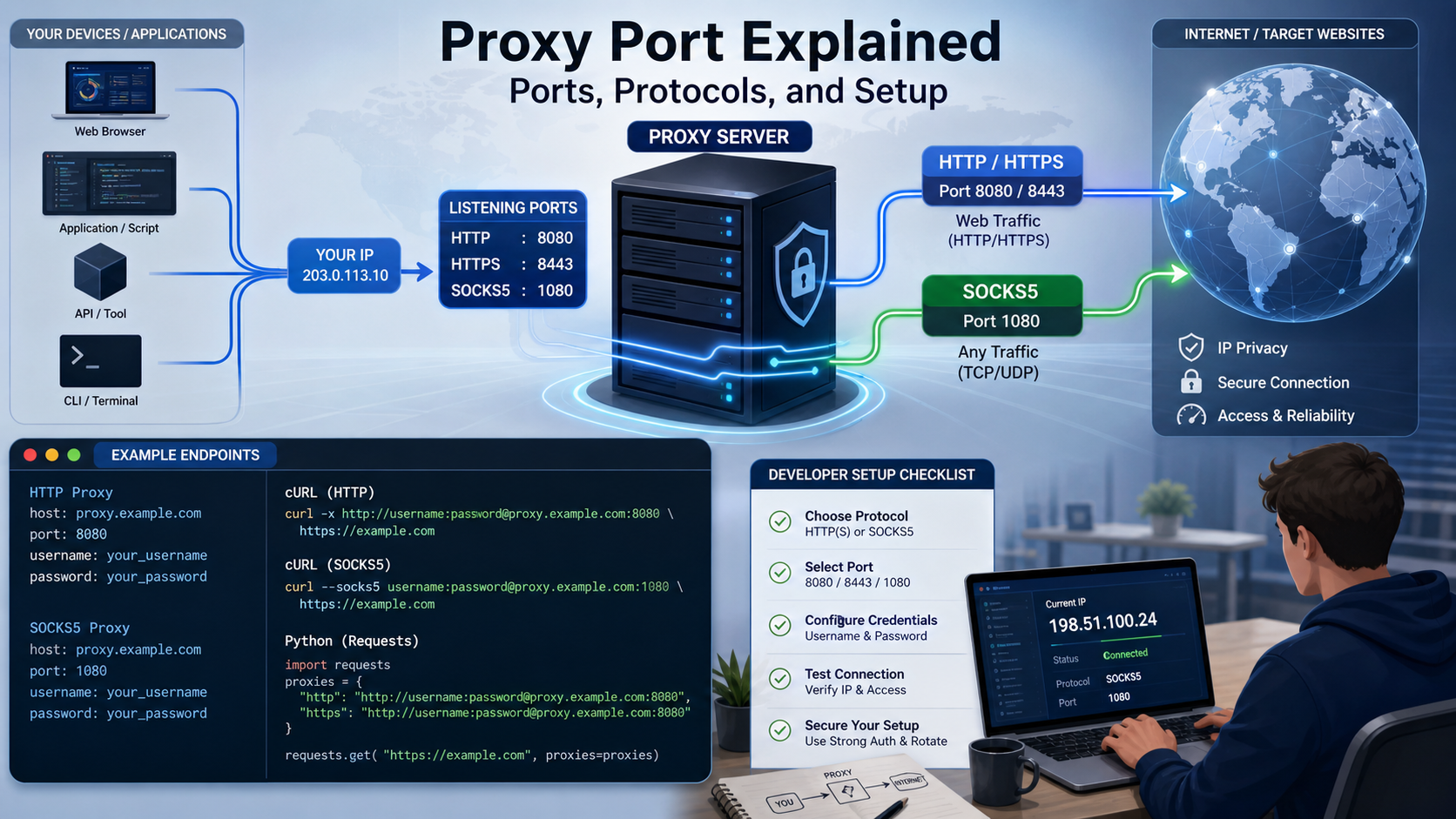
That is why proxy credentials often look like this:
A proxy port is the numbered network endpoint your application connects to on a proxy server. The proxy host identifies the machine or service address. The port identifies the listening service on that host.
The hostname tells the client where to connect. The number after the colon tells it which endpoint to contact. Your proxy protocol, authentication method, and provider configuration then determine what happens after the connection opens.
The most important practical rule is simple: use the host, port, and protocol assigned by your proxy provider or server administrator. Numbers such as 1080, 8080, and 3128 are common, but a port number by itself does not guarantee that a particular proxy protocol is running there.
What is a proxy port in practical terms?
A proxy port is a transport-layer port number on which a proxy service accepts client connections.
One server can run many network services at the same IP address or hostname. A web service might listen on one port, an SSH service on another, and a proxy service on another. The port allows the operating system to deliver an incoming connection to the correct listening process.
Valid TCP and UDP port numbers are represented in a 16-bit field. In day-to-day networking, ports are commonly discussed in three broad ranges: system ports from 0 through 1023, user ports from 1024 through 49151, and dynamic or private ports from 49152 through 65535. The \IANA Service Name and Transport Protocol Port Number Registry\ documents assigned services and these ranges.
For proxy users, the theory matters less than correct endpoint mapping. If your provider says the SOCKS5 gateway is proxy.example.com:12345, entering port 1080 because it is a well-known SOCKS port will not help. Your client must reach the service that is actually listening.
For the LycheeIP implementation details behind this step, review rotating residential proxies.
For the LycheeIP implementation details behind this step, review static residential proxies.
How does host:port syntax identify a proxy endpoint?
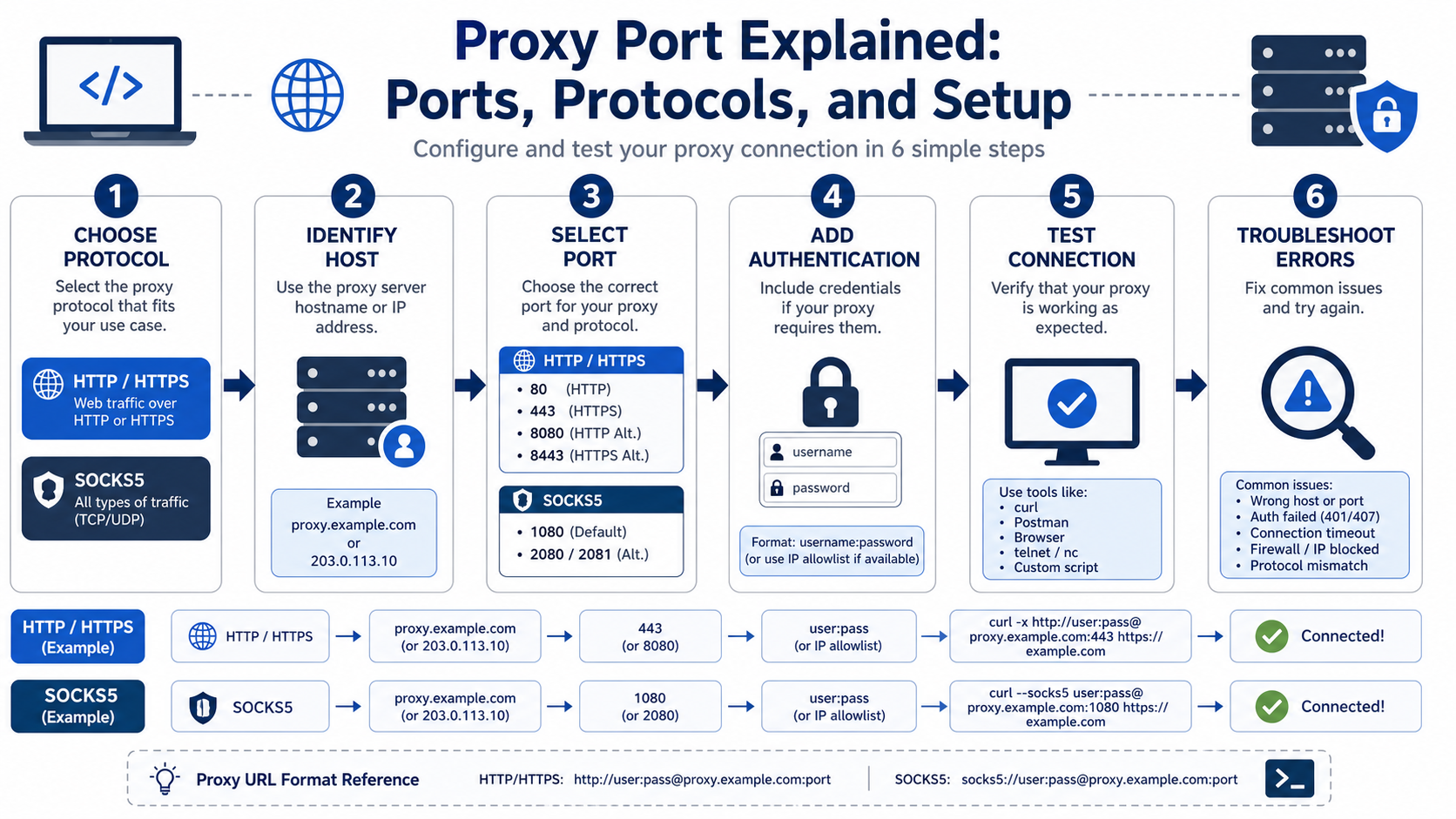
The host:port format combines the network address and listening endpoint into one compact proxy address.
Common formats include:
HOST:PORT
proxy.example.com:8080

SCHEME://HOST:PORT
http://proxy.example.com:8080
socks5://proxy.example.com:1080

SCHEME://USERNAME:PASSWORD@HOST:PORT
http://user:password@proxy.example.com:8080
The scheme is especially important in scripts and command-line tools because it tells the client which proxy protocol to speak. The port alone is not a reliable protocol detector.
Consider two services listening on the same server:
proxy.example.com:8000accepts HTTP proxy connections.proxy.example.com:8001accepts SOCKS5 connections.
If a client sends a SOCKS5 greeting to the HTTP proxy port, the server may close the connection or return an unexpected response. The hostname is correct, but the protocol-to-port mapping is wrong.
Why are 1080, 8080, and 3128 called common proxy ports?
These numbers are common because standards, software defaults, and operational conventions have made them familiar, not because every proxy must use them.
Port 1080
Port 1080 has the clearest standards connection to proxying. IANA registers the service name “socks” on port 1080 for TCP and UDP, and the SOCKS5 specification describes a protocol for relaying TCP connections and supporting UDP-related operations. See \RFC 1928, SOCKS Protocol Version 5.
Many SOCKS services therefore use 1080, but managed providers can expose SOCKS5 on another port.
Port 8080
Port 8080 is widely used as an alternate web or proxy-facing port. Administrators often choose it for HTTP-related services because it is memorable and avoids binding to a privileged system port on some operating systems.
However, “8080” does not automatically mean “HTTP proxy.” A web application, development server, management service, or another program can listen there.
Port 3128
Port 3128 is strongly associated with HTTP proxy deployments because of long-standing proxy software conventions, especially Squid deployments.
Again, the number is a convention. IANA's registry does not turn every connection to 3128 into a proxy connection. The server configuration determines the actual service.
Ports 80 and 443
Ports 80 and 443 are primarily associated with HTTP and HTTPS web services. They may also appear in proxy architectures, but it is misleading to assume that 80 is “the HTTP proxy port” or 443 is “the HTTPS proxy port.”
A proxy provider can accept HTTP proxy connections on 8000, 12321, or another configured port. A client can then use that proxy to reach an HTTPS destination. These are different concepts: the client-to-proxy connection, the proxy protocol, and the destination service port.
What is the difference between an HTTP proxy port and an HTTPS website port?
An HTTP proxy port is where the client reaches the proxy service, while an HTTPS website port is where the destination's secure web service usually listens.
This distinction prevents one of the most common proxy configuration misunderstandings.
Suppose your proxy endpoint is:
http://proxy.example.com:8000You use it to request:
https://www.example.org/productsThe proxy listens on port 8000. The destination URL uses HTTPS, normally associated with destination port 443. Your application still connects first to the proxy endpoint on 8000.
For HTTPS destinations through an HTTP proxy, clients commonly use the HTTP CONNECT method to ask the proxy to establish a tunnel to the destination authority. After the tunnel is established, TLS for the destination can pass through the proxy connection.
There is another separate question: is the connection from your client to the proxy itself protected with TLS? Some providers support HTTPS proxy endpoints where the client-to-proxy hop is encrypted. Others expose an HTTP proxy endpoint that can tunnel HTTPS destination traffic. Read the provider's protocol documentation instead of guessing from the word “HTTPS.”
For the official technical reference behind this point, see MDN HTTP overview.
For the official technical reference behind this point, see HTTP Semantics standard.
How does a SOCKS5 proxy port differ from an HTTP proxy port?
A SOCKS5 port expects the SOCKS5 protocol, while an HTTP proxy port expects HTTP proxy semantics.
SOCKS5 operates as a more general-purpose relay protocol. The client first negotiates authentication and a command with the SOCKS server, then asks the server to connect or handle the requested network operation. The SOCKS5 specification defines CONNECT, BIND, and UDP ASSOCIATE commands.
An HTTP proxy understands HTTP request semantics and, where supported, CONNECT tunneling. This makes HTTP proxies a natural fit for web clients and scraping libraries that already speak HTTP.
Use SOCKS5 when the application needs SOCKS support, broader protocol flexibility, or specific DNS-routing behavior. Use an HTTP or HTTPS proxy when the workload is primarily web traffic and the client has strong HTTP proxy support.
The wrong port often produces a vague error because the client and server never agree on the first protocol message.
How do authentication details relate to the proxy port?
Authentication is separate from the port, even though credentials often appear in the same proxy string.
A provider may use username and password authentication:
http://username:password@proxy.example.com:8080Another service may allow connections only from approved source IP addresses. Some enterprise gateways combine network allowlists with additional credentials.
The port tells your client which service to contact. Authentication tells that service whether the client is allowed to use it and, in managed proxy systems, may also carry configuration parameters such as location or session identifiers.
Do not assume an “authentication error” means the port is correct. A protocol mismatch can sometimes surface as a generic connection or handshake error before authentication completes.
How should you choose the correct proxy port?
You should choose the exact port that matches your provider's endpoint and the protocol configured in your client.
Use this decision sequence:
- Identify the required proxy protocol. Does the application support HTTP, HTTPS proxying, SOCKS5, or several options?
- Read the assigned endpoint. Copy the provider's host and port rather than substituting a “standard” number.
- Match the scheme or client setting. Configure HTTP as HTTP and SOCKS5 as SOCKS5.
- Confirm authentication. Check username, password, source-IP allowlisting, and any session syntax.
- Test one simple request. Verify connectivity before adding concurrency, rotation, or a full scraping pipeline.
For LycheeIP workloads, start with the connection details shown for the purchased proxy product and match them to the supported protocol. LycheeIP lists HTTP, HTTPS, and SOCKS5 support across its proxy infrastructure, with product-specific options for dynamic residential proxies, static residential proxies, and static datacenter proxies.
The best port is therefore not the most popular port. It is the configured port for the service you are actually using.
How do you configure a proxy port in cURL and Python?
You configure the port as part of the proxy endpoint passed to the client.
cURL example
curl \--proxy http://proxy.example.com:8080 https://example.com/For an authenticated proxy:
curl \--proxy http://proxy.example.com:8080 \\
  \--proxy-user "username:password" \\
  https://example.com/
Keeping credentials out of the URL can reduce accidental exposure in logs, shell history, and error messages, although you still need to manage secrets carefully.
Python Requests example
import os
import requests

proxy\_url \= os.environ\["PROXY\_URL"\]

proxies \= {
    "http": proxy\_url,
    "https": proxy\_url,
}

response \= requests.get(
    "https://example.com/",
    proxies=proxies,
    timeout=30,
)

response.raise\_for\_status()
print(response.status\_code)
A common detail surprises beginners: both the http and https destination mappings may reference an http:// proxy endpoint. That can be valid when the HTTP proxy supports CONNECT tunneling to HTTPS destinations.
Do not hard-code production proxy credentials into source code or commit them to a repository. Use environment variables or a secret-management system appropriate to your infrastructure.
How do you troubleshoot a proxy port that will not connect?
Troubleshoot proxy ports from the network layer upward instead of changing several settings at once.
Step 1: Verify the exact endpoint
Copy the host and port from the provider dashboard or server configuration. Check for transposed digits, hidden spaces, stale endpoints, and expired products.
Step 2: Confirm DNS resolution
If the endpoint uses a hostname, verify that your system can resolve it. A DNS failure is different from a refused TCP connection.
Step 3: Check whether the port is reachable
Test basic connectivity from the same environment where the application runs. Corporate firewalls, cloud egress policies, security groups, and local antivirus software can block outbound ports.
A “connection refused” result often means the destination host was reached but nothing accepted the connection on that endpoint, or a firewall actively rejected it. A timeout can indicate filtering, routing problems, or an unavailable service.
Step 4: Match the proxy protocol
Confirm that an HTTP client is not pointed at a SOCKS5 listener or vice versa. In libraries that require an explicit scheme, use the provider's documented scheme.
Step 5: Test authentication separately
Once the service is reachable and the protocol matches, verify credentials or source-IP authorization. Check whether your current public IP changed after an ISP, VPN, NAT gateway, or cloud deployment change.
Step 6: Remove advanced options
Disable rotation logic, custom headers, large concurrency, and application-specific middleware temporarily. Prove one request works, then reintroduce complexity one layer at a time.
Step 7: Record the actual error stage
“Proxy failed” is not a useful incident label. Record whether failure happened during DNS lookup, TCP connect, TLS to the proxy, proxy handshake, authentication, tunnel establishment, destination TLS, HTTP response, or content validation.
That classification makes recurring failures much easier to fix.
What security mistakes should you avoid when using proxy ports?
You should treat proxy endpoints and credentials as infrastructure secrets, not disposable strings.
- Do not expose credentials in screenshots or tickets. Redact usernames, passwords, API parameters, and full proxy strings.
- Do not commit proxy URLs with passwords. Use environment variables or a secret store.
- Restrict access where supported. Source-IP allowlisting can reduce unauthorized use, but operational teams must update allowlists when egress IPs change.
- Understand encryption on each hop. HTTPS to the destination does not automatically mean the client-to-proxy connection is encrypted.
- Use unique credentials for teams or workloads when available. Shared credentials make incident attribution and rotation harder.
- Monitor unexpected usage. Sudden traffic growth can indicate a leaked credential, retry storm, or misconfigured worker.
Use LycheeIP Proxy Endpoints in Your Setup
How does proxy port choice affect large-scale web data workflows?
Port choice usually affects connectivity and protocol mapping more than scraping performance by itself.
Switching from 8080 to 3128 does not inherently make a proxy faster. Performance depends on the proxy network, routing, server load, target distance, protocol implementation, connection reuse, and the workload.
Where ports do matter operationally is compatibility. A restrictive enterprise network may allow common outbound ports and block unusual ones. A legacy application may support HTTP proxies but not SOCKS5. A container platform may require explicit proxy environment variables. A browser profile manager may expect separate HTTP and SOCKS fields.
For production systems, document the endpoint contract for each proxy pool:
- Proxy protocol
- Hostname
- Port
- Authentication method
- DNS behavior
- Rotation or session behavior
- Location parameters
- Timeout policy
- Maximum intended concurrency
- Credential owner and rotation process
This prevents a simple port change from becoming a cross-team outage.
For the LycheeIP implementation details behind this step, review LycheeIP proxy infrastructure.
For the LycheeIP implementation details behind this step, review scaling lead scraping with n8n.
Frequently Asked Questions
What is the default proxy port?
There is no universal default for all proxies. Port 1080 is registered for SOCKS, while 8080 and 3128 are common operational choices for HTTP-related proxy services. Use the endpoint assigned by your provider or administrator.
Is port 8080 always an HTTP proxy?
No. Many services use port 8080. The server configuration determines what protocol is listening there.
Can I use port 443 as a proxy port?
A proxy service can be configured on port 443 when the deployment permits it, but port 443 is primarily associated with HTTPS web services. Follow the proxy service's documented endpoint.
Why does my proxy work in one app but not another?
The applications may support different proxy protocols, DNS behavior, authentication methods, or environment-variable conventions. Compare the exact scheme, host, port, and credential configuration.
Does changing the proxy port change my proxy IP?
Not necessarily. A different port may reach another protocol listener, gateway, product, or routing configuration. Whether the exit IP changes depends on the provider's network design and session rules.
What does “connection refused” mean for a proxy port?
It usually means your device reached the host but the connection was rejected at that endpoint. Check the port, service status, firewall rules, and whether the proxy product is active. Conclusion A proxy port is a simple concept with important operational consequences. The host tells your client where the proxy service is. The port tells it which listening endpoint to contact. The protocol tells the client and proxy how to communicate. Common numbers such as 1080, 8080, and 3128 are useful reference points, but they are not substitutes for configuration. Always match the assigned endpoint to the correct proxy protocol, test one request before scaling, and troubleshoot failures by connection stage. When teams document host, port, protocol, authentication, and session behavior as one endpoint contract, proxy setup becomes far easier to automate and maintain.
Related LycheeIP Guides and Resources

Recommended Articles

DataDome Bypass for Web Scraping
DataDome Bypass for Web Scraping
View Details
Web Scraping Rate Limiting: How to Handle 429s, Backoff, and Concurrency
Web scraping rate limiting is the engineering discipline of keeping an authorized collection workload inside a target service's acceptable request envelope. When that envelope is exceeded, a server may respond with HTTP 429 Too Many Requests, delay responses, or apply other controls.
View Details
reCAPTCHA vs hCaptcha vs Cloudflare Turnstile: What Scraping Teams Need to Know
If an authorized data-collection workflow suddenly stops at a verification screen, identifying the protection system matters before you change code, browser settings, or proxy infrastructure. reCAPTCHA vs hCaptcha vs Turnstile is not simply a branding comparison. The three systems can expose different browser flows, token models, risk decisions, and failure symptoms.
View Details
Browser Automation Proxies: IPs, Geo-Targeting, Sessions, and AI Agents
A browser automation proxy belongs to the network layer of Playwright, Selenium, cloud-browser, and AI-agent workflows. It changes how browser traffic is routed and can affect the source IP address, geographic egress, and session continuity seen by a destination site. It does not improve an AI model's reasoning, repair browser logic, or guarantee that a website will accept the session.
View Details
SERP Scraping: Methods, APIs, Workflows, and Best Practices
SERP scraping is the automated collection of information from search engine results pages. A SERP scraper can capture organic rankings, advertisements, featured snippets, People Also Ask questions, local results, shopping listings, images, and other search features, then convert them into structured data for analysis.
View Details