
Crawling List: Build a Reliable Web Scraping Queue

A crawling list is a structured inventory of crawl targets and the rules that tell a crawler what to fetch, when to fetch it, and how to process the result.
A crawling list is a structured inventory of crawl targets and the rules that tell a crawler what to fetch, when to fetch it, and how to process the result.
For a small project, the list may be a CSV containing 500 product URLs. For a production data pipeline, it becomes closer to a crawl frontier: a continuously changing queue of URLs with priority, status, next-crawl time, source, retry count, and extraction metadata.
The quality of that list often determines the quality of the dataset. A perfect parser cannot recover products your discovery logic never found. More proxies cannot fix a queue filled with duplicate filter URLs. Faster concurrency only helps you collect bad targets faster when the crawl inventory is poorly designed.
What is a crawling list, and why is it more than a URL list?
A crawling list is both an inventory of targets and an operational control surface for a crawler.
A plain URL list answers one question: “Which addresses do I know?” A production crawling list should answer several more:
- Why is this URL in the queue?
- What type of page is it?
- When was it last fetched?
- Did the last fetch return valid content?
- When should it be crawled again?
- How important is it compared with other targets?
- Which parser or extraction schema should process it?
- Has an equivalent URL already been crawled?
This distinction becomes important on ecommerce sites, job boards, directories, travel aggregators, search results, and marketplaces. These sites expose lists that change over time and lead to detail pages. The crawler must discover new items without refetching every possible URL variation on every run.
For the LycheeIP implementation details behind this step, review static residential proxies.
For the official technical reference behind this point, see MDN HTTP overview.
How is a crawling list different from a seed list, crawl frontier, and dataset?
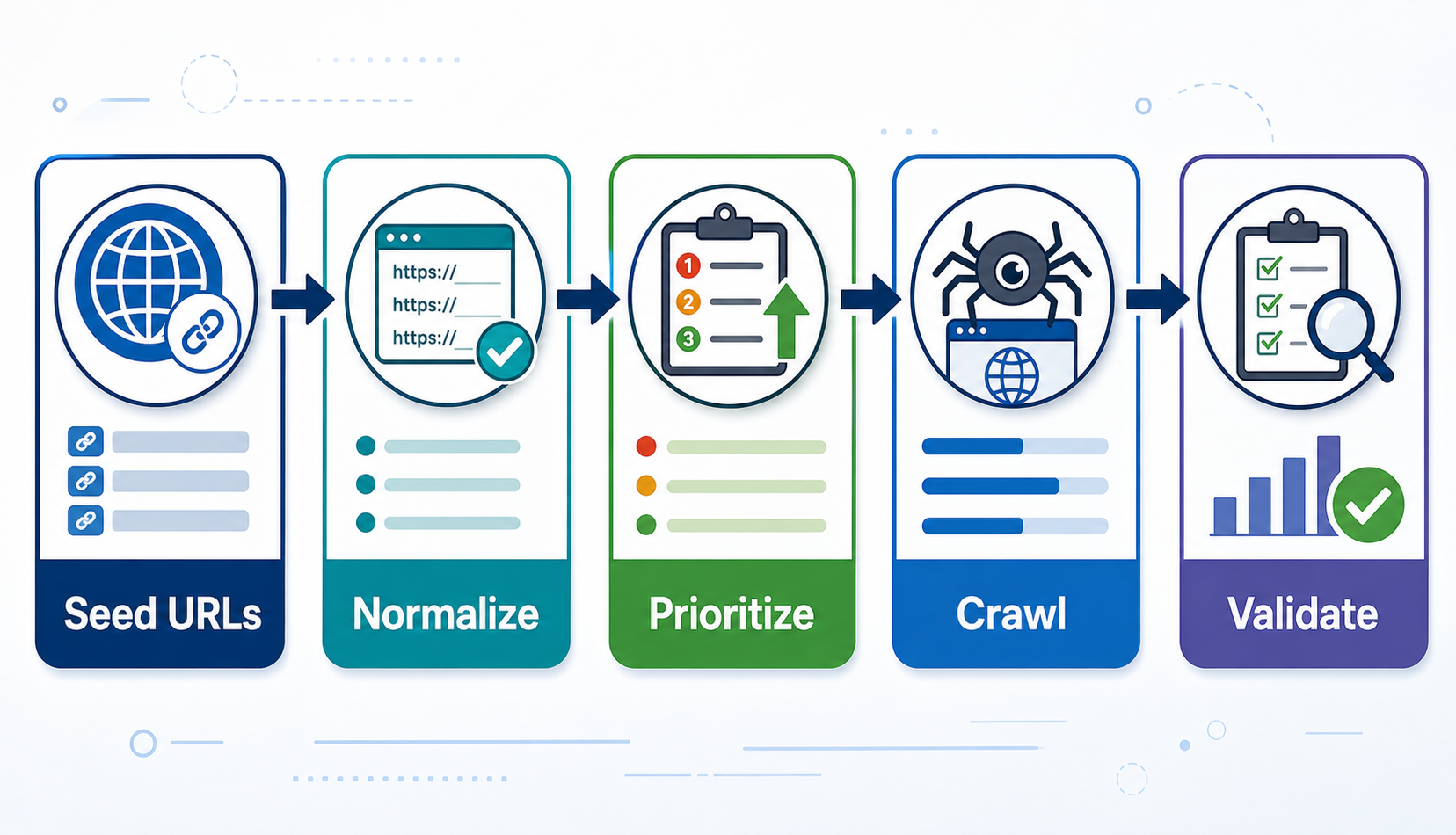
A crawling list sits between initial discovery and extracted data, but related terms describe different stages.
Seed list: the starting URLs or sources that initiate discovery. Examples include category pages, sitemaps, known domains, or search result URLs.
Crawling list: the maintained inventory of pages or list targets that the project intends to visit. In smaller workflows, this may also contain crawl status and schedules.
Crawl frontier: the queue-management system that decides which URL should be fetched next. A frontier usually handles priorities, deduplication, scheduling, retries, and politeness constraints at scale.
Extracted dataset: the structured records produced after fetch and parse. Product title, SKU, price, job ID, company, location, and last-seen timestamp belong in the data layer, not the crawl queue.
Keeping these concepts separate makes systems easier to maintain. A changed product price should update the product record. It should not create a new crawl target unless the URL or discovery logic also changed.
For the LycheeIP implementation details behind this step, review LycheeIP proxy infrastructure.
What fields should a production crawling list contain?
A production crawling list should contain enough metadata to make scheduling and diagnostics explicit.
A practical crawl record can include:
- canonicalurl and sourceurl: the normalized target and where it was discovered.
- pagetype and parserid: the expected template and extraction logic.
- priority and status: queue importance and current workflow state.
- lastcrawledat and nextcrawlat: crawl history and scheduling.
- httpstatus and validationstatus: transport outcome and content validity.
- contenthash, retrycount, and lastseenat: change, failure, and lifecycle signals.
- discovery_method: sitemap, pagination, API, category, or manual seed.
You do not need every field on day one. The goal is to avoid a single “URL” column becoming the entire control plane.
For the LycheeIP implementation details behind this step, review rotating residential proxies.
For the official technical reference behind this point, see Playwright documentation.
Where should you get URLs for a crawling list?
You should build crawling lists from the most authoritative and structured discovery sources available.
Sitemaps can expose large sets of public URLs and are useful discovery sources, although they may include pages you do not need or omit interaction-only URLs.
Category and index pages are common on stores, directories, job boards, and archives. They can reveal detail-page links and lightweight identifiers.
Pagination and cursor endpoints expose additional result states through next links, page numbers, offsets, or cursors. Record the discovery path so navigation failures are diagnosable.
Approved APIs, feeds, and exports are often preferable because they can provide stable IDs and explicit pagination. Business-owned inventories of SKUs, domains, locations, or public profile URLs can also seed the list directly.
How should you normalize URLs before adding them to the crawl queue?
You should normalize URLs before enqueueing them so equivalent targets do not consume separate crawl budget.
URL normalization is target-specific. Aggressively deleting every query parameter can break valid pages, while keeping every tracking and filter parameter can create millions of duplicates.
A practical normalization pipeline is:
- Resolve relative URLs against the correct base URL.
- Apply a hostname policy for known aliases and subdomains.
- Remove fragments when they do not identify a separate server resource.
- Filter query parameters so tracking values are removed while real pagination or content parameters remain.
- Follow target-specific slash and redirect rules instead of imposing one global convention.
- Create a deduplication key from the normalized URL or a stable target identity such as product ID.
For faceted navigation, URL normalization may not be enough. A category with ten independent filters can generate a combinatorial number of pages. Define which filter combinations answer the data question and reject the rest before they reach the frontier.
How do you crawl numbered pagination without missing or duplicating items?
You should treat pagination as a state machine with explicit stop conditions and item-level deduplication.
A fragile crawler assumes page numbers continue until a request fails. A stronger crawler records the current page, extracts item identities, finds the next navigation state, and stops when a verified condition is met.
Useful stop conditions include:
- No next-page link or cursor is returned.
- The API reports no next cursor.
- The page contains zero valid new item IDs.
- The same page signature repeats.
- A configured safety limit is reached.
Do not stop only because one page contains fewer items than expected. A filtered result set, sponsored block, personalization change, or temporary missing item can produce a short page before the real end.
Deduplicate at the item level as well as the page level. The same product can appear on page 2 and page 3 while inventory changes during a long crawl. Store the product ID or canonical detail URL as the record key.
How do you handle infinite scroll and “load more” lists?
You should first determine whether the list is powered by a repeatable data request before automating scrolling.
Inspect network activity as new items load. Many infinite-scroll interfaces call a structured endpoint with a cursor, page token, offset, or GraphQL request. When that interface is approved for your use, a stable data request can be simpler than rendering every page.
When browser rendering is required, define a deterministic completion rule. Stop when unique item IDs no longer increase, an end-of-results marker appears, or a cursor repeats or returns no items. Also enforce a maximum iteration or item limit so a UI bug cannot create an infinite loop.
How should you prioritize URLs in a crawling list?
You should prioritize crawl targets by business value, freshness need, and discovery role.
Not every URL deserves the same frequency. Consider a retail monitoring project:
- Top-selling product pages may refresh every 15 minutes.
- Long-tail products may refresh daily.
- Category discovery pages may refresh every few hours to find new items.
- Static brand-information pages may not belong in the crawl at all.
A simple priority score can combine:
- Business importance
- Expected change frequency
- Time since last successful crawl
- Whether the item is newly discovered
- Recent validation failures
- Downstream consumer demand
Be careful with failure priority. Retrying a broken page more aggressively can create a self-inflicted traffic spike. Use capped retries and move persistent failures into a separate diagnostic queue.
How do you decide when a URL should be crawled again?
You should set recrawl frequency from observed change rate and data requirements rather than one site-wide schedule.
Start with a business freshness target. How stale can the field be before it loses value? A job vacancy's active status may need frequent checks. A company address in a public directory may change rarely.
Then collect change telemetry. Store a content or field-level hash and measure how often relevant values change. URLs that remain unchanged for months can gradually move to a slower schedule. Frequently changing pages can move to a faster schedule within the target site's permitted capacity.
This adaptive recrawl model reduces waste. It also produces a better dataset because request budget moves toward pages where fresh observations matter.
A useful rule is to separate discovery frequency from detail refresh frequency. You may need to check a category often for new products while refreshing old product pages at a slower cadence.
What does a robust list-crawling workflow look like?
A robust list-crawling workflow separates discovery, queueing, fetching, parsing, validation, and storage.
- Discover. Read approved sitemaps, feeds, categories, indexes, or known inventories.
- Normalize. Resolve URLs and create a target-specific canonical identity.
- Deduplicate. Reject targets that already exist unless discovery metadata needs updating.
- Prioritize. Calculate priority and next-crawl eligibility.
- Fetch. Send the request with host-level concurrency and timeout controls.
- Validate. Confirm that the response is the expected page type before extraction.
- Parse. Run the parser or schema version assigned to that page type.
- Store. Upsert records with stable item identifiers and timestamps.
- Measure. Record latency, HTTP status, validation result, item count, and parse errors.
- Reschedule. Set the next crawl time based on success, observed change, priority, and retry policy.
This architecture prevents one page-layout change from contaminating every stage. Fetch success and parse success are different metrics. Discovery coverage and extraction completeness are different metrics. Keep them visible separately.
For the LycheeIP implementation details behind this step, review scaling lead scraping with n8n.
How do you verify that a crawling list is producing complete data?
You should use coverage and content-quality checks rather than assuming a successful crawl is complete.
Compare discovered item counts with prior runs, source totals, or known inventories. Track new versus repeated item IDs so a pagination failure does not look like a quiet day. Validate required fields by page type, record page signatures that can reveal challenge templates, and keep a last_seen_at timestamp instead of deleting records after one absence.
Also store the parser version that produced each observation. When extraction logic breaks, you can identify which records may need reprocessing or recrawling.
How should a crawler respect robots.txt and target capacity?
A crawler should check crawler guidance, define conservative host-level limits, and respond to server signals.
The IETF's \RFC 9309 Robots Exclusion Protocol\ specifies how crawlers retrieve and interpret robots.txt rules. It also states that robots.txt is not access authorization. That means responsible collection needs broader review of access permissions, terms, privacy obligations, and applicable law.
At runtime, use per-host concurrency controls and adaptive delays. Scrapy's \AutoThrottle documentation\ describes one framework for adjusting crawl delay based on observed latency while respecting configured concurrency and delay limits.
Even when a target permits crawling, avoid waste. Duplicate URLs, runaway filter combinations, and tight retry loops consume the target's resources and your own proxy bandwidth.
When do proxies belong in a list-crawling architecture?
Proxies belong in a list-crawling architecture when the legitimate workload needs distributed network origins, geographic observation, or isolation between concurrent collection workers.
A small crawler reading a public sitemap and a few hundred pages may not need proxies. Adding proxy complexity can make debugging harder.
At greater scale, the right proxy type depends on the target and workflow. Static datacenter proxies can fit accessible, throughput-oriented crawling. Dynamic residential proxies can support geo-distributed public web research or workloads that genuinely need rotating residential routes. Static residential proxies can fit longer sessions where a consistent residential network identity matters.
LycheeIP provides these network options as separate proxy products. The crawler still needs its own queue discipline, duplicate controls, rate policy, validation, and compliance review. Proxies do not replace crawl architecture.
Which crawling tool should you use for a crawling list?
You should use the lightest tool that can reliably reach and validate the required content.
Use an HTTP client and parser when the target data is already present in HTML or an approved structured response. Use Scrapy when you need request scheduling, duplicate filtering, link extraction, retries, and item pipelines in one crawl framework. Use Playwright or another browser tool when JavaScript execution or interaction is genuinely required.
Large platforms may eventually need a dedicated frontier backed by a database or message queue to coordinate workers, lease jobs, enforce per-domain limits, and recover abandoned tasks. The tool decision should follow the crawl model, not programming-language popularity.
Build Reliable Crawl Pipelines with LycheeIP Proxies
What are the most common crawling-list failure modes?
The most common failures come from uncontrolled discovery, weak deduplication, and missing validation.
- Pagination loops: the next URL or cursor repeats without a stop condition.
- Faceted URL explosions: unnecessary filter combinations flood the queue.
- Duplicate variants: tracking parameters create multiple targets for one page.
- Silent soft blocks: HTTP 200 challenge pages are parsed as empty lists.
- Parser drift: selectors still match, but the field meaning has changed.
- Retry storms: large failed batches become eligible at the same moment.
- Stale priorities: retired items remain high-value targets forever.
Each failure becomes easier to control when the crawling list stores explicit state and the workflow has stage-specific metrics.
Frequently Asked Questions
Is a crawling list the same as a sitemap?
No. A sitemap is a website-published discovery source. A crawling list is your maintained inventory of crawl targets and can combine sitemap URLs with category discovery, APIs, known records, and operational scheduling data.
Should I store every discovered URL?
No. Normalize and filter URLs before enqueueing them. Reject irrelevant paths, unsupported page types, known tracking variants, and unsafe faceted combinations.
How do I know when infinite scroll has finished?
Use a deterministic completion signal such as an empty cursor response, end-of-results element, repeated cursor, or no growth in unique item IDs after defined load attempts. Always enforce a safety limit.
How often should I recrawl a URL?
Base the schedule on business freshness requirements and observed change frequency. Separate discovery cadence from detail-page refresh cadence and slow down pages that rarely change.
Do I need a headless browser for list crawling?
Not always. Use an HTTP client when the required content is in HTML or an approved structured endpoint. Use browser automation when JavaScript execution or interaction is genuinely required. Conclusion A useful crawling list is not a static spreadsheet that grows forever. It is a controlled inventory of targets with explicit identity, provenance, priority, schedule, and validation state. Start with structured discovery sources. Normalize and deduplicate before enqueueing. Treat pagination and infinite scroll as navigation state. Separate discovery from detail refresh. Measure coverage and page validity, not only HTTP success. Then add the lightest crawler and proxy infrastructure that the legitimate workload actually requires. When the crawl queue is designed well, scaling becomes a capacity problem. When the queue is designed badly, scaling becomes a multiplier for duplicates, stale pages, and silent data loss.
Related LycheeIP Guides and Resources

Recommended Articles

DataDome Bypass for Web Scraping
DataDome Bypass for Web Scraping
View Details
Web Scraping Rate Limiting: How to Handle 429s, Backoff, and Concurrency
Web scraping rate limiting is the engineering discipline of keeping an authorized collection workload inside a target service's acceptable request envelope. When that envelope is exceeded, a server may respond with HTTP 429 Too Many Requests, delay responses, or apply other controls.
View Details
reCAPTCHA vs hCaptcha vs Cloudflare Turnstile: What Scraping Teams Need to Know
If an authorized data-collection workflow suddenly stops at a verification screen, identifying the protection system matters before you change code, browser settings, or proxy infrastructure. reCAPTCHA vs hCaptcha vs Turnstile is not simply a branding comparison. The three systems can expose different browser flows, token models, risk decisions, and failure symptoms.
View Details
Browser Automation Proxies: IPs, Geo-Targeting, Sessions, and AI Agents
A browser automation proxy belongs to the network layer of Playwright, Selenium, cloud-browser, and AI-agent workflows. It changes how browser traffic is routed and can affect the source IP address, geographic egress, and session continuity seen by a destination site. It does not improve an AI model's reasoning, repair browser logic, or guarantee that a website will accept the session.
View Details
SERP Scraping: Methods, APIs, Workflows, and Best Practices
SERP scraping is the automated collection of information from search engine results pages. A SERP scraper can capture organic rankings, advertisements, featured snippets, People Also Ask questions, local results, shopping listings, images, and other search features, then convert them into structured data for analysis.
View Details