
Anti-Scraping Techniques: How Bot Detection Works
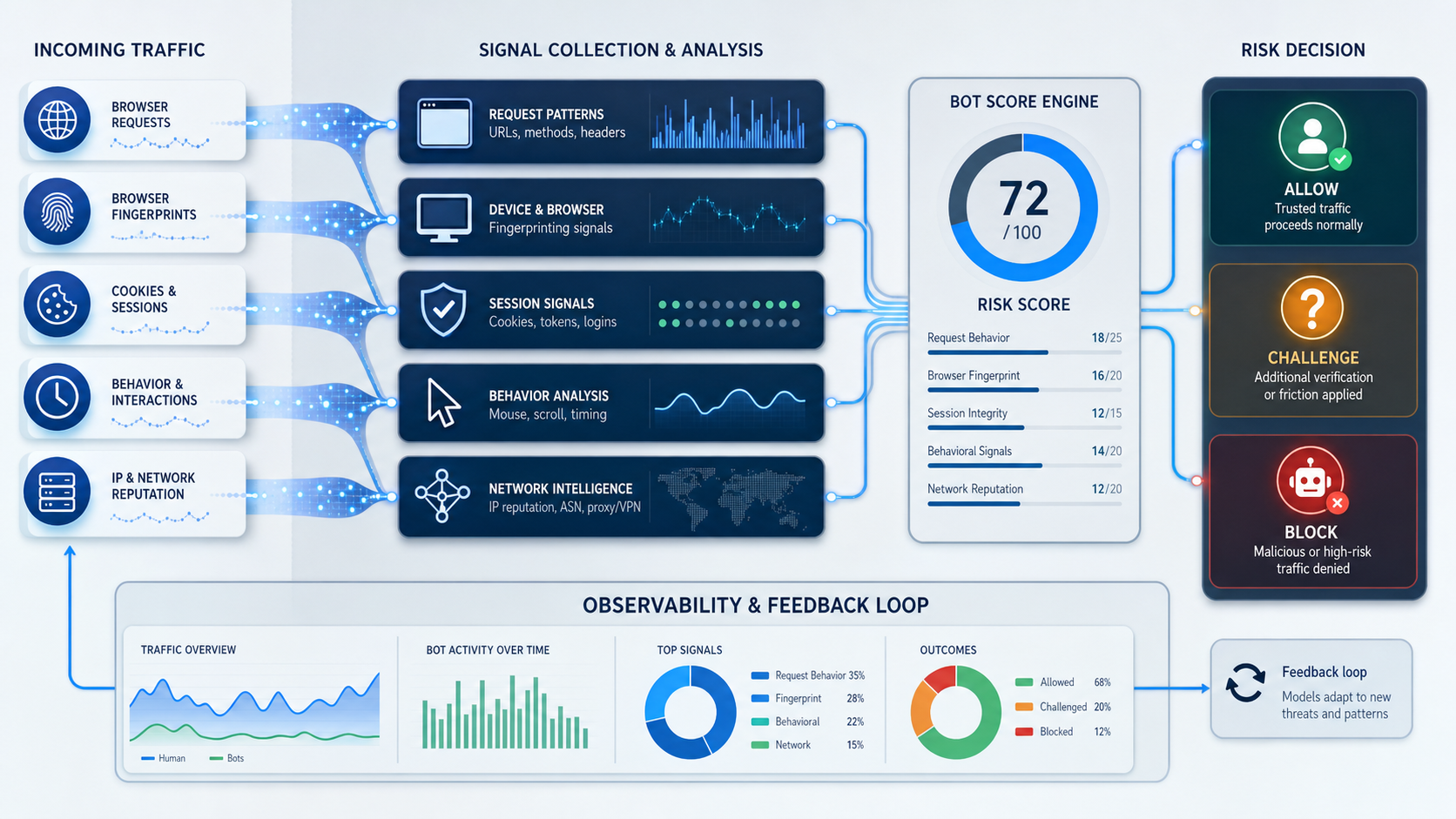
Anti-scraping techniques are controls websites use to identify, classify, slow, challenge, or block automated data collection. Modern systems rarely make that decision from one signal. They combine network context, HTTP behavior, browser characteristics, session state, request patterns, and application-specific rules.
Anti-scraping techniques are controls websites use to identify, classify, slow, challenge, or block automated data collection. Modern systems rarely make that decision from one signal. They combine network context, HTTP behavior, browser characteristics, session state, request patterns, and application-specific rules.
That layered model explains why anti-scraping is more complicated than “block one IP address.” A request can come from a normal-looking network and still be flagged because the session is inconsistent. It can also receive HTTP 200 while the returned page is a challenge, an empty state, or a different template from the expected content.
For website owners, the goal is to protect infrastructure, data, accounts, and business rules without unnecessarily disrupting legitimate users or approved automation. For authorized data teams, the goal is not to defeat those controls. It is to understand where a collection workflow is failing, reduce unnecessary traffic, use approved access paths where available, and validate the data that is actually returned.
What is anti-scraping, and why do websites use it?
Anti-scraping is a category of anti-automation control focused on unwanted or excessive automated extraction.
Websites deploy it for different reasons. An ecommerce platform may need to protect origin capacity during traffic bursts. A marketplace may want to limit bulk copying of listings. A publisher may respond to large-scale content replication. A logged-in application may need to distinguish normal automation from credential abuse, account takeover attempts, or automated purchasing.
Anti-scraping and anti-bot are therefore related but not identical. Anti-bot systems address a wider range of automated activity. Scraping is one type of automation inside that broader security and traffic-management problem.
The distinction matters during troubleshooting. A request can be denied because of authentication, authorization, rate limits, network reputation, malformed protocol behavior, or application policy. Not every blocked automated request is evidence of a dedicated scraping rule.
For the LycheeIP implementation details behind this step, review static residential proxies.
For the LycheeIP implementation details behind this step, review rotating residential proxies.
For the official technical reference behind this point, see MDN HTTP overview.
For the official technical reference behind this point, see Anthropic documentation.
How do modern anti-scraping systems evaluate automated traffic?
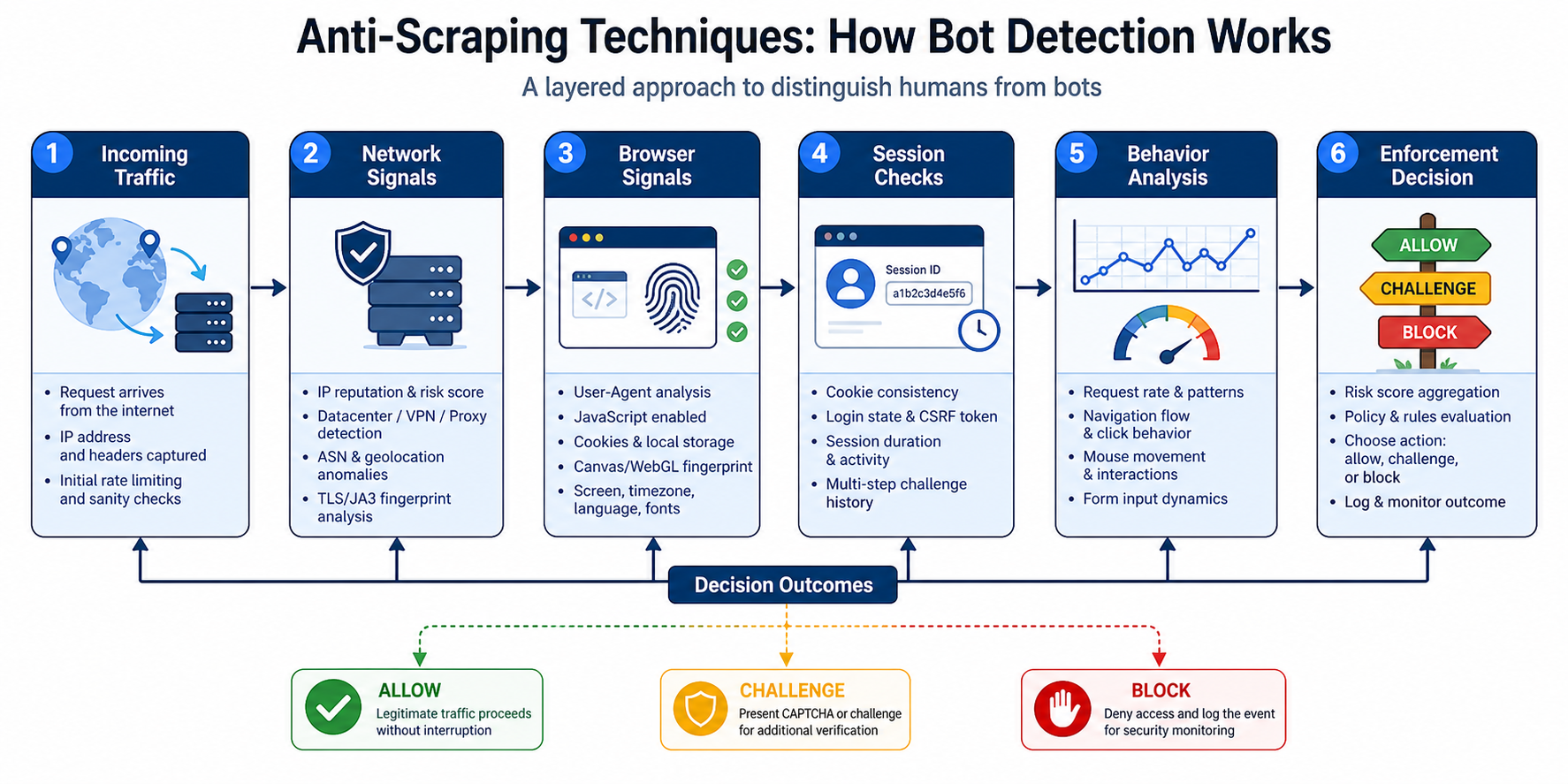
Modern anti-scraping systems evaluate several signal layers and combine them into a broader risk decision.
Network and IP context
The network layer can provide information such as source IP, ASN, approximate geography, request volume, concurrent connections, and historical abuse signals.
An IP address is useful context, but it is not a complete identity. Many legitimate users can share an egress address through carrier-grade NAT, enterprise gateways, or cloud infrastructure. Conversely, changing an address does not make the rest of a client session consistent.
For defenders, network signals work best as part of a larger decision rather than as the only rule.
HTTP and transport characteristics
Servers can observe how clients use HTTP and transport protocols. Header combinations, HTTP versions, connection reuse, TLS client characteristics, and malformed request patterns can all contribute context.
One unusual header should not automatically prove that a request is malicious. The value comes from correlation. Cloudflare's current Bot Management documentation, for example, exposes bot scoring, verified-bot indicators, detection IDs, and JA3 or JA4-related fields as parts of a broader detection model. See the \Cloudflare Bot Management variables documentation.
Browser and device signals
When a website executes JavaScript, it can observe characteristics of the browser environment. These may include viewport dimensions, timezone, supported browser APIs, graphics information, hardware concurrency, and other device or runtime properties.
Defensive systems often look for impossible or highly inconsistent combinations. A client that claims one browser family but exposes behaviors associated with a very different runtime can create additional risk context.
Session and application state
Normal browsing often creates state. Cookies persist. Tokens are refreshed. Locale settings survive navigation. A user may move from an index page to a detail page while carrying the same session context.
Anti-automation systems can evaluate whether a session behaves consistently with the application's own state model. Repeatedly losing required cookies, reusing invalid tokens, or requesting protected resources without the expected application state may trigger additional verification.
Request patterns and behavior
Traffic patterns can also reveal operational problems. Large bursts, fixed-interval requests, repeated access to expensive endpoints, or identical navigation paths across a very large number of sessions can be relevant.
Website owners use rate limiting and behavioral controls because infrastructure cost and application risk often depend on patterns over time, not only the content of one request.
How does a website turn bot signals into an enforcement action?
A website usually collects signals, evaluates risk, and applies a response proportionate to the result.
Low-risk traffic may be served normally. Medium-risk traffic may receive additional verification, slower service, or a managed challenge. High-risk traffic may be rate limited or denied.
Common enforcement outcomes include:
- Rate limiting: requests are delayed or rejected after a defined threshold.
- Managed challenges: the platform asks the client to complete additional browser verification.
- CAPTCHA: the user is asked to complete an explicit interaction.
- Session invalidation: a token or cookie is no longer accepted.
- Reauthentication: the application requires the user to sign in again.
- Content variation: the response contains an empty, reduced, or alternative page.
- Hard denial: the server returns a status such as HTTP 403.
The important operational lesson is that HTTP status alone is not enough to classify success. A data pipeline must also validate the response content.
Why can anti-scraping systems create false positives?
False positives happen because many bot signals are probabilistic and legitimate traffic can look unusual.
A corporate network may send thousands of users through one public IP. Accessibility software can produce atypical interaction patterns. Privacy tools can reduce browser signals. A monitoring service can request the same page at regular intervals. A mobile network can change a user's address during a session.
Website owners therefore need layered controls and measured enforcement. Blocking every unusual signal can damage conversion, search visibility, partner integrations, accessibility, and internal automation.
A mature anti-scraping program tracks challenge rates, denial rates, support reports, verified automation, and application-level outcomes. It also provides a path for approved agents, partners, and enterprise integrations where appropriate.
What do common response symptoms mean for an authorized data workflow?
Response symptoms can help an authorized data team classify a problem, but they do not reveal a guaranteed root cause.
HTTP 429 or repeated throttling
A 429 response commonly indicates that request-rate controls are active.
Review the documented limits for the API or site, your host-level concurrency, retry behavior, and whether multiple workers share the same access path. Honor Retry-After when it is provided. Use exponential backoff with jitter and reduce duplicate requests.
The correct response to a rate limit is to lower pressure or use an approved higher-capacity interface, not to conceal the same request volume.
HTTP 403
A 403 means the server is refusing the request. The cause can include authorization policy, invalid credentials, access controls, or anti-automation rules.
Confirm that the resource is permitted for the intended workflow. Check authentication and account status. Compare the automated request with the documented access method. If the site provides an API or partner channel, use that interface instead of repeatedly retrying a denied page.
HTTP 200 with missing or incorrect data
A successful status can still contain the wrong content.
The response may be a login page, JavaScript shell, consent screen, challenge template, locale variant, or redesigned HTML. Record the final URL, content type, page title, response size, and the presence of expected page elements before parsing.
A pipeline that stores empty records after every HTTP 200 can produce silent data corruption.
Sessions repeatedly return to login
Repeated session resets often indicate an application-state problem.
Review cookie persistence, token refresh logic, clock synchronization, redirects, and the approved authentication flow. Do not share credentials or authenticated sessions across workers unless the application explicitly supports that architecture.
For the LycheeIP implementation details behind this step, review AI-powered browser automation hub.
How should website owners design anti-scraping controls?
Website owners should protect the highest-risk resources first and use the least disruptive control that solves the problem.
Start by identifying the business risk. Is the concern infrastructure exhaustion, account abuse, content replication, inventory hoarding, price manipulation, or unauthorized access? Different risks need different controls.
Then separate public content, authenticated content, expensive endpoints, and transactional actions. A public help article does not need the same enforcement as a login endpoint or inventory reservation workflow.
Useful design practices include:
- Apply rate limits by resource sensitivity. Expensive or transactional endpoints may need tighter limits than static pages.
- Use application-level identifiers carefully. Account, session, API key, and device context can be more meaningful than IP alone.
- Protect authentication separately. Login, password reset, and token endpoints deserve dedicated abuse controls.
- Create approved automation paths. APIs, feeds, partner integrations, and verified agents can reduce unnecessary scraping pressure.
- Measure false positives. Track support cases, challenge completion, conversion impact, and verified-bot errors.
- Validate changes gradually. Roll out new rules with observation or limited enforcement before applying broad blocks.
How should authorized data teams build a lower-risk collection workflow?
Authorized data teams should begin with permission, scope, scheduling, and validation.
1. Confirm the permitted access path
Check for an API, feed, export, dataset, or partner integration. Review the website's terms and the requirements relevant to the data type and jurisdiction.
Also evaluate robots.txt for crawler guidance. The IETF's \RFC 9309 Robots Exclusion Protocol\ formalizes how crawlers retrieve and interpret allow and disallow rules. The RFC also distinguishes crawler guidance from access authorization and security controls.
2. Define the smallest useful scope
Collect only the pages and fields needed for the business question.
A product-monitoring project may need a known catalog of public product pages. It may not need account pages, help archives, every search filter combination, or repeated copies of the same canonical URL.
3. Set explicit host-level limits
Define maximum concurrency and request frequency per host. Separate discovery crawling from detail-page refreshes. Use backoff after errors and slow down when latency or rate-limit responses increase.
Avoid fixed retry loops that immediately replay thousands of failures.
4. Keep state only where the approved workflow requires it
Stateful applications need careful session handling. Keep required cookies and tokens with the workflow that owns them.
For stateless public pages, do not add unnecessary session complexity. Match state management to the access model.
5. Validate content before storage
Define what a valid response looks like for each page type. Check required identifiers, expected page elements, content type, or a minimum set of fields.
Record why validation failed. “HTTP 200” should not be treated as a data-quality guarantee.
6. Monitor the pipeline by layer
Track successful validated pages, 403 and 429 rates, median latency, response-size changes, validation failures, missing-field rates, and duplicate records.
Segment those metrics by target, collector version, access method, and deployment environment. This makes it easier to distinguish a target redesign from a networking problem or parser regression.
Where does proxy infrastructure fit in a compliant data stack?
Proxy infrastructure belongs at the network-routing layer. It can support approved workloads that require controlled egress, geographic observation, or isolation between environments.
For example, a company may need to verify how its own public site appears from different countries, separate QA environments, or route authorized monitoring through defined network pools.
The LycheeIP proxy infrastructure provides dynamic residential, static residential, and static datacenter products. Engineering teams should select among those options based on the permitted workflow's routing, geography, and session requirements.
A proxy does not grant permission to access data, remove application policy, or make a client exempt from rate limits. It should be treated as one infrastructure component alongside queue management, observability, credential security, and compliance review.
For the LycheeIP implementation details behind this step, review LycheeIP proxy infrastructure.
What mistakes make anti-scraping incidents harder to diagnose?
The worst operational mistakes remove evidence or create unnecessary traffic.
- Retrying every failure immediately: a retry storm can increase server pressure and extend the incident.
- Checking only status codes: alternative or challenge content can pass through as a successful response.
- Crawling duplicate URLs: tracking and filter variants waste the request budget.
- Using one global concurrency setting: different hosts and endpoints have different capacity and policies.
- Ignoring collector versions: without deployment tags, a new parser or client change is difficult to correlate with failures.
- Treating every denial as a network problem: authentication, authorization, rendering, redirects, and page changes can produce similar symptoms.
- Failing to provide an approved automation channel: website owners can force legitimate partners into fragile interfaces when no API or feed exists.
Route Authorized Data Collection Through LycheeIP
What is changing in anti-scraping detection in 2026?
Anti-scraping systems are becoming more contextual and more focused on combined signals.
Current bot-management platforms expose bot scores, verified-bot categories, TLS-related fingerprints, and detection identifiers. At the same time, website operators increasingly need to distinguish malicious automation from search crawlers, monitoring agents, AI-related agents, and enterprise integrations.
That creates a two-sided engineering challenge. Defenders need more precise policies and verified automation paths. Authorized data teams need narrower crawl scope, better scheduling, stronger content validation, and clearer telemetry.
The durable advantage is not sending more requests. It is making access decisions and collection workflows more explicit, measurable, and accountable.
Frequently Asked Questions
Can a website detect automated traffic from a residential network?
Yes. Network origin is only one signal. A site can also evaluate HTTP characteristics, browser context, cookies, application state, request rate, and behavior over time.
Is a CAPTCHA proof that an IP address is blocked?
No. A CAPTCHA can be triggered by a broader risk decision. Network reputation may contribute, but session, browser, authentication, or request-rate signals can also be relevant.
Why does a collector receive HTTP 200 but extract zero records?
The response may contain a login page, JavaScript shell, consent screen, challenge template, locale variant, or changed HTML. Validate content before extraction and record the final URL, title, response size, and expected elements.
Should an authorized crawler ignore robots.txt?
A responsible crawler should evaluate robots.txt guidance and the broader access rules for the project. RFC 9309 defines the Robots Exclusion Protocol, but robots.txt is not an authorization mechanism and does not replace legal, privacy, contractual, or security review.
Do proxies bypass anti-scraping systems?
No. A proxy changes the network route or apparent network origin. Anti-scraping systems can evaluate many other signals, and a proxy does not override permissions, authentication, rate limits, or application policy. Conclusion Anti-scraping is best understood as a layered traffic-control system. Websites combine network, protocol, browser, session, and behavioral context, then apply responses according to risk and policy. For website owners, effective protection means matching controls to business risk, measuring false positives, and creating approved paths for legitimate automation. For authorized data teams, reliability comes from narrow scope, explicit rate budgets, correct state handling, content validation, and strong observability. A healthy web data workflow is not defined by how aggressively it can collect. It is defined by whether it consistently produces valid, permitted, observable data while respecting the systems it depends on.
Related LycheeIP Guides and Resources

Recommended Articles

DataDome Bypass for Web Scraping
DataDome Bypass for Web Scraping
View Details
Web Scraping Rate Limiting: How to Handle 429s, Backoff, and Concurrency
Web scraping rate limiting is the engineering discipline of keeping an authorized collection workload inside a target service's acceptable request envelope. When that envelope is exceeded, a server may respond with HTTP 429 Too Many Requests, delay responses, or apply other controls.
View Details
reCAPTCHA vs hCaptcha vs Cloudflare Turnstile: What Scraping Teams Need to Know
If an authorized data-collection workflow suddenly stops at a verification screen, identifying the protection system matters before you change code, browser settings, or proxy infrastructure. reCAPTCHA vs hCaptcha vs Turnstile is not simply a branding comparison. The three systems can expose different browser flows, token models, risk decisions, and failure symptoms.
View Details
Browser Automation Proxies: IPs, Geo-Targeting, Sessions, and AI Agents
A browser automation proxy belongs to the network layer of Playwright, Selenium, cloud-browser, and AI-agent workflows. It changes how browser traffic is routed and can affect the source IP address, geographic egress, and session continuity seen by a destination site. It does not improve an AI model's reasoning, repair browser logic, or guarantee that a website will accept the session.
View Details
SERP Scraping: Methods, APIs, Workflows, and Best Practices
SERP scraping is the automated collection of information from search engine results pages. A SERP scraper can capture organic rankings, advertisements, featured snippets, People Also Ask questions, local results, shopping listings, images, and other search features, then convert them into structured data for analysis.
View Details