
Private vs Shared Proxies: Which One Should You Use?
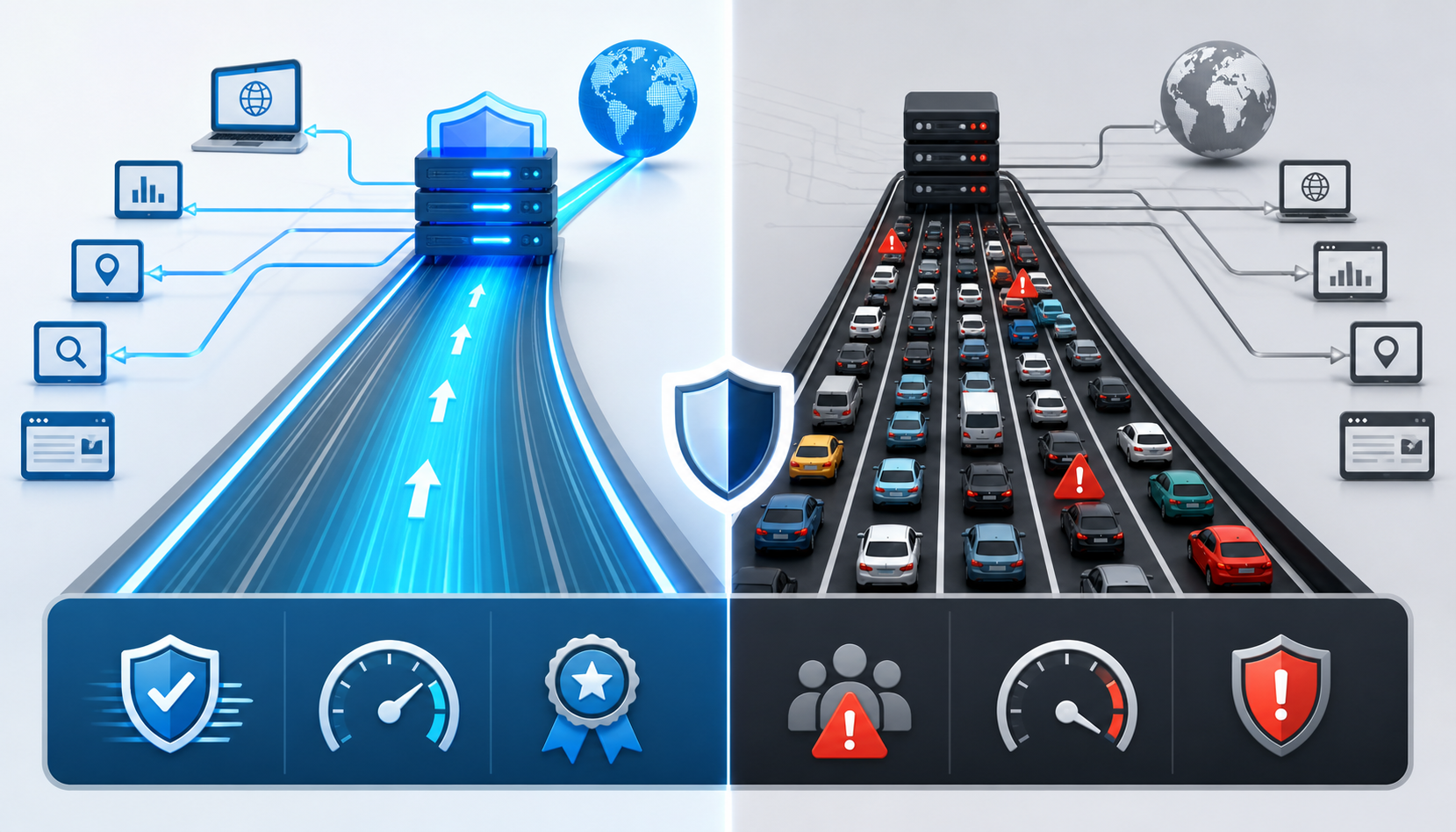
Private vs Shared Proxies: Which One Should You Use?
Private vs Shared Proxies: Which One Should You Use?
If you are comparing **private vs shared proxies**, the real question is simple: who else is using the same proxy IP?
That one detail affects speed, reliability, proxy reputation, block risk, security exposure, and cost. A private proxy gives you more control because fewer people, or only you, use the IP. A shared proxy costs less because multiple users access the same proxy pool. A public proxy is open or freely available, but it is usually too unstable and risky for serious work.
This guide focuses only on the proxy sharing model. It will help you decide whether you need exclusivity, lower cost, or a temporary proxy option.
For the LycheeIP implementation details behind this step, review LycheeIP proxy infrastructure.
For the LycheeIP implementation details behind this step, review static residential proxies.
For the LycheeIP implementation details behind this step, review rotating residential proxies.
For the official technical reference behind this point, see MDN HTTP overview.
What is the difference between private, shared, and public proxies?
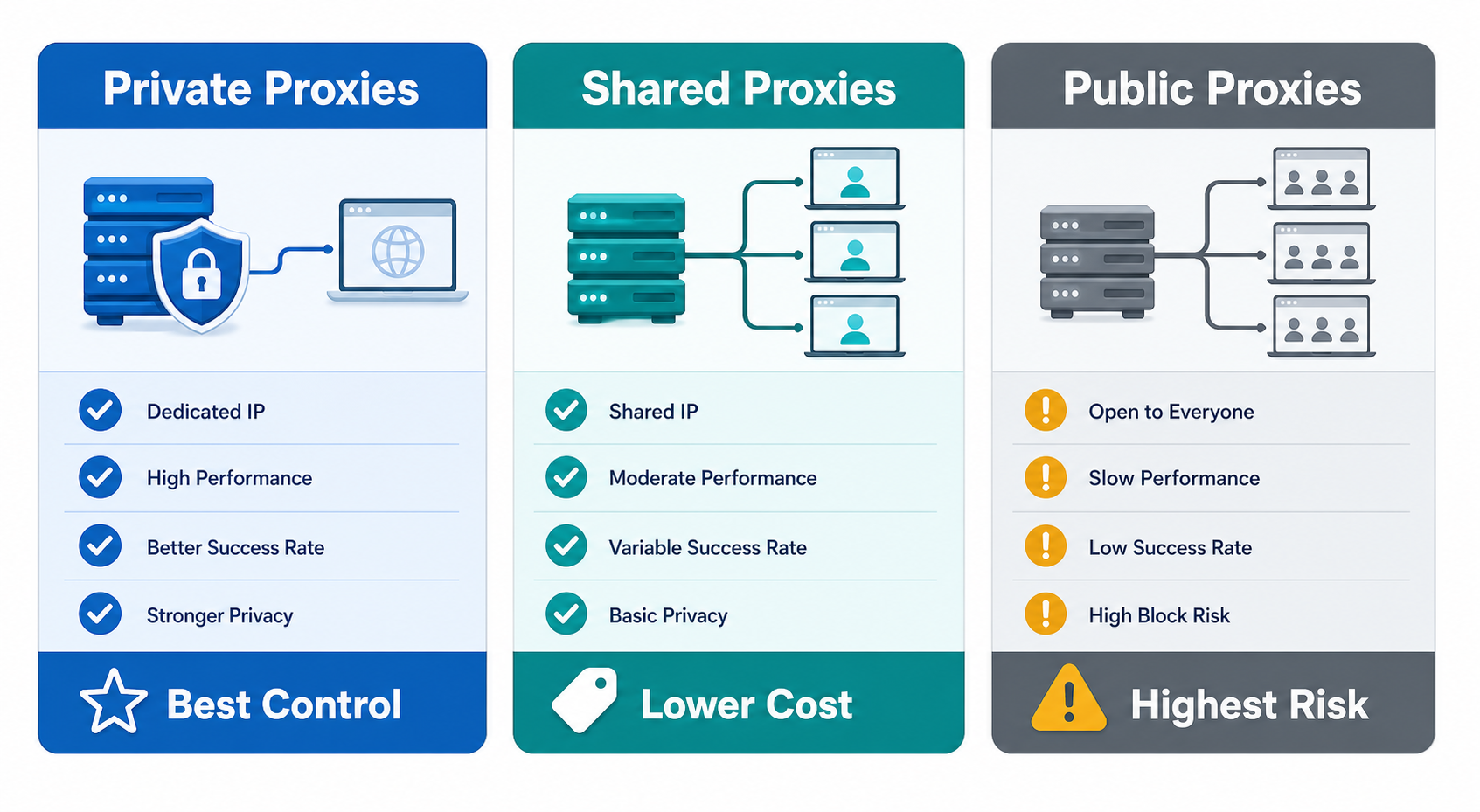
Private, shared, and public proxies differ by how many people can use the same proxy IP.
A private proxy is assigned to one user, one account, or one customer environment. In many commercial contexts, this is also called a dedicated proxy, although providers may define the terms differently. Some providers use “private” to mean limited-user access, while “dedicated” means single-user access. Always confirm the provider’s wording before you buy.
A shared proxy is used by multiple customers or users. You still get access through a provider, but the same proxy IP may serve other people’s workflows. This lowers cost, but it also means you have less control over how the IP reputation was built before your traffic touched it.
A public proxy is open, free, or widely available. Public proxies can look attractive because they cost nothing upfront, but they often come with major drawbacks: unstable uptime, unknown operators, inconsistent speeds, weak privacy, and a higher chance that the IP has already been abused.
The cleanest way to understand it is this:
So when comparing private vs shared proxies, do not start with price. Start with control.
How do private proxies compare with shared proxies?
Private proxies give you more control over speed, usage behavior, and proxy reputation, while shared proxies trade some of that control for lower cost.
This does not mean private proxies are always better. It means they are better when your workflow depends on stability, reputation, and consistent identity.
How do they compare on speed and bandwidth control?
Private proxies usually offer more predictable performance because fewer users compete for the same proxy IP and resources.
With shared proxies, speed can vary more. If other users on the same shared pool send heavy traffic, your performance may drop. This matters for tasks where timing, page loading, or request consistency affects results, such as rank tracking, automated testing, or scheduled scraping.
Private proxies are not automatically fast. A poorly maintained private proxy server can still be slow. But if the provider has good infrastructure, private access gives you a cleaner performance environment.
How do they compare on proxy reputation and block risk?
Private proxies usually give you better reputation control because your activity is not mixed with many unknown users.
Proxy reputation is the history and trust profile attached to a proxy IP. If an IP has been used for spam, aggressive scraping, suspicious logins, or repeated abuse, websites may treat future requests from that IP with more suspicion.
This is the biggest weakness of shared proxies. You may use the proxy carefully, but someone else may have already damaged the IP reputation before you start.
Private proxies reduce this risk because fewer users touch the same IP. Dedicated proxies reduce it further when only your account uses the IP. Still, private access does not guarantee zero blocks. Websites can also evaluate behavior, browser fingerprints, cookies, account history, request frequency, and location consistency.
How do they compare on cost and scalability?
Shared proxies are usually cheaper because the cost of infrastructure is spread across multiple users.
Private proxies cost more because you are paying for more exclusive access. Dedicated proxies may cost even more, depending on the provider’s model and how strict the exclusivity is.
For early testing, shared proxies may be enough. For production workflows, the cheaper option can become expensive if it causes more failed requests, account checks, CAPTCHAs, retries, or manual cleanup.
A practical way to judge cost is not “price per proxy.” It is “cost per successful outcome.”
Ask:
- How many successful requests did the proxy support?
- How many blocks or CAPTCHAs did it trigger?
- How much time did the team spend fixing failures?
- How many accounts, tests, or workflows were disrupted?
- How often did IPs need replacement?
If shared proxies work cleanly for your use case, they may be the better financial choice. If shared proxies create constant failures, private proxies may cost less in the long run.
How do they compare by best-fit use case?
Private proxies are best when you need consistent access, stable identity, and better control over proxy IP usage.
Shared proxies are best when cost matters more than exclusivity.
Use private proxies for:
- SEO rank tracking where clean location and consistency matter
- Sensitive account workflows
- Production scraping where IP reputation affects success
- Ad verification and QA tasks
- Repeated testing from the same location
- Workflows where downtime is costly
Use shared proxies for:
- Low-risk browsing
- Lightweight testing
- Early-stage proxy experiments
- Simple automation checks
- Budget-limited workflows
- Tasks where occasional failure is acceptable
Use public proxies only for temporary, low-risk experiments where security, privacy, reliability, and account safety do not matter.
When are shared proxies still good enough?
Shared proxies are good enough when the workflow is low-risk, non-sensitive, and does not depend heavily on IP reputation.
They can be useful when you are still validating an idea. For example, if a team wants to test whether a tool supports proxy configuration at all, shared proxies may be fine. If a marketer wants to check basic access from another location, shared proxies may be enough. If a developer wants to run a small proof of concept, a shared proxy can reduce early cost.
Shared proxies can also make sense when the target website is not aggressive about proxy detection and the workflow does not involve accounts, payments, or repeated logins.
Good shared proxy use cases include:
- Basic browsing through another IP
- Testing proxy support inside a tool
- Checking simple page access
- Small scraping experiments on low-risk targets
- Budget-limited research
- Temporary QA checks
The key is to know when you have outgrown them.
You should consider moving from shared proxies to private or dedicated proxies when:
- You see inconsistent performance
- You get blocked even at low volume
- You need stable sessions
- You manage accounts
- You need cleaner location control
- You care about repeatable results
- You cannot afford reputation damage from other users
Shared proxies are not bad by default. They are just a weaker fit for workflows that depend on control.
Why are public proxies risky for serious workflows?
Public proxies are risky because you usually do not know who operates them, who used them before, or whether they are stable.
A public proxy may work for a few minutes and fail later. It may be overloaded. It may be blacklisted. It may inject unwanted content. It may expose traffic. It may disappear without warning. Even when a public proxy works, the IP reputation may already be poor because many unknown users have touched it.
For serious business workflows, this creates several problems.
First, uptime is unreliable. A public proxy that works during setup can fail during production.
Second, the previous usage is unknown. The proxy IP may have been abused before you used it.
Third, security exposure is higher. You should not route sensitive logins, customer data, financial data, private dashboards, or internal tools through a proxy you do not trust.
Fourth, public proxies often attract abuse. This means websites may already distrust them.
For the LycheeIP implementation details behind this step, review AI-powered browser automation hub.
Avoid public proxies for:
- Business accounts
- Client work
- Scraping projects
- SEO rank tracking
- Ad verification
- Fintech or security QA
- Login-based workflows
- Anything involving private or sensitive information
A free proxy can become expensive if it damages accounts, breaks workflows, or exposes data.
Which proxy sharing model should you choose?
Choose the proxy sharing model based on how much control, trust, and stability your workflow needs.
For the official technical reference behind this point, see Anthropic documentation.
A simple decision rule helps:
Choose shared proxies when the job is temporary, low-risk, and budget-sensitive.
Choose private proxies when the job needs consistency, cleaner proxy reputation, and fewer surprises.
Choose dedicated proxies when one user, one project, or one account needs strong isolation.
Avoid public proxies when the work is serious, sensitive, or client-facing.
What mistakes should you avoid when choosing between private and shared proxies?
The biggest mistake is buying based on price before understanding reputation risk.
A cheap proxy can be useful, but only when the workflow can tolerate failures. For serious work, the cost of a blocked account, broken scraper, or unreliable result can be higher than the savings.
Avoid these mistakes:
Buying shared proxies for login-heavy workflows
If an account keeps logging in through IPs with mixed history, it may trigger security checks. For account workflows, stable private or dedicated proxies are usually safer.
Using public proxies for business tasks
Public proxies are not a serious infrastructure choice. They are too unstable and too risky for production work.
Assuming private always means dedicated
Some providers use “private” loosely. Ask whether the proxy IP is single-user, limited-user, or shared within a small pool.
Ignoring replacement policies
Even private proxies can fail. Check whether the provider allows replacements, how often, and under what conditions.
Mixing too many workflows on one proxy IP
Do not run account logins, scraping tests, SEO checks, and unrelated experiments through the same IP without a plan. Mixed usage can damage your own proxy reputation.
Scaling before testing
Start with a small pool. Test success rate, block rate, latency, and replacement quality before buying more.
Treating proxies as a privacy guarantee
A proxy can hide your original IP from the destination website, but it does not erase browser fingerprints, cookies, account data, payment trails, or behavior patterns.
Why LycheeIP fits this decision stage
LycheeIP is useful for teams that do not just want “a proxy,” but need the right proxy setup for a real workflow.
If you are comparing private vs shared proxies, your next question is usually about control. Do you need stable access? Cleaner proxy reputation? Better session management? Better location control? A setup that can support scraping, SEO checks, account workflows, or QA without random public proxy risk?
That is where a structured proxy provider matters.
For low-risk experiments, shared proxies may be enough. For serious workflows, evaluate private or dedicated proxy options and test them against your actual use case before scaling.
Compare LycheeIP Proxy Plans for Your Workflow
Final recommendation
If you only need a temporary, low-risk proxy, shared proxies may be good enough.
If you need reliability, cleaner proxy reputation, stable sessions, or business-grade control, private proxies are the better choice.
If the workflow involves sensitive accounts, client work, production scraping, rank tracking, ad checks, or fintech QA, avoid public proxies completely and choose a private or dedicated setup that you can monitor, test, and replace when needed.
Frequently Asked Questions
Are private proxies better than shared proxies?
Private proxies are better when you need more control, stable performance, and cleaner proxy reputation. Shared proxies can still work for low-risk browsing, simple tests, or short-term tasks where occasional blocks or slower speeds are acceptable.
Are private proxies the same as dedicated proxies?
Not always. Some providers use “private proxies” to mean limited access, while “dedicated proxies” means only one customer uses the proxy IP. Before buying, confirm whether the IP is single-user, limited-user, or shared with other customers.
Are shared proxies safe to use?
Shared proxies can be safe enough for low-risk tasks if they come from a trusted provider. They are not ideal for sensitive logins, client work, financial workflows, or anything where proxy reputation and session stability matter.
Why are public proxies not recommended?
Public proxies are risky because anyone can use them, and you usually do not know who operates them or how the IP was used before. They may be slow, unstable, already blocked, or unsafe for private data and business workflows.
Can a shared proxy get my account blocked?
Yes, it can happen. If the shared proxy IP has poor reputation or is used by many unrelated users, login-heavy platforms may treat the activity as suspicious. For account workflows, private or dedicated proxies are usually a safer choice.
Do private proxies hide my IP address?
Yes, a private proxy can hide your original IP address from the destination website by showing the proxy IP instead. However, it does not hide every identity signal, such as cookies, browser fingerprints, account history, or behavior patterns.
Which is better for SEO rank tracking, private or shared proxies?
Private proxies are usually better for SEO rank tracking because they offer cleaner IP control and more consistent location signals. Shared proxies may work for lighter checks, but they can produce less reliable results if the IP reputation is poor.
Should I use public proxies for web scraping?
Public proxies are not recommended for serious web scraping. They are unstable, often overused, and may already be blocked by many websites. For production scraping, private proxies or a controlled rotating proxy pool are safer options.
How many private proxies do I need?
The number depends on your use case, request volume, target sensitivity, session length, and failure tolerance. Start with a small test pool, measure success rate and block rate, then scale based on real performance instead of guessing.
When should I upgrade from shared proxies to private proxies?
Upgrade when shared proxies start causing inconsistent speed, frequent blocks, login challenges, unreliable location results, or poor success rates. You should also upgrade when the workflow becomes business-critical or client-facing.
Related LycheeIP Guides and Resources

Recommended Articles

DataDome Bypass for Web Scraping
DataDome Bypass for Web Scraping
View Details
Web Scraping Rate Limiting: How to Handle 429s, Backoff, and Concurrency
Web scraping rate limiting is the engineering discipline of keeping an authorized collection workload inside a target service's acceptable request envelope. When that envelope is exceeded, a server may respond with HTTP 429 Too Many Requests, delay responses, or apply other controls.
View Details
reCAPTCHA vs hCaptcha vs Cloudflare Turnstile: What Scraping Teams Need to Know
If an authorized data-collection workflow suddenly stops at a verification screen, identifying the protection system matters before you change code, browser settings, or proxy infrastructure. reCAPTCHA vs hCaptcha vs Turnstile is not simply a branding comparison. The three systems can expose different browser flows, token models, risk decisions, and failure symptoms.
View Details
Browser Automation Proxies: IPs, Geo-Targeting, Sessions, and AI Agents
A browser automation proxy belongs to the network layer of Playwright, Selenium, cloud-browser, and AI-agent workflows. It changes how browser traffic is routed and can affect the source IP address, geographic egress, and session continuity seen by a destination site. It does not improve an AI model's reasoning, repair browser logic, or guarantee that a website will accept the session.
View Details
SERP Scraping: Methods, APIs, Workflows, and Best Practices
SERP scraping is the automated collection of information from search engine results pages. A SERP scraper can capture organic rankings, advertisements, featured snippets, People Also Ask questions, local results, shopping listings, images, and other search features, then convert them into structured data for analysis.
View Details