
How to Test Proxies: A Practical Reliability Checklist

How to Test Proxies: A Practical Reliability Checklist
How to Test Proxies: A Practical Reliability Checklist
How to Test Proxies for Connectivity, Speed, and Reliability
To test a proxy properly, verify seven things: connectivity, authentication, exit IP, location, target-specific access, timing, and stability under realistic load.
A basic IP checker confirms only part of the picture. It cannot prove the proxy works with your target, that a sticky session stays stable, or that performance survives production concurrency.
A useful proxy test is a sequence that moves from the network layer to the actual workload.
This guide shows a practical proxy testing workflow for developers, data teams, and infrastructure operators. Use it on proxy infrastructure you are authorized to access and against destinations you are permitted to test.
What Should You Test in a Proxy?
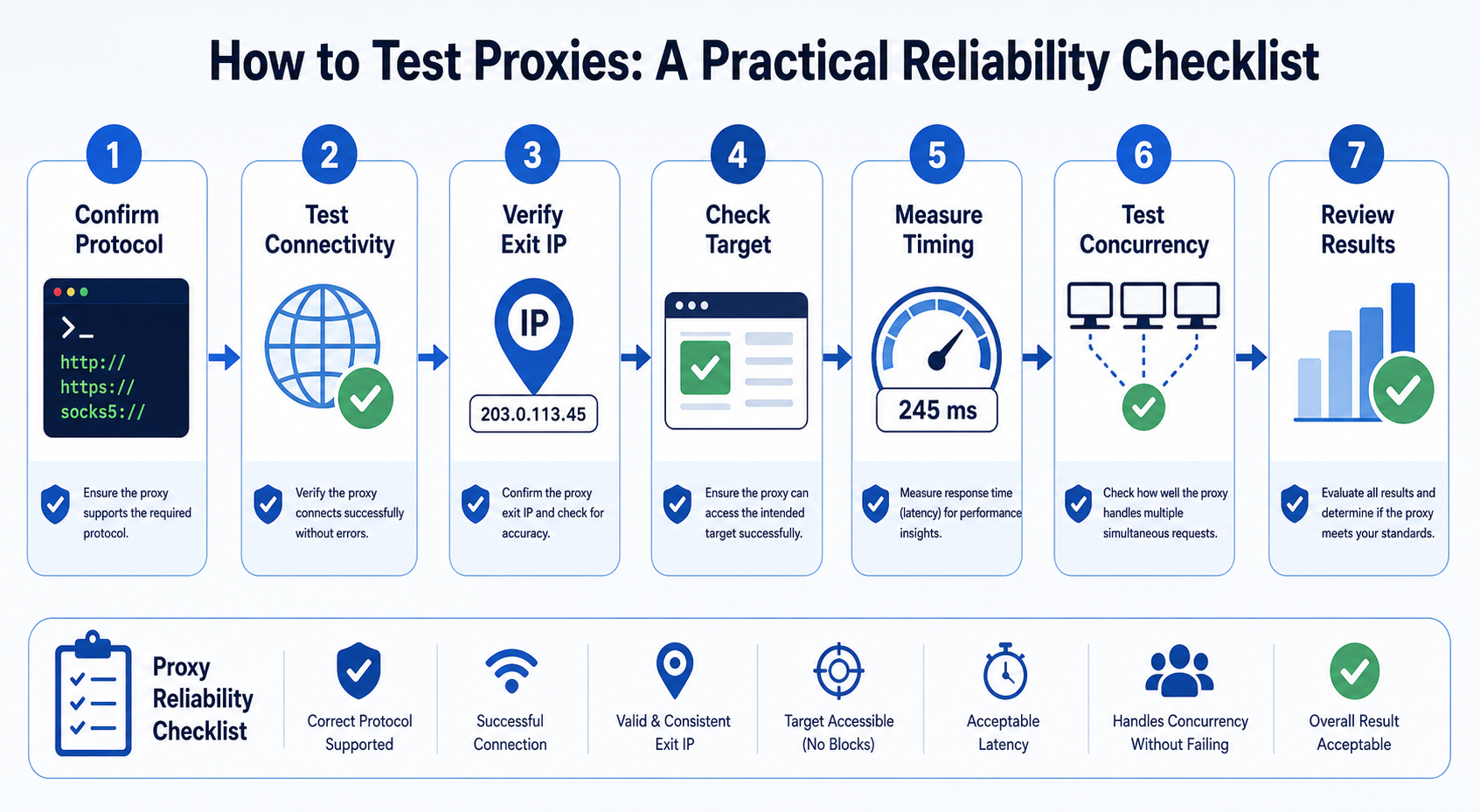
A production-ready test should verify endpoint connectivity, authentication, exit IP, routing location, target access, timing, and reliability across repeated or concurrent requests. Each check isolates a different failure mode.
For example, an HTTP 407 response points to proxy authentication. MDN defines 407 Proxy Authentication Required as a failure caused by missing or invalid credentials for the intermediary proxy. That is different from a 401 Unauthorized response sent by the destination service.
Likewise, an IP lookup can succeed while your real target returns a rate limit, access-control response, or unexpected page.
Test in layers so you know where the failure begins.
For the LycheeIP implementation details behind this step, review LycheeIP proxy infrastructure.
Step 1: Confirm the Proxy Format and Protocol
Before testing performance, confirm that your client and proxy agree on the protocol.
A proxy credential may look conceptually like:
scheme://username:password@host:port
Common schemes include http://, https://, socks5://, and socks5h://. The scheme matters.
cURL documents that a proxy without an explicit scheme, or one using http://, is treated as an HTTP proxy. It also supports SOCKS variants including socks5:// and socks5h://.
For SOCKS connections, DNS behavior can also differ. The Python Requests documentation explains that socks5 resolves the destination name on the client, while socks5h resolves it through the proxy server.
If a proxy works by IP address but fails when the target is a hostname, DNS handling is one of the first things to inspect.
Check the port and endpoint
Confirm the hostname, port, protocol, credential format, geo or session parameters, and any IP allowlisting. Providers often encode routing controls in the username, so a typo can authenticate yet select the wrong route.
Do not paste live proxy credentials into public proxy-checker websites unless you trust the service and understand how credentials are handled.
Step 2: Test Basic Connectivity With cURL
cURL is one of the fastest ways to isolate a proxy problem from your application.
Use a destination that you control or a simple test endpoint.
For an HTTP proxy:
curl \ --proxy "http://proxy.example:8000" \ --proxy-user "$PROXYUSER:$PROXYPASS" \ --max-time 20 \ https://example.com/
The --proxy option, also available as -x, tells cURL which proxy to use. --proxy-user supplies credentials.
Keep secrets out of screenshots, tickets, and shell history where possible. Environment variables are convenient for local testing, but they are not a complete secret-management strategy.
Interpret the first result
If the request succeeds, move to exit-IP validation. A 407 points to proxy authentication. Resolution failures suggest hostname or DNS problems. Timeouts can involve the endpoint, port, firewall, routing, or provider. For TLS failures, determine whether the proxy or destination handshake failed before changing certificate settings.
cURL warns that skipping HTTPS proxy certificate verification makes the proxy connection insecure.
Step 3: Verify the Exit IP and Location
After basic connectivity works, confirm what the destination sees.
Send the request through the proxy to an approved IP information endpoint. Record the exit IP, country, region, city when needed, ASN, and network owner. Compare the result with a direct request.
A changed IP proves that traffic reached the test destination through a different network path. It does not prove that the proxy is suitable for your production target.
Why IP geolocation can disagree
Two geolocation databases may report nearby but different cities because IP location relies on network-attribution data, not device GPS. Define the accuracy your application needs. Country routing may be enough for localization, while city-specific QA requires validating the target content as well as the IP database.
Check rotation and sticky sessions
If you purchased rotating proxies, create multiple fresh sessions and record the exit IP.
If you purchased sticky or static sessions, send repeated requests using the same session identifier.
Test whether the IP remains stable for the duration you require.
A simple test can log one IP at intervals across the required session window and record any unexpected changes.
For the LycheeIP implementation details behind this step, review static residential proxies.
Step 4: Test the Exact Target, Not Only an IP Checker
This is the most important step.
A proxy that reaches an IP-check service can still fail on the website, API, or application your workload uses.
Send a request to the actual target you are authorized to access. Record the final URL, status, redirects, response size and type, an expected content marker, total time, and error category.
Do not define success as status code 200.
A 200 response can contain a challenge page, login page, consent screen, maintenance notice, or application shell without the required data.
Validate the content.
For a product page, check the target product identifier.
For a search page, check that the requested query and expected result container are present.
For an internal service, validate a known health response or schema.
Test multiple pages from the same target
Different URL templates can behave differently.
If your application accesses category and product pages, test both. If it collects public search results and detail pages, test both.
A homepage is usually a poor proxy for the rest of a site's infrastructure.
Respect rate limits and access rules
An HTTP 429 Too Many Requests response indicates that the client sent too many requests within a period. The server may include a Retry-After header.
Record the response and slow the client appropriately.
Do not treat 429 as a signal to add more IPs simply to bypass a documented limit. Your application should respect the destination's rules, terms, and authorized request rate.
Step 5: Measure Proxy Timing Correctly
"Ping" is not a complete proxy speed test.
Many HTTP proxy workloads involve DNS, TCP connection setup, proxy negotiation, TLS handshakes, the destination server, and response transfer. A single latency number can hide where time is spent.
cURL's --write-out option can print transfer metrics after a request.
Example:
curl \ --silent \ --show-error \ --output /dev/null \ --proxy "http://proxy.example:8000" \ --proxy-user "$PROXYUSER:$PROXYPASS" \ --write-out \ 'code=%{httpcode} connect=%{timeconnect} appconnect=%{timeappconnect} starttransfer=%{timestarttransfer} total=%{time_total}\n' \ https://example.com/
Key metrics include:
- time_connect: time until the TCP connection to the remote host or proxy completes
- time_appconnect: time until the SSL, SSH, or other application connection handshake completes
- time_starttransfer: time until the first response byte begins
- time_total: total transfer time
cURL's documentation defines time_connect as the time from the start until the TCP connection to the remote host or proxy completes.
Compare distributions, not one request
Run repeated tests and calculate:
- median, or p50
- p90
- p95
- error rate
A proxy that returns one fast result and nine timeouts is not fast.
For a rotating pool, timing also reflects the variability of different exit nodes. Test enough sessions to see that variation.
For the official technical reference behind this point, see MDN HTTP overview.
Separate latency from throughput
Latency measures how long a request takes.
Throughput measures how much useful work the system completes over time.
For bulk jobs, record valid results per minute or hour. A slightly slower proxy can deliver higher throughput if it fails less often and needs fewer retries.
For the LycheeIP implementation details behind this step, review datacenter proxies.
Step 6: Build a Small Proxy Tester in Python
For repeated checks, automate the workflow.
The following example tests proxies against a URL you choose and records status, latency, and an expected text marker.
from __future__ import annotations

from dataclasses import dataclass
from time import perf_counter
from typing import Iterable

import requests
@dataclass
class ProxyResult:
    proxy_name: str
    ok: bool
    status_code: int | None
    elapsed_seconds: float
    error: str | None

def test_proxy(
    proxy_name: str,
    proxy_url: str,
    target_url: str,
    expected_text: str,
    timeout: tuple[float, float] = (10.0, 30.0),
) -> ProxyResult:
- proxies = {
- "http": proxy_url,
- "https": proxy_url,
- }
    started = perf_counter()

    try:
        response = requests.get(
            target_url,
            proxies=proxies,
            timeout=timeout,
        )
        elapsed = perf_counter() - started

        content_ok = expected_text in response.text
        ok = response.ok and content_ok

        return ProxyResult(
            proxy_name=proxy_name,
            ok=ok,
            status_code=response.status_code,
            elapsed_seconds=elapsed,
            error=None if ok else "content validation failed",
        )

    except requests.RequestException as exc:
        elapsed = perf_counter() - started
        return ProxyResult(
            proxy_name=proxy_name,
            ok=False,
            status_code=None,
            elapsed_seconds=elapsed,
            error=type(exc).__name__,
        )

def run_tests(
    proxy_items: Iterable[tuple[str, str]],
    target_url: str,
    expected_text: str,
) -> list[ProxyResult]:
- return [
- testproxy(name, url, targeturl, expected_text)
- for name, url in proxy_items
- ]
Use a target you own, a documented test endpoint, or another destination you are permitted to access.
The example deliberately uses a timeout. The Requests quickstart warns that requests do not time out unless a timeout value is specified.
Do not hard-code live credentials
Load proxy secrets from an approved secret-management mechanism.
Also be careful with logs. A proxy URL can contain the username and password. Do not print full proxy URLs in production error messages.
Validate more than text in production
The expected_text check is intentionally simple.
A production tester may validate:
- JSON Schema
- HTML selectors
- known item IDs
- content length ranges
- expected country or currency
- checksum or response fingerprints
- redirect destination
Keep transport success and content success as separate fields.
For the LycheeIP implementation details behind this step, review rotating residential proxies.
For the official technical reference behind this point, see HTTP Semantics standard.
Step 7: Test Concurrency and Failure Behavior
After single-request testing, simulate your expected workload.
Do not jump from one request to hundreds of workers.
Increase gradually:
- one worker
- five concurrent workers
- expected normal concurrency
- expected peak concurrency
At each level, record attempts, valid successes, timeouts, authentication failures, proxy errors, target 4xx and 5xx responses, and p50/p95 total time. Stop if the test would violate target rules or overload a system.
Test the provider gateway as well as individual exit IPs
Residential and mobile proxy products often expose a gateway rather than a permanent list of exit IPs.
Test gateway availability, authentication, session creation, geo controls, rotation, and exit-node variance. A list checker built for static IP:port proxies may misrepresent a gateway-based network.
How to Diagnose Common Proxy Test Failures
407 Proxy Authentication Required
Likely causes:
- incorrect username
- incorrect password
- expired credentials
- malformed geo or session parameters
- unsupported authentication method
- IP allowlisting not configured
Test a minimal credential format first, then add optional location or session parameters.
Proxy connects but location is wrong
Check:
- requested country or city code
- username syntax
- provider's supported locations
- session reuse
- cached application state
- the geolocation database used for validation
Then test the actual target content. The destination may use signals beyond IP location.
IP checker works but the target fails
This is a target-specific problem until proven otherwise.
Compare:
- direct request
- proxy request
- different proxy type
- another exit location
- response body
- headers
- redirects
- timing
Do not assume the proxy is "dead."
Requests are slow
Break the timing into stages.
Look for:
- proxy connect delay
- TLS handshake delay
- destination time to first byte
- large response transfer
- retries
- overloaded client connection pools
Test from the same client location you will use in production. A proxy checker running from a server in another country measures its network path, not yours.
SOCKS proxy reaches IPs but not hostnames
Check DNS resolution mode.
With Requests and cURL, socks5:// and socks5h:// can differ in where hostname resolution occurs. Use the scheme appropriate for your network design.
LycheeIP Proxy Testing Workflow
When evaluating LycheeIP residential, ISP, datacenter, or mobile proxy infrastructure, use the same repeatable test sequence rather than assuming every proxy type should produce identical results.
Start with a low-risk endpoint to verify authentication and the exit IP. Then test the required geography and session behavior. Finally, run the exact authorized workload at realistic concurrency.
A useful comparison matrix is:
- residential: rotation quality, geo coverage, and session controls
- ISP or static residential: IP persistence and long-session stability
- datacenter: connection time, throughput, and cost efficiency
- mobile: carrier or mobile-network routing and session behavior
Keep the validator constant when comparing proxy types.
The goal is not to prove one network class is always superior. It is to identify which infrastructure produces the highest percentage of valid outputs for your workload.
Validate proxy performance with LycheeIP routing
A Proxy Testing Checklist
Before moving a proxy configuration into production, confirm:
- protocol and endpoint are correct
- authentication succeeds consistently
- exit IP is different from the direct connection when expected
- country and region match the routing requirement
- the actual target returns valid content
- redirects and page markers are correct
- connection and total timing are within your limits
- sticky sessions remain stable for the required duration
- rotating sessions change according to your intended policy
- production-like concurrency does not create unacceptable failures
- credentials are not exposed in logs
- monitoring separates proxy errors from target errors
Save the results with a timestamp. Proxy and target behavior can change.
Frequently Asked Questions
How do I check if a proxy is working?
Send a request through the proxy to a known test endpoint. Confirm the request completes, the exit IP changes when expected, and the returned content is valid. Then test the actual destination you are permitted to access.
What is the best tool for testing proxies?
cURL is excellent for individual diagnostics and timing. A small Python tester is better for repeatable batch testing. Online proxy checkers can provide a quick overview, but their speed measurements reflect the checker's server location rather than your client.
How do I test proxy speed?
Measure repeated request timings and report p50 and p95 results. Track connection time, time to first byte, total time, error rate, and valid throughput. Do not rely on one ping result.
Why does my proxy return 407?
HTTP 407 means the proxy requires valid authentication credentials. Check your username, password, authentication configuration, IP allowlist, and any session or location parameters in the credential format.
Why does the proxy work in cURL but not Python?
Compare the proxy URL scheme, environment variables, certificate settings, DNS behavior, and timeouts. Requests can use standard proxy environment variables, and its documentation notes that environment proxy configuration can affect session behavior.
How do I test a rotating proxy?
Create multiple fresh sessions and log the exit IP for each. Also test sticky-session controls separately. Confirm rotation matches your provider configuration and your application's intended session model.
Can I test hundreds of proxies at once?
You can batch-test proxy infrastructure you are authorized to use, but increase concurrency responsibly. Your test destination also has capacity and access rules. A large checker should use bounded concurrency, timeouts, and clear error classification. Conclusion A proxy test should move from simple to specific. First confirm protocol and authentication. Then verify the exit IP and location. Next, test the exact authorized target and validate the returned content. Measure timing across repeated requests, check session behavior, and only then test production-like concurrency. This workflow gives you something a basic proxy checker cannot: evidence that the proxy is suitable for your application. The most useful proxy metric is not "alive." It is the percentage of requests that produce valid results under the conditions your workload actually uses.
Related LycheeIP Guides and Resources

Recommended Articles

DataDome Bypass for Web Scraping
DataDome Bypass for Web Scraping
View Details
Web Scraping Rate Limiting: How to Handle 429s, Backoff, and Concurrency
Web scraping rate limiting is the engineering discipline of keeping an authorized collection workload inside a target service's acceptable request envelope. When that envelope is exceeded, a server may respond with HTTP 429 Too Many Requests, delay responses, or apply other controls.
View Details
reCAPTCHA vs hCaptcha vs Cloudflare Turnstile: What Scraping Teams Need to Know
If an authorized data-collection workflow suddenly stops at a verification screen, identifying the protection system matters before you change code, browser settings, or proxy infrastructure. reCAPTCHA vs hCaptcha vs Turnstile is not simply a branding comparison. The three systems can expose different browser flows, token models, risk decisions, and failure symptoms.
View Details
Browser Automation Proxies: IPs, Geo-Targeting, Sessions, and AI Agents
A browser automation proxy belongs to the network layer of Playwright, Selenium, cloud-browser, and AI-agent workflows. It changes how browser traffic is routed and can affect the source IP address, geographic egress, and session continuity seen by a destination site. It does not improve an AI model's reasoning, repair browser logic, or guarantee that a website will accept the session.
View Details
SERP Scraping: Methods, APIs, Workflows, and Best Practices
SERP scraping is the automated collection of information from search engine results pages. A SERP scraper can capture organic rankings, advertisements, featured snippets, People Also Ask questions, local results, shopping listings, images, and other search features, then convert them into structured data for analysis.
View Details