
Best Social Media Proxies: A Practical Selection Guide

Best Social Media Proxies: A Practical Selection Guide
Best Social Media Proxies: A Practical Selection Guide
Best Social Media Proxies: How to Choose by Workflow and Risk
The best social media proxies are the ones that match your actual workflow, not the ones with the longest feature list. For location-sensitive quality assurance, mobile or residential IPs may be useful. For stable, long-running sessions, ISP or other static proxies can be easier to manage. For public-data workflows where collection is permitted, rotating residential proxies can provide broad geographic coverage. Datacenter proxies are usually better reserved for low-risk testing, internal tools, and targets that do not require consumer-network IPs.
That answer is less exciting than declaring one proxy type "best for every platform." It is also more accurate.
Social platforms evaluate far more than an IP address. Account history, authentication state, cookies, device signals, request patterns, API permissions, and user behavior can all affect whether a workflow succeeds. A proxy changes the network path and visible source IP. It does not make prohibited automation acceptable, erase browser fingerprints, or guarantee account safety.
This guide gives you a practical way to evaluate social media proxies for legitimate agency operations, regional QA, approved automation, and permitted public-web data workflows.
For the LycheeIP implementation details behind this step, review AI-powered browser automation hub.
For the official technical reference behind this point, see MDN HTTP overview.
Start With the Job You Need the Proxy to Do
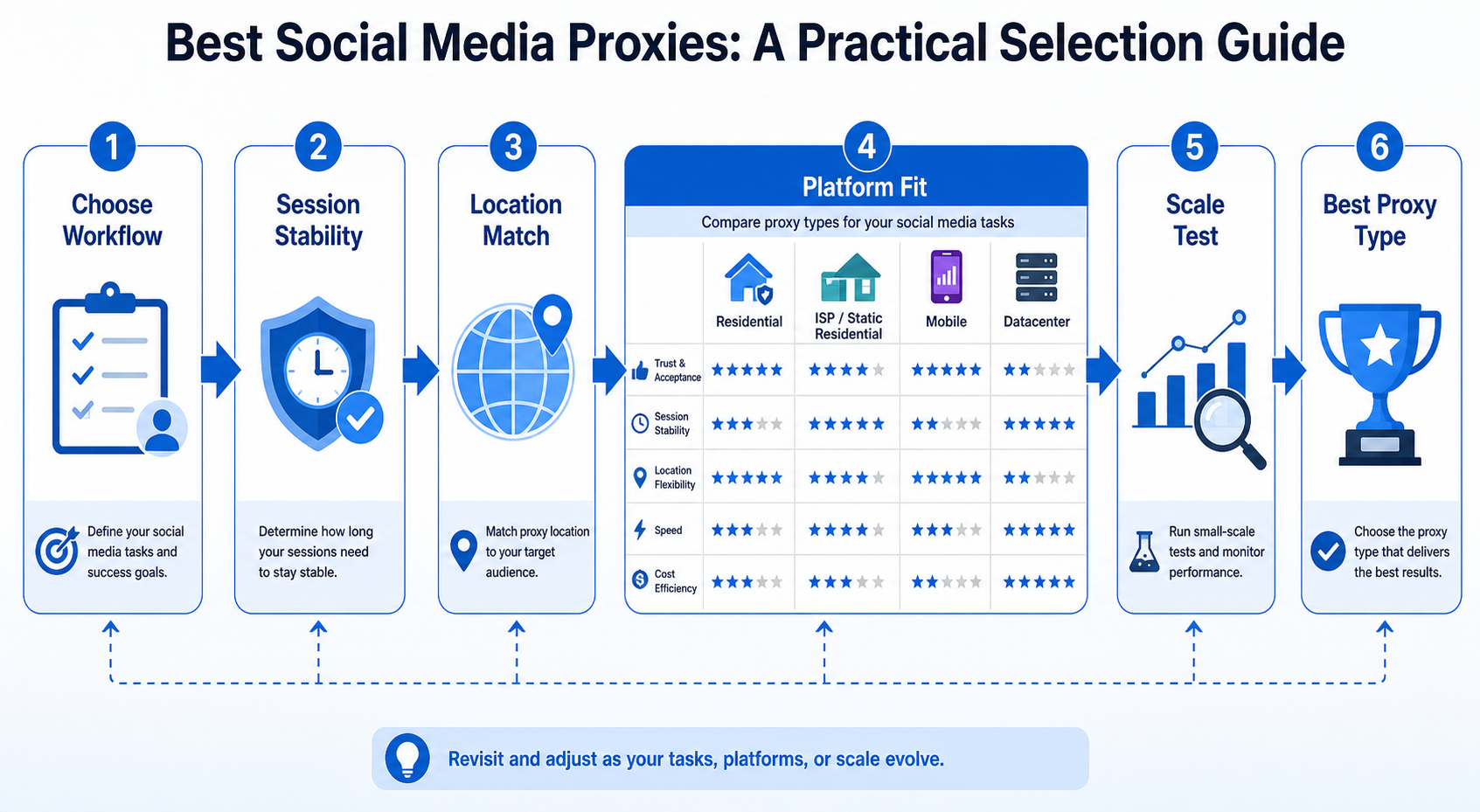
Before comparing providers, describe the workload in one sentence.
For example:
- "Our QA team needs to verify how public campaign pages appear from five countries."
- "Our application uses an official platform API and needs stable outbound IPs for infrastructure control."
- "We collect public pages where automated access is permitted and need a large rotating pool."
- "A distributed support team needs consistent network egress for approved account operations."
These workloads sound similar because they involve social platforms. Their network requirements are different.
A useful selection model has five questions:
- Do you need a stable IP or a new IP across requests?
- Is accurate country, state, or city targeting important?
- Does the target expect a mobile, household, or server-network connection?
- How long must one session remain consistent?
- What do the platform's terms, API rules, and applicable laws permit?
Answer those questions before looking at pool size or price per gigabyte.
Stable sessions and rotating traffic solve different problems
Rotating proxies change exit IPs between requests or according to a provider policy. They can fit distributed, permitted public-data collection. Sticky or static proxies preserve a more consistent network identity for regional QA and long sessions.
Do not rotate simply because rotation sounds sophisticated. If the application needs continuity, aggressive rotation creates operational noise.
For the LycheeIP implementation details behind this step, review static residential proxies.
Which Proxy Type Is Best for Social Media Workflows?
There is no universal winner. Residential, ISP, mobile, and datacenter proxies each trade cost, stability, targeting, and network characteristics differently.
Proxy type | Best fit | Main strength | Main limitation Rotating residential | Permitted public-page collection and broad geo testing | Large consumer-network footprint and flexible rotation | Bandwidth cost and variable IP quality ISP or static residential | Stable regional sessions and long-lived workflows | Consistent IP with ISP-associated network characteristics | Smaller inventory and higher per-IP cost Mobile | Mobile-network QA and carrier-sensitive regional checks | Traffic exits through mobile-network address space | Usually expensive and less predictable Datacenter | Low-risk testing, internal tools, and tolerant targets | Fast, inexpensive, easy to scale | Server-network IP ranges are easier to classify
Rotating residential proxies
Residential proxies route traffic through IP addresses associated with consumer internet connections, commonly through a gateway that selects exits from a pool.
They fit broad geographic coverage, country or city routing, and rotation across separate, permitted public-web requests. They are a poor excuse for changing countries every few seconds inside one authenticated browser session.
Test the actual locations you need. Global coverage claims do not reveal availability, latency, or success in a specific city.
For the LycheeIP implementation details behind this step, review rotating residential proxies.
ISP and static residential proxies
ISP proxies combine stable IP allocation with ISP-associated or consumer-oriented address space. Vendor definitions vary, so verify how the product is actually sourced and routed.
Their main advantage is persistence. Stable egress fits regional content QA, long browser sessions, and approved workflows that map a workspace to one outbound IP. It is also easier to debug because the network identity is not constantly changing.
Mobile proxies
Mobile proxies use IP space associated with cellular networks. Use them when the network context is part of the test, such as mobile-first regional QA or carrier-sensitive redirects.
They are not automatically "safer" for account automation. A mobile IP does not override platform policies or compensate for inconsistent sessions or unauthorized scripts. Choose mobile routing because mobile-network characteristics are required, not because a platform name appears in a generic comparison chart.
Datacenter proxies
Datacenter proxies use hosting or server-network IPs. They are often fast, inexpensive, and simple to operate, making them useful for development, integration tests, checks against your own services, and tolerant endpoints.
Server-network ranges can be easier to classify as non-consumer traffic. Do not pay residential rates for a test that only needs a second outbound IP, but do not force datacenter routing into a location-sensitive workflow that requires a consumer or mobile network profile.
The Best Social Media Proxy Depends on the Platform and the Action
It is tempting to create a simple chart saying "mobile for TikTok, residential for Facebook, ISP for X." Real deployments are more nuanced.
The same platform can require different infrastructure depending on the action.
Instagram and Facebook
For Meta properties, separate regional content testing from account automation. For legitimate QA, prioritize accurate geo targeting, stable sessions, and direct comparison of proxied and non-proxied results. For business automation, start with official APIs and permissions. A proxy is network infrastructure, not platform authorization.
LinkedIn deserves extra caution. Its User Agreement prohibits software, scripts, crawlers, plugins, and similar processes used to scrape or copy the service, and it prohibits bypassing access controls or use limits.
The engineering question is therefore not "which IP avoids a block?" Use supported products, approved integrations, and official APIs where available. Stable egress may still serve permitted corporate networking or QA needs, but it does not change the platform contract.
X
X's automation rules distinguish permitted use from prohibited behaviors such as unsolicited bulk automated direct messages and certain automated engagement. For approved integrations, prioritize API architecture and rate-limit handling. Do not use IP rotation to circumvent API limits. Proxies can still support network segmentation, controlled egress, and regional testing within the rules.
TikTok
For TikTok, mobile-network testing can be useful when validating regional public experiences, while residential routes may fit country-specific QA. A proxy can reproduce a network location; it cannot guarantee content reach, recommendation behavior, or account outcomes. For advertising or business integrations, use supported business and developer products where they fit the task.
A Better Way to Compare Social Media Proxy Providers
Provider comparisons often focus on four numbers: IP pool size, countries, price, and advertised speed. Those metrics are easy to publish. They are not enough to predict your production experience.
Use a weighted evaluation score instead.
1. Target-location success
List your required locations and test each one.
A provider with excellent global coverage may still perform poorly in the exact city or country that matters to your campaign. Measure whether the proxy actually exits in the requested location and whether geolocation databases agree closely enough for your use case.
Do not assume every database will return identical city-level results. Geolocation is an inference system, not GPS.
2. Session control
Check how the provider implements sticky sessions.
Ask:
- How is a session ID created?
- How long can a session persist?
- What happens if the selected IP goes offline?
- Can the same session be recreated after a client restart?
- Is rotation time-based, request-based, or configurable?
For long-lived workflows, session behavior can matter more than the total number of IPs in the network.
3. Protocol and authentication support
Verify the protocols your application actually uses.
HTTP and HTTPS proxying are common. SOCKS5 is useful for clients that support generic TCP proxying and related networking requirements. SOCKS Version 5 is formally defined in RFC 1928 and includes support for IPv6 addressing and multiple authentication-method negotiations.
Also test authentication. Providers commonly use username and password credentials, IP allowlisting, or both.
A 407 Proxy Authentication Required response means the proxy did not accept the credentials supplied for the intermediary. It is not the same as a 401 from the destination website.
4. Failure visibility
A good proxy product should make failures diagnosable.
Look for:
- clear error messages
- documented authentication formats
- session and geo parameters
- usage visibility
- API documentation
- status information
- logs or request identifiers where available
"Connection failed" is not enough when you are running thousands of jobs.
For the official technical reference behind this point, see Anthropic documentation.
5. Commercial fit
Compare pricing against the traffic pattern.
Bandwidth-based pricing can work well for light HTML requests but become expensive for image-heavy browser sessions or video pages. Per-IP pricing can be easier to forecast for static workspaces. Per-request pricing may fit managed scraping products better than raw proxy access.
The cheapest unit price is not necessarily the lowest total cost. Add engineering time, failed requests, retries, support requirements, and unused commitments.
LycheeIP for Developer-First Proxy Infrastructure
LycheeIP is a practical option for teams that want to evaluate multiple proxy types within a developer-focused infrastructure workflow. Its product range includes residential, ISP or static residential, datacenter, and mobile proxy options, which makes it possible to choose the network type around the workload instead of forcing every project through one proxy category.
Start with a test matrix: static or ISP-style IPs for session continuity, residential rotation for permitted public-page collection and geographic coverage, mobile routes for carrier-network QA, and datacenter proxies for low-risk development.
The value of multiple network classes is the ability to measure the same permitted workflow instead of relying on claims such as "mobile is always best." Treat LycheeIP or any provider as infrastructure. The application still needs compliant automation, secure credentials, rate control, and monitoring.
For the LycheeIP implementation details behind this step, review LycheeIP proxy infrastructure.
How to Test a Social Media Proxy Before Scaling
Do not buy a large package and immediately route production traffic through it.
Run a controlled pilot.
Step 1: Verify the exit IP and location
Connect through the proxy and query an IP information service. Record:
- exit IP
- country
- region or city when relevant
- ASN or network owner
- proxy type as reported by your provider
Repeat the test across multiple sessions.
Step 2: Test the exact public page or approved endpoint
A generic "what is my IP" page only proves the proxy can connect to one service.
Test the actual destination your workflow is permitted to access. Record status codes, page titles, response size, and whether the expected content is present.
A 200 status alone is not proof of success. Some services return a 200 response containing a challenge, login wall, consent page, or incomplete content.
Step 3: Measure session stability
For sticky sessions, send repeated requests over the period your workload requires.
Track whether:
- the IP remains consistent
- the connection drops
- latency changes sharply
- the location changes
- authentication unexpectedly fails
Step 4: Test realistic concurrency
A proxy that works for one request may fail when 20 workers use it.
Increase concurrency gradually. Measure success rate, connect time, total response time, and error categories.
Do not use this step to overwhelm a third-party platform. Test within authorization, documented limits, and a responsible request rate.
Step 5: Calculate usable cost
Measure the amount of paid traffic or requests required to produce one valid result.
A simple metric is:
usable cost = total proxy cost / number of validated successful outputs
This is more useful than comparing advertised price per GB in isolation.
Common Social Media Proxy Mistakes
Treating a proxy as an antidetect system
A proxy changes network routing. Browsers and apps expose many other signals.
Do not assume a new IP creates a completely new device or user identity.
Rotating inside a session that needs continuity
If a browser session begins in one country and suddenly exits through another, your own application may become difficult to debug and the destination may treat the change as unusual.
Use deliberate session mapping.
Buying by pool size alone
Published pool size does not tell you how many IPs are available in your target location at the moment you need them.
Test inventory quality where your workload runs.
Ignoring platform rules
This is the most expensive mistake because technical success can still create contractual, legal, privacy, or account risk.
Read the current terms and API policies for every platform in your workflow.
Explore LycheeIP proxy options for social media workflows
Sending credentials into logs
Proxy URLs often contain usernames and passwords. Command histories, CI logs, screenshots, and verbose network traces can expose them.
Store secrets in environment variables or a secret manager. Redact credentials before sharing logs.
Frequently Asked Questions
What are social media proxies?
Social media proxies are proxy servers used as network intermediaries for workflows involving social platforms. They can provide a different outbound IP, a selected geographic exit location, or a stable network route. The term describes a use case, not a special proxy protocol.
Are residential proxies better than mobile proxies for social media?
Neither is universally better. Residential proxies are often more economical for broad geographic routing and rotating public-data workflows. Mobile proxies are relevant when mobile-carrier network characteristics are part of the requirement. Test the specific platform action and location.
Should I use rotating or sticky proxies?
Use rotation for separate requests that benefit from a distributed pool. Use sticky or static sessions when continuity matters. Do not rotate aggressively inside a workflow that depends on a persistent authenticated session.
Can a proxy prevent social media account bans?
No. A proxy changes the network path and visible source IP. Platforms can apply rules and evaluate many other signals. No responsible provider can guarantee that a proxy prevents restrictions or bans.
Are free social media proxies safe?
Free public proxies create significant reliability and security uncertainty because you may not know who operates them, how traffic is handled, or who else uses the same IP. For business workflows, use infrastructure with clear ownership, authentication, documentation, and support.
Can I use proxies for social media scraping?
That depends on the platform, the data, your location, applicable law, and the platform's current terms. Some platforms explicitly prohibit scraping or automated collection. Review the relevant rules and obtain legal guidance for high-risk data collection projects. Conclusion The best social media proxies are selected by workload. Start with the action you are authorized to perform. Decide whether the workflow needs rotation or continuity, how precise the location must be, and whether residential, ISP, mobile, or datacenter routing is technically justified. Then test the exact destination and calculate cost per usable result. This approach is slower than choosing the first "top proxy" in a comparison table. It produces better infrastructure decisions. For developer teams, the practical goal is not to find a magical IP that solves every platform problem. It is to build a measurable, policy-aware network layer that supports legitimate social media operations without hiding the tradeoffs.
Related LycheeIP Guides and Resources

Recommended Articles

DataDome Bypass for Web Scraping
DataDome Bypass for Web Scraping
View Details
Web Scraping Rate Limiting: How to Handle 429s, Backoff, and Concurrency
Web scraping rate limiting is the engineering discipline of keeping an authorized collection workload inside a target service's acceptable request envelope. When that envelope is exceeded, a server may respond with HTTP 429 Too Many Requests, delay responses, or apply other controls.
View Details
reCAPTCHA vs hCaptcha vs Cloudflare Turnstile: What Scraping Teams Need to Know
If an authorized data-collection workflow suddenly stops at a verification screen, identifying the protection system matters before you change code, browser settings, or proxy infrastructure. reCAPTCHA vs hCaptcha vs Turnstile is not simply a branding comparison. The three systems can expose different browser flows, token models, risk decisions, and failure symptoms.
View Details
Browser Automation Proxies: IPs, Geo-Targeting, Sessions, and AI Agents
A browser automation proxy belongs to the network layer of Playwright, Selenium, cloud-browser, and AI-agent workflows. It changes how browser traffic is routed and can affect the source IP address, geographic egress, and session continuity seen by a destination site. It does not improve an AI model's reasoning, repair browser logic, or guarantee that a website will accept the session.
View Details
SERP Scraping: Methods, APIs, Workflows, and Best Practices
SERP scraping is the automated collection of information from search engine results pages. A SERP scraper can capture organic rankings, advertisements, featured snippets, People Also Ask questions, local results, shopping listings, images, and other search features, then convert them into structured data for analysis.
View Details