
Ad Verification Proxies: How to Choose and Test Them
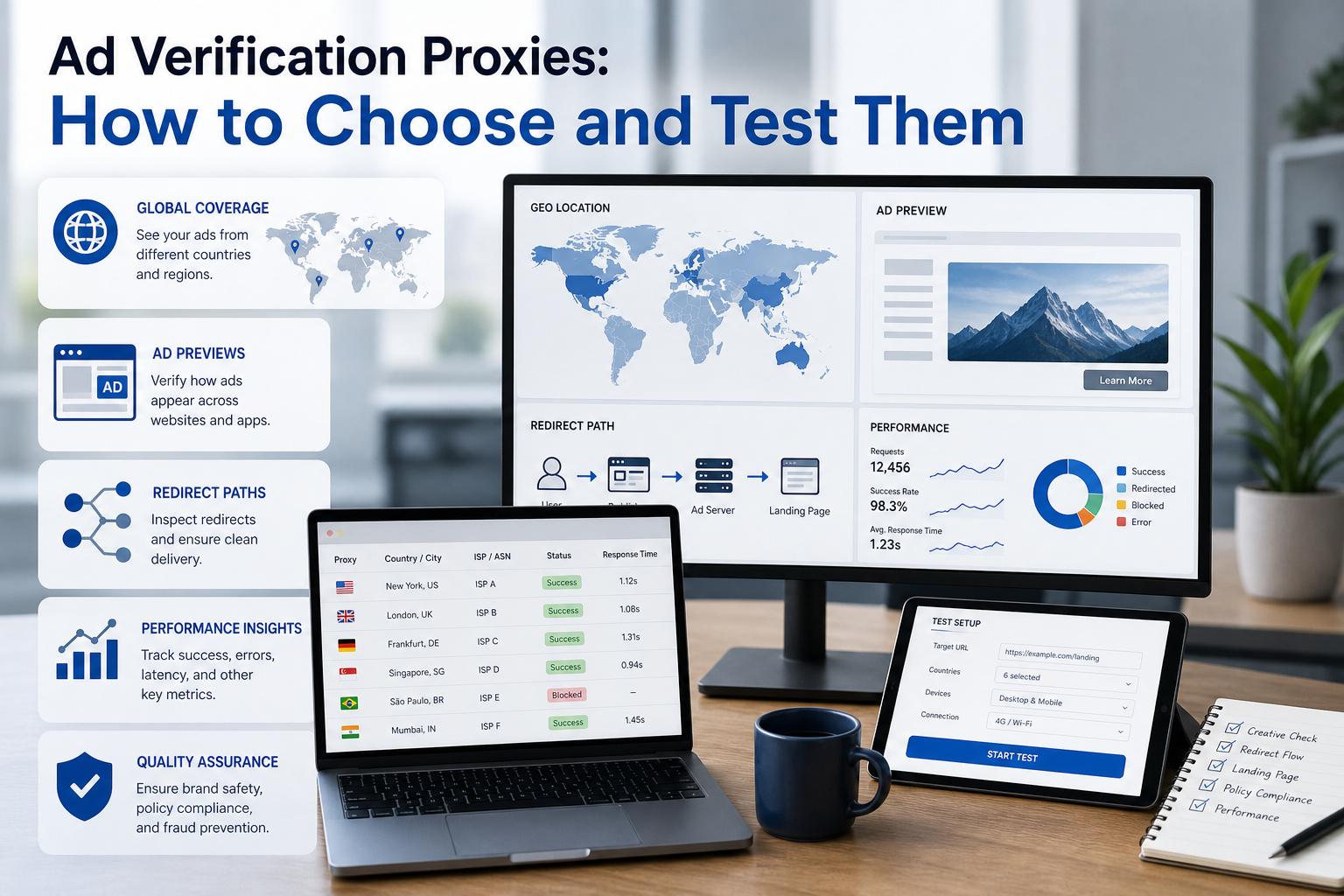
Learn how ad verification proxies support geo ad preview, fraud checks, and brand safety, plus how to choose, test, and operate the right proxy type.
Learn how ad verification proxies support geo ad preview, fraud checks, and brand safety, plus how to choose, test, and operate the right proxy type.
ad-verification-proxies
The best proxies for ad verification are selected by verification task, not by the largest advertised IP pool. This guide explains how to build a repeatable geo ad preview workflow, choose residential, mobile, ISP, or datacenter routes, capture evidence, and avoid false conclusions.
For the official technical reference behind this point, see Anthropic documentation.
For the official technical reference behind this point, see HTTP Semantics standard.
Full Article
Proxies for ad verification help teams inspect how ads, landing pages, redirects, and placements appear from different network locations. The right proxy can provide a local market vantage point, but it does not verify an ad by itself.
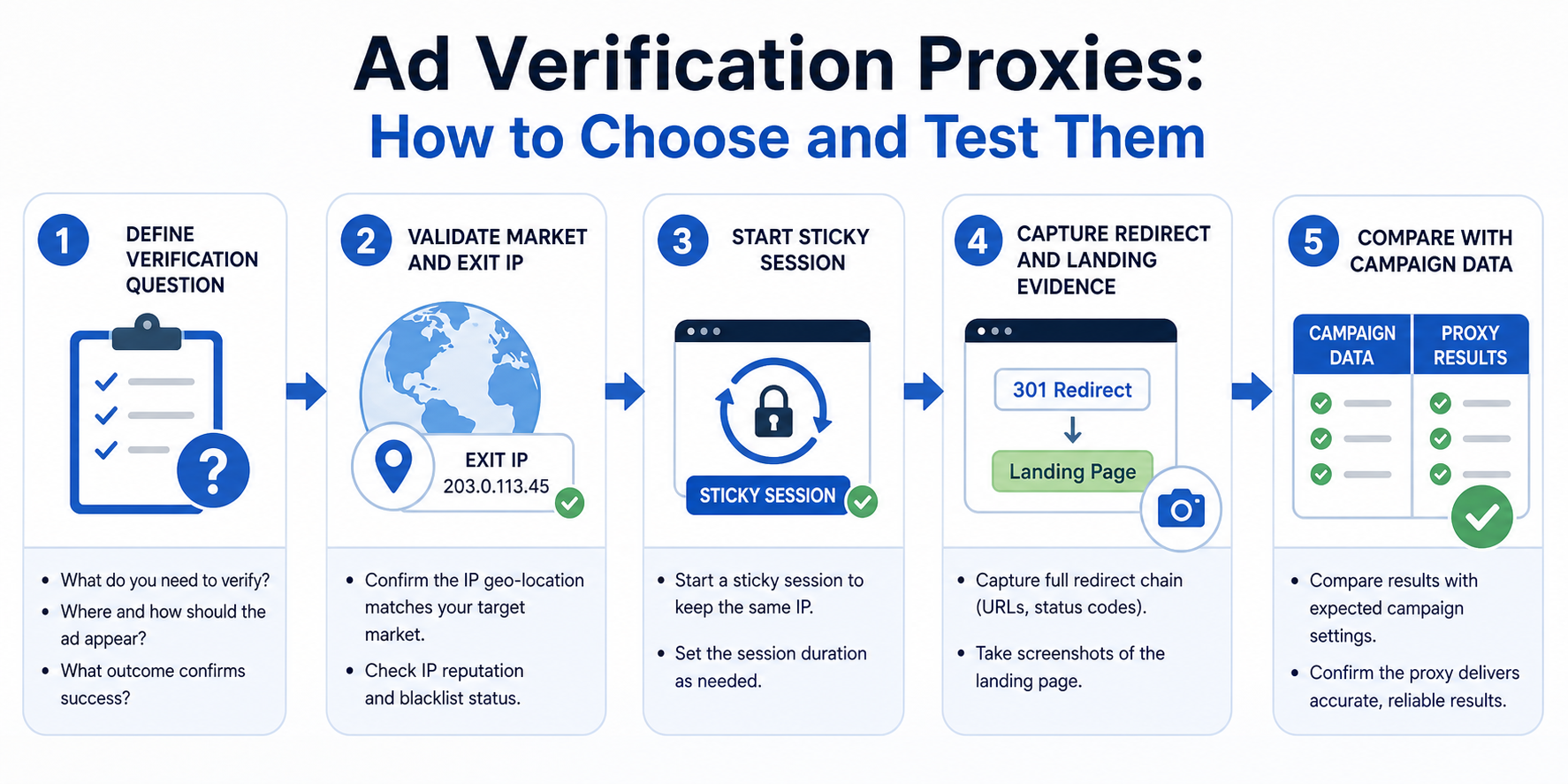
Reliable ad verification is a workflow. You need a defined test case, a representative network route, a controlled browser or device environment, consistent session handling, evidence capture, and a way to compare the observation with campaign settings or measurement data.
That is why choosing an ad verification proxy by price or IP pool size alone is a weak strategy. The better question is: what signal are you trying to validate?
What Does an Ad Verification Proxy Actually Verify?
An ad verification proxy changes the public network origin from which a page, app flow, or ad request is observed. That makes it useful when geography or network identity can affect ad delivery.
For the LycheeIP implementation details behind this step, review LycheeIP proxy infrastructure.
Common checks include:
- Whether a campaign appears in a target country or city
- Whether a creative is localized correctly
- Whether a landing page redirects users by region
- Whether a suspicious redirect chain appears only in selected markets
- Whether mobile or carrier-specific ad behavior differs from desktop
- Whether a publisher page places an ad beside unsuitable content
- Whether the observed destination matches the approved campaign URL
- Whether geo-targeting rules produce inconsistent user experiences
The proxy is only one part of the evidence.
Modern ad delivery can also depend on device type, browser state, language, time, audience eligibility, consent state, auction conditions, campaign budget, frequency controls, and prior interactions. A new IP address cannot recreate all of those factors.
This limitation is important. When an ad does not appear through a proxy, you have observed a result. You have not automatically proved that the campaign never serves in that market.
What Should You Check Before Using Proxies for Ad Verification?
Start with the platform's own preview, diagnosis, and campaign reporting tools where they are available.
Native tools are useful because they can explain campaign-side reasons for non-delivery, such as eligibility, targeting, billing, asset, or keyword conditions. They can also let you preview certain search ad scenarios without repeatedly creating live impressions.
However, a platform preview is not a complete replacement for external observation. Simulated previews may not reproduce every real-time condition, personalization factor, device environment, publisher context, redirect, or auction outcome.
Use the two approaches for different questions.
Question | Better starting point Why is my search ad not eligible to show? | Platform diagnosis What creative is configured in the campaign? | Platform interface Does the landing page redirect differently in another country? | Controlled geo observation What appears on a publisher page in a real browser? | Controlled geo observation Is an ad viewable according to measurement signals? | Verification and measurement tooling Does a suspicious chain occur only on mobile traffic? | Mobile-focused controlled testing Is traffic invalid or non-genuine? | Platform, analytics, verification, and fraud signals
A mature workflow combines internal campaign data with external testing rather than treating a proxy as a substitute for the ad platform.
Which Proxy Type Is Best for Ad Verification?
Residential proxies are the general-purpose choice for consumer web ad observation. Mobile proxies are better when carrier or mobile network behavior is part of the test. ISP proxies are strong for long, stable sessions. Datacenter proxies are useful for fast, low-cost checks where a hosting-network origin will not distort the result.
Residential proxies
Residential IPs are associated with consumer internet networks. They are useful for geo ad preview, localized landing page checks, publisher-page observation, and market-by-market web testing.
Use them when the test should resemble an ordinary home internet connection and when you need to move across multiple countries or cities.
Their main tradeoff is cost and variability. Residential routes can differ in latency and connection quality, so you need health checks and retry rules.
For the LycheeIP implementation details behind this step, review rotating residential proxies.
Mobile proxies
Mobile proxies route traffic through mobile network infrastructure. Use them for mobile-web campaigns, carrier-sensitive flows, app-related observations where the network path is relevant, or cases where a suspicious ad appears only to mobile users.
Do not pay for mobile routes simply because they are harder to classify. If the campaign is desktop search, a mobile proxy can make the test less representative.
ISP proxies
ISP proxies combine stable server-hosted operation with IP addresses associated with internet service provider networks. They are useful when an investigation must preserve one IP across a long redirect chain, repeated screenshots, login, or evidence capture.
They can also serve as fixed market reference points for scheduled QA.
Datacenter proxies
Datacenter proxies are fast, predictable, and inexpensive at scale. They work well for basic reachability, landing-page uptime, header checks, or internal test endpoints.
Their limitation is representativeness. A publisher, security system, or ad delivery layer may classify the connection as hosting infrastructure. If your goal is to observe what a normal consumer sees, that can affect the result.
How Do You Choose a Proxy Based on the Verification Task?
Use the test objective as the primary decision rule.
Verification task | Recommended starting route | Session model Country-level web ad preview | Residential | Sticky per test City-level localized landing page QA | Residential with city targeting | Sticky Long redirect-chain investigation | ISP or stable residential | Long sticky session Mobile-web or carrier-sensitive observation | Mobile | Sticky High-volume landing-page health checks | Datacenter | Rotating or fixed pool Cross-market browser QA | Residential | Separate sticky session per market Repeatable daily market benchmark | ISP | Fixed endpoint Public page collection for authorized analysis | Residential or datacenter | Depends on scale and site rules
This matrix should be adjusted when the publisher or platform behaves differently in testing. Do not lock the entire program to one proxy type before you measure success.
Why Are Sticky Sessions Important for Ad Verification?
Sticky sessions preserve the same proxy IP across a multi-step investigation. This is essential when you are following a redirect chain or trying to reproduce a suspicious user journey.
For the LycheeIP implementation details behind this step, review static residential proxies.
Imagine this flow:
Ad impression Click Tracking redirect Affiliate or exchange redirect Intermediate domain Localized landing page Final checkout or lead form
If the IP changes between steps, the destination may change because of geo rules, fraud controls, frequency logic, or session state. You can no longer be certain that you reproduced one user journey.
Use a sticky session for the full evidence window. Assign a test ID to the session and record the proxy endpoint, market, start time, and end time.
Rotation is useful when each request is an independent observation. It is not useful when the requests form one journey.
What Is a Practical Geo Ad Preview SOP?
A repeatable standard operating procedure is more valuable than a collection of random screenshots.
- Define the question.
Write a falsifiable test statement. For example: "The approved English creative should appear on mobile web in Dallas and lead directly to example.com/us."
- Build the test matrix.
Define market, device class, browser, language, consent state, signed-in state, time window, and campaign or creative reference.
- Establish a control.
Run the test from a known direct connection or a trusted benchmark market. Confirm that the page and browser are working before investigating geography.
- Validate the proxy exit.
Record the observed IP, country, city, ASN, and carrier where relevant. Reject the route if it does not match the required market.
- Isolate the browser profile.
Use a dedicated profile for the test. Keep extensions, language, timezone, viewport, and cookie policy consistent. Do not use a personal browsing profile with years of history.
- Start a sticky session.
Keep one IP for the entire journey. Do not rotate while following the ad and redirect chain.
- Observe without creating unnecessary interactions.
Capture the page, creative, placement context, destination domain, redirect sequence, and timestamps. Avoid repeatedly clicking live ads when a preview or direct test path can answer the question.
- Repeat the test.
A single observation can be affected by auction conditions or transient failures. Repeat according to a defined sampling plan and record both positive and negative results.
- Compare with campaign data.
Review location settings, exclusions, device targeting, schedule, creative status, and available invalid-traffic or verification signals.
- Escalate with evidence.
A useful incident record contains the exact market, device, session, timestamps, screenshots, redirect destinations, and reproduction steps.
This workflow reduces two common errors: declaring a campaign broken after one missed impression and treating every localized difference as fraud.
Where Does LycheeIP Fit Into an Ad Verification Workflow?
LycheeIP can serve as the geo-routing layer for teams that need residential, ISP, datacenter, or mobile proxy options across different verification tasks.
A sensible implementation is to avoid forcing every check through the same pool. Use residential routes for consumer web observations, stable ISP sessions for long investigations, mobile routes when carrier behavior matters, and datacenter endpoints for low-risk health checks.
The value comes from orchestration. Assign proxy types to test categories, preserve sticky sessions where evidence depends on one journey, validate the exit location, and log the result.
LycheeIP should not be treated as the verification verdict. The proxy gives the team a controlled network vantage point. Campaign data, platform diagnostics, measurement systems, and captured evidence still determine what the observation means.
For the LycheeIP implementation details behind this step, review AI-powered browser automation hub.
What Security and Compliance Rules Should Be Part of the SOP?
Use least-privilege credentials for proxy access and separate production, QA, and analyst usage where possible.
Do not send privileged ad-platform logins through random public proxies. Keep administrative access on approved corporate routes and use isolated test identities only when the platform and your organization permit them.
Respect platform terms, publisher rules, privacy requirements, and applicable law. Avoid automated ad clicking, artificial engagement, or behavior designed to create inaccurate campaign measurements.
Rate-limit automated checks. A verification script that behaves like an attack can trigger defenses and contaminate the test.
Minimize personal data in logs. Store only what the investigation needs, define retention rules, and restrict evidence access.
Finally, document the limitations of each test. "Observed three times from one residential IP in Chicago" is a precise statement. "The campaign is fraudulent everywhere" is not.
Run geo ad verification with LycheeIP proxy routes
What Are the Assumptions and Limitations of Proxy-Based Ad Verification?
Proxy-based verification observes ad delivery from selected network vantage points. It does not reproduce every auction, audience segment, device, consent state, or user history.
A missing ad is not proof of non-delivery. An observed ad is not proof that every user in that market receives it.
IP geolocation can differ across databases. Mobile networks can use shared addressing and dynamic routes. Residential pools can vary in availability and latency.
The strongest conclusions come from repeated observations, controlled variables, campaign-side data, independent measurement signals, and documented evidence.
Frequently Asked Questions
What are ad verification proxies?
Ad verification proxies route test traffic through selected network locations so teams can observe geo-sensitive ad delivery, landing pages, redirects, and placements from different market vantage points.
Are residential proxies best for ad verification?
They are a strong default for consumer web observation, but not every task needs them. Mobile proxies fit carrier-sensitive tests, ISP proxies fit long stable investigations, and datacenter proxies can handle low-risk health checks.
Why do I need sticky sessions for ad verification?
A sticky session keeps one IP throughout a multi-step user journey. That makes redirect and landing-page evidence easier to reproduce and prevents mid-test location changes.
Can a proxy prove that an ad is fraudulent?
No. A proxy provides an observation point. Fraud conclusions require broader evidence, such as repeated delivery patterns, redirect records, campaign data, invalid-traffic signals, and verification analysis.
How precise should proxy geo-targeting be?
Match the proxy precision to the campaign. Country campaigns need country-level observation, while city, ZIP, ASN, or carrier-specific tests require narrower targeting.
Can I verify ads by repeatedly searching for and clicking them?
That is a poor verification method. Repeated live searches and clicks can affect measurements and do not produce a controlled test. Use native preview or diagnosis tools when they answer the question, then use external observation for the gaps.
What should I measure when testing proxy providers?
Measure location accuracy, successful observations, challenge rate, session stability, latency, integration, concurrency, support, and cost per usable result.
Do ad verification proxies replace viewability measurement?
No. Network location testing and viewability measurement answer different questions. A proxy helps you observe delivery from a market; measurement tooling helps determine whether an ad was viewable and how verification signals were reported. Conclusion The best proxies for ad verification are the proxies that match the verification question. Residential routes are a strong default for localized consumer web checks. Mobile routes matter when the mobile network is part of the scenario. Stable ISP sessions help preserve long investigations. Datacenter proxies can reduce cost for simple technical checks. But proxy selection is only the infrastructure layer. Build a repeatable test matrix, validate every exit location, isolate the browser environment, keep one IP through multi-step journeys, capture evidence, repeat observations, and compare the result with campaign and measurement data. That approach produces something more useful than a provider ranking: an ad verification system your team can reproduce, audit, and improve.
Related LycheeIP Guides and Resources

Recommended Articles

DataDome Bypass for Web Scraping
DataDome Bypass for Web Scraping
View Details
Web Scraping Rate Limiting: How to Handle 429s, Backoff, and Concurrency
Web scraping rate limiting is the engineering discipline of keeping an authorized collection workload inside a target service's acceptable request envelope. When that envelope is exceeded, a server may respond with HTTP 429 Too Many Requests, delay responses, or apply other controls.
View Details
reCAPTCHA vs hCaptcha vs Cloudflare Turnstile: What Scraping Teams Need to Know
If an authorized data-collection workflow suddenly stops at a verification screen, identifying the protection system matters before you change code, browser settings, or proxy infrastructure. reCAPTCHA vs hCaptcha vs Turnstile is not simply a branding comparison. The three systems can expose different browser flows, token models, risk decisions, and failure symptoms.
View Details
Browser Automation Proxies: IPs, Geo-Targeting, Sessions, and AI Agents
A browser automation proxy belongs to the network layer of Playwright, Selenium, cloud-browser, and AI-agent workflows. It changes how browser traffic is routed and can affect the source IP address, geographic egress, and session continuity seen by a destination site. It does not improve an AI model's reasoning, repair browser logic, or guarantee that a website will accept the session.
View Details
SERP Scraping: Methods, APIs, Workflows, and Best Practices
SERP scraping is the automated collection of information from search engine results pages. A SERP scraper can capture organic rankings, advertisements, featured snippets, People Also Ask questions, local results, shopping listings, images, and other search features, then convert them into structured data for analysis.
View Details