
Public vs Private IP Address — The Simple Breakdown
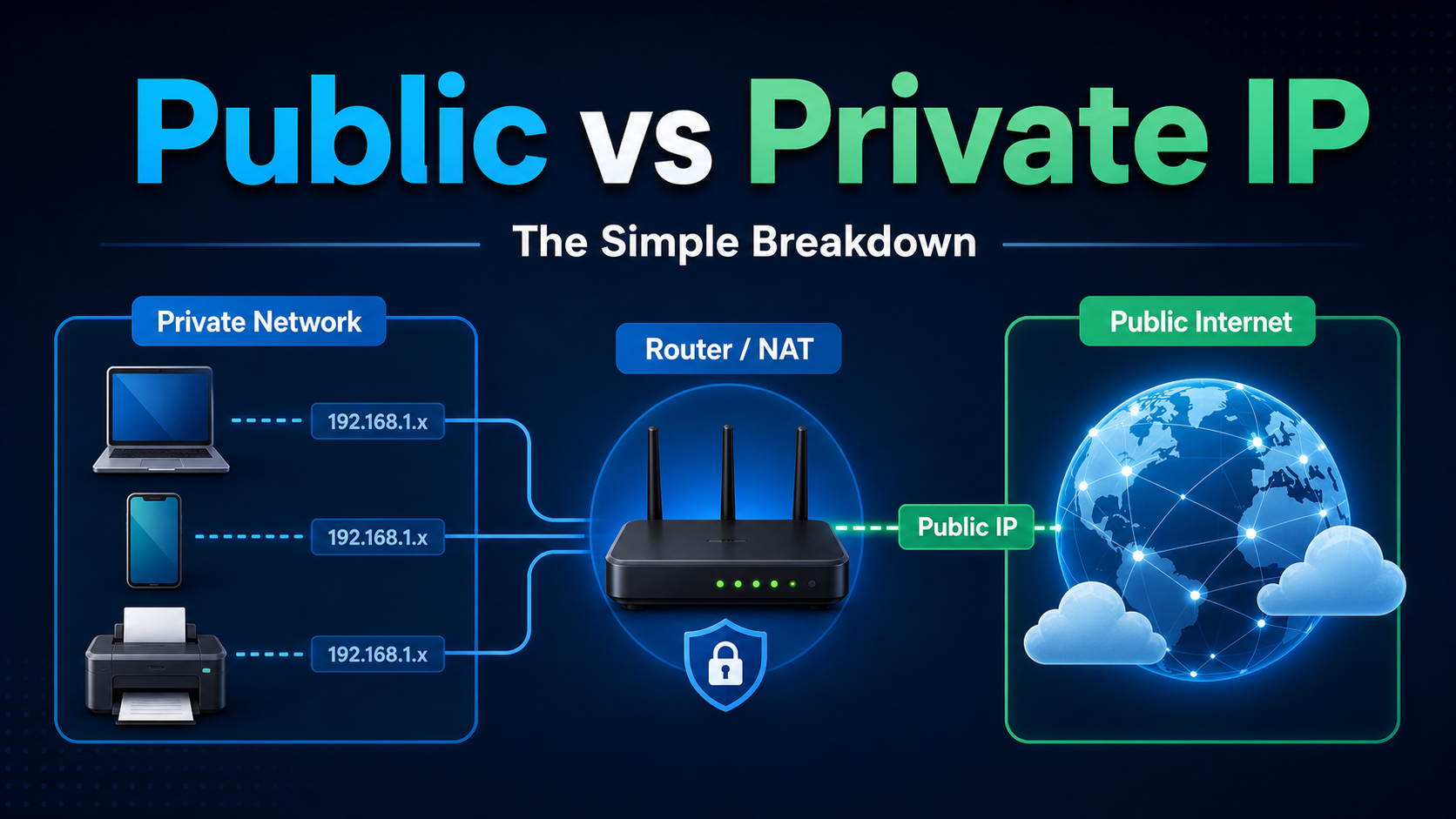
Check your IP on Google, then check it in your router settings. They are different because one is public, one is private, and NAT sits between them.
Most people notice this once and move on. But if you work with networks, proxies, automation, or web infrastructure, the distinction is genuinely useful. It explains how dozens of devices share one connection, why websites see only one public address, and how proxy infrastructure changes the IP that external services observe.
This guide breaks down public IPs, private IPs, NAT, and proxy routing without jargon overload, then connects the concept to practical workflows using LycheeIP.
Your Public IP: What the Internet Sees
Your public IP address is assigned to your internet connection by your ISP. It is the address the outside world sees when traffic leaves your home, office, cloud instance, or server network.
When you visit a website, send a request, or load a video, the destination server receives your public IP and uses it to send the response back. From the internet perspective, your entire household or office connection may appear as one address.
Key Facts About Public IPs
- They are assigned by an ISP, cloud provider, or upstream network.
- They are unique on the public internet at a given moment.
- They can be dynamic, changing periodically, or static, staying fixed.
- They are visible to websites, servers, APIs, and online services.
- They are associated with geolocation signals that affect content, access, and compliance workflows.
Because your public IP is visible externally, websites can use it for rate limiting, geo-targeting, abuse prevention, localization, and traffic analysis. If too many requests come from one public IP, a service may slow or block responses. If the IP resolves to the wrong region, content can change or become unavailable.
Your Private IP: What Exists Only Inside Your Network
Your private IP address is assigned inside your local network, usually by your router. It exists only within that local environment and is not routed across the public internet.
RFC 1918 defines the address ranges reserved for private internets, including the familiar 192.168.x.x, 10.x.x.x, and 172.16.x.x ranges. The RFC 1918 private address allocation is the formal reason these addresses can be reused across millions of separate networks.
| Range | Common Use |
|---|---|
| 192.168.0.0 – 192.168.255.255 | Home and small office routers |
| 10.0.0.0 – 10.255.255.255 | Larger private networks and cloud environments |
| 172.16.0.0 – 172.31.255.255 | Medium-sized private networks |
Why Private IPs Exist
IPv4 has a limited number of available addresses. There are not enough public IPv4 addresses for every laptop, phone, printer, camera, smart TV, and virtual machine to have a globally unique address. Private IPs solve this by letting internal devices reuse reserved ranges behind a router or gateway.
- Your laptop might use
192.168.1.5. - Your phone might use
192.168.1.8. - Both share the same public IP when they access the internet.
- External servers cannot directly reach those private IPs across the public internet.
NAT: The Bridge Between Private and Public IPs
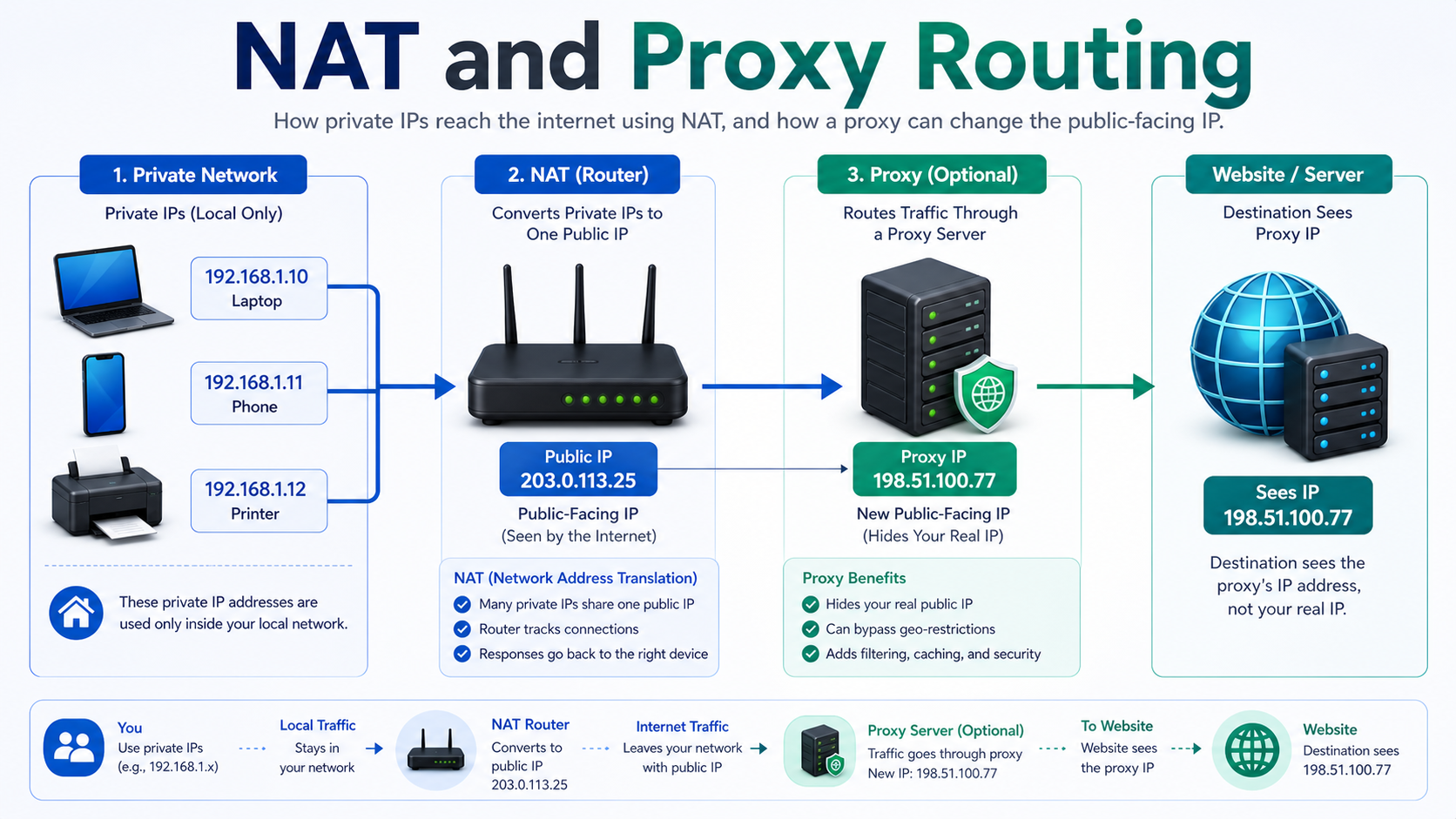
Network Address Translation, or NAT, is the mechanism that lets private devices communicate with the public internet through one public-facing address. RFC 3022 describes traditional NAT as a way for hosts in private networks to communicate with external hosts, and the RFC 3022 NAT specification is the canonical reference for the concept.
The Basic NAT Flow
- Your laptop sends a request from a private IP such as
192.168.1.5. - The request reaches your router.
- The router replaces the private source IP with the public IP and records the translation.
- The website receives the request from the public IP and sends the response back.
- The router maps the response back to the correct private device.
From the website perspective, it only sees the public IP. It does not know how many devices sit behind that address or what their private IPs are.
This is why multiple devices in one household can browse simultaneously using one public IP, why your private IP stays local, and why changing devices inside your network does not change what the outside internet sees.
How This Connects to Proxy Infrastructure
Understanding public vs private IPs is foundational to understanding proxies. A proxy server sits between your device and the destination server. When traffic routes through a proxy, the destination sees the proxy public IP instead of your original public IP.
- Appear from a different region for localization or geo-testing.
- Distribute public data requests across multiple IPs.
- Separate personal or office traffic from automated research workflows.
- Verify how ads, search results, or content appear across regions.
Proxy providers like LycheeIP operate at the public IP layer. Your private IP never leaves your local network. What changes is the public-facing address the destination server sees.
For example, dynamic residential proxies rotate public IPs for distributed access, static proxy IPs support workflows that need continuity, and datacenter proxies prioritize speed and scale for technical workflows.
If you are evaluating proxy infrastructure for scraping, localization testing, SERP monitoring, or public data collection, this public/private IP layer helps you make better decisions about rotation strategy and session management.
Suggested Video: Public vs Private IPs
This short explainer is a useful visual companion for understanding public IPs, private IPs, and why the internet sees a different address than your router settings show.
Common Mistakes and Considerations
Confusing the Two Addresses
A common mistake is assuming the IP shown in router settings is what websites see. It usually is not. The router interface often shows your device private IP. External services log your public IP.
Assuming Your Public IP Is Always the Same
Most residential ISP connections use dynamic public IPs. Your public IP can change when your router restarts or when your ISP reassigns addresses. Static public IPs usually cost more and are common for servers or business connectivity.
Thinking a Private IP Is a Complete Security Solution
Private IP addressing provides separation, but it is not a full security model. Firewalls, network segmentation, patching, and monitoring still matter.
Overlooking NAT in Automation Setups
If many users or processes share one office, cloud, or home connection, they may also share one public IP. High-volume automation from that IP increases the chance of IP-level rate limits. LycheeIP proxy services can help route legitimate workflows through the right public IP model.
Using Proxies Without a Clear Workflow Reason
Not every task needs a proxy. Use one when you need geo-specific results, session isolation, controlled public IP rotation, or scalable request distribution. Choose rotating dynamic IPs, stable static IPs, or fast datacenter IPs based on the workflow.
Public vs Private IPs in Practical Terms
| Question | Public IP | Private IP |
|---|---|---|
| Who assigns it? | ISP, cloud provider, or upstream network | Router, DHCP server, or local network admin |
| Who can see it? | Websites and external services | Devices inside the local network |
| Is it globally routable? | Yes | No |
| Can it repeat elsewhere? | No, not at the same time globally | Yes, across separate private networks |
| Where proxies operate | At this public-facing layer | Not exposed to the destination |
Conclusion
The difference between public and private IP addresses is simple once you see the structure. Your public IP is your identity on the internet, assigned by an ISP or upstream network and visible to servers you contact. Your private IP is internal, assigned by your router, and only meaningful inside your local network. NAT bridges the two.
This distinction matters beyond basic networking. It explains geo-blocking, rate limiting, session behavior, proxy routing, and why websites see one address even when many devices are behind it.
For teams working with public web data, proxies operate by changing the public-facing IP layer. Static proxies from LycheeIP, dynamic proxy pools, and datacenter proxy options give teams different ways to control that public-facing identity.
Frequently Asked Questions
Why does my IP look different on Google versus in my router settings?
Google shows your public IP, while your router settings often show your private IP inside the local network. They exist at different layers.
Can a website see my private IP address?
No. Private IP addresses are not routable on the public internet. Websites see your public IP or the proxy IP if you use a proxy.
What is NAT?
NAT means Network Address Translation. It maps traffic between private devices and the public internet so multiple devices can share one public IP.
Does my public IP change?
It depends on your ISP. Most home connections use dynamic public IPs that can change. Static public IPs stay fixed and often cost more.
How does a proxy relate to public and private IPs?
A proxy changes the public-facing IP seen by the destination. Your private IP remains inside your local network.
What are the standard private IP ranges?
The main private ranges are 192.168.0.0/16, 10.0.0.0/8, and 172.16.0.0/12.
Can two devices on the same network have the same private IP?
No. Within one local network, private IPs must be unique. Across separate private networks, the same ranges can be reused.
Why do web scrapers use proxies if private IPs are hidden?
Because websites track the public IP. Proxies distribute requests across public IPs for legitimate data workflows and reduce dependence on one address.
Is a private IP more secure than a public IP?
It provides basic separation from the public internet, but it is not a full security solution. Firewalls and proper configuration still matter.
What is the difference between static and dynamic public IPs?
A static public IP stays the same over time. A dynamic public IP can change periodically and is common on residential connections.

Recommended Articles

DataDome Bypass for Web Scraping
DataDome Bypass for Web Scraping
View Details
Web Scraping Rate Limiting: How to Handle 429s, Backoff, and Concurrency
Web scraping rate limiting is the engineering discipline of keeping an authorized collection workload inside a target service's acceptable request envelope. When that envelope is exceeded, a server may respond with HTTP 429 Too Many Requests, delay responses, or apply other controls.
View Details
reCAPTCHA vs hCaptcha vs Cloudflare Turnstile: What Scraping Teams Need to Know
If an authorized data-collection workflow suddenly stops at a verification screen, identifying the protection system matters before you change code, browser settings, or proxy infrastructure. reCAPTCHA vs hCaptcha vs Turnstile is not simply a branding comparison. The three systems can expose different browser flows, token models, risk decisions, and failure symptoms.
View Details
Browser Automation Proxies: IPs, Geo-Targeting, Sessions, and AI Agents
A browser automation proxy belongs to the network layer of Playwright, Selenium, cloud-browser, and AI-agent workflows. It changes how browser traffic is routed and can affect the source IP address, geographic egress, and session continuity seen by a destination site. It does not improve an AI model's reasoning, repair browser logic, or guarantee that a website will accept the session.
View Details
SERP Scraping: Methods, APIs, Workflows, and Best Practices
SERP scraping is the automated collection of information from search engine results pages. A SERP scraper can capture organic rankings, advertisements, featured snippets, People Also Ask questions, local results, shopping listings, images, and other search features, then convert them into structured data for analysis.
View Details