
n8n Web Scraping for Job Board Lead Generation: Turn Hiring Signals Into Sales Opportunities
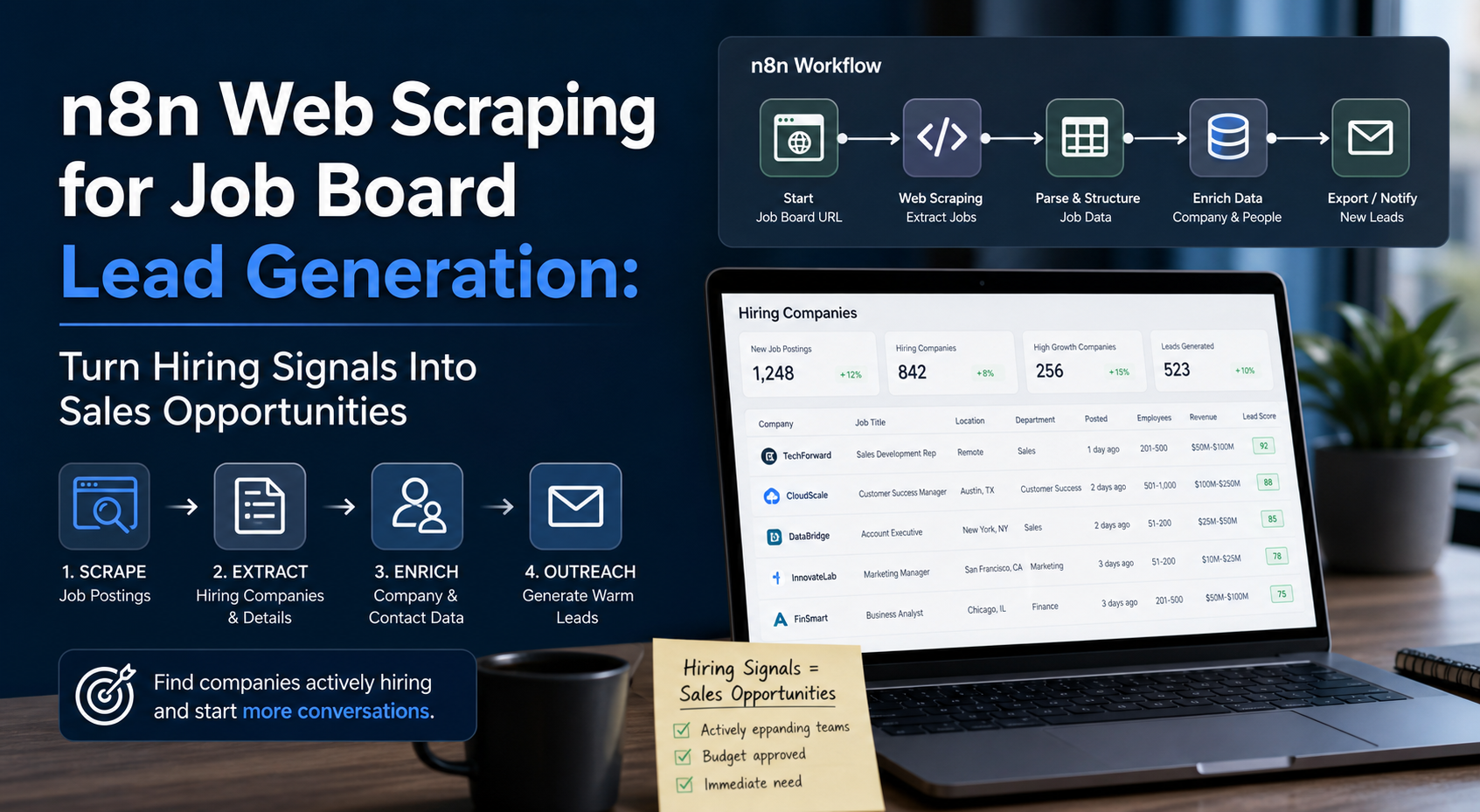
Turn job postings into warm leads by scraping hiring companies who are actively expanding their teams and likely need your services. For freelancers, agencies, and B2B service providers, the challenge is not finding potential clients but identifying which companies are ready to buy right now. A company posting for a marketing manager might need marketing automation services. A business hiring DevOps engineers likely needs infrastructure consulting. A startup adding sales roles could benefit from CRM implementation or sales training.
Turn job postings into warm leads by scraping hiring companies who are actively expanding their teams and likely need your services. For freelancers, agencies, and B2B service providers, the challenge is not finding potential clients but identifying which companies are ready to buy right now. A company posting for a marketing manager might need marketing automation services. A business hiring DevOps engineers likely needs infrastructure consulting. A startup adding sales roles could benefit from CRM implementation or sales training.
The problem is that service providers can't efficiently monitor dozens of job boards manually to spot these opportunities. By the time you discover a relevant posting through casual browsing, competitors may have already reached out. You need a systematic approach to capture hiring signals across multiple platforms automatically, extract actionable company information, and initiate outreach while the opportunity is fresh.
This guide walks through building an automated lead generation system using n8n, an open-source workflow automation platform, to scrape 35+ job boards simultaneously. You'll learn how to configure multi-board monitoring, extract company and decision maker details, and automate initial contact based on hiring activity. This approach transforms public job posting data into a continuous stream of qualified prospects who have demonstrated clear buying intent through their recruitment activities.
Configuring n8n to Scrape Multiple Job Boards Simultaneously
n8n provides a visual workflow builder that connects different services and data sources through nodes. For job board scraping, you're essentially building a scheduled workflow that visits multiple job listing sites, extracts relevant postings, filters them based on your criteria, and stores the results for further processing.
Setting Up Your n8n Environment
Before scraping job boards, you need a functioning n8n instance. You can self-host n8n on a VPS, run it locally using Docker, or use n8n Cloud. Self-hosting gives you complete control over execution frequency, data storage, and integration options. Most freelancers and small agencies start with a basic DigitalOcean or AWS instance running the Docker image.
For the official technical reference behind this point, see Playwright documentation.
Your n8n workflow for job board scraping typically includes these node types:
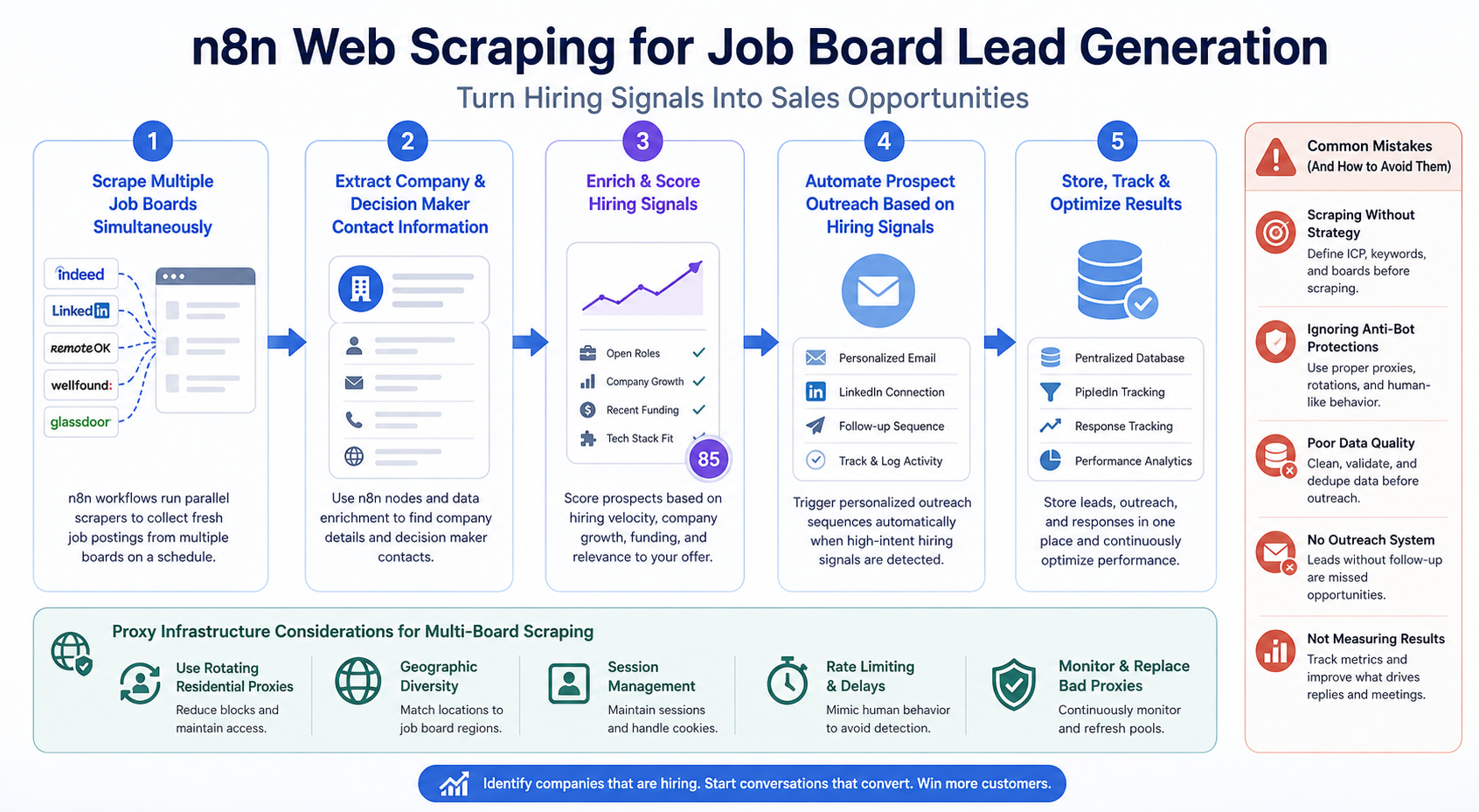
\- Schedule Trigger: Runs your workflow at set intervals (hourly, daily, or custom) \- HTTP Request nodes: Fetch job board pages or API endpoints \- HTML Extract or Function nodes: Parse job posting data from page HTML \- Filter nodes: Apply criteria to identify relevant postings \- Set nodes: Structure and clean extracted data \- Database nodes: Store results in PostgreSQL, MySQL, or Airtable \- Deduplication logic: Prevent processing the same job multiple times
Identifying Scrapable Job Boards
Not all job boards are equally accessible for automated scraping. Some provide official APIs, others have predictable HTML structures, and many actively block automated access. Your target list should balance coverage with technical feasibility.
For the LycheeIP implementation details behind this step, review rotating residential proxies.
For the LycheeIP implementation details behind this step, review scaling lead scraping with n8n.
For the LycheeIP implementation details behind this step, review AI-powered browser automation hub.
For the official technical reference behind this point, see MDN HTTP overview.
Job boards fall into several categories:
Public job boards with APIs: LinkedIn (limited), Indeed (partner program required), Adzuna (free API tier), and GitHub Jobs (deprecated but similar services exist). These are ideal because they provide structured data without HTML parsing.
Public boards with accessible HTML: AngelList, RemoteOK, We Work Remotely, Stack Overflow Jobs, Hacker News Who's Hiring threads. These sites generally allow responsible scraping and have consistent page structures.
Aggregated job search engines: Google Jobs, SimplyHired, ZipRecruiter. These aggregate listings from multiple sources but often implement anti-bot measures.
Industry-specific boards: Behance for creatives, Dribbble for designers, AngelList for startups, FlexJobs for remote work. These provide higher-quality leads for niche services.
Company career pages: Direct scraping of target company career pages provides the earliest signals but requires maintaining a list of companies to monitor.
For maximum coverage, build workflows for 5-10 primary sources initially, then expand. Focus on boards where your target clients actually post. If you sell to startups, prioritize AngelList and YC jobs. If you target enterprises, LinkedIn and industry-specific boards matter more.
Building the Multi-Board Workflow
A typical n8n job scraping workflow looks like this:
1\. Schedule trigger fires every 4 hours 2\. Split workflow into parallel branches, one per job board 3\. Each branch contains: \- HTTP Request to fetch job listings page \- HTML parsing to extract job title, company, location, posting date, job URL \- Filter to match your target criteria (keywords, locations, seniority) \- Set node to normalize data structure across different sources 4\. Merge branches back together 5\. Deduplicate against previously scraped jobs (using job URL or hash) 6\. Enrich with additional data (company website, size, funding) 7\. Store new jobs in database 8\. Trigger notification or outreach workflow for high-priority matches
Handling Different Page Structures
Each job board formats listings differently. RemoteOK uses a clean HTML structure with consistent class names. Indeed dynamically loads content via JavaScript. AngelList requires handling pagination and infinite scroll.
For static HTML pages, n8n's HTML Extract node can pull data using CSS selectors or XPath expressions. You identify the selector for job title, company name, and other fields by inspecting the page HTML:
\__INLINEHTML0\INLINEHTML1\INLINEHTML2__
For JavaScript-rendered pages, you need a different approach. Options include:
\- Using job board APIs when available \- Rendering JavaScript with headless browser automation (Puppeteer or Playwright integrated with n8n) \- Finding alternative data sources (RSS feeds, sitemaps, alternative listing pages) \- Using third-party job aggregation APIs that already handle the scraping
Rate Limiting and Request Management
Scraping 35+ job boards simultaneously generates significant HTTP traffic. Without proper rate limiting, you risk getting blocked or overloading target servers. Implement these safeguards:
\- Space out requests using Wait nodes (2-5 seconds between requests to the same domain) \- Randomize request timing slightly to avoid predictable patterns \- Set reasonable User-Agent headers that identify your bot \- Honor robots.txt directives where present \- Implement exponential backoff for failed requests \- Monitor error rates and adjust frequency if blocks occur
For high-volume scraping across multiple job boards, rotating proxies become essential. Job boards often rate-limit by IP address, and making dozens of requests from a single IP quickly triggers blocks. Residential proxies or rotating datacenter proxies distribute requests across many IPs, preventing rate limit issues.
Extracting Company and Decision Maker Contact Information
Raw job postings provide the initial signal, but you need actionable contact information to reach decision makers. Most job postings include the company name and sometimes the hiring manager's name, but rarely include direct email addresses or decision maker titles for purchasing decisions.
Enriching Company Data
Once you've identified a company posting a relevant job, the next step is gathering company intelligence:
Company website: Usually linked in the job posting or easily found via search. The website reveals company size, services, tech stack (from job postings or footer), and contact information.
Company size and funding: Tools like Clearbit, Hunter.io, or LinkedIn can provide employee count, funding rounds, and growth trajectory. Fast-growing companies with recent funding are higher-priority leads.
Technology stack: BuiltWith, Wappalyzer, or similar services identify what technologies a company uses. If you sell WordPress services, knowing a company uses WordPress is crucial qualification data.
Social profiles: LinkedIn company pages, Twitter accounts, and Facebook pages provide additional context about company culture, recent announcements, and employee information.
News and press releases: Recent product launches, expansions, or partnerships indicate companies with budget and growth momentum.
You can automate much of this enrichment within n8n:
\- HTTP Request nodes can query enrichment APIs (Clearbit, Hunter, RocketReach) \- Function nodes can parse company websites for contact forms or email patterns \- LinkedIn nodes (via unofficial APIs or integrations) can gather employee and company data \- Google Custom Search API can find recent news mentions
Finding Decision Maker Contacts
The person posting a job is not always the person who buys your services. A recruiter posts the listing, but the department head makes purchasing decisions. Your outreach strategy needs to reach the right person:
For services targeting the hiring department: If a company is hiring a marketing manager and you sell marketing services, the VP of Marketing or CMO is your target. They have budget authority and clear need.
For services supporting the hiring process: If you sell recruiting software or HR services, the Head of People or HR Director is the decision maker.
For infrastructure and development services: CTO, VP of Engineering, or Head of DevOps typically control budget for technical services and tools.
Finding these contacts involves several techniques:
1\. LinkedIn searches: Search for the company and filter by job title. "Company Name" \+ "VP Marketing" usually surfaces the right person. LinkedIn Sales Navigator makes this more efficient.
2\. Email pattern detection: Most companies follow predictable email patterns (firstname.lastname@company.com, first@company.com). Tools like Hunter.io identify the pattern, then you can construct addresses for specific people.
3\. Company website team pages: Many companies list leadership teams with names and sometimes photos. Combine these names with the company email pattern.
4\. Job posting clues: Sometimes job postings mention the hiring manager by name or include a contact email. These are gold because they're explicitly requesting contact.
5\. WHOIS and domain records: Company domains often have technical or administrative contacts in WHOIS records, useful for IT or infrastructure services.
Automating Contact Discovery in n8n
You can build contact discovery into your n8n workflow:
1\. After capturing a job posting, extract the company name 2\. Use Hunter.io API node to find company email pattern and potential contacts 3\. Use Clearbit or similar API to get company details and size 4\. Search LinkedIn via unofficial APIs or manual export for decision makers 5\. Construct likely email addresses using pattern \+ known names 6\. Optionally verify emails using validation services (NeverBounce, ZeroBounce) 7\. Store enriched contact records in your CRM or database
This process takes a job posting from basic data (company name, job title) to a qualified lead record with company details, decision maker names, verified email addresses, and context about their current needs.
Automating Prospect Outreach Based on Hiring Signals
Once you have qualified leads with contact information, the final step is initiating outreach while the hiring signal is fresh. Companies hiring for specific roles have immediate needs and budget allocated, making them significantly more receptive than cold prospects.
Designing Hiring Signal Outreach
Your outreach should reference the hiring activity specifically and connect it to your service value:
For companies hiring roles you support: "I noticed you're hiring a senior DevOps engineer. As your team scales, we help companies like yours implement infrastructure automation that reduces deployment time by 60%. Would it make sense to chat about how we've helped similar teams during growth phases?"
For companies hiring in departments you serve: "Saw your posting for a content marketing manager. While you're building out your content team, we provide SEO research and content strategy that helps new teams hit the ground running. Have 15 minutes to discuss?"
For companies with multiple openings: "Noticed you're hiring across engineering and product teams. Rapid hiring often creates onboarding and documentation challenges. We help scaling startups build internal knowledge bases that reduce new hire ramp time. Worth a conversation?"
The key is demonstrating that you understand their current situation (hiring, expanding, growing) and offering relevant value, not generic cold outreach.
Building the Outreach Automation
Your n8n workflow can trigger automated outreach through several channels:
Email sequences: Integrate with email platforms (SendGrid, Mailgun, Amazon SES) to send initial outreach emails. Use personalization tokens to insert company name, job title, and specific details.
LinkedIn connection requests and messages: Use LinkedIn automation tools (carefully, respecting LinkedIn's terms) to send connection requests with personalized notes.
CRM entry with task creation: Add the lead to your CRM (HubSpot, Pipedrive, Salesforce) and create a task for manual, personalized outreach. This approach maintains quality while automating research.
Slack or email notifications: Send alerts to your sales team with lead details, letting humans decide whether and how to reach out.
Multi-channel cadences: Combine email, LinkedIn, and follow-ups over 1-2 weeks, with each message referencing the hiring activity.
Outreach Workflow Structure
A complete automated outreach workflow in n8n looks like:
1\. Trigger: New qualified job posting detected (from scraping workflow) 2\. Wait node: Delay 1-24 hours to avoid appearing too automated 3\. Conditional logic: Check if company/contact already exists in CRM 4\. Create or update CRM record: Add company and contact details 5\. Email/LinkedIn node: Send first outreach message 6\. Schedule follow-up: Create delayed workflow for follow-up message in 3-5 days 7\. Track engagement: Monitor opens, clicks, replies 8\. Update CRM: Log outreach activity and responses
Personalization at Scale
Automated outreach only works if messages feel personal. Use these techniques:
\- Reference specific job title and posting details in your message \- Mention recent company news or funding if available (from enrichment data) \- Customize value proposition based on department (engineering vs. marketing vs. sales) \- Use conversational, human language rather than formal sales copy \- Include a relevant case study or example from similar companies \- Keep messages short (under 100 words for cold outreach)
Compliance and Best Practices
Automated outreach must respect recipient preferences and legal requirements:
\- Include clear unsubscribe options in emails \- Honor opt-outs immediately \- Comply with GDPR, CAN-SPAM, and relevant regulations \- Avoid high-volume spam patterns that damage sender reputation \- Use verified sender domains with proper SPF/DKIM/DMARC configuration \- Monitor bounce rates and engagement metrics \- Maintain human oversight of automated campaigns
Proxy Infrastructure Considerations for Multi-Board Scraping
Scraping dozens of job boards continuously requires reliable proxy infrastructure to avoid blocks and maintain consistent access. Job boards implement various anti-bot measures including IP-based rate limiting, geographic restrictions, and behavioral analysis.
Why Proxies Matter for Job Board Scraping
For the LycheeIP implementation details behind this step, review LycheeIP proxy infrastructure.
When you scrape multiple job boards from a single IP address, several problems emerge:
Rate limiting: Job boards limit how many requests a single IP can make per hour. Scraping 35+ boards every few hours quickly exceeds these limits.
IP bans: Repeated access from the same IP, especially with patterns that look automated, results in temporary or permanent IP blocks.
Geographic restrictions: Some job boards show different listings based on visitor location. A proxy in the US might see different jobs than one in Europe.
Data accuracy: Job boards may serve cached or limited results to suspected bots. Rotating IPs helps ensure you're getting complete, current data.
Proxy infrastructure distributes your requests across many IP addresses, making your scraping activity appear as normal traffic from different users rather than a single bot.
Choosing Proxy Types for Job Scraping
Different proxy types offer different tradeoffs for job board scraping:
Datacenter proxies: Fast and inexpensive, datacenter proxies work well for job boards without sophisticated bot detection. They're ideal for boards that focus on rate limiting rather than IP reputation. However, some job boards block entire datacenter IP ranges.
Residential proxies: These IPs come from real residential internet connections, appearing as legitimate users to job boards. They're more expensive but essential for boards with strict anti-bot measures. Residential proxies rarely get blocked and can access JavaScript-heavy sites more reliably.
Rotating vs. static proxies: Rotating proxies automatically change IP addresses between requests or at set intervals, spreading requests across many IPs. Static residential proxies maintain the same IP for longer sessions, useful if you need to maintain session state or avoid triggering suspicious behavior from rapid IP changes.
For comprehensive job board scraping, a hybrid approach often works best: datacenter proxies for simple, permissive boards, and residential proxies for sophisticated platforms with strong anti-bot systems.
Implementing Proxies in n8n Workflows
n8n's HTTP Request node supports proxy configuration. You can:
\- Configure a single proxy for all requests \- Rotate through a list of proxies using Function nodes \- Integrate with proxy management APIs that provide rotating endpoints \- Use proxy services that provide a single endpoint that automatically rotates IPs
For teams evaluating proxy infrastructure for job scraping workflows, providers like LycheeIP offer residential and datacenter proxy options designed for web scraping and public data collection. When building production scraping systems, reliable proxy infrastructure reduces maintenance overhead from handling blocks and ensures consistent data collection across multiple job boards.
Request Distribution Strategy
Even with proxies, intelligent request distribution improves reliability:
\- Assign different proxies to different job boards \- Rotate proxies after a set number of requests (10-50 depending on board) \- Implement jitter (random delays) between requests \- Use different proxies for different workflow runs \- Monitor which IPs get blocked and rotate them out temporarily \- Match proxy geographic location to job board target region when relevant
Common Mistakes When Scraping Job Boards for Lead Generation
Building an automated job scraping system involves several pitfalls that reduce effectiveness or create legal and technical problems:
Over-Automation Without Quality Control
The temptation is to automate everything from scraping to outreach without human review. This results in poor-fit leads, irrelevant outreach, and damaged reputation. Better approach: automate research and data collection, but include human review before outreach, especially initially. Review 50-100 leads manually to refine your filtering criteria before fully automating.
Ignoring Job Board Terms of Service
Many job boards explicitly prohibit automated scraping in their terms of service. While enforcing these terms varies, responsible scraping means:
\- Reviewing each board's robots.txt and terms of service \- Respecting rate limits and implementing reasonable delays \- Using official APIs when available instead of HTML scraping \- Avoiding excessive load on target servers \- Not republishing scraped job data (use it for internal lead generation only)
Poor Deduplication Logic
Without proper deduplication, you'll contact the same company multiple times about the same job posting, appearing unprofessional. Implement deduplication at multiple levels:
\- Job posting URL (exact match) \- Company name \+ job title \+ date (fuzzy match) \- Company domain in your CRM (don't outreach if recently contacted) \- Contact email (don't email the same person multiple times)
Weak Filtering Criteria
Scraping every job posting creates noise. Most will be irrelevant to your services. Define specific criteria:
\- Job title keywords (exact titles, not just broad terms) \- Seniority level (manager+ roles if selling to executives) \- Company size (if you serve enterprises or startups specifically) \- Location (if you serve specific markets) \- Industry (if you specialize in certain sectors) \- Posting age (focus on jobs posted within 1-7 days)
Start narrow and expand criteria as you validate lead quality.
Neglecting Data Enrichment
Raw job postings rarely provide enough context for effective outreach. Without enrichment, you don't know company size, funding stage, technology stack, or decision maker contacts. The difference between a qualified lead and noise is enrichment quality.
Single-Channel Outreach
Relying solely on email or LinkedIn limits response rates. Multi-channel approaches (email \+ LinkedIn \+ phone for high-value leads) increase connection rates significantly. Your n8n workflow should support multiple outreach channels with proper sequencing.
Insufficient Error Handling
Job boards change HTML structure, implement new anti-bot measures, or go offline. Without error handling, your workflow silently fails and you miss opportunities. Implement:
\- Error notifications when scraping fails \- Retry logic with exponential backoff \- Regular manual checks that data is flowing correctly \- Logging of successful scrapes per board \- Alerts when specific boards haven't returned data in expected timeframe
Forgetting Seasonal Patterns
Hiring activity fluctuates by season and industry. Tech hiring slows in December. Retail hiring peaks before holidays. Education hiring concentrates in spring and summer. Adjust your workflow frequency and outreach intensity based on seasonal patterns in your target industries.
Explore LycheeIP Proxy Infrastructure
Conclusion
Building an automated lead generation system based on job board scraping transforms how service providers identify and reach potential clients. Instead of cold outreach to companies with unknown needs, you're connecting with businesses that have demonstrated clear buying intent through their hiring activity. A marketing agency reaching out when a company hires a marketing manager is offering timely help during a period of expansion and budget availability.
The n8n workflow approach provides flexibility to scrape multiple job boards simultaneously, extract and enrich company data, and trigger personalized outreach based on specific hiring signals. By combining scheduled scraping, intelligent filtering, contact discovery, and multi-channel outreach automation, you create a systematic pipeline that continuously surfaces warm leads.
Success requires balancing automation with quality control. Automate the tedious research and data collection that wastes hours manually browsing job boards, but maintain human oversight on filtering criteria, outreach messaging, and response handling. Start with 5-10 high-quality job boards, refine your targeting criteria based on actual lead quality, then scale to additional sources.
Reliable proxy infrastructure ensures your scraping system remains operational as you scale across dozens of job boards. Rotating residential proxies prevent IP blocks while distributing requests across many addresses maintains access to sites with rate limiting. For teams building production scraping workflows, evaluating proxy providers based on reliability, geographic coverage, and scraping-specific features helps ensure consistent data collection without constant maintenance.
The companies most successfully using job scraping for lead generation treat it as one signal in a broader sales intelligence system. Job postings indicate growth and budget, but combining hiring data with funding announcements, technology stack information, and company news creates a complete picture of which prospects to prioritize. Your n8n workflow should feed into a larger CRM and sales process, not replace strategic thinking about which clients to pursue.
Frequently Asked Questions
Is scraping job boards legal?
Job postings are generally considered public information that companies intentionally publish to attract candidates. However, legality depends on how you collect and use the data. Respect website terms of service, robots.txt files, and rate limits. Use scraped data for internal lead generation, not for republishing job listings. When possible, use official APIs rather than HTML scraping. Avoid accessing password-protected content or circumventing access controls. The legal landscape around web scraping continues to evolve, so consult legal counsel for your specific use case.
How many job boards should I scrape for effective lead generation?
Start with 5-10 boards where your target clients actually post jobs. Quality matters more than quantity. If you sell to startups, focus on AngelList, YC jobs, and startup-specific boards. For enterprises, prioritize LinkedIn and industry-specific platforms. Monitor which boards produce qualified leads and expand gradually. Scraping 35+ boards is realistic once your workflow is proven, but starting broad before validating lead quality wastes resources on irrelevant data.
How often should I run my job scraping workflow?
Most job boards update throughout the day, so running your workflow every 4-6 hours captures new postings quickly. More frequent scraping (hourly) risks rate limits and provides diminishing returns since jobs don't appear instantly. Less frequent scraping (daily) means competitors may reach prospects first. Four times daily balances fresh data with responsible request volume. Adjust based on your industry's hiring velocity and your capacity to follow up on leads.
Do I need proxies for job board scraping?
For scraping multiple job boards repeatedly, proxies are essential. Without proxies, your IP will be rate-limited or blocked, causing workflow failures. The proxy type depends on the job boards you're targeting. Simple boards with basic rate limiting work with datacenter proxies. Sophisticated platforms with strong anti-bot detection require residential proxies. Most production scraping systems use a mix: datacenter for permissive sites and residential for strict ones. Free or unreliable proxies cause more problems than they solve.
How do I prevent my automated outreach from being marked as spam?
Several factors influence deliverability and spam perception. First, use a verified sending domain with proper email authentication (SPF, DKIM, DMARC). Second, keep sending volume reasonable and ramp up gradually. Third, personalize messages with specific references to the job posting and company. Fourth, provide clear unsubscribe options and honor them immediately. Fifth, maintain good engagement rates by only contacting qualified, relevant prospects. Finally, avoid spam trigger words and keep messages conversational rather than sales-heavy.
Can I automate finding decision maker email addresses?
Partially. Email finding tools like Hunter.io, RocketReach, and Apollo can be integrated into n8n workflows to automatically discover contact information. These services use public data sources and email pattern recognition to suggest likely addresses. However, accuracy varies, and some contacts require manual research. A hybrid approach works best: automate email discovery for 70-80% of leads, then manually research high-value prospects. Always verify email addresses before adding them to outreach campaigns to protect sender reputation.
What's the best way to structure outreach based on different job types?
Create multiple outreach templates based on job categories relevant to your services. If you offer three services (marketing automation, CRM implementation, sales training), build templates for each. When a company posts a marketing role, use the marketing automation template with specific references to scaling marketing teams. For sales roles, reference sales team growth challenges. Segment your scraped jobs by category using keyword matching in n8n, then route each category to its appropriate outreach sequence. This targeted approach dramatically improves response rates versus generic messaging.
How do I measure ROI on automated job scraping lead generation?
Track metrics at each funnel stage. At the top, monitor jobs scraped per day and qualified leads after filtering (aim for 5-10% of raw scrapes becoming qualified leads). In the middle, measure outreach sent, response rate (2-5% is typical for cold outreach, higher for warm hiring signals), and meeting bookings. At the bottom, track closed deals from job scraping leads versus other sources. Calculate time saved versus manual research (typically 10-20 hours per week for agencies). ROI becomes clear when you close even one client that you'd have missed without automated monitoring.
What should I do when a job board changes its HTML structure and breaks my scraper?
Site structure changes are inevitable. Build resilience by implementing error notifications that alert you when a specific board stops returning data. Use try-catch error handling in your n8n Function nodes so one broken scraper doesn't stop the entire workflow. Maintain documentation of CSS selectors for each board so updating is faster. Consider abstracting common parsing logic into reusable functions. When a board breaks, decide whether to fix it based on lead quality from that source. Some boards aren't worth maintaining if they produce few qualified leads.
Should I scrape company career pages directly instead of job boards?
Both approaches have value. Job boards provide broad coverage with consistent structure, making them easier to scrape at scale. Company career pages offer earlier signals since jobs appear there before aggregating to boards, but each company's career page has unique structure requiring individual scrapers. A mature lead generation system combines both: scrape major job boards for discovery, then monitor career pages of high-value target companies. Start with job boards for faster implementation, then add company-specific scrapers for strategic accounts.
Related LycheeIP Guides and Resources

Recommended Articles

DataDome Bypass for Web Scraping
DataDome Bypass for Web Scraping
View Details
Web Scraping Rate Limiting: How to Handle 429s, Backoff, and Concurrency
Web scraping rate limiting is the engineering discipline of keeping an authorized collection workload inside a target service's acceptable request envelope. When that envelope is exceeded, a server may respond with HTTP 429 Too Many Requests, delay responses, or apply other controls.
View Details
reCAPTCHA vs hCaptcha vs Cloudflare Turnstile: What Scraping Teams Need to Know
If an authorized data-collection workflow suddenly stops at a verification screen, identifying the protection system matters before you change code, browser settings, or proxy infrastructure. reCAPTCHA vs hCaptcha vs Turnstile is not simply a branding comparison. The three systems can expose different browser flows, token models, risk decisions, and failure symptoms.
View Details
Browser Automation Proxies: IPs, Geo-Targeting, Sessions, and AI Agents
A browser automation proxy belongs to the network layer of Playwright, Selenium, cloud-browser, and AI-agent workflows. It changes how browser traffic is routed and can affect the source IP address, geographic egress, and session continuity seen by a destination site. It does not improve an AI model's reasoning, repair browser logic, or guarantee that a website will accept the session.
View Details
SERP Scraping: Methods, APIs, Workflows, and Best Practices
SERP scraping is the automated collection of information from search engine results pages. A SERP scraper can capture organic rankings, advertisements, featured snippets, People Also Ask questions, local results, shopping listings, images, and other search features, then convert them into structured data for analysis.
View Details