
AI-Powered n8n Scraping with Claude Integration
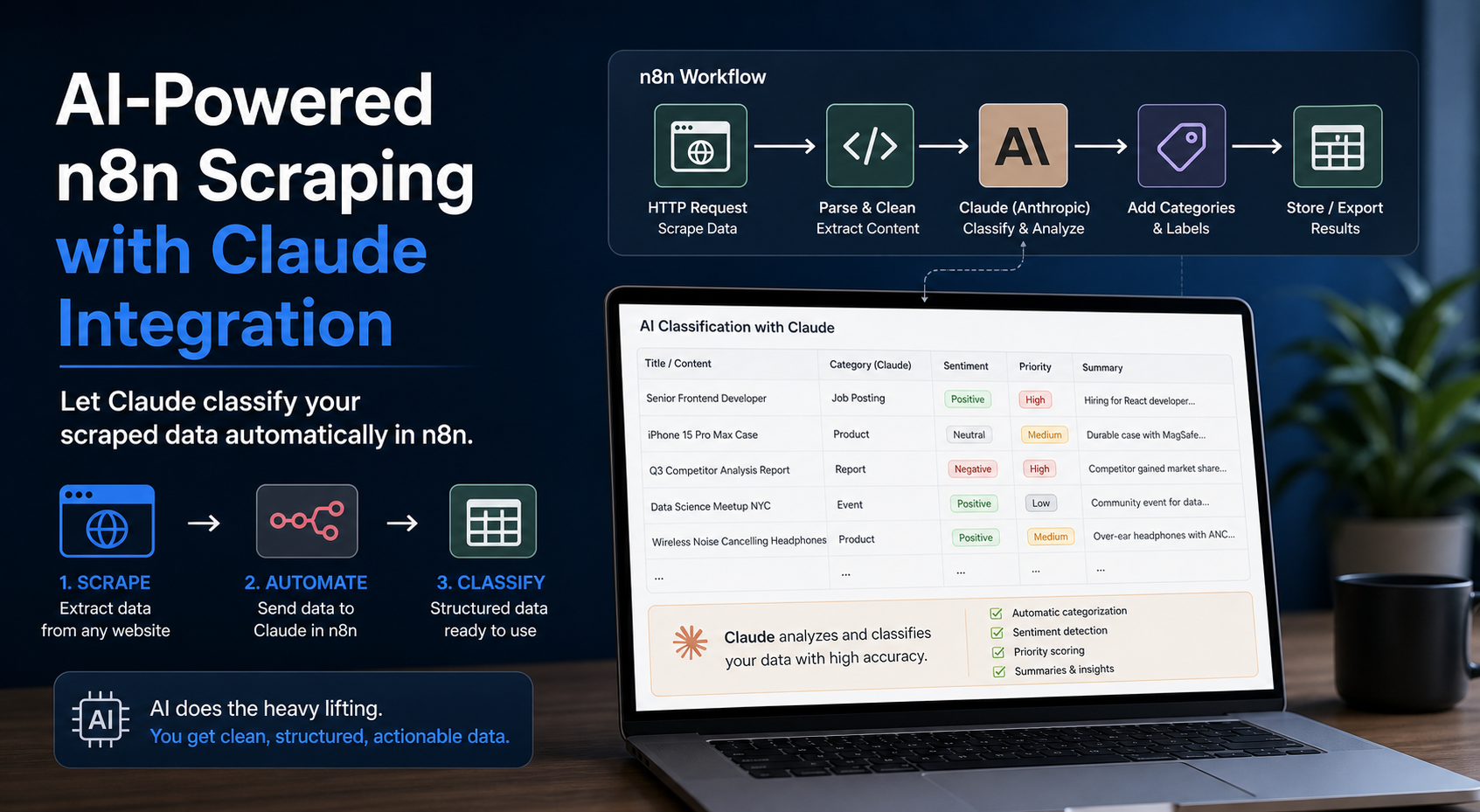
Let Claude classify your scraped data automatically in n8n. Manual data classification after scraping is time-consuming and error-prone, especially when processing thousands of product listings, job postings, or competitor content. Even with perfectly structured scraped data, someone still needs to categorize products, identify sentiment, extract key attributes, or determine content relevance. This bottleneck turns efficient scraping operations into slow, human-dependent workflows.
Let Claude classify your scraped data automatically in n8n. Manual data classification after scraping is time-consuming and error-prone, especially when processing thousands of product listings, job postings, or competitor content. Even with perfectly structured scraped data, someone still needs to categorize products, identify sentiment, extract key attributes, or determine content relevance. This bottleneck turns efficient scraping operations into slow, human-dependent workflows.
Using Claude AI within n8n workflows solves this problem by automatically classifying and processing scraped data as it arrives. This integration combines n8n's visual automation platform with Claude's natural language understanding to build classification pipelines that run continuously without manual intervention. Automation engineers and data professionals can now scrape public data at scale and immediately enrich it with AI-driven categorization, sentiment analysis, entity extraction, and content validation.
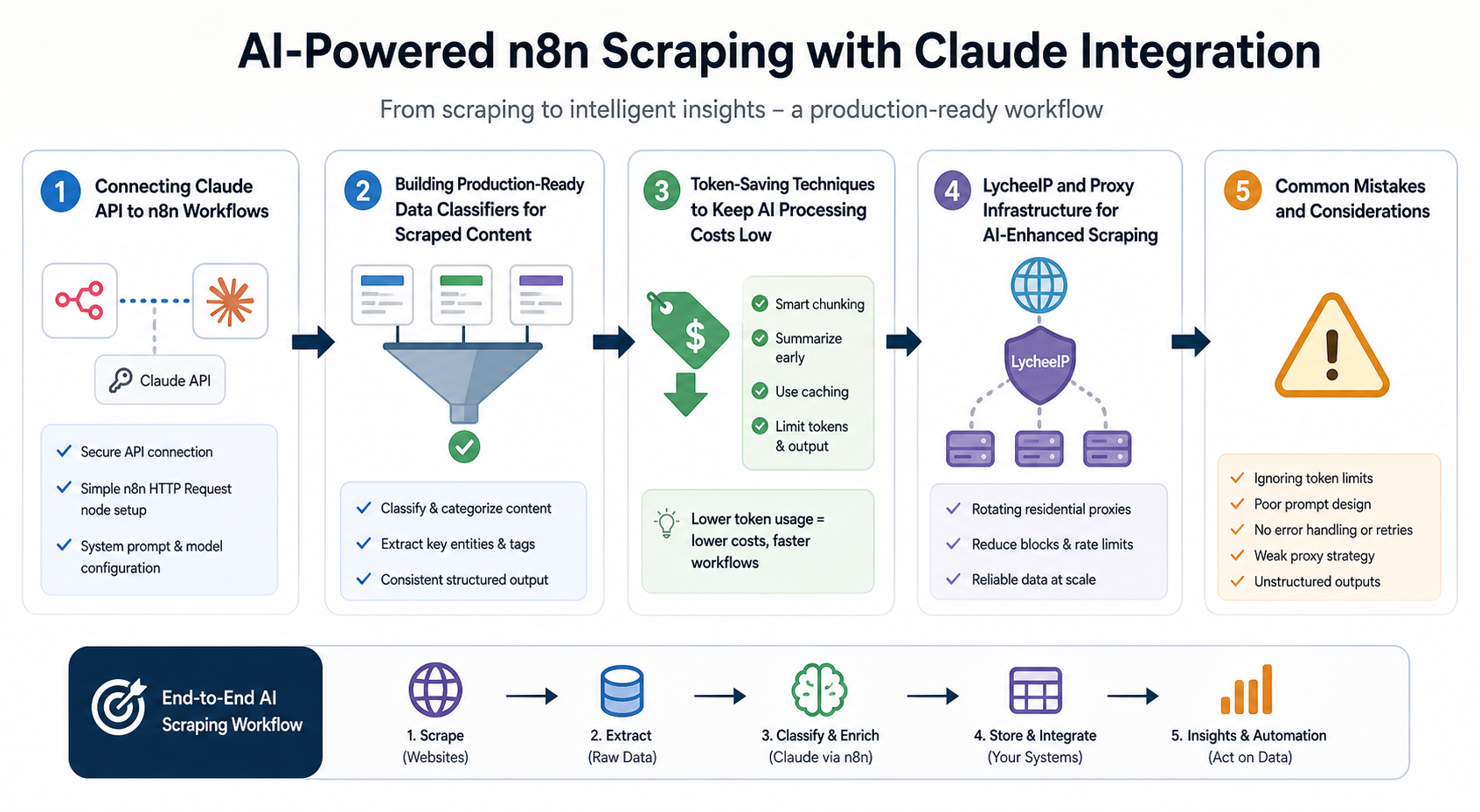
This article walks through connecting Claude to n8n workflows, building production-ready classifiers for scraped content, and implementing token-saving techniques that keep AI processing costs manageable while maintaining classification accuracy.
Connecting Claude API to n8n Workflows
Understanding the Integration Architecture
The Claude API integration in n8n operates through HTTP request nodes that send scraped data to Anthropic's API endpoints and receive structured classification results. Unlike simple webhook integrations, effective Claude implementations require careful prompt engineering, response parsing, and error handling to work reliably with scraped data.
When scraping public data from e-commerce sites, job boards, or business directories, the raw HTML or JSON output needs transformation before classification. An n8n workflow typically includes:
- A scraping trigger or scheduled node that initiates data collection
- HTML parsing or JSON extraction to isolate relevant content fields
- Data cleaning to remove markup, normalize text, and prepare classification inputs
- Claude API calls with structured prompts that define classification tasks
- Response parsing to extract classifications and confidence scores
- Database writes or downstream actions based on classification results
This architecture separates data collection from AI processing, allowing you to optimize each stage independently. Scraping can use proxy infrastructure to access geo-restricted content or avoid rate limits, while Claude processing happens in controlled batches to manage API costs.
Setting Up Claude API Credentials in n8n
Before building classification workflows, configure Claude API access in n8n's credential system. Create an Anthropic API account and generate an API key with appropriate rate limits for your expected scraping volume. In n8n, add a new credential of type "HTTP Header Auth" with:
- Header Name: \__INLINEHTML0__
- Header Value: Your Anthropic API key
- Name: Claude API Credentials
This credential attaches to HTTP Request nodes that call Claude endpoints. Store credentials at the workflow level rather than hardcoding them in individual nodes, making it easier to rotate keys or switch between development and production API accounts.
Building Your First Classification Node
Start with a basic HTTP Request node configured to call Claude's Messages API. Set the request method to POST and the URL to \__INLINEHTML0__. Attach your Claude API credentials and configure the request body with:
{
"model": "claude-3-haiku-20240307",
"max_tokens": 150,
"messages": [
{
"role": "user",
"content": "Classify this product into one category: Electronics, Clothing, Home & Garden, or Other. Product: {{$json["product_title"]}} - {{$json["product_description"]}}"
}
]
}
This configuration sends product data from previous nodes to Claude and requests a single category classification. The \__INLINEHTML0__ parameter limits response length to control costs, while the prompt structure uses n8n's variable syntax to inject scraped data dynamically.
Test this node with sample scraped data to verify API connectivity and response format. Claude returns JSON with a \__INLINEHTML0__ array containing the classification result and token usage statistics.
Handling API Responses and Errors
Claude API responses require parsing before you can use classification results in downstream workflow nodes. Add a Set node after your HTTP Request to extract the classification text:
- Extract \__INLINEHTML0__ as the classification result
- Extract \__INLINEHTML0 and \INLINEHTML1__ for cost tracking
- Store the original scraped data alongside classifications for validation
Implement error handling with n8n's Error Trigger node to catch API failures, rate limit errors, or invalid responses. Common issues include:
- Rate limit exceeded: Queue requests and implement exponential backoff
- Invalid API key: Verify credential configuration and key validity
- Timeout errors: Increase timeout settings or reduce max_tokens
- Malformed responses: Add validation to check for expected JSON structure
For production workflows, add retry logic that attempts failed classifications up to three times before marking items for manual review. This prevents temporary API issues from stopping entire scraping pipelines.
Proxy Infrastructure for Scraping Before Classification
When scraping data that feeds Claude classification workflows, reliable proxy infrastructure ensures consistent access to target websites. Residential proxies work well for e-commerce scraping where sites block datacenter IPs, while static residential proxies provide stable sessions for sites requiring login or maintaining shopping carts.
Integrate proxies at the scraping stage, before data reaches Claude. Configure your HTTP Request nodes or scraping tools to route through proxy endpoints, rotating IPs as needed to avoid detection. This separation keeps scraping infrastructure independent from AI processing, letting you scale each component based on its specific requirements.
For geo-testing scenarios where you need to classify localized content, combine geo-targeted proxies with Claude classification. Scrape the same product or search results from different locations, then use Claude to identify regional variations in pricing, descriptions, or availability. This approach powers competitive intelligence workflows and market research automation.
For the LycheeIP implementation details behind this step, review scaling lead scraping with n8n.
For the official technical reference behind this point, see Anthropic documentation.
Building Production-Ready Data Classifiers for Scraped Content
Designing Classification Prompts for Consistency
Production classifiers need prompts that produce consistent, parseable results across thousands of scraped items. Generic prompts like "classify this product" lead to inconsistent output formats that break downstream automation. Instead, structure prompts with explicit instructions, examples, and output format requirements.
For the LycheeIP implementation details behind this step, review rotating residential proxies.
For product category classification:
Classify the following product into exactly ONE category.

Categories: Electronics, Clothing, Home & Garden, Sports, Toys, Books, Other

Product Title: {{title}}
Product Description: {{description}}

Respond with ONLY the category name, nothing else.
This prompt eliminates ambiguity by specifying valid categories, limiting output to a single choice, and requesting only the category name. Claude follows these instructions reliably, producing clean output that n8n can parse without complex regex or string manipulation.
For multi-attribute extraction from scraped listings:
Extract structured information from this job posting.

Job Title: {{title}}
Job Description: {{description}}

Return a JSON object with these fields:
- experience_level: Entry, Mid, Senior, or Executive
- employment_type: Full-time, Part-time, Contract, or Freelance
- remote_allowed: true or false
- salary_mentioned: true or false

Return ONLY valid JSON, no additional text.
By requesting JSON output, you get structured data that n8n can immediately use in conditional branches, database inserts, or API calls to other systems. Test prompts with diverse scraped samples to identify edge cases where Claude produces unexpected formats.
Implementing Batch Processing for Cost Efficiency
Sending individual scraped items to Claude in real-time creates excessive API calls and inflates costs. Batch processing groups multiple items into single requests, dramatically reducing token usage and API overhead.
Add an n8n "Wait" node that accumulates scraped items until reaching a batch size threshold or time limit. For example, collect 10 products or wait 60 seconds, whichever comes first. Then send the batch to Claude with a prompt structured to handle multiple items:
Classify each product below into one category: Electronics, Clothing, Home & Garden, or Other.

Return results as a JSON array with format: [{"id": "1", "category": "Electronics"}, ...]

Products:
1\. Title: {{item1.title}} - Description: {{item1.description}}
2\. Title: {{item2.title}} - Description: {{item2.description}}
...
This approach processes 10 items in one API call instead of 10 separate calls, reducing the fixed overhead of input tokens from prompt text. The trade-off is slightly higher complexity in parsing batch responses, but the cost savings justify the additional logic.
Monitor batch sizes to stay within Claude's context window limits. Claude 3 Haiku supports 200,000 token contexts, but smaller batches of 10-20 items work better for most scraping workflows. Larger batches risk timeout errors and make debugging harder when individual classifications fail.
Building Confidence Scoring and Validation
Production classifiers need confidence metrics to identify low-quality classifications that require manual review. Extend your Claude prompts to return confidence scores:
Classify this product and rate your confidence.

Product: {{title}} - {{description}}

Return JSON with format:
{"category": "Electronics", "confidence": "high"}

Confidence levels: high (very certain), medium (somewhat certain), low (guessing)
Claude reliably estimates its own certainty when prompted explicitly. Route low-confidence items to separate workflows for human review or additional processing. This prevents incorrect classifications from polluting downstream systems while keeping high-confidence items fully automated.
Implement validation checks after classification:
- Verify categories match your predefined list
- Check for placeholder text or error messages in responses
- Compare classification results against known rules (e.g., products with "laptop" in the title should be Electronics)
- Flag items where Claude's classification contradicts obvious keywords
Add these checks as Function or Code nodes in n8n that examine classification results before committing to databases. Validation catches API errors, prompt misunderstandings, and edge cases where scraped data confuses the classifier.
Handling Multi-Language Scraped Content
When scraping international sites or multi-language marketplaces, Claude handles classification across languages without requiring translation steps. Include language detection in your prompts:
Classify this product regardless of language.

Product: {{title}} - {{description}}

Categories: Electronics, Clothing, Home & Garden, Sports, Other

Respond in English with only the category name.
Claude processes Spanish, French, German, and other major languages while returning English classifications, normalizing your data pipeline outputs. This eliminates separate translation API calls and associated costs.
For workflows scraping localized content using geo-targeted proxies, maintain the original language text in your database alongside English classifications. This supports future analysis of regional terminology differences while keeping classification standardized.
Integrating Classifications with Downstream Systems
Classified data drives actions in other systems: updating product catalogs, triggering price monitoring, routing leads, or filtering content. Connect n8n workflows to databases, CRMs, or custom APIs based on classification results.
Use n8n's Switch node to route items by category:
- Electronics → Send to price tracking database
- Clothing → Update inventory system
- Other → Flag for manual categorization
Add conditional logic that combines classifications with scraped metadata. For example, only send Electronics products with prices under $100 to a deal alert system, or route Senior-level jobs to a specialized recruiter workflow.
When writing to databases, structure records to preserve classification metadata:
- Original scraped data (title, description, URL)
- Classification results (category, attributes)
- Classification metadata (timestamp, confidence, model version)
- Processing information (tokens used, response time)
This structure supports auditing, reprocessing, and cost analysis. You can identify which product categories consume the most tokens or which scraping sources produce low-confidence classifications that need prompt refinement.
Token-Saving Techniques to Keep AI Processing Costs Low
Choosing the Right Claude Model for Classification Tasks
Claude offers multiple models with different cost-performance trade-offs. For straightforward classification of scraped data, Claude 3 Haiku provides the best cost efficiency:
- Haiku: $0.25 per million input tokens, $1.25 per million output tokens
- Sonnet: $3 per million input tokens, $15 per million output tokens
- Opus: $15 per million input tokens, $75 per million output tokens
Simple category classification, sentiment analysis, or attribute extraction works reliably on Haiku. Reserve Sonnet for complex reasoning tasks like identifying subtle product differences or analyzing technical specifications. Opus is rarely necessary for classification workflows.
Test your prompts on Haiku first. Only upgrade to Sonnet if accuracy metrics show significant improvement that justifies the 12x cost increase. For most e-commerce, job posting, or business listing classifications, Haiku handles the task without quality loss.
Minimizing Input Token Usage
Input tokens from your prompts and scraped data constitute the majority of API costs. Reduce input tokens through:
Prompt optimization: Remove unnecessary words from system prompts. "Classify the product below into a category" becomes "Classify into one category:". Shorter prompts repeated across thousands of API calls create substantial savings.
Content truncation: Scraped descriptions often contain hundreds of words when the first 50 provide sufficient context for classification. Add a Function node that truncates descriptions to 100 characters or 20 words before sending to Claude. Test truncation levels against classification accuracy to find the optimal balance.
Selective field inclusion: Only send relevant scraped fields to Claude. If classifying products, send title and category breadcrumbs but skip customer reviews, seller information, or shipping details. Parse scraped HTML to extract minimal content needed for accurate classification.
Template reuse: Structure prompts to minimize repeated content across batch items. Instead of repeating "Classify this product: [full prompt]" for each item, write one prompt header followed by numbered items.
Caching Strategies for Repeated Classifications
When scraping sites continuously, many products or listings remain unchanged between scraping runs. Implement caching to avoid reclassifying identical content:
Add a database lookup before Claude API calls that checks if you have already classified the same product title or URL. If found, return the cached classification without calling Claude. Only new or modified items reach the API.
For the LycheeIP implementation details behind this step, review datacenter proxies.
Store cache records with:
- Content hash (MD5 or SHA256 of title \+ description)
- Previous classification result
- Classification timestamp
- Expiration date
Set cache expiration based on content change frequency. Product categories rarely change, so 30-day cache expiration works well. Job postings become stale quickly, so use 3-7 day expiration.
For workflows scraping thousands of products daily, caching reduces API calls by 60-80% after the initial classification run. This compounds over time as your classified content library grows.
Implementing Smart Filtering Before AI Processing
Not all scraped items require AI classification. Apply rule-based filters that handle obvious cases without Claude:
- Products with category already in scraped data
- Items matching exact keyword lists ("iPhone" → Electronics)
- Duplicates identified by URL or product ID
- Content too short to classify meaningfully (\< 10 characters)
Add an IF node in n8n that routes obvious classifications directly to output while sending ambiguous cases to Claude. This hybrid approach combines fast, free rule-based logic with flexible AI classification where needed.
For job postings, check if the scraped data already includes structured fields like seniority level or employment type. Many job boards provide this data in HTML data attributes or JSON-LD markup. Extract structured data first, then only use Claude for missing fields.
Monitoring and Optimizing Token Usage Over Time
Track token consumption across your classification workflows to identify optimization opportunities:
Store token usage data from each Claude API response:
- Input tokens per request
- Output tokens per request
- Total cost per request
- Item ID or URL
- Classification category
For the official technical reference behind this point, see MDN HTTP overview.
Analyze this data weekly to find:
- Categories that consume excessive tokens (may need prompt refinement)
- Anomalous requests with unusually high token counts (identify prompt errors)
- Average tokens per category (establish baselines for cost forecasting)
- Requests with low confidence and high token usage (candidates for rule-based handling)
Use n8n's built-in analytics or export token data to spreadsheets for analysis. Set up alert workflows that notify you when daily token usage exceeds expected thresholds, preventing unexpected API bills from runaway workflows.
Balancing Speed and Cost with Parallel Processing
Processing scraped items sequentially through Claude creates bottlenecks when handling large data volumes. n8n supports parallel execution that sends multiple batches to Claude simultaneously, reducing total processing time.
Configure the HTTP Request node's "Batch Size" setting to process items in parallel. Start with 3-5 parallel requests and monitor for rate limit errors. Anthropic's API supports reasonable concurrency, but excessive parallel calls trigger rate limiting.
Parallel processing increases throughput without increasing per-item costs, letting you classify thousands of scraped products in minutes instead of hours. The trade-off is slightly more complex error handling, as failures in parallel branches need individual retry logic.
For time-sensitive workflows like competitor price monitoring or trending product discovery, parallel processing justifies the added complexity. For batch jobs processing historical data, sequential processing keeps workflows simpler while meeting relaxed timing requirements.
LycheeIP and Proxy Infrastructure for AI-Enhanced Scraping
Combining Claude classification with reliable proxy infrastructure creates end-to-end automation that scales from prototype to production. When building workflows that scrape public data for AI processing, proxy selection impacts both data quality and operational costs.
Residential proxies enable scraping e-commerce sites that block datacenter IPs, ensuring your classification workflows receive complete product data. For multi-regional scraping that feeds localized classification, geo-targeted residential proxies access region-specific content that varies by location.
Static residential proxies work well for workflows requiring persistent sessions, such as scraping logged-in marketplaces or maintaining shopping carts across page loads. The stable IP addresses reduce the likelihood of CAPTCHA challenges that interrupt automated workflows.
Datacenter proxies provide cost-effective options for scraping public data from sites with minimal bot detection. When combined with proper request pacing and user-agent rotation, datacenter proxies handle high-volume scraping that feeds batch classification workflows.
LycheeIP provides proxy infrastructure supporting these scraping patterns. Teams building AI-enhanced data collection workflows can access residential, datacenter, and static residential proxies through unified APIs that integrate with n8n HTTP Request nodes. This supports scenarios from e-commerce research to competitive intelligence to public data aggregation for classification.
For the LycheeIP implementation details behind this step, review LycheeIP proxy infrastructure.
When designing proxy strategies for AI classification workflows, consider:
- Request volume: Match proxy type to scraping scale and site requirements
- Geographic targeting: Use geo-targeted proxies when classification requires localized content
- Session persistence: Choose static IPs for multi-step workflows that maintain state
- Cost optimization: Balance proxy costs with Claude API expenses in total workflow budgeting
- Compliance: Ensure scraping respects website terms, robots.txt, and rate limits regardless of proxy type
Common Mistakes and Considerations
Overcomplicating Classification Categories
Defining dozens of specific categories creates classification errors and increases token usage as Claude weighs more options. Start with 5-10 broad categories and add subcategories only when accuracy metrics justify the added complexity. Hierarchical classification using two Claude calls (broad category, then subcategory) often works better than single-step classification into 50+ options.
Ignoring Claude's Context Window Limits
Sending extremely long scraped content to Claude wastes tokens and risks hitting context limits. Always truncate or summarize content before classification. Most classification tasks work with the first 200-300 words of scraped text, making full content transmission unnecessary.
Failing to Handle Rate Limits Gracefully
Claude API rate limits vary by account tier. Production workflows need proper rate limit handling: detect 429 errors, implement exponential backoff, and queue requests during limit periods. Without this logic, workflows fail unpredictably during high-volume scraping.
Not Testing Prompts with Edge Cases
Test classification prompts with problematic scraped data: items with minimal text, foreign languages, mixed content, HTML artifacts, and special characters. Edge cases that work in testing often break in production when encountering unusual scraped content.
Skipping Validation and Confidence Scoring
Blindly trusting Claude classifications without validation leads to downstream data quality issues. Always implement confidence scoring and validation checks that catch errors before they propagate to other systems.
Mixing Scraping and Classification Scaling
Scraping and AI classification have different scaling characteristics. Scraping scales with proxy bandwidth and request pacing. Classification scales with API rate limits and token budgets. Design workflows that scale each component independently rather than coupling them tightly.
Underestimating Token Costs at Scale
Small per-request costs multiply quickly at scale. Classifying 100,000 products daily with unoptimized prompts can cost hundreds of dollars monthly. Always calculate projected monthly costs based on expected volume before deploying production workflows.
Explore LycheeIP Proxy Infrastructure
Conclusion
Integrating Claude AI into n8n scraping workflows transforms manual classification bottlenecks into automated pipelines that process thousands of items continuously. By connecting Claude's API to n8n's visual automation platform, automation engineers build production-ready classifiers that handle scraped e-commerce data, job postings, business listings, and other public content at scale.
The key to successful AI-enhanced scraping lies in prompt optimization, batch processing, and strategic token management. Choosing appropriate Claude models, implementing caching strategies, and applying rule-based filters before AI processing keeps costs manageable while maintaining classification accuracy.
When combined with reliable proxy infrastructure, these workflows enable sophisticated data collection and analysis that scales from prototypes to production systems. The separation of scraping infrastructure from AI processing allows independent optimization of each component based on specific requirements for data access, classification quality, and operational efficiency.
Start with simple classification tasks using Claude 3 Haiku, validate results against known samples, then expand to more complex attributes and larger processing volumes as you refine prompts and optimize token usage.
Frequently Asked Questions
What is the best Claude model for classifying scraped e-commerce data?
Claude 3 Haiku provides the best cost-performance ratio for straightforward classification tasks like product categorization, sentiment analysis, or attribute extraction. It costs $0.25 per million input tokens compared to $3 for Sonnet, while maintaining sufficient accuracy for most classification workflows. Only upgrade to Sonnet if testing shows meaningful accuracy improvements that justify the 12x cost increase.
How many scraped items can I classify in a single Claude API call?
Batch size depends on content length, but 10-20 items per API call balances cost savings with response reliability. Larger batches risk timeout errors and complicate debugging when individual classifications fail. Test batch sizes with your specific scraped content to find the optimal balance between API efficiency and workflow stability.
What proxy type works best for scraping data that feeds AI classification?
Residential proxies work best for e-commerce scraping where sites employ sophisticated bot detection. Datacenter proxies provide cost-effective alternatives for public data sources with minimal anti-scraping measures. Static residential proxies suit workflows requiring persistent sessions across multiple pages. Choose based on target site requirements rather than classification needs, as proxy type affects scraping success but not AI processing.
How do I reduce Claude API costs for high-volume classification workflows?
Implement caching to avoid reclassifying identical content, truncate scraped descriptions to 100-200 words, use rule-based filters for obvious classifications, and structure prompts to minimize repeated text. Batch processing also reduces fixed overhead from prompt instructions. These techniques combined typically reduce token usage by 60-80% compared to naive implementations.
Can Claude classify scraped content in multiple languages?
Yes, Claude handles Spanish, French, German, and other major languages without requiring separate translation steps. Include instructions in your prompt to respond in English regardless of input language, normalizing classification results across multilingual scraped data. This eliminates translation API costs while maintaining consistent category outputs.
How do I handle Claude API failures in production scraping workflows?
Implement retry logic with exponential backoff for temporary failures, use n8n's Error Trigger nodes to catch API errors, and maintain a queue of failed items for reprocessing. Add monitoring that alerts you to sustained API issues rather than transient errors. Always validate responses to catch malformed outputs that indicate API problems.
What confidence threshold should I use for automated classification?
Start with high-confidence classifications only, routing medium and low confidence items to manual review. After building a validation dataset, calculate accuracy rates for each confidence level and adjust thresholds based on acceptable error rates. Most workflows achieve 95%+ accuracy on high-confidence items, making full automation viable for this subset.
How do I structure n8n workflows to separate scraping from classification?
Use separate workflow branches: one for scraping and data extraction, another for AI classification. Connect them through a database or queue that buffers scraped items. This architecture lets you scale scraping independently from classification, implement different retry logic for each stage, and pause classification during API issues without stopping data collection.
Should I classify scraped data in real-time or batch process later?
Batch processing reduces API costs through request consolidation and enables better token optimization. Real-time classification suits scenarios requiring immediate action based on classification results, like alerting on specific product categories. For most workflows, accumulating items for 1-5 minutes before batch classification provides good balance between latency and cost efficiency.
How do I validate Claude classifications against scraped data quality?
Extract structured data from scraped HTML before classification (breadcrumbs, categories, attributes) and compare Claude's results against this metadata. Flag mismatches for review. Also monitor classification distribution over time: sudden changes in category percentages often indicate scraping issues that produce malformed content rather than classification errors.
Related LycheeIP Guides and Resources

Recommended Articles

AI Search API for AI Agents: How to Ground LLMs With Live Search Data
An AI search API gives an application or agent programmatic access to current search results. Its most useful role is discovery: the agent can find candidate sources, identify fresh information, and decide what to retrieve next instead of relying only on model memory.
View Details
AI Web Scraping with Browser Agents: Architecture, Extraction, and Data Validation
AI web scraping uses AI to help discover, navigate, interpret, or extract information from websites. Browser agents are one implementation option when page interaction, rendering, or layout variation makes a simple scraper too brittle, but the agent should not become the entire data pipeline.
View Details
AI Browser Automation: Browser Agents vs Playwright vs Selenium
A browser agent interprets a goal and decides what browser action to take next. Playwright and Selenium can execute explicit, testable browser logic defined by developers. In 2026, however, Playwright also provides official MCP and agent-oriented workflows, so Playwright is no longer just the deterministic alternative to agentic automation. It can also serve as the browser-control layer inside an agent system.
View Details
Agentic Browser Security: Prompt Injection, Permissions, and Safe Deployment
That combination creates risks that are different from ordinary browsing and traditional automation. The most important is indirect prompt injection, where hostile instructions hidden in web content attempt to redirect the agent away from the user's goal. Google describes indirect prompt injection as a primary new threat for agentic browsing and has introduced layered defenses that include origin constraints, independent action checks, threat detection, and user confirmation for sensitive actions. Google's Chrome security architecture is a useful reference for how browser-agent defenses are evolving.
View Details
How to Give AI Agents Reliable Real-Time Web Data
A production-ready solution therefore needs more than a web scraper. It needs a web data layer that connects acquisition, validation, storage, retrieval, security, and observability. This guide explains how to design that layer.
View Details