
Why AI-Native Browsers Beat Chrome Extensions
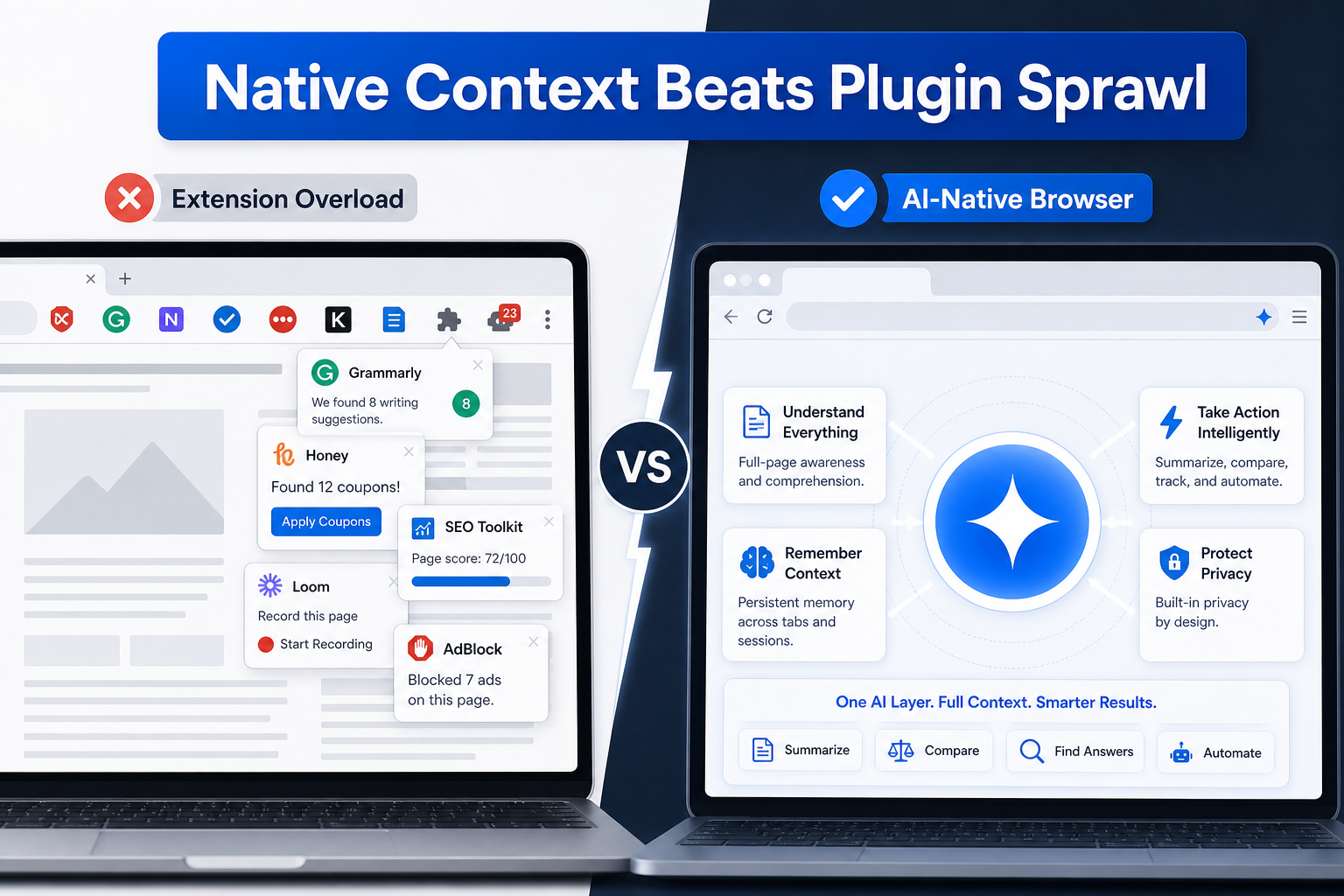
Your Chrome Extensions Are Fighting Each Other—Here's the Fix
Browser extensions create fragmented experiences with limited cross-tool understanding. When you run multiple Chrome extensions for automation, scraping, or AI assistance, each operates in isolation with restricted access to browser internals. The result: duplicated effort, conflicting behaviors, performance degradation, and a patchwork architecture that breaks under real-world demands.
The browser layer becomes even more important once the workflow touches public data collection, QA, geo-testing, or multi-session automation that benefits from proxy infrastructure.
AI-native browsers solve this by integrating intelligence directly into the browser architecture. Instead of bolting AI capabilities onto Chrome through extensions, these browsers build AI into the core execution layer. For power users and developers working with automation workflows, web scraping, geo-testing, or data collection tasks, understanding this architectural difference matters.
How Native AI Integration Accesses Full Browser Context vs Extensions
Chrome extensions operate within strict sandbox constraints. The browser architecture deliberately limits what extensions can access to protect user security and browser stability. While these restrictions make sense for general-purpose extensions, they create fundamental limitations for AI-powered automation.
Extension Architecture Constraints
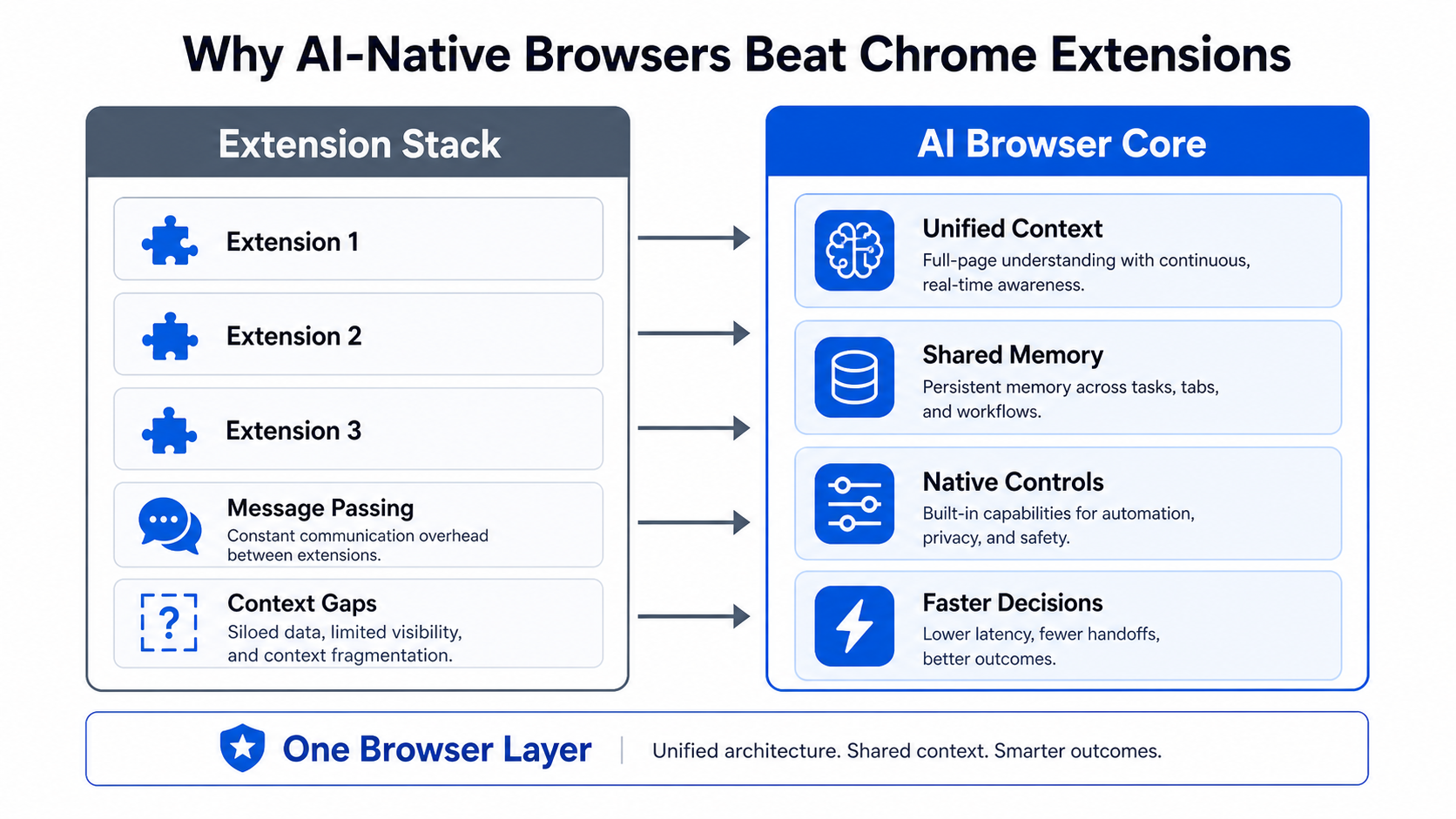
Extensions run in isolated JavaScript contexts with three main components
- Content scripts: Execute in the context of web pages but with limited DOM access
- Background scripts: Run persistently but cannot directly interact with page content
- Popup scripts: Provide UI but exist in yet another isolated context
These components communicate through message passing, adding latency and complexity. More importantly, extensions cannot
- Access the browser's rendering pipeline directly
- Hook into network requests before they leave the browser (beyond basic webRequest API limits)
- Modify browser behavior at the engine level
- Share state efficiently across tabs without overhead
- Access complete navigation history and user interaction patterns
- Integrate with browser memory management
For AI models trying to understand full page context, these restrictions mean working with incomplete information. An extension-based AI assistant might see the rendered DOM but miss dynamic script execution, shadow DOM contents, or iframe interactions. It cannot understand the full network waterfall or timing relationships between resources.
Native Browser Integration Advantages
AI-native browsers embed intelligence directly into the browser engine. This architecture provides
Complete Context Access: Native AI sees everything the browser sees. It has full visibility into the rendering tree, JavaScript execution context, network activity, and user interactions. When you navigate a page, the AI model receives the complete picture, not a filtered subset.
Real-Time Decision Making: Instead of reacting to events after they occur, native AI can participate in browser decisions as they happen. It can prioritize resource loading, optimize rendering paths, and make intelligent prefetch decisions based on predicted user behavior.
Unified State Management: All browser tabs, windows, and sessions share a single AI context. The browser understands relationships between your activities across domains without requiring extensions to coordinate through expensive message passing.
Deep Integration With Developer Tools: For automation workflows, native AI browsers can expose complete debugging information, network traces, and performance metrics directly to AI models. This enables sophisticated automation that adapts based on page performance characteristics.
For developers building scraping workflows or geo-testing automation, this means AI can make intelligent decisions about request timing, handle anti-bot challenges more naturally, and adapt crawling behavior based on site-specific patterns without explicit programming.
The Extension Coordination Problem
When you run multiple Chrome extensions, each operates independently. A proxy management extension doesn't coordinate with your scraping automation extension, which doesn't share context with your AI assistant extension. Each maintains separate state, duplicates functionality, and creates potential conflicts.
Common conflicts include
- Multiple extensions modifying the same DOM elements
- Conflicting network request interception rules
- Race conditions in page modification timing
- Duplicated resource usage as each extension parses the same content
- Inconsistent behavior when extension load order changes
AI-native browsers eliminate these coordination problems by providing a single, coherent intelligence layer that understands all aspects of browser activity.
Performance and Privacy Benefits of Integrated AI Browsers
The architectural differences between extensions and native integration create measurable performance and privacy advantages.
Performance Improvements
Reduced Memory Overhead: Each Chrome extension runs in its own process with separate memory allocation. Five extensions might consume 500MB+ of memory through duplicated JavaScript engines, copied DOM representations, and separate state storage. Native AI browsers consolidate this into a single integrated process.
Lower CPU Usage: Extensions constantly poll for DOM changes, monitor network activity, and respond to browser events. This creates continuous background CPU usage even when you're not actively using extension features. Native integration eliminates polling by receiving direct event notifications from the browser engine.
Faster Response Times: Extension message passing introduces latency. A typical extension workflow involves
- Content script detects event (2-5ms)
- Message sent to background script (5-15ms)
- Background script processes request (variable)
- Response sent back to content script (5-15ms)
- Content script applies changes (2-10ms)
Native AI operates synchronously with browser internals, reducing this chain to single-digit milliseconds for most operations.
Network Efficiency: For automation and scraping workflows, native browsers can optimize network usage by understanding the complete request context. They can batch requests intelligently, reuse connections more effectively, and apply compression strategies that extensions cannot access.
When combined with proxy infrastructure, native AI browsers can make smarter decisions about when to rotate IPs, which requests to route through proxies, and how to manage session consistency across distributed scraping operations.
Privacy Advantages
Reduced Data Exposure: Chrome extensions request broad permissions to function. An AI assistant extension might require access to all websites, all tabs, and complete browsing history. This creates a large attack surface and requires trusting third-party extension developers with sensitive data.
Native AI browsers keep intelligence local. The AI model runs within the browser itself rather than sending data to extension servers for processing. This matters especially for
- Enterprise users handling proprietary data
- Developers testing geo-restricted content
- Teams conducting competitive research
- Anyone scraping sensitive or regulated data sources
Fewer Permission Boundaries: Each extension you install expands your permission surface. Extensions can be compromised, sold to malicious actors, or updated with tracking code. Native browsers reduce this by consolidating functionality into the core browser you've already chosen to trust.
Better Audit Trail: Extension behavior is difficult to audit. They update automatically, execute arbitrary code, and can modify behavior based on server responses. Native browser AI operates with fixed, auditable behavior that changes only with explicit browser updates.
When to Use AI-Native Browsers vs Traditional Setups
The right choice depends on your specific workflows and requirements.
Choose AI-Native Browsers When
You Run Complex Automation Workflows: If you're orchestrating multi-step scraping operations, managing numerous browser sessions, or coordinating actions across many tabs, native AI provides the context awareness and control you need without extension coordination overhead.
Performance Matters: For large-scale data collection or operations where browser efficiency impacts cost, native browsers deliver measurable performance gains. This becomes especially relevant when running headless browser farms for scraping.
You Need Deep Integration: Tasks like sophisticated bot mitigation bypass, complex session management, or dynamic proxy rotation benefit from native access to browser internals.
Privacy is Critical: When handling sensitive data, minimizing third-party code execution reduces risk. Native browsers keep processing local.
You're Building Custom Workflows: Developers creating specialized automation tools benefit from native browser APIs that expose capabilities extensions cannot access.
Stick With Traditional Chrome + Extensions When
You Have Simple Needs: If you just need basic proxy switching or simple form filling, extensions work fine and integrate with your existing Chrome profile.
You Rely on Specific Extensions: Some specialized extensions have no native browser equivalent. If your workflow depends on specific extension capabilities, Chrome remains necessary.
Enterprise Requirements: Organizations with Chrome Enterprise policies, centralized extension management, or existing Chrome-based tooling may need to maintain Chrome-based workflows.
You Need Maximum Compatibility: Chrome remains the most compatible browser for web applications. Some sites explicitly check for Chrome and behave differently in other browsers.
Learning Curve Concerns: Switching to a new browser means learning new interfaces, migrating bookmarks, and adjusting workflows. For some teams, this transition cost outweighs the benefits.
Hybrid Approaches
Many developers use both
- Chrome for daily browsing and site compatibility
- AI-native browsers for automation, scraping, and testing workflows
- Extension-based tools for simple tasks
- Native browsers for performance-critical operations
This approach lets you optimize tool choice per task while maintaining familiarity.
LycheeIP Context: Proxy Infrastructure and Browser Automation Workflows
Browser automation for web scraping, geo-testing, and public data collection often requires proxy infrastructure to manage IP rotation, geographic distribution, and request patterns that avoid rate limiting.
Whether you choose AI-native browsers or Chrome with extensions, your proxy infrastructure needs remain the same. You still need
- Residential proxies for requests requiring authentic IP reputation
- Datacenter proxies for high-speed, cost-effective bulk operations
- Static residential IPs for session consistency
- Geographic distribution matching your data collection requirements
AI-native browsers can make smarter proxy decisions when they have full visibility into browser context. For example, native AI can
- Detect when a site is fingerprinting browser behavior and automatically adjust request patterns
- Understand which requests require proxy routing vs direct connection
- Maintain session consistency across proxy rotations by tracking authentication state
- Optimize proxy selection based on target site performance characteristics
For teams using proxy infrastructure providers like LycheeIP for web scraping workflows, ad verification, or e-commerce research, native browsers provide better integration opportunities. The browser can coordinate proxy selection with page loading patterns, manage IP rotation timing based on site behavior, and adapt strategies based on success rates.
However, extension-based proxy management still works effectively for simpler use cases. The key is matching your browser architecture to your workflow complexity. Simple proxy rotation for basic scraping works fine with extensions. Complex, adaptive automation benefits from native integration.
When implementing browser automation workflows that combine AI capabilities with proxy infrastructure, consider
- How your browser choice impacts proxy session management
- Whether you need dynamic proxy selection based on page characteristics
- If your workflow benefits from browser-level traffic optimization
- Whether extension overhead impacts your scraping throughput
- How browser architecture affects your ability to avoid bot detection
For legitimate public data collection, geo-testing, and automation workflows, combining appropriate browser architecture with professional proxy infrastructure creates more reliable, efficient operations. Always respect target site terms of service, review robots.txt files, and implement rate limiting to avoid overloading target websites.
Common Mistakes When Choosing Browser Automation Approaches
Developers frequently make these errors when evaluating browser architectures
Underestimating Extension Coordination Complexity
Adding more extensions seems like an easy way to add capabilities, but each additional extension increases coordination complexity exponentially. Five extensions create 10 potential interaction pairs. Ten extensions create 45 pairs. Most developers don't account for this when building their extension stack.
Ignoring Performance at Small Scale
Extension overhead seems negligible on a single browser instance. But when you scale to 10, 50, or 100 concurrent browser sessions for scraping workflows, memory and CPU overhead multiply. Native browsers maintain better performance characteristics at scale.
Over-Trusting Extension Security
Popular extensions with millions of users still get compromised or sold to advertisers. Granting broad permissions to multiple extensions creates risk most users don't fully evaluate. Native browsers reduce this attack surface.
Choosing Based on Familiarity Instead of Requirements
Sticking with Chrome because it's familiar makes sense for casual browsing. For specialized automation workflows, choosing based on technical requirements rather than comfort produces better results.
Not Testing Both Approaches
Browser architecture significantly impacts automation reliability and performance. Testing both extension-based and native approaches with your specific workflows reveals real-world differences that specifications don't capture.
Overlooking Bot Detection Differences
Sites using sophisticated bot detection can often identify extension patterns. Native browsers present more consistent fingerprints that better mimic genuine users. This matters for scraping workflows targeting protected sites.
Failing to Plan for Scale
What works for manual browsing fails at scale. Browser architecture choices that seem equivalent for single-user scenarios show dramatic differences when running automated operations across many sessions.
Conclusion
AI-native browsers deliver meaningful architectural advantages over Chrome extensions for automation, scraping, and data collection workflows. Native integration provides complete browser context, eliminates extension coordination overhead, and enables performance and privacy benefits that extensions cannot match.
For power users and developers, the choice between AI-native browsers and traditional extension-based setups depends on workflow complexity, performance requirements, and integration needs. Simple tasks work fine with extensions. Complex automation, large-scale scraping, and performance-critical operations benefit from native architecture.
The fragmented experience of fighting extensions has a clear fix: consolidate intelligence into the browser core where it can access full context, coordinate effectively, and operate efficiently. As browser automation becomes more sophisticated and AI capabilities more central to workflows, native integration represents the architectural direction that solves real problems rather than creating new ones.
Compare LycheeIP Browser Automation Infrastructure
Frequently Asked Questions
What is the biggest advantage of an AI-native browser over separate extensions?
The biggest advantage is shared context. A native browser layer can understand tabs, page state, workflows, and automation intent together instead of forcing isolated extensions to coordinate through narrow browser APIs.
Are Chrome extensions still useful for automation?
Yes. Extensions still work well for focused tasks, lightweight augmentation, and environments where you do not need deep cross-tab reasoning. The tradeoff is coordination, performance overhead, and limited visibility into the broader session.
Why does proxy infrastructure matter in browser automation?
It matters when the browser needs location-aware access, cleaner session isolation, or broader request distribution for scraping, testing, ad verification, or research tasks that extend beyond one local browsing session.
Related LycheeIP Guides and Resources

Recommended Articles

AI Search API for AI Agents: How to Ground LLMs With Live Search Data
An AI search API gives an application or agent programmatic access to current search results. Its most useful role is discovery: the agent can find candidate sources, identify fresh information, and decide what to retrieve next instead of relying only on model memory.
View Details
AI Web Scraping with Browser Agents: Architecture, Extraction, and Data Validation
AI web scraping uses AI to help discover, navigate, interpret, or extract information from websites. Browser agents are one implementation option when page interaction, rendering, or layout variation makes a simple scraper too brittle, but the agent should not become the entire data pipeline.
View Details
AI Browser Automation: Browser Agents vs Playwright vs Selenium
A browser agent interprets a goal and decides what browser action to take next. Playwright and Selenium can execute explicit, testable browser logic defined by developers. In 2026, however, Playwright also provides official MCP and agent-oriented workflows, so Playwright is no longer just the deterministic alternative to agentic automation. It can also serve as the browser-control layer inside an agent system.
View Details
Agentic Browser Security: Prompt Injection, Permissions, and Safe Deployment
That combination creates risks that are different from ordinary browsing and traditional automation. The most important is indirect prompt injection, where hostile instructions hidden in web content attempt to redirect the agent away from the user's goal. Google describes indirect prompt injection as a primary new threat for agentic browsing and has introduced layered defenses that include origin constraints, independent action checks, threat detection, and user confirmation for sensitive actions. Google's Chrome security architecture is a useful reference for how browser-agent defenses are evolving.
View Details
How to Give AI Agents Reliable Real-Time Web Data
A production-ready solution therefore needs more than a web scraper. It needs a web data layer that connects acquisition, validation, storage, retrieval, security, and observability. This guide explains how to design that layer.
View Details