
Gemini AI Studio Automation Use Cases for Business
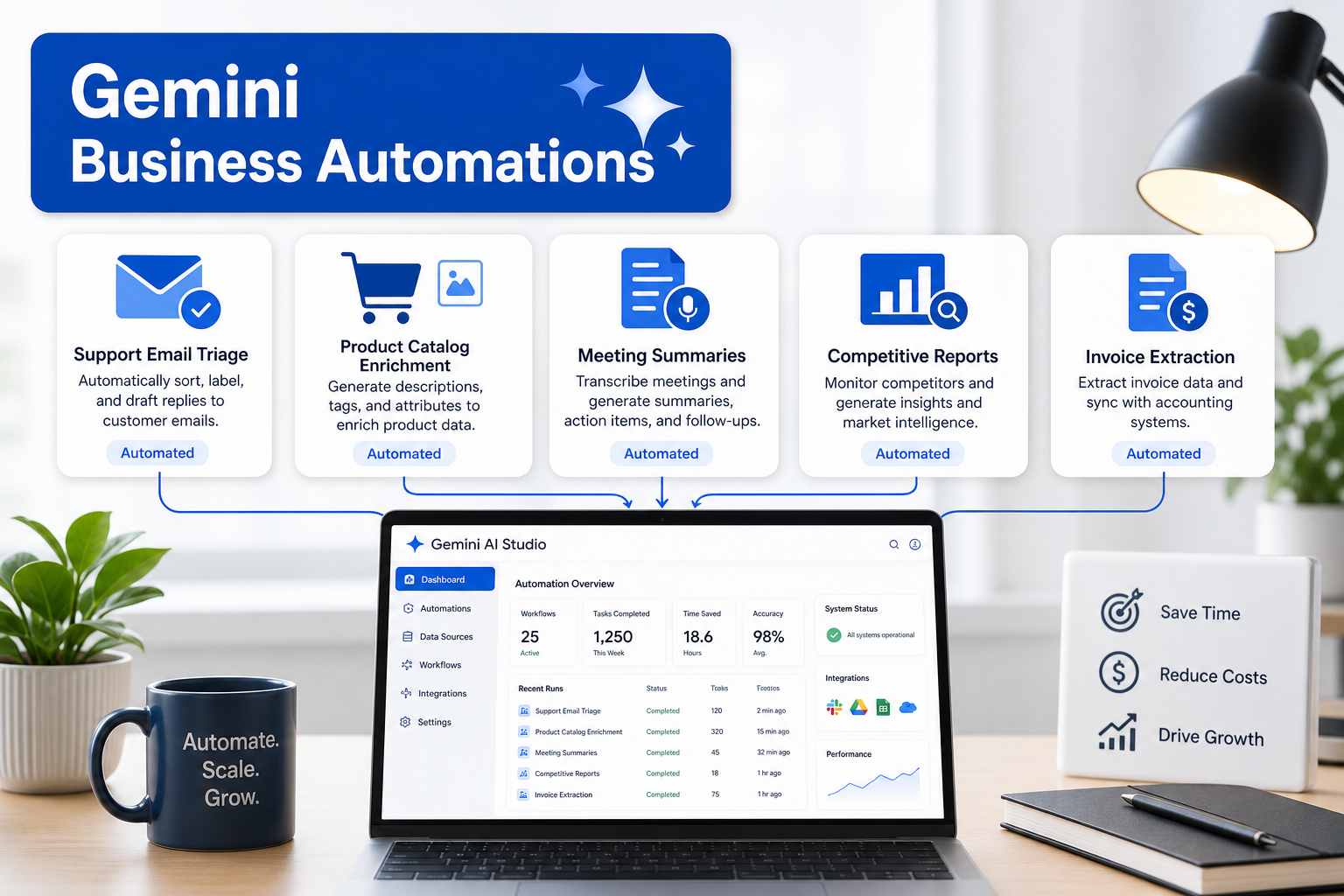
These 5 Gemini Automations Saved Me 10+ Hours This Week
Small business owners and operations managers face a persistent challenge: identifying AI automation opportunities that actually deliver measurable returns. While AI tools promise productivity gains, many businesses struggle to move beyond experimental use cases to workflows that consistently save time and reduce manual overhead.
When these automations extend into browser-driven monitoring or public web collection, stable proxy infrastructure helps distribute requests and preserve clean operational context.
Gemini AI Studio offers practical automation capabilities that integrate with existing business processes. The difference between experimenting with AI and achieving real ROI comes down to choosing the right use cases, setting them up correctly, and measuring their impact systematically.
Top Automation Use Cases in Gemini AI Studio for Daily Operations
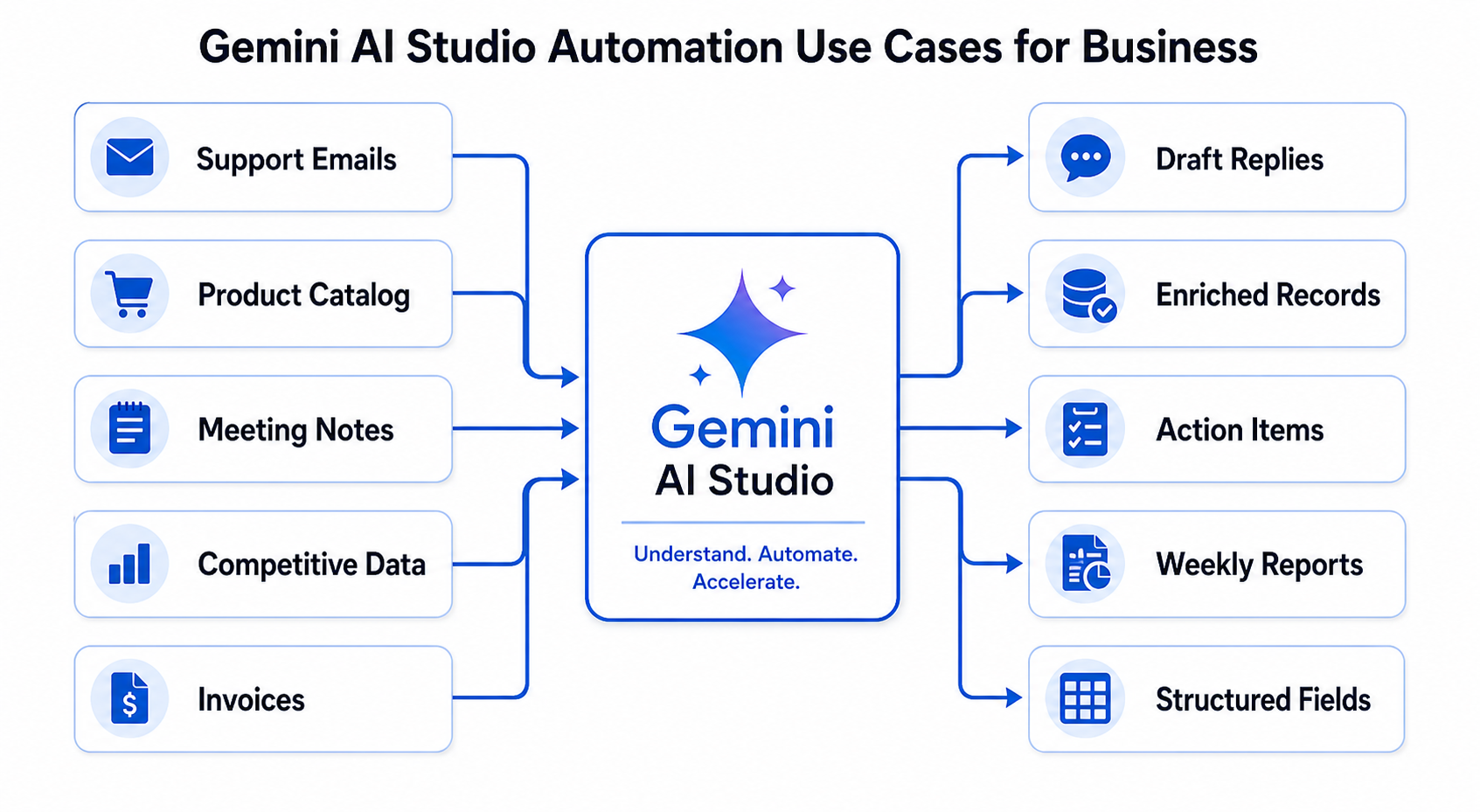
Gemini AI Studio automations work best when applied to repetitive, high-volume tasks that follow predictable patterns. These five use cases represent the highest ROI opportunities for small business operations
Customer Support Email Triage and Response Drafting
Customer support teams spend significant time reading, categorizing, and drafting initial responses to incoming emails. A Gemini automation can analyze incoming support emails, categorize them by urgency and topic, and generate draft responses based on your knowledge base.
Time savings: 2-3 hours per day for businesses handling 50+ support emails daily.
Implementation requirements
- Email API integration (Gmail, Outlook, or support platform)
- Structured knowledge base or FAQ documentation
- Response approval workflow
The automation reads each incoming email, extracts key information like customer intent and urgency indicators, assigns a category, and drafts a response using your approved language and policies. Human agents review and send, cutting response time while maintaining quality.
Product Data Enrichment for E-commerce Catalogs
E-commerce businesses constantly need to enrich product listings with descriptions, specifications, and category tags. Manually writing these for hundreds or thousands of SKUs consumes enormous operations time.
A Gemini automation can take basic product information (name, brand, basic specs) and generate detailed descriptions, extract features, suggest categories, and create SEO-friendly content at scale.
Time savings: 5-8 hours per week for catalog teams managing 100+ new products monthly.
Implementation approach
- Connect to your product database or spreadsheet
- Define output format and style guidelines
- Set up batch processing with review checkpoints
This automation particularly helps e-commerce research teams who gather competitive product data and need to standardize it quickly. When combined with public data collection workflows using proxy infrastructure, businesses can efficiently monitor competitor catalogs and enrich their own listings based on market insights.
Meeting Notes Summarization and Action Item Extraction
Operations managers spend hours in meetings, then more hours writing summaries and tracking action items. Gemini can process meeting transcripts, extract key decisions, generate structured summaries, and identify action items with owners and deadlines.
Time savings: 1-2 hours per day for managers with 3+ meetings daily.
Setup requirements
- Meeting transcription tool (Zoom, Meet, Teams)
- Consistent action item format
- Task management system integration
The automation reads the transcript, identifies decision points and commitments, structures them into a standard format, and can automatically create tasks in your project management system.
Competitive Intelligence Report Generation
Small businesses need to monitor competitors but rarely have dedicated market research teams. Gathering competitive data from websites, social media, and public sources, then synthesizing it into actionable reports, typically requires 4-6 hours weekly.
Gemini can process collected competitive data, identify trends, compare pricing and positioning, and generate structured reports highlighting changes and opportunities.
Time savings: 3-5 hours per week for businesses doing regular competitive monitoring.
Implementation considerations
- Structured data collection process
- Consistent data sources and formats
- Clear report template and KPIs
This use case connects directly to web scraping and public data collection workflows. Businesses using proxy infrastructure like LycheeIP for competitive monitoring can feed that collected public data into Gemini automations to generate insights without manual analysis. Residential proxies enable reliable access to competitor websites and localized content, while the AI handles synthesis and reporting.
Invoice and Receipt Data Extraction
Accounting and operations teams manually enter data from invoices, receipts, and financial documents into accounting systems. This tedious work takes 3-5 hours weekly for small businesses processing 50+ documents monthly.
Gemini can extract structured data from document images or PDFs, validate against expected formats, flag anomalies, and prepare data for import into accounting systems.
Time savings: 3-4 hours per week for businesses with regular invoice processing.
Technical setup
- Document upload workflow (email, cloud storage, or direct upload)
- Data validation rules
- Export format matching your accounting system
The automation processes each document, extracts key fields (vendor, date, amount, line items), validates the data against your rules, and outputs clean structured data ready for your accounting workflow.
Step-by-Step Setup for High-Impact Business Automations
Implementing Gemini automations effectively requires systematic setup that balances speed with quality control. Here is a practical framework for the customer support email automation, which can be adapted to other use cases.
Phase 1: Data Preparation and Testing
Week 1: Build your knowledge base
- Document your 20 most common customer questions and approved responses
- Identify email categories (urgent, technical, billing, general inquiry)
- Define your brand voice guidelines and prohibited language
- Gather 50-100 past customer emails as test data
Week 2: Initial automation setup
- Connect Gemini to your email system via API
- Create prompts that include your knowledge base and formatting requirements
- Test with your historical emails
- Measure accuracy for categorization (target: 85%+ correct) and response quality
Phase 2: Pilot with Human Review
Week 3-4: Supervised deployment
- Route 25% of incoming emails through the automation
- Require human review before sending any AI-generated response
- Track metrics: time to first response, agent editing time, customer satisfaction
- Collect feedback from agents on accuracy and usefulness
Adjustment cycle
- If categorization accuracy is below 85%, refine your category definitions
- If responses require heavy editing (more than 2 minutes), improve prompts or add examples
- If certain email types perform poorly, add them to your knowledge base
Phase 3: Scale and Optimize
Week 5+: Expand coverage
- Gradually increase to 50%, then 75% of emails
- Maintain human review but reduce review time as confidence builds
- Track time savings weekly
- Update prompts monthly based on new patterns
Optimization tactics
- Create separate automations for different email types if accuracy varies significantly
- Build feedback loops where agents can flag poor responses to improve training data
- Integrate with your CRM to personalize responses based on customer history
Technical Considerations for Reliable Automation
Business automations need consistent performance. Several technical factors affect reliability
API rate limits: Gemini AI Studio has rate limits that vary by pricing tier. For businesses processing high volumes, structure your automations to batch requests and handle rate limit responses gracefully.
Data security: Customer emails and business documents contain sensitive information. Ensure your Gemini implementation follows data handling policies, encrypts data in transit, and complies with relevant privacy regulations.
Fallback workflows: Automations fail. Design workflows that route items to human queues when the automation cannot process them confidently. Set confidence thresholds (for example, only auto-categorize emails with 90%+ confidence).
Geo-testing for customer-facing content: If your business operates in multiple regions, test how Gemini handles different languages, cultural contexts, and regional terminology. This is where geo-testing capabilities become valuable. Using proxies with specific geographic locations lets you verify that generated content appears correctly to customers in different markets.
Measuring Time Savings and ROI from AI Automation
Quantifying automation ROI requires tracking specific metrics before and after implementation. Generic claims about productivity gains do not help decision-making. Measure these concrete indicators
Time Tracking Framework
Before automation (baseline period: 2-4 weeks)
- Average time per task (for example, minutes to respond to one support email)
- Total tasks completed per week
- Total staff hours spent on the task category
- Error rate or rework percentage
After automation (measurement period: 4-8 weeks)
- Average time per task with automation assistance
- Total tasks completed per week (capacity should increase)
- Total staff hours spent (should decrease or reallocate to higher-value work)
- Error rate with AI assistance
- Time spent reviewing AI output
ROI Calculation Example: Customer Support Email Automation
Baseline metrics
- 50 emails per day
- 12 minutes average time per email (reading, researching, drafting, sending)
- 600 minutes (10 hours) daily
- 50 hours weekly
- At $25/hour = $1,250 weekly cost
With automation
- Same 50 emails per day
- 5 minutes average time per email (reviewing AI draft, editing, sending)
- 250 minutes (4.2 hours) daily
- 21 hours weekly
- At $25/hour = $525 weekly cost
- Time savings: 29 hours weekly
- Cost savings: $725 weekly or $37,700 annually
Implementation costs
- Gemini AI Studio API costs: approximately $50-150 monthly depending on volume
- Initial setup time: 40 hours at $50/hour = $2,000
- Ongoing optimization: 4 hours monthly at $50/hour = $200 monthly
Net first-year ROI
- Annual savings: $37,700
- Annual costs: $1,800 (API) + $2,400 (optimization) + $2,000 (setup) = $6,200
- Net benefit: $31,500
- ROI: 508%
These numbers represent realistic outcomes for well-implemented automations. Your results will vary based on task complexity, volume, and wage rates.
Beyond Time: Quality and Capacity Metrics
ROI is not just about time savings. Track these additional impact areas
Response quality: Customer satisfaction scores, complaint rates, and resolution time often improve with AI assistance because responses are faster and more consistent.
Staff capacity: Time saved on routine tasks allows teams to handle higher volumes or focus on complex issues requiring human judgment.
Scalability: Automations handle volume spikes without proportional cost increases, unlike hiring.
Knowledge capture: Building automation prompts forces you to document processes and best practices, creating valuable institutional knowledge.
Connecting Gemini Automations to Data Infrastructure Workflows
Many Gemini automation use cases depend on reliable access to external data sources. E-commerce research, competitive intelligence, ad verification, and market monitoring all require collecting public data from websites, platforms, and digital properties.
This is where proxy infrastructure becomes relevant to your automation strategy. When Gemini automations need to process data gathered from competitor websites, search engines, or e-commerce platforms, that data collection often requires proxy infrastructure to ensure reliable, uninterrupted access.
For example, the competitive intelligence automation described earlier works best when paired with systematic public data collection. Businesses using residential or datacenter proxies can gather competitor pricing, product catalogs, and market positioning data consistently without access issues or geographic restrictions. That collected data then feeds into Gemini for analysis and report generation.
LycheeIP provides proxy infrastructure that supports these data collection workflows. Teams building automation pipelines that include web scraping, public data gathering, or multi-region content verification can use proxy solutions to ensure their data sources remain accessible and their Gemini automations have reliable input data.
When implementing data-dependent automations
- Use rotating residential proxies for gathering public data from websites that implement rate limiting
- Use static residential proxies for workflows requiring consistent sessions, like monitoring account-specific content
- Use datacenter proxies for high-volume, performance-critical data collection where speed matters
- Implement geo-testing workflows to verify that Gemini-generated content appears correctly across different regions
Automation ROI depends on data reliability. Intermittent data access undermines automation value by requiring manual intervention.
Common Mistakes When Implementing Gemini Automations
Businesses frequently make these errors when deploying AI automations, reducing ROI and creating frustration
Skipping the Pilot Phase
Deploying automation at 100% scale without testing risks quality problems, customer complaints, and staff resistance. Always pilot with a subset of volume and mandatory human review.
Insufficient Knowledge Base Documentation
Gemini performs best with clear guidelines and examples. Businesses that skip documentation and rely on generic prompts get generic, often unusable outputs. Invest time in documenting your processes, approved language, and edge cases.
No Measurement Framework
Without baseline metrics, you cannot prove ROI or identify improvement opportunities. Track specific metrics before and after implementation.
Over-Automating Too Soon
Not every task should be automated immediately. Start with high-volume, repetitive tasks with clear success criteria. Save complex, judgment-intensive work for later or keep it human-driven.
Ignoring Data Security and Privacy
Automations often process customer data, financial information, or proprietary business intelligence. Ensure your implementation complies with relevant regulations and follows security best practices. Review Gemini AI Studio data handling policies and configure your setup appropriately.
Treating Automation as Set-and-Forget
Business contexts change. Customer questions evolve. Competitors adjust positioning. Effective automations require monthly optimization to maintain accuracy and relevance. Schedule regular prompt reviews and performance analysis.
Neglecting the Human Experience
Automations should make staff work easier, not create frustration. Involve the people who will use the automation in design and testing. If agents hate the tool, they will work around it, eliminating any ROI.
Responsible Automation Practices
When implementing automations that interact with external websites or collect public data, follow responsible practices
- Review website terms of service before collecting public data
- Respect robots.txt files where applicable
- Implement rate limiting to avoid overloading target websites
- Use proxy infrastructure appropriately for legitimate business purposes like market research, competitive analysis, ad verification, and public data collection
- Ensure your data collection workflows comply with relevant regulations
- Focus on publicly available information
These practices protect your business from legal and reputational risks while enabling valuable automation workflows.
Conclusion
Gemini AI Studio automations deliver measurable ROI when applied to the right use cases with systematic implementation. The five automations discussed (customer support triage, product data enrichment, meeting summarization, competitive intelligence, and invoice processing) represent high-impact opportunities for small business operations.
Success requires moving beyond experimentation to structured deployment: document your processes, pilot with human oversight, measure specific metrics, and optimize continuously. ROI comes from time savings, quality improvements, and increased capacity, not from automating everything possible.
For businesses building automations that depend on external data, reliable data infrastructure matters. Whether you are gathering competitive intelligence, monitoring market trends, or enriching product catalogs, your automation is only as good as your data access. Proxy infrastructure supports these workflows by ensuring consistent, reliable access to the public data your automations need.
Start with one automation, measure results rigorously, prove ROI, then expand. Systematic automation builds competitive advantage that scales without proportional cost increases.
See LycheeIP Automation-Ready Proxy Options
Frequently Asked Questions
What business tasks are a strong fit for Gemini AI Studio?
High-volume, repetitive tasks with clear input and output patterns tend to be the strongest fit. Examples include email triage, catalog enrichment, document summarization, reporting, and structured extraction from receipts or invoices.
Should Gemini automations run without human review?
Only after you have measured quality on a controlled sample. A practical rollout starts with human review, confidence thresholds, and clear exception handling before you allow more autonomous execution.
Where do proxies fit into Gemini-linked automation workflows?
They matter when the workflow includes browser automation, public web data collection, or geographically sensitive monitoring that needs reliable routing, cleaner request distribution, or stable sessions.
Related LycheeIP Guides and Resources

Recommended Articles

AI Search API for AI Agents: How to Ground LLMs With Live Search Data
An AI search API gives an application or agent programmatic access to current search results. Its most useful role is discovery: the agent can find candidate sources, identify fresh information, and decide what to retrieve next instead of relying only on model memory.
View Details
AI Web Scraping with Browser Agents: Architecture, Extraction, and Data Validation
AI web scraping uses AI to help discover, navigate, interpret, or extract information from websites. Browser agents are one implementation option when page interaction, rendering, or layout variation makes a simple scraper too brittle, but the agent should not become the entire data pipeline.
View Details
AI Browser Automation: Browser Agents vs Playwright vs Selenium
A browser agent interprets a goal and decides what browser action to take next. Playwright and Selenium can execute explicit, testable browser logic defined by developers. In 2026, however, Playwright also provides official MCP and agent-oriented workflows, so Playwright is no longer just the deterministic alternative to agentic automation. It can also serve as the browser-control layer inside an agent system.
View Details
Agentic Browser Security: Prompt Injection, Permissions, and Safe Deployment
That combination creates risks that are different from ordinary browsing and traditional automation. The most important is indirect prompt injection, where hostile instructions hidden in web content attempt to redirect the agent away from the user's goal. Google describes indirect prompt injection as a primary new threat for agentic browsing and has introduced layered defenses that include origin constraints, independent action checks, threat detection, and user confirmation for sensitive actions. Google's Chrome security architecture is a useful reference for how browser-agent defenses are evolving.
View Details
How to Give AI Agents Reliable Real-Time Web Data
A production-ready solution therefore needs more than a web scraper. It needs a web data layer that connects acquisition, validation, storage, retrieval, security, and observability. This guide explains how to design that layer.
View Details