
AI Operating Systems: The Future of Work?
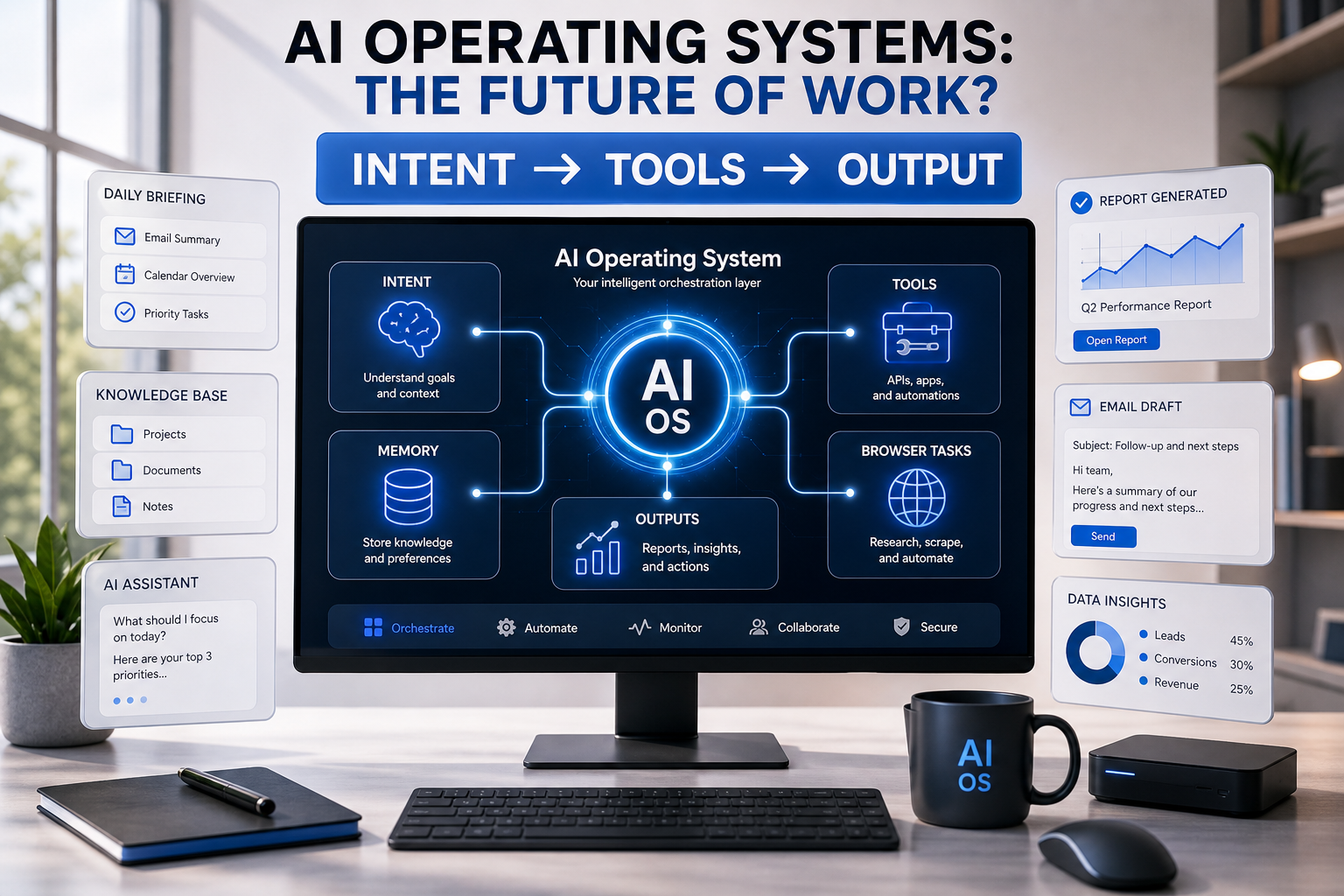
Windows and MacOS are dead—meet the AI operating system
Context switching between apps and tools destroys focus and productivity. The average knowledge worker toggles between 10 to 15 different applications daily, losing up to 40% of productive time to context switching, tab hunting, and interface navigation. Traditional operating systems were built for file management and application isolation, not intelligent workflow orchestration. AI operating systems promise to eliminate this fragmentation by unifying all work into a single intelligent interface that understands intent, coordinates actions across tools, and reduces cognitive overhead.
For teams orchestrating browser tasks, testing, or public-data automation, the execution layer often depends on proxy infrastructure for routing control, session stability, and geographic reach.
But what exactly is an AI operating system, and how does it differ from the desktop environments we have used for decades? More importantly, are these systems ready for production use, or are they just another layer of complexity masquerading as innovation?
What Makes an AI Operating System Different from Traditional OS
A traditional operating system manages hardware resources, executes programs, and provides a graphical interface for launching applications. Windows, MacOS, and Linux are platforms that let you run isolated software tools. Each app operates in its own silo, with limited communication between them. You copy data from Slack, paste it into a spreadsheet, export a report, attach it to an email, and manually track the entire workflow.
An AI operating system inverts this model. Instead of managing applications, it manages intent. You describe what you want to accomplish, and the system coordinates the necessary actions across multiple tools, APIs, and data sources without requiring you to manually orchestrate each step.
Core Architectural Differences
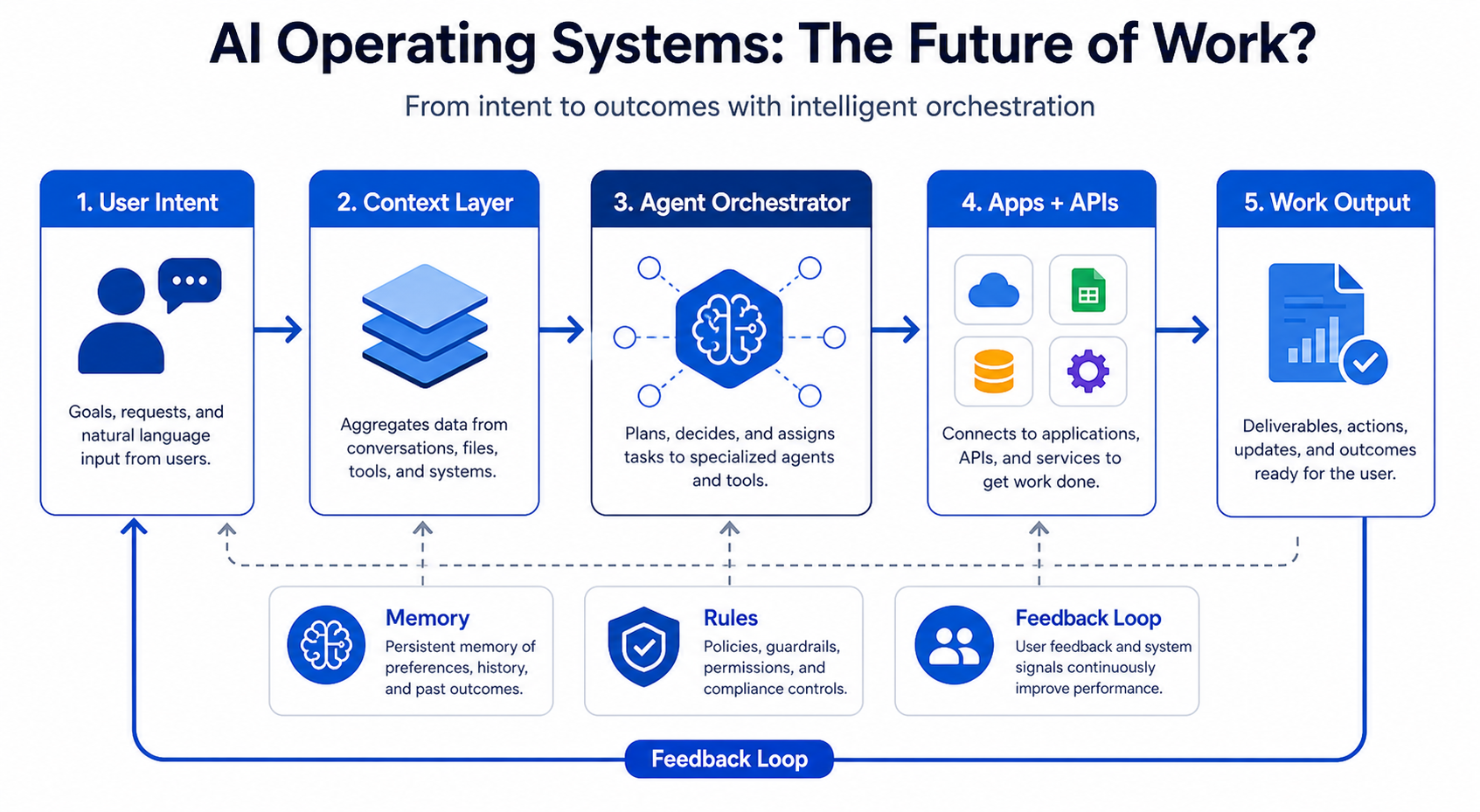
Intent-Based Interaction
Traditional OS relies on discrete commands: click, type, save, open. AI OS interprets natural language intent and translates it into multi-step workflows. Instead of opening five apps to compile a market research report, you describe the deliverable and the system retrieves data, synthesizes findings, formats output, and routes it to the appropriate destination.
Unified Context Layer
AI operating systems maintain persistent context across all tools and sessions. They remember what you are working on, who you are collaborating with, and what data you have accessed. This context awareness allows the system to proactively suggest next actions, surface relevant information, and reduce repetitive input.
API Orchestration as Core Function
While traditional OS treats applications as endpoints, AI OS treats them as composable services. The system uses APIs to connect SaaS tools, databases, web services, and internal systems into unified workflows. For teams running automation, web scraping, or public data collection pipelines, this orchestration capability can consolidate proxy management, data extraction, transformation, and delivery into seamless sequences.
Adaptive Interface
The interface adapts to the task. Instead of presenting a static desktop with fixed icons, AI OS surfaces relevant tools, data, and actions based on current context. You do not navigate to applications. The system brings functionality to you.
Relevance to Data Infrastructure and Automation Workflows
For teams managing scraping pipelines, geo-testing environments, or ad verification workflows, AI OS concepts align with how modern automation already works. Tools like web scraping orchestration platforms coordinate proxy rotation, request scheduling, data parsing, and storage without manual intervention. An AI OS extends this logic to the entire work environment, treating every tool as an API-accessible service that can be programmed, monitored, and optimized.
Proxy infrastructure becomes a managed service layer within the AI OS framework. Instead of manually configuring residential proxies for each scraping job, the system selects appropriate IP types, rotates sessions, handles retries, and routes requests based on target requirements. Teams using LycheeIP or similar proxy infrastructure providers for e-commerce research, SERP monitoring, or account workflows could integrate these services as native components within an AI OS, reducing configuration overhead and improving workflow reliability.
Real-World AI OS Implementations Available Today
Several platforms are actively building toward the AI operating system model, though none have achieved full realization. Current implementations fall into three categories: AI-native desktops, workflow automation platforms with LLM integration, and agent frameworks designed for multi-tool orchestration.
AI-Native Desktop Environments
Rewind
Rewind records everything you do on your computer and uses local AI models to make that history searchable and actionable. You can ask natural language questions about past work, retrieve information from old meetings, or reference documents you viewed months ago. While not a full operating system, it introduces the persistent context layer that defines AI OS architecture.
Microsoft Copilot
Integrated across Windows 11 and Microsoft 365, Copilot acts as an ambient assistant that surfaces contextual actions, automates repetitive tasks, and connects data across Office applications. It represents an AI layer on top of a traditional OS rather than a ground-up reimagining, but it demonstrates how large vendors are moving toward intent-based interaction models.
Workflow Automation Platforms with LLM Integration
Zapier Central
Zapier extended its workflow automation platform with an AI layer that allows users to describe workflows in natural language. The system interprets intent, maps it to available integrations, and builds multi-step automations without manual configuration. For teams managing data collection pipelines, this reduces setup time for common patterns like extracting public data from websites, routing it through transformation services, and delivering it to analytics platforms.
Make (Integromat) with AI
Make added LLM-powered scenario builders that generate automation workflows from text descriptions. Users can describe complex scraping, data processing, or notification workflows, and the platform generates the necessary API calls, transformations, and routing logic. When combined with proxy infrastructure for request distribution, these tools enable rapid deployment of data collection workflows without deep technical implementation.
Agent Frameworks for Multi-Tool Orchestration
AutoGPT and BabyAGI
These open-source frameworks break down high-level goals into subtasks, execute them using available tools and APIs, and iterate based on results. They represent a developer-focused approach to AI OS concepts, where autonomous agents manage multi-step workflows that would traditionally require manual coordination.
LangChain Agents
LangChain provides a framework for building LLM applications that can use external tools, call APIs, and chain reasoning steps. Developers use it to build domain-specific AI assistants that orchestrate tasks across multiple services. For web scraping and automation teams, LangChain agents can coordinate proxy selection, request execution, HTML parsing, data validation, and error handling within a single workflow definition.
How These Systems Handle Proxy and Data Workflows
AI OS implementations designed for technical workflows treat proxy infrastructure as a configurable service. Instead of hardcoding proxy endpoints into scraping scripts, you define requirements (geographic location, IP type, rotation policy) and the system selects appropriate providers and configurations.
For example, a workflow orchestrator integrated with proxy infrastructure might
- Automatically select residential proxies for e-commerce price monitoring to avoid rate limits
- Route ad verification requests through datacenter proxies in specific geographic regions
- Rotate static residential IPs for account-based workflows that require persistent sessions
- Handle retry logic and proxy replacement when requests fail due to blocks or timeouts
Teams using LycheeIP or similar proxy providers can expose their proxy pools as API-accessible services within AI OS workflows. This allows the orchestration layer to dynamically allocate proxy resources based on task requirements, improving efficiency and reducing manual configuration.
Timeline and Predictions for AI OS Mainstream Adoption
AI operating systems are currently in the early adopter phase. The core technologies exist, implementations are functional for specific use cases, but mainstream adoption faces significant barriers.
2024-2025: Niche Adoption and Experimentation
Current AI OS implementations serve power users, developers, and teams with complex automation requirements. Adoption is highest among
- Data teams managing scraping and public data collection pipelines
- DevOps engineers orchestrating multi-service workflows
- Knowledge workers drowning in SaaS tool sprawl who are willing to experiment with new interfaces
During this period, expect rapid iteration on interaction models, significant improvements in context retention, and better integration with enterprise SaaS ecosystems.
2026-2027: Enterprise Integration and Standardization
Major operating system vendors will ship AI-native features as default components rather than optional add-ons. Microsoft, Apple, and Google will embed persistent context layers, natural language workflow builders, and cross-application orchestration into their core platforms.
Enterprise adoption will accelerate as
- Security and compliance frameworks mature for AI-mediated workflows
- Integration standards emerge for connecting SaaS tools to AI orchestration layers
- ROI data validates productivity gains from reduced context switching
For teams managing data infrastructure, this phase will bring native support for proxy configuration, request orchestration, and data pipeline management within AI OS environments. Providers like LycheeIP that expose clean APIs and support standard authentication methods will integrate more easily into these emerging platforms.
2028+: Mainstream Displacement of Traditional Desktop Paradigms
By the late 2020s, intent-based interaction will become the default mode for knowledge work. Traditional application launchers and file systems will still exist for legacy workflows, but most users will interact with their computers by describing goals rather than navigating menus.
Key indicators of mainstream adoption
- New employees receive AI OS training rather than application-specific onboarding
- Job descriptions emphasize workflow design over tool proficiency
- Software vendors prioritize API quality over UI design because most users never see their interfaces directly
Barriers to Adoption
Several factors could slow this timeline
Trust and Transparency
Users need confidence that AI systems are executing workflows correctly. When a traditional app fails, the error is visible. When an AI OS silently misconfigures a workflow, the consequences might not surface until critical data is lost or compliance is violated.
Integration Complexity
AI OS depends on comprehensive API access to every tool in a user's workflow. Many legacy enterprise systems lack modern APIs, creating integration gaps that force users back to manual processes.
Cost and Infrastructure
Running persistent AI models that maintain context across all user activity requires significant compute resources. Cloud-based AI OS platforms introduce latency and privacy concerns. Local implementations demand hardware upgrades.
Workflow Lock-In
As AI OS learns user preferences and builds custom workflows, switching costs increase. Users become dependent on the orchestration layer, making migration to alternative platforms more difficult than switching traditional operating systems.
LycheeIP and AI Operating System Workflows
For teams evaluating proxy infrastructure within emerging AI OS environments, the key consideration is API accessibility. Proxy providers that expose clean, well-documented APIs for session management, IP rotation, geographic targeting, and usage monitoring will integrate more easily into orchestrated workflows.
LycheeIP provides proxy infrastructure designed for programmatic access, making it suitable for integration into automation platforms, workflow orchestrators, and AI-driven data collection pipelines. Teams using AI OS concepts to manage scraping workflows, geo-testing environments, or public data collection can incorporate proxy selection, rotation, and monitoring as automated components rather than manual configuration steps.
When building AI-orchestrated workflows that require proxy infrastructure
- Define proxy requirements as workflow parameters (location, IP type, rotation policy) rather than hardcoding endpoints
- Use API-based session management to allow the orchestration layer to allocate and release proxy resources dynamically
- Implement monitoring hooks that surface proxy performance metrics to the AI layer for adaptive optimization
- Respect target website terms and rate limits within your workflow definitions to ensure sustainable data collection
Common Mistakes and Considerations
Over-Reliance on Automation
AI OS automates intent interpretation, not judgment. Users who blindly trust automated workflows without validation introduce risk. Always implement checkpoints for critical operations, especially in data collection, financial transactions, or compliance-sensitive processes.
Inadequate Error Handling
Traditional apps fail visibly. AI OS workflows can fail silently if error handling is not explicitly designed. When building orchestrated workflows that include proxy rotation, web scraping, or API integration, define fallback behaviors, retry logic, and alert conditions.
Privacy and Data Exposure
AI OS maintains persistent context by recording user activity. Ensure you understand what data is stored, where it is processed, and who has access. For workflows involving proprietary research, competitive intelligence, or customer data, evaluate whether cloud-based AI OS platforms meet your security requirements.
Proxy Configuration Mistakes
When integrating proxy infrastructure into AI-orchestrated workflows
- Match proxy type to use case (residential for e-commerce scraping, datacenter for high-volume public data collection, static residential for account-based workflows)
- Implement proper session management to avoid unnecessary IP rotation that triggers anti-bot systems
- Monitor proxy performance metrics to identify blocked IPs or degraded endpoints before they impact workflow reliability
Ignoring Robots.txt and Terms of Service
Automation makes it easy to scale data collection workflows, but legality and ethics do not change with technology. Always review target website terms, respect robots.txt directives where applicable, and design workflows that avoid overloading servers or violating access policies.
Conclusion
AI operating systems represent a fundamental shift from application-centric to intent-centric computing. By unifying work into a single intelligent interface, these systems promise to eliminate the productivity drain caused by context switching, manual coordination, and tool fragmentation. Current implementations demonstrate the viability of core concepts like persistent context, natural language orchestration, and API-driven workflow automation, but mainstream adoption remains years away.
For teams managing data infrastructure, web scraping, automation, or public data collection workflows, the AI OS model aligns with existing orchestration patterns. Treating proxy infrastructure, data extraction, transformation, and delivery as composable services within an intelligent orchestration layer reduces configuration overhead and improves reliability. As these systems mature, providers that expose clean APIs and support programmatic access will integrate most naturally into AI-native work environments.
The question is not whether AI operating systems will replace traditional desktops, but when the benefits outweigh the risks and costs of adoption. For now, early adopters willing to experiment with emerging platforms will gain insights into how work will be structured in the coming decade.
Explore LycheeIP Infrastructure for AI Workflows
Frequently Asked Questions
What makes an AI operating system different from a chatbot?
A chatbot answers prompts. An AI operating system coordinates intent, tools, memory, and execution across multiple applications and workflows. The shift is from conversation only to end-to-end task orchestration.
Are AI operating systems replacing Windows and macOS today?
Not in a literal platform-replacement sense for most teams. What is happening now is a workflow-layer shift, where AI coordination sits on top of traditional operating systems and starts to absorb more of the user’s daily task flow.
How do proxies relate to AI operating systems?
They support the execution layer when the AI system needs region-specific browsing, scalable research, session continuity, or resilient network routing for scraping, monitoring, and cross-market testing tasks.
Related LycheeIP Guides and Resources

Recommended Articles

AI Search API for AI Agents: How to Ground LLMs With Live Search Data
An AI search API gives an application or agent programmatic access to current search results. Its most useful role is discovery: the agent can find candidate sources, identify fresh information, and decide what to retrieve next instead of relying only on model memory.
View Details
AI Web Scraping with Browser Agents: Architecture, Extraction, and Data Validation
AI web scraping uses AI to help discover, navigate, interpret, or extract information from websites. Browser agents are one implementation option when page interaction, rendering, or layout variation makes a simple scraper too brittle, but the agent should not become the entire data pipeline.
View Details
AI Browser Automation: Browser Agents vs Playwright vs Selenium
A browser agent interprets a goal and decides what browser action to take next. Playwright and Selenium can execute explicit, testable browser logic defined by developers. In 2026, however, Playwright also provides official MCP and agent-oriented workflows, so Playwright is no longer just the deterministic alternative to agentic automation. It can also serve as the browser-control layer inside an agent system.
View Details
Agentic Browser Security: Prompt Injection, Permissions, and Safe Deployment
That combination creates risks that are different from ordinary browsing and traditional automation. The most important is indirect prompt injection, where hostile instructions hidden in web content attempt to redirect the agent away from the user's goal. Google describes indirect prompt injection as a primary new threat for agentic browsing and has introduced layered defenses that include origin constraints, independent action checks, threat detection, and user confirmation for sensitive actions. Google's Chrome security architecture is a useful reference for how browser-agent defenses are evolving.
View Details
How to Give AI Agents Reliable Real-Time Web Data
A production-ready solution therefore needs more than a web scraper. It needs a web data layer that connects acquisition, validation, storage, retrieval, security, and observability. This guide explains how to design that layer.
View Details