
Instagram Lead Scraping with n8n and Apify: Automated B2B Lead Generation Pipeline
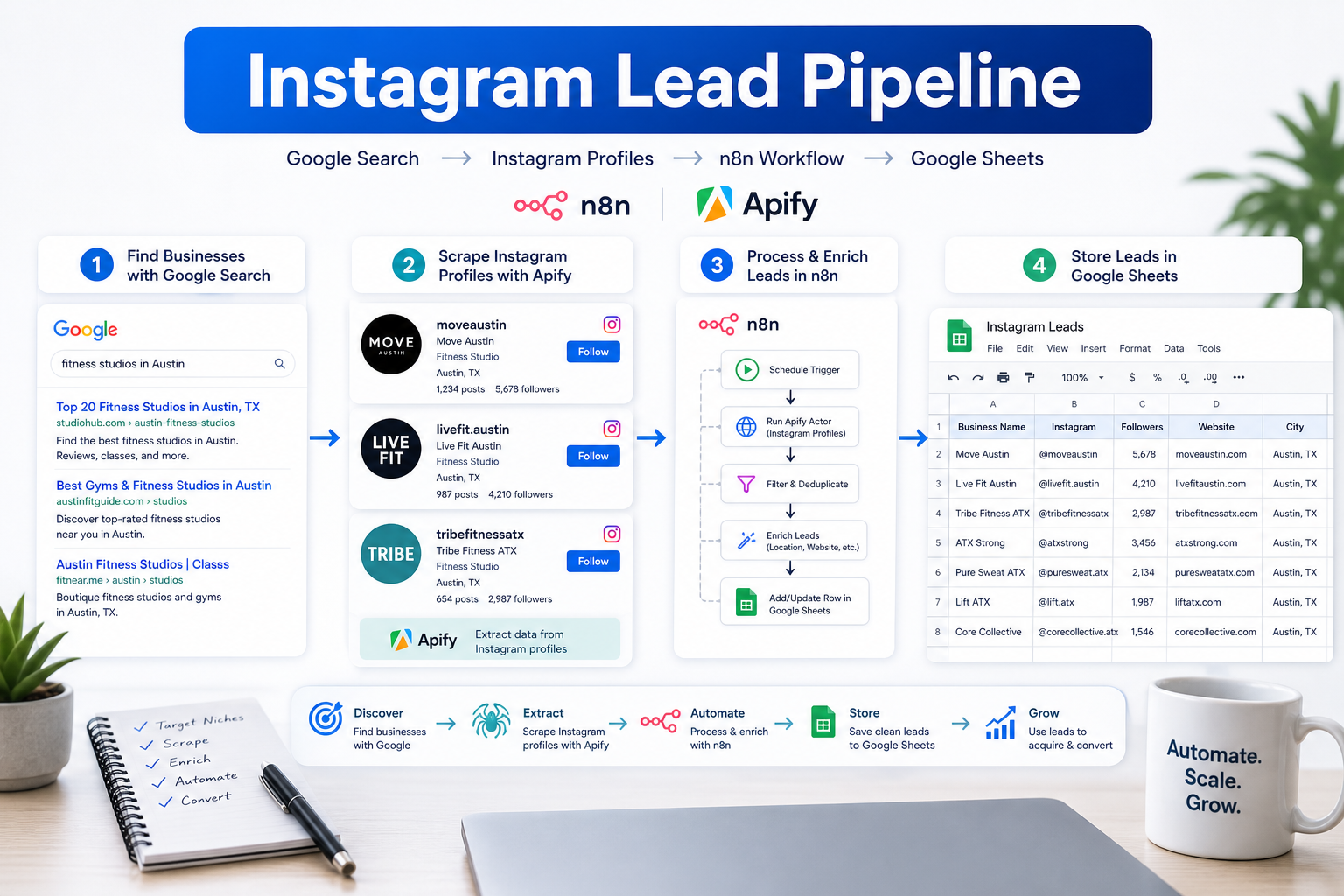
Get unlimited Instagram B2B leads on autopilot with this n8n workflow. B2B marketers, social media agencies, and lead generation specialists face a common challenge: finding targeted Instagram leads without paying expensive agencies or spending hours manually searching profiles. Traditional methods involve hiring virtual assistants, subscribing to costly lead databases, or manually combing through Instagram searches, all of which drain time and budget.
Because this workflow touches public search results, scraping infrastructure, and repeated collection, it benefits from clean proxy infrastructure, careful retry handling, and respectful rate management.
This article walks through building an autonomous AI agent that scrapes Instagram leads using Google Dorking techniques, connecting Apify to n8n for automated data extraction, and creating a self-sustaining pipeline that delivers fresh leads directly to Google Sheets. The workflow combines search engine indexing, automated scraping infrastructure, and workflow automation to create a hands-off lead generation system.
Understanding Google Dorking for Instagram Profile Discovery
Google Dorking is a search technique that uses advanced Google search operators to uncover publicly indexed information that standard searches might miss. For Instagram lead generation, this approach exploits the fact that Google indexes millions of public Instagram profiles, allowing you to build targeted search queries that surface exactly the prospects you need.
How Google Indexes Instagram Profiles
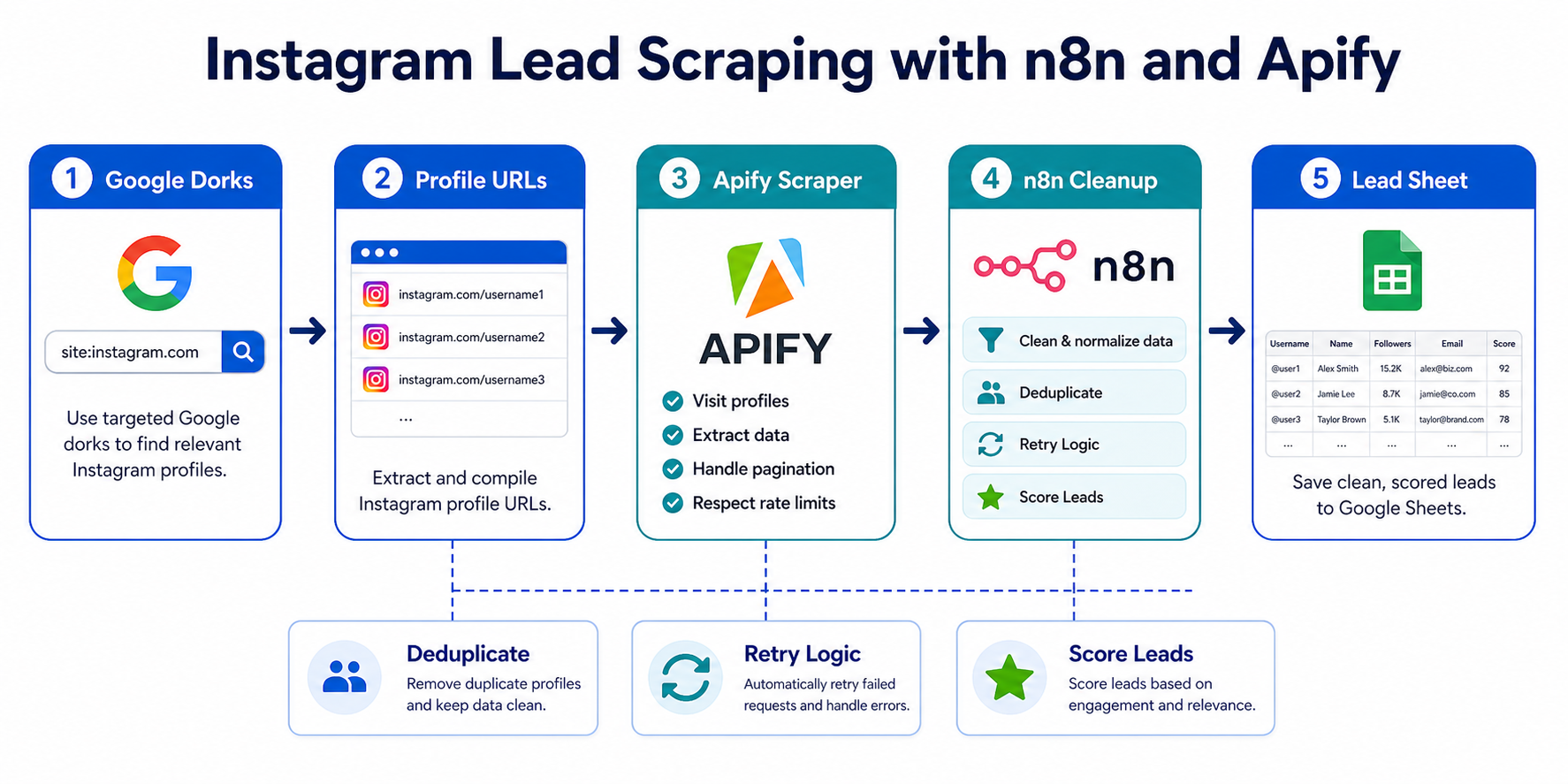
Instagram profiles set to public are crawled and indexed by Google's search engine. While Instagram's internal search is limited to usernames, hashtags, and location tags, Google indexes the full text of Instagram bios, profile names, and associated metadata. This creates an opportunity to find profiles based on job titles, industries, locations, and keywords that appear in bio descriptions.
For B2B lead generation, this is particularly valuable because business owners, consultants, agency owners, and service providers often include their profession and location directly in their Instagram bio. A marketing agency owner might have "Digital Marketing Agency | NYC" in their bio, while a real estate investor might include "Real Estate Investor | Miami."
Building Effective Google Dork Queries for Instagram
The basic structure of an Instagram-focused Google Dork query uses the `site:` operator combined with targeted keywords
site:instagram.com "marketing agency" "Los Angeles" "DM for collabs"This query tells Google to return only results from instagram.com that contain all three phrases. You can refine queries further with additional operators
intitle:- Searches within the page title (Instagram username)inurl:- Searches within the URL structure- Quotation marks - Exact phrase matching
- OR operator - Matches any of several terms
- Minus sign - Excludes specific terms
Practical examples for B2B lead generation
Finding e-commerce store owners
site:instagram.com "e-commerce" "founder" "online store" -"looking for"Targeting fitness coaches in specific locations
site:instagram.com "fitness coach" OR "personal trainer" "Miami" "book a call"Identifying SaaS founders
site:instagram.com "SaaS" "founder" OR "CEO" "B2B"Real estate professionals
site:instagram.com "real estate agent" "luxury homes" "California"The key is understanding your ideal customer profile and translating their likely bio language into search operators. Most business-focused Instagram users include specific signals: their profession, location, call-to-action phrases like "DM to work together," and industry keywords.
Extracting Profile URLs from Search Results
Once you have effective Google Dork queries, you need to extract the Instagram profile URLs from search results at scale. Manually clicking through pages of Google results defeats the purpose of automation. This is where the workflow automation begins.
Google search results provide structured data: each result contains a title, URL, and description snippet. For Instagram profiles, the URL follows a consistent pattern: https://www.instagram.com/username/. By automating the extraction of these URLs from Google search results, you create a continuously updating list of target profiles that match your criteria.
The challenge is that Google limits how many results you can retrieve per search and implements rate limiting to prevent automated scraping of search results. This is where proper infrastructure becomes critical.
Connecting Apify to n8n for Automated Instagram Scraping
Building a reliable, scalable Instagram lead scraping pipeline requires combining workflow automation with robust scraping infrastructure. n8n provides the workflow orchestration while Apify handles the heavy lifting of data extraction.
Setting Up the Integration
The connection between n8n and Apify happens through Apify's REST API. n8n includes native Apify nodes that simplify the integration.
Step 1: Create Apify account and get API token
Sign up for an Apify account and navigate to Settings > Integrations to generate an API token. This token authenticates your n8n workflow when making requests to Apify.
Step 2: Configure Apify credentials in n8n
In n8n, add new credentials for Apify by providing your API token. This allows any Apify node in your workflows to authenticate automatically.
Step 3: Select the appropriate Apify actor
Apify offers several Instagram-related actors. For profile scraping, the Instagram Profile Scraper actor works well. It accepts a list of Instagram profile URLs and returns detailed profile data.
Step 4: Structure the workflow logic
A basic workflow structure looks like
- Schedule Trigger - Runs daily at a specified time
- Function Node - Generates Google Dork query with variables
- HTTP Request Node - Queries Google Search API or custom Google scraper
- Data Transformation - Extracts Instagram URLs from search results
- Apify Node - Sends URLs to Instagram Profile Scraper
- Wait Node - Allows Apify actor to complete
- Apify Get Dataset Node - Retrieves scraped data
- Data Cleaning - Filters and formats profile data
- Google Sheets Node - Appends new leads
Step 5: Handle pagination and rate limits
Instagram scraping at scale requires managing rate limits. Apify actors typically handle individual request throttling, but you should also consider
- Limiting how many profiles you scrape per workflow run
- Spreading requests across multiple workflow executions
- Implementing exponential backoff for failed requests
- Monitoring Apify usage to stay within plan limits
Proxy Infrastructure for Reliable Scraping
Reliable Instagram scraping depends heavily on proper proxy infrastructure. Instagram actively blocks requests from datacenter IPs and implements sophisticated fingerprinting to detect automated access. Apify handles some of this internally, but understanding proxy requirements helps you configure workflows effectively.
Why proxies matter for Instagram scraping
- Instagram rate limits are IP-based, not account-based
- Datacenter IPs are flagged and blocked quickly
- Geographic targeting may be necessary for location-based leads
- Session persistence prevents repeated authentication challenges
Apify actors typically include proxy configuration options. For Instagram specifically, residential proxies provide the best success rates because they use IP addresses assigned to real residential internet connections, making requests appear like genuine users.
When scraping profiles at scale (hundreds or thousands per day), rotating residential proxies distribute requests across many IP addresses, keeping each IP well below Instagram's rate limit thresholds. Static residential proxies work better for session-based scraping where you need to maintain the same IP across multiple requests.
Providers like LycheeIP offer residential proxy infrastructure specifically designed for web scraping workflows. These proxy services integrate directly with platforms like Apify, allowing you to configure proxy rotation, geographic targeting, and session management through simple API parameters.
For teams building internal scraping infrastructure rather than using Apify, proxy infrastructure becomes even more critical. You need to handle
- Proxy rotation logic
- Failed request retry with different IPs
- Geographic IP selection based on target profiles
- Session management and cookie handling
- Proxy health monitoring and automatic replacement
Best practices for proxy usage in Instagram scraping
- Use residential proxies for Instagram, not datacenter proxies
- Rotate IPs after every 10-20 requests to avoid rate limits
- Match proxy location to target audience when possible
- Monitor proxy success rates and replace poor-performing IPs
- Keep request rates conservative (1-2 requests per second maximum)
- Respect Instagram's terms of service and robots.txt guidelines
Building an Autonomous Lead Generation Pipeline to Google Sheets
The final component is creating a self-sustaining pipeline that delivers qualified leads to a central database without manual intervention. Google Sheets works well for this because it provides easy access for sales teams while supporting automated updates through APIs.
Proxy Infrastructure Considerations for Scaled Operations
As your lead generation pipeline matures and scales, proxy infrastructure becomes a critical success factor. What works for scraping 50 profiles per day may fail entirely at 500 profiles per day.
Common Mistakes and Considerations
Building a reliable Instagram lead scraping pipeline requires avoiding several common pitfalls
Ethical and Responsible Scraping Practices
Web scraping, particularly of social media platforms, carries ethical responsibilities
Conclusion
Building an autonomous Instagram lead generation pipeline with n8n and Apify transforms how B2B marketers discover and qualify prospects. By combining Google Dorking techniques for targeted discovery, Apify's robust scraping infrastructure, and n8n's workflow automation, you create a system that delivers qualified leads continuously without manual intervention.
The key to success is thoughtful architecture: rotating search queries to discover fresh profiles, implementing quality filters to ensure lead relevance, using proper proxy infrastructure to maintain scraping reliability, and building error handling to keep the pipeline running smoothly. When configured correctly, this approach generates hundreds of qualified leads weekly at a fraction of the cost of traditional lead generation services.
For teams scaling beyond basic scraping needs, professional proxy infrastructure becomes essential. Providers like LycheeIP offer residential proxy pools specifically designed for social media scraping workflows, with geographic targeting, automatic rotation, and high success rates that keep lead generation pipelines running reliably at scale.
The autonomous nature of this system means your sales team receives a steady stream of fresh, qualified leads while you focus on refining targeting criteria and outreach strategies rather than manual profile hunting. As with all web scraping and automation workflows, approach Instagram data collection responsibly: respect the platform's terms, honor individual privacy, implement rate limiting to avoid overload, and use collected data ethically for legitimate business purposes.
Explore LycheeIP Proxy Options for Lead Scraping
Frequently Asked Questions
Why use Google Dorking before scraping Instagram leads?
Google Dorking helps you discover public Instagram profiles that match industry, role, location, or niche signals before you send those targets into a scraper. It improves input quality instead of scraping blindly.
What does Apify handle better than a simple HTTP request workflow?
Apify handles dynamic rendering, actor infrastructure, request orchestration, and the maintenance burden that comes with targets like Instagram, where anti-bot logic and page structure change frequently.
When do proxies become necessary in this workflow?
They become necessary when you need cleaner request distribution, better retry resilience, geographic coverage, or reduced rate-limit pressure while collecting public lead data at scale.
Related LycheeIP Guides and Resources

Recommended Articles

AI Search API for AI Agents: How to Ground LLMs With Live Search Data
An AI search API gives an application or agent programmatic access to current search results. Its most useful role is discovery: the agent can find candidate sources, identify fresh information, and decide what to retrieve next instead of relying only on model memory.
View Details
AI Web Scraping with Browser Agents: Architecture, Extraction, and Data Validation
AI web scraping uses AI to help discover, navigate, interpret, or extract information from websites. Browser agents are one implementation option when page interaction, rendering, or layout variation makes a simple scraper too brittle, but the agent should not become the entire data pipeline.
View Details
AI Browser Automation: Browser Agents vs Playwright vs Selenium
A browser agent interprets a goal and decides what browser action to take next. Playwright and Selenium can execute explicit, testable browser logic defined by developers. In 2026, however, Playwright also provides official MCP and agent-oriented workflows, so Playwright is no longer just the deterministic alternative to agentic automation. It can also serve as the browser-control layer inside an agent system.
View Details
Agentic Browser Security: Prompt Injection, Permissions, and Safe Deployment
That combination creates risks that are different from ordinary browsing and traditional automation. The most important is indirect prompt injection, where hostile instructions hidden in web content attempt to redirect the agent away from the user's goal. Google describes indirect prompt injection as a primary new threat for agentic browsing and has introduced layered defenses that include origin constraints, independent action checks, threat detection, and user confirmation for sensitive actions. Google's Chrome security architecture is a useful reference for how browser-agent defenses are evolving.
View Details
How to Give AI Agents Reliable Real-Time Web Data
A production-ready solution therefore needs more than a web scraper. It needs a web data layer that connects acquisition, validation, storage, retrieval, security, and observability. This guide explains how to design that layer.
View Details