
Bandwagon Host China Latency Spikes: Diagnose CN2 GIA Delay
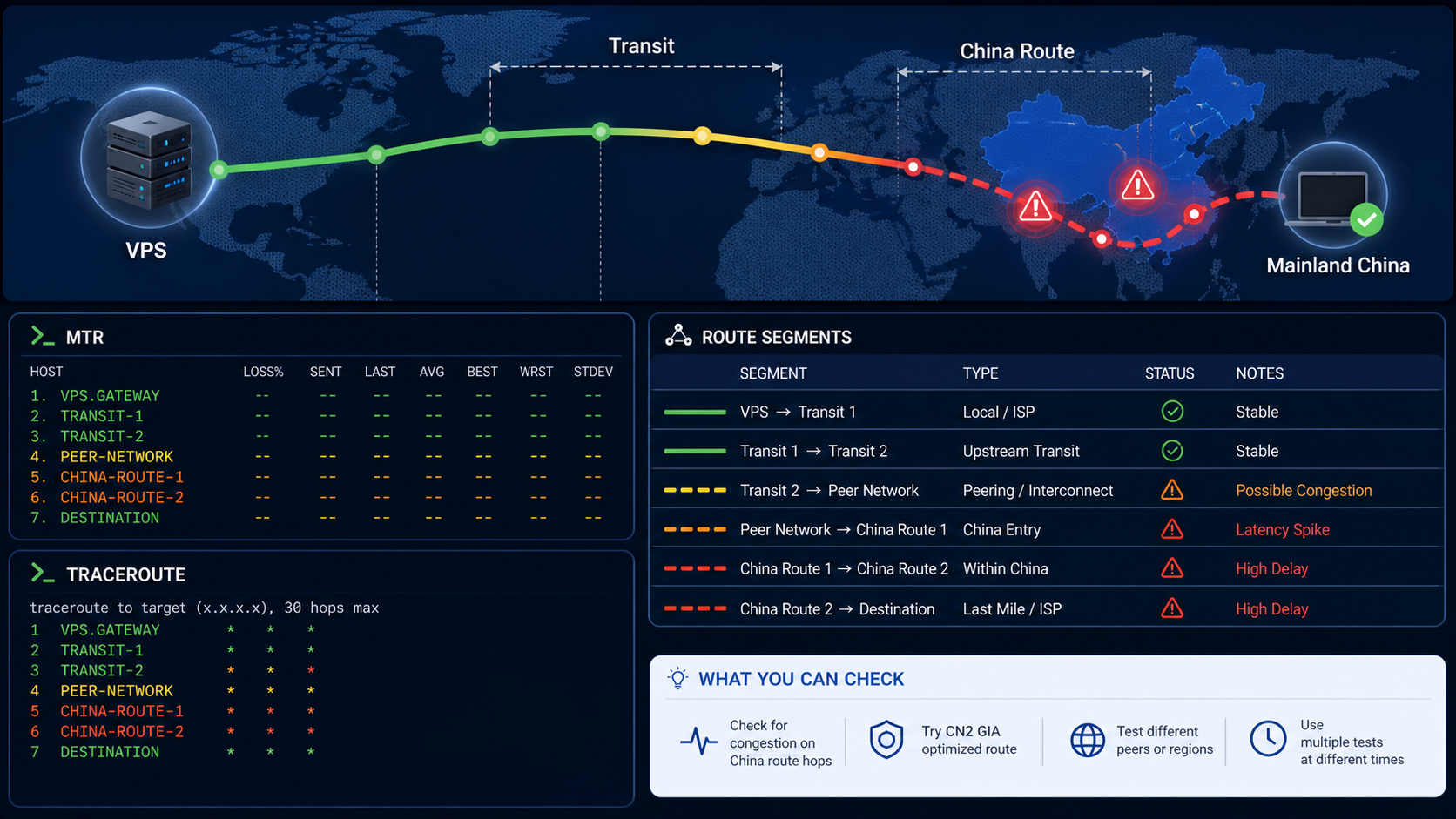
Bandwagon Host China latency spikes usually come from route congestion, packet loss, datacenter path changes, VPS load, or IP reputation issues. Diagnose the route before assuming the server is broken.
The original MTR/traceroute focus is preserved, while the update clarifies the diagnostic order and removes repeated CTA headings.
Start With the Symptom
Run ping and MTR from the user location to the VPS. Cloudflare’s browser-accessible MTR explanation and traceroute guidance support the technical explanation.
| Symptom | Likely cause | Next check |
|---|---|---|
| High latency at peak hours | Route congestion | Compare time-of-day MTR samples |
| Loss continues to final hop | Real path or destination issue | Open provider ticket with evidence |
| Loss only at one middle hop | Possible ICMP rate limiting | Check whether later hops recover |
| One site blocks the VPS | IP reputation issue | Separate route health from access policy |
MTR and Traceroute Workflow
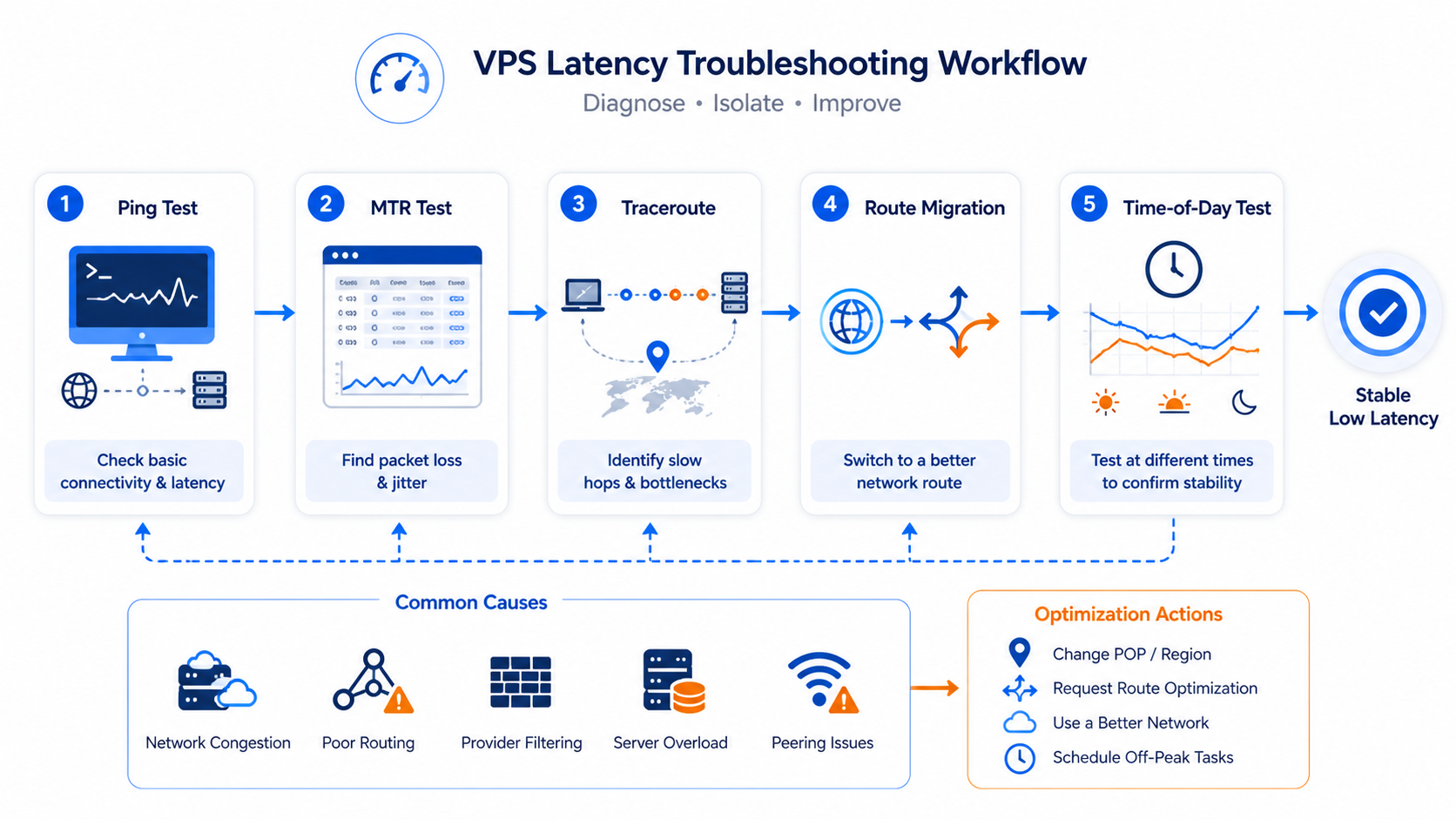
- Capture at least 100 packets.
- Test from more than one network.
- Compare IPv4 and IPv6 when available.
- Record time, source network, target IP, and route.
- Send concise evidence to support before migrating.
mtr -rwzc 100 your-vps-ip
traceroute your-vps-ip
ping -c 20 your-vps-ip
When Proxies Are the Right Fix
Proxies do not fix a congested VPS route, but they can help if the problem is IP reputation or regional request routing. Compare datacenter proxies, static residential proxies, rotating residential proxies, residential proxy selection, and LycheeIP proxy infrastructure for those cases.
For related troubleshooting, use geo-restriction diagnostics, proxy setup on Android, rotation planning, provider comparison criteria, and VPS vs VPN trust-model guidance.
Explore LycheeIP Proxy Infrastructure
Common Causes of China-Route Spikes
China-route complaints are often caused by a mix of factors: time-of-day congestion, a route change that adds an unfavorable handoff, application-layer delay that feels like network lag, or simply a misread test result. Treating every spike as “provider broken” leads to rushed decisions and weak evidence.
The better question is whether the final user experience and the measurement data agree. If they do not, you probably need more diagnosis before you need a different server.
How to Read the Results Without Overreacting
| Result pattern | Practical interpretation |
|---|---|
| Loss on one middle hop only | Could be ICMP de-prioritization rather than end-user packet loss. |
| Latency rises and stays high through the destination | More consistent with a real route or congestion problem. |
| SSH feels slow but ping is stable | Check application, disk, CPU, or protocol behavior before blaming transit alone. |
| Bad results only at one time of day | Congestion is more likely than a permanent route failure. |
Migration, Waiting, or Changing the Architecture
Once you know the pattern, the options get clearer. If the issue is time-of-day congestion, you may wait, reschedule workloads, or move only if the pattern is unacceptable. If the issue is persistent end-to-end route degradation, migration deserves stronger consideration. If the issue is application-side, moving servers may not help at all.
That is also the point where routing alternatives matter. A VPS can remain the origin while other traffic paths move to a more suitable network layer, especially when the workload is not just “host the app” but “control how different sessions exit.”
Where LycheeIP Fits in the Decision
If the real problem is that the workload needs more deliberate egress control than one VPS can provide, compare LycheeIP proxy infrastructure with the IP-type choices in the residential proxy guide and rotating proxy planning. That does not mean proxies replace route troubleshooting. It means the right long-term fix may be architectural rather than purely server-location based.
Practical Next Steps
- Confirm the symptom at the application layer.
- Capture multiple MTR and traceroute samples at the time users feel the problem.
- Decide whether the issue is persistent, time-based, or misread.
- Only then choose between migration, waiting, tuning the app, or changing the egress architecture.
Latency, Packet Loss, and Route Congestion Are Different Problems
Latency is the round-trip time between the test host and destination. Packet loss means probes or packets did not receive a response. Congestion can increase latency and loss during busy periods, but a router may also de-prioritize diagnostic probes while forwarding real traffic normally. Do not diagnose a bad route from one high intermediate-hop percentage when the final destination remains stable.
Run the same test during a good period and a bad period. If latency rises sharply only during mainland evening hours and the change continues through the final hop, congestion is plausible. If one intermediate hop looks poor but later hops recover, that device is probably rate-limiting probes rather than dropping transit traffic. If loss begins at one hop and persists through every later hop, investigate that segment more closely.
Forward and Return Paths Can Disagree
Traceroute and MTR primarily reveal the forward path from the test machine. Internet routing is asymmetric, so responses may return through a different carrier, peering point, or international link. A clean outbound trace therefore does not prove the return path is clean. When possible, run tests from both ends or use a measurement host near the affected user to compare directions.
This matters for China routes because the path advertised toward mainland networks can differ by carrier and time. Labels such as CN2 or CN2 GIA describe routing products, but they should not be treated as permanent guarantees for every prefix and direction. Verify the observed route, repeat it, and ask the host to confirm the current routing policy for the exact VPS location and IP range.
Repeatable MTR and Traceroute Test Method
Use a wired connection when possible and stop large downloads before testing. Run MTR for enough cycles to smooth out random variation, save the report with local time and timezone, and test more than one destination. Compare a nearby neutral destination, the VPS, and another host in the same region. On Windows, use WinMTR or pathping; on macOS or Linux, use mtr and traceroute with consistent options.
Example commands
On Linux or macOS, mtr -rwzc 100 your-vps-ip produces a report after 100 cycles, while traceroute your-vps-ip shows the current hop sequence. From the VPS, run the equivalent test toward a representative client IP only when you have permission. Save both directions with timestamps so the hosting provider can correlate the evidence with route changes or congestion.
What to include in a support ticket
Provide the VPS IP, source network or carrier, source region, timezone, good-period and bad-period reports, final-hop latency and loss, and the first hop where a persistent change appears. Avoid sending only a screenshot of one intermediate hop. A concise comparison gives the host enough evidence to check upstream routing or recommend a location migration.
What You Can Change and What Requires the Provider
You can rule out local Wi-Fi, test another ISP, verify CPU and bandwidth saturation on the VPS, adjust application timeouts, and schedule non-interactive transfers outside congested periods. You can also test another Bandwagon Host location before migrating. You cannot directly change BGP announcements, international peering, return-path selection, or upstream congestion; those require the host or carrier.
Separate route quality from IP reputation. A proxy or replacement IP can help when a destination blocks or challenges the VPS address, but it will not repair packet loss on the path between the user and VPS. Conversely, moving datacenters can improve latency while leaving a destination-site reputation block unchanged. Diagnose transport and reputation as separate layers before buying another product.
Troubleshooting Decision Sequence
If the final hop is stable and only an intermediate hop shows loss, monitor the application before escalating. If final-hop latency or loss rises at the same local time across several days, collect paired good/bad MTR reports and open a routing ticket. If only one ISP is affected, test from another carrier and include both traces. If every source is slow and the VPS shows CPU, disk, or transfer saturation, fix the server workload before blaming the international route.
When another Bandwagon location performs consistently better from the same source, a controlled migration test is reasonable. When the route is healthy but one destination rejects the VPS address, investigate IP reputation or destination policy instead. This sequence keeps local access, host capacity, upstream routing, and destination blocking as separate hypotheses.
After any migration or provider-side route change, repeat the same saved tests from the same source networks. A lower ping from one location is encouraging, but the repair is proven only when the final-hop behavior remains stable across the periods that previously showed spikes.
Frequently Asked Questions
Is every bad MTR hop a real problem?
No. Intermediate hops can rate-limit or de-prioritize ICMP. Focus on whether the loss or delay persists to the final destination.
Should I migrate datacenters immediately?
Only after the measurements show why migration is likely to help. Migration without a hypothesis is mostly guesswork.
Can proxies fix VPS route latency?
Not directly. Proxies help when you need a different egress model or workload separation, not when the VPS route problem itself remains unexplained.
What is the best first test?
Confirm the user-visible symptom, then run ping, MTR, and traceroute during the affected period and compare multiple samples.
When is the problem probably not the route?
If ping looks fine but the application stays slow, or if only one intermediate hop looks ugly while the final path remains stable, investigate the app or measurement interpretation first.

Recommended Articles

DataDome Bypass for Web Scraping
DataDome Bypass for Web Scraping
View Details
Web Scraping Rate Limiting: How to Handle 429s, Backoff, and Concurrency
Web scraping rate limiting is the engineering discipline of keeping an authorized collection workload inside a target service's acceptable request envelope. When that envelope is exceeded, a server may respond with HTTP 429 Too Many Requests, delay responses, or apply other controls.
View Details
reCAPTCHA vs hCaptcha vs Cloudflare Turnstile: What Scraping Teams Need to Know
If an authorized data-collection workflow suddenly stops at a verification screen, identifying the protection system matters before you change code, browser settings, or proxy infrastructure. reCAPTCHA vs hCaptcha vs Turnstile is not simply a branding comparison. The three systems can expose different browser flows, token models, risk decisions, and failure symptoms.
View Details
Browser Automation Proxies: IPs, Geo-Targeting, Sessions, and AI Agents
A browser automation proxy belongs to the network layer of Playwright, Selenium, cloud-browser, and AI-agent workflows. It changes how browser traffic is routed and can affect the source IP address, geographic egress, and session continuity seen by a destination site. It does not improve an AI model's reasoning, repair browser logic, or guarantee that a website will accept the session.
View Details
SERP Scraping: Methods, APIs, Workflows, and Best Practices
SERP scraping is the automated collection of information from search engine results pages. A SERP scraper can capture organic rankings, advertisements, featured snippets, People Also Ask questions, local results, shopping listings, images, and other search features, then convert them into structured data for analysis.
View Details