
Apify + n8n: The Best Web Scraping Combo
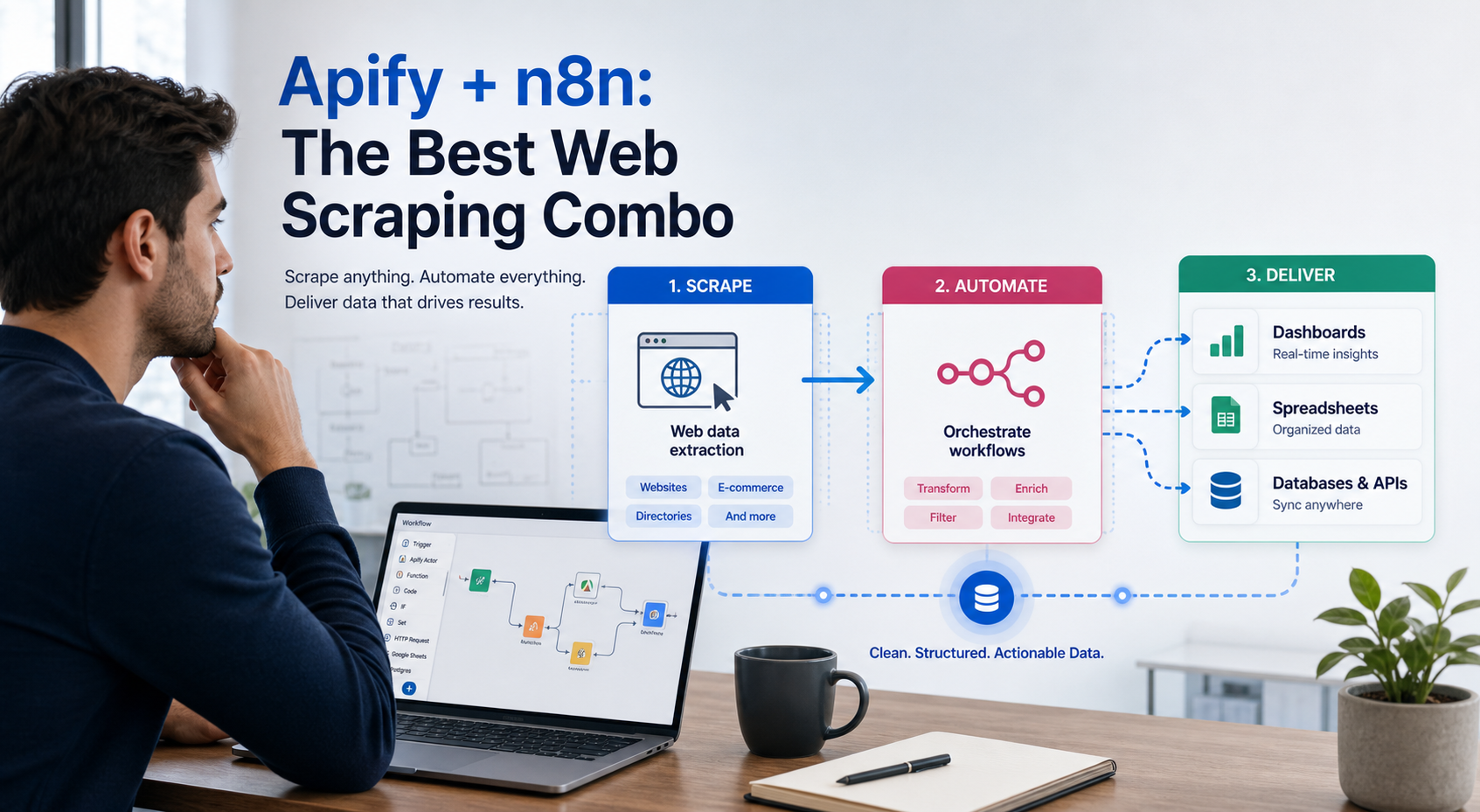
Why Apify + n8n is the Ultimate Web Scraping Stack
Why Apify + n8n is the ultimate web scraping stack for teams that need both power and flexibility. While n8n excels at connecting APIs and automating workflows, it struggles when you need to scrape JavaScript-heavy sites, handle authentication flows, or extract data from complex web applications. That's where Apify comes in.
n8n alone can't handle complex scraping tasks that require browser automation. Its HTTP Request node works well for simple API calls and static pages, but modern websites render content dynamically with JavaScript, use anti-bot measures, and require sophisticated interaction sequences. Trying to build these capabilities from scratch in n8n means wrestling with headless browsers, managing sessions, rotating user agents, and dealing with CAPTCHAs.
Combining Apify's scraping power with n8n's workflow automation gives you the best of both worlds: pre-built, maintained scraping actors that handle the hard parts, plus flexible workflow logic that routes data wherever you need it.
When to Use Apify Actors vs Native n8n HTTP Nodes
The decision between Apify actors and n8n's built-in HTTP nodes depends on what you're scraping and how the target site is built.
For the LycheeIP implementation details behind this step, review rotating residential proxies.
For the LycheeIP implementation details behind this step, review static residential proxies.
For the official technical reference behind this point, see MDN HTTP overview.
For the official technical reference behind this point, see Playwright documentation.
Use n8n HTTP Nodes When:
The target has a proper API. If you're pulling data from a service that offers REST or GraphQL endpoints, n8n's HTTP Request node is the right tool. You authenticate once, make structured requests, and receive clean JSON responses. No need for browser automation.
You're scraping simple, static HTML. Some websites still render content server-side. If you can see all the data in the page source (not just after JavaScript executes), the HTTP node paired with n8n's HTML Extract node can handle basic extraction.
You control the target. When scraping your own services or internal tools where you can adjust the markup or add data attributes, simple HTTP requests often suffice.
Cost is the primary constraint and volume is low. n8n HTTP requests consume minimal resources compared to running browser automation.
Use Apify Actors When:
The site renders content with JavaScript. E-commerce sites, social platforms, and modern web applications load data dynamically. You need a real browser to execute JavaScript and wait for content to appear. Apify actors run headless Chrome or Playwright browsers that handle this automatically.
You need to interact with the page. Clicking buttons, filling forms, scrolling to trigger infinite scroll, hovering to reveal menus. These interactions require browser automation that Apify actors provide.
Anti-bot measures are present. Many sites detect headless browsers or block datacenter IPs. Apify actors can integrate proxy rotation, browser fingerprinting, and human-like behavior patterns to avoid blocks.
You want pre-built, maintained scrapers. Apify Store offers hundreds of ready-made actors for popular platforms: Instagram, LinkedIn, Google Maps, Amazon, Zillow. These actors are maintained when sites change their structure.
The scraping logic is complex. Multi-step workflows that require session management, authentication flows, or conditional navigation are easier to build and maintain in Apify's environment.
You need pagination and deep crawling. Apify actors handle crawling strategies, request queues, and deduplication automatically.
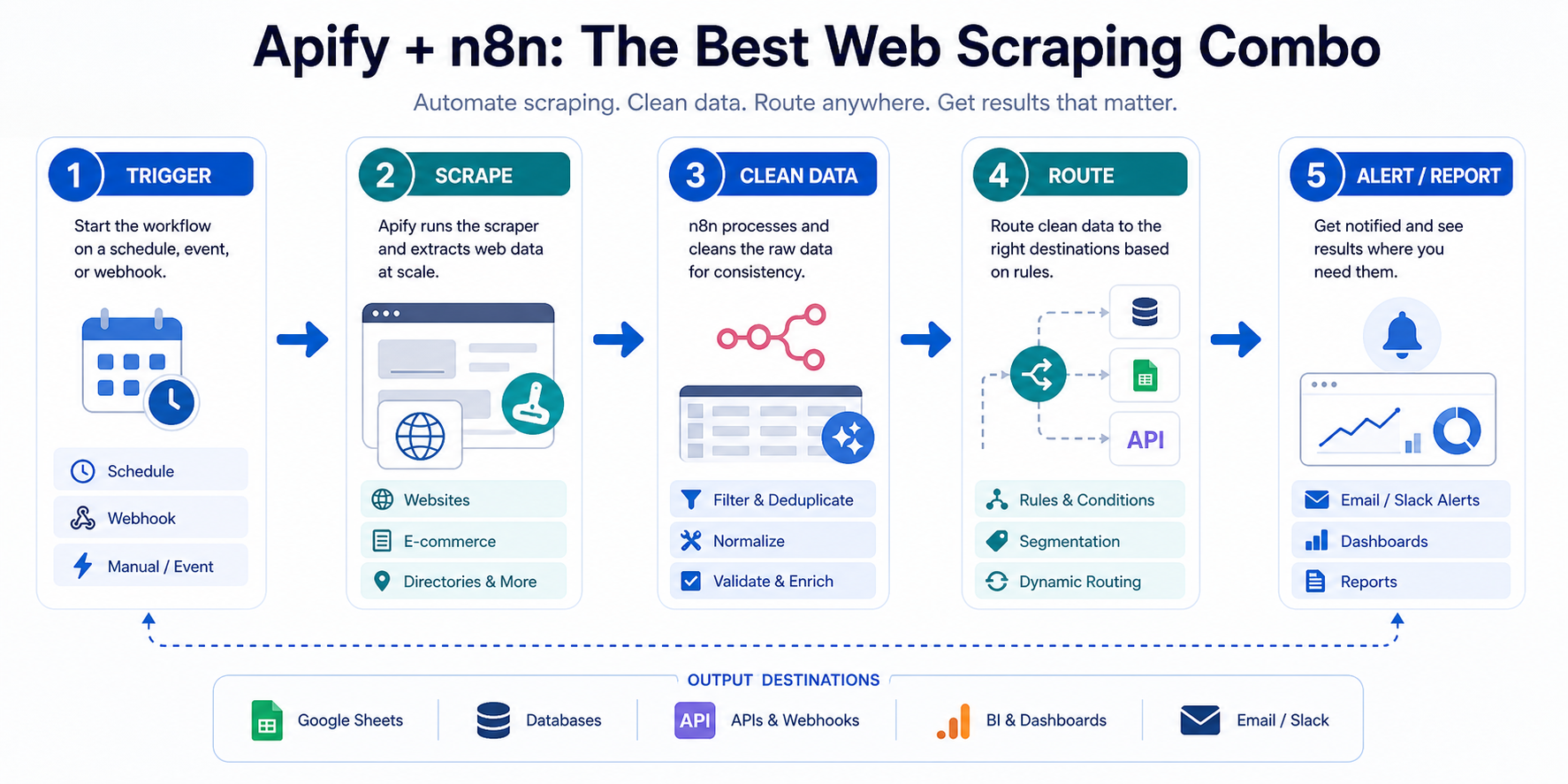
The practical pattern: use Apify for data extraction, use n8n for everything that happens after. Let Apify handle the browser complexity and anti-bot challenges, then pipe clean data into n8n where you can filter, transform, enrich, and route it to your database, spreadsheet, CRM, or notification system.
Passing Scraped Data from Apify Into n8n Workflows
Connecting Apify to n8n is straightforward thanks to n8n's native Apify integration node. The workflow follows this pattern:
For the LycheeIP implementation details behind this step, review scaling lead scraping with n8n.
Basic Integration Setup
Step 1: Configure your Apify credentials in n8n. You need your Apify API token, which you can find in your Apify account settings. Add these credentials to n8n's credential system once, then reference them in any workflow.
Step 2: Add the Apify node to your workflow. The node offers several operations: start an actor, get actor run results, or wait for actor completion. For most scraping workflows, you'll use the task operation that starts an actor and waits for results.
Step 3: Select your actor. You can choose from actors in your Apify account or use public actors from Apify Store. Each actor has its own input schema: URLs to scrape, search queries, pagination settings, output formats.
Step 4: Configure actor inputs. This is where you specify what to scrape. For a Google Maps scraper, you might provide search terms and location parameters. For a product scraper, you'd provide category URLs and depth settings.
Step 5: Handle the output. Apify returns data as an array of items. Each item represents one scraped entity: a product, a listing, a profile, a search result. n8n receives this array and can process each item individually in subsequent nodes.
Practical Example: E-commerce Price Monitoring
Here's how you'd build a workflow that scrapes competitor prices daily and alerts you to changes:
- Schedule Trigger: Set to run daily at 6 AM
- Apify Node: Runs a product scraper actor targeting specific competitor URLs
- Set Node: Extracts just the fields you need (product name, price, availability)
- Spreadsheet Node: Compares current prices against yesterday's data stored in Google Sheets
- IF Node: Checks if any price dropped more than 10%
- Slack Node: Sends notification with the product and new price
- Spreadsheet Node: Updates the sheet with today's prices for tomorrow's comparison
The Apify actor handles the hard part (dealing with JavaScript rendering, pagination, anti-bot measures). n8n handles the logic (comparison, filtering, routing, storage).
Data Transformation Tips
Apify returns raw scraped data that often needs cleaning before use:
Filter out empty items. Sometimes scrapers return null entries or failed extractions. Use n8n's Filter node to remove items where critical fields are missing.
Normalize formats. Prices might come as strings with currency symbols. Dates might be in various formats. Use n8n's Set node with expressions to clean and standardize these values.
Deduplicate results. If you're running scrapers regularly, use n8n's Merge node or database lookups to identify truly new items versus ones you've already processed.
Enrich with additional data. Once you have scraped data, you might look up additional information via APIs, geocode addresses, or cross-reference with your own databases.
Proxy Integration for Apify Workflows
When your Apify actors make hundreds or thousands of requests, especially to sites with rate limiting or geo-restrictions, you need proxy infrastructure. Most Apify actors support proxy configuration through input parameters.
You can configure Apify actors to use proxy services by passing proxy URLs in the actor input. For workflows involving public data collection across multiple regions, or when scraping sites that block datacenter IPs, rotating residential proxies become essential.
This is where services like LycheeIP fit into the stack. When your Apify actors need reliable proxy rotation for e-commerce scraping, geo-specific testing, or ad verification workflows, integrating a proxy provider ensures your actors avoid blocks and access region-specific content. You pass the proxy configuration to Apify through the actor input, and Apify routes all requests through those IPs.
The workflow becomes: n8n triggers Apify → Apify routes requests through your proxy infrastructure → scraped data returns to n8n → n8n processes and routes the data to your systems.
Cost Optimization Strategies for Apify + n8n Integrations
Running scrapers at scale gets expensive if you're not careful. Both Apify and n8n charge for compute time, and proxies add per-GB costs. Here's how to optimize:
Reduce Apify Compute Costs
Use dataset caching. If multiple workflows need the same scraped data, run the scraper once and store results in Apify's dataset storage. Multiple n8n workflows can fetch from the same dataset rather than triggering new scraper runs.
Schedule smartly. Don't scrape more frequently than your use case requires. If you're monitoring prices, daily runs are usually sufficient. Hourly runs cost 24x more for data that likely changes once a day.
Scrape only what you need. Many actors let you limit the depth of crawling, the number of results, or specific sections to scrape. A scraper that collects 1,000 products uses far less compute time than one that collects 100,000.
Choose the right memory allocation. Apify lets you select memory for actor runs. Lightweight scrapers targeting simple sites can run with 1GB. Complex scrapers with multiple browser contexts need 4GB or more. Right-sizing prevents both failures and waste.
Use webhooks instead of polling. Rather than having n8n check repeatedly if an Apify run is complete, configure Apify to send a webhook to n8n when results are ready. This reduces n8n execution time.
Optimize Proxy Usage
Don't use proxies when you don't need them. If you're scraping sites that don't block requests and don't require geo-targeting, datacenter proxies or even direct requests might work fine.
Match proxy type to use case. Residential proxies cost more than datacenter proxies. Use residential IPs for sites with sophisticated anti-bot detection. Use datacenter proxies for straightforward scraping where speed matters more than avoiding detection.
Implement request throttling. Scraping slower reduces the chance of blocks and may let you use fewer proxy IPs. Many Apify actors have built-in rate limiting parameters.
Use session persistence wisely. Some scraping workflows benefit from sticky sessions where multiple requests come from the same IP. Others work better with rotation on every request. Configure based on the target site's behavior.
Monitor bandwidth consumption. Track how much data your scrapers transfer. Extracting just the fields you need rather than downloading entire pages reduces bandwidth costs.
n8n Execution Optimization
Process data in batches. Rather than triggering workflows for each scraped item individually, process Apify results in batches. This reduces the number of workflow executions.
Use sub-workflows for complex logic. If you're running extensive transformations on scraped data, consider breaking these into sub-workflows that execute only when needed.
Store intermediate results. For multi-step workflows, storing data in a database or file storage between steps can be cheaper than keeping the entire workflow execution active.
Self-host n8n for high volume. If you're running dozens of scraping workflows daily, self-hosting n8n on your own infrastructure eliminates per-execution costs. You pay for the server instead.
Combined Strategy Example
Let's say you're scraping 50 e-commerce sites daily for 500 products each (25,000 total items).
Inefficient approach: Run 50 separate Apify actors, each processing its full catalog. Use residential proxies for everything. Have n8n poll every minute to check if actors are done. Process each product individually in n8n. Total monthly cost: potentially $500-1000.
Optimized approach: Run scrapers during off-peak hours when Apify compute is cheapest. Configure each actor to scrape only the specific product categories you track (reduces from 500 to 100 products per site). Use datacenter proxies for sites without aggressive blocking, residential only for the 10 sites that require it. Apify sends webhooks when complete. n8n receives all products in a single batch and processes them together. Store results in a database. Total monthly cost: potentially $150-300.
The optimization isn't about cutting corners. It's about matching resources to requirements and eliminating waste.
How This Connects to Broader Data Infrastructure
The Apify + n8n combination sits within a larger ecosystem of data collection and automation tools. Understanding where it fits helps you build more robust systems.
When you're collecting public data at scale, whether for market research, competitor monitoring, lead generation, or content aggregation, you need multiple layers:
Data extraction layer: This is where Apify operates. It handles the browser automation, JavaScript rendering, and scraping logic.
Proxy infrastructure layer: This ensures your requests appear legitimate, come from appropriate geographic locations, and don't get blocked. Providers like LycheeIP offer residential and datacenter proxy pools specifically designed for scraping workflows and public data collection.
Workflow orchestration layer: This is n8n's domain. It controls when scrapers run, how data flows between systems, what transformations happen, and where results end up.
Data storage layer: Databases, data warehouses, or data lakes where cleaned, structured data lives for analysis and application use.
Application layer: The systems that consume scraped data, whether that's business intelligence tools, internal applications, APIs, or machine learning models.
The Apify + n8n stack handles the extraction and orchestration layers effectively. For teams building serious data operations, you'll want to think through proxy infrastructure early. Reliable proxies aren't optional for most production scraping workflows. They're what keeps your data collection running when sites implement anti-bot measures or when you need geo-specific content.
For the LycheeIP implementation details behind this step, review LycheeIP proxy infrastructure.
Common Mistakes and Considerations
Mistake: Not respecting rate limits and robots.txt. Just because you can scrape faster doesn't mean you should. Responsible scraping means checking robots.txt files, implementing reasonable delays between requests, and avoiding patterns that overload target servers. Use Apify's rate limiting features.
Mistake: Ignoring error handling. Scrapers fail. Sites change their structure. Proxies time out. Your n8n workflows need error handling: retry logic, fallback paths, notifications when scrapers fail multiple times.
Mistake: Not monitoring scraper health. Set up alerts when scrapers return zero results, when error rates spike, or when proxy costs increase unexpectedly. These often indicate the target site changed or your scraper needs maintenance.
Mistake: Storing too much data. You don't need to save every field from every scrape. Define what data you actually use and discard the rest. This reduces storage costs and makes downstream processing faster.
Mistake: Running scrapers synchronously in workflows. If your workflow triggers an Apify actor and then sits waiting for 10 minutes while it runs, you're paying for idle execution time in n8n. Use webhooks or split workflows so n8n isn't just waiting.
Mistake: Not testing scrapers before production deployment. Run scrapers manually with small datasets first. Verify the data quality. Check that all required fields extract correctly. Then scale up.
Mistake: Hardcoding configuration. Store URLs, search terms, and scraper settings in databases or configuration files, not hardcoded in workflows. This lets you update targets without modifying workflows.
Mistake: Overlooking legal and ethical considerations. Scraping public data is generally legal, but terms of service matter. Some sites explicitly prohibit scraping. Focus your efforts on legitimate use cases: market research, price comparison, public data aggregation, your own property monitoring.
Explore LycheeIP Proxy Options for Apify Workflows
Conclusion
The Apify + n8n combination solves a real problem for no-code automation builders and growth marketers who need data from the web but don't want to build and maintain complex scraping infrastructure.
n8n alone can't handle complex scraping tasks that require browser automation, but it excels at workflow logic, data transformation, and system integration. Apify provides production-ready scraping actors that handle JavaScript rendering, anti-bot measures, and extraction logic. Together, they give you an end-to-end data collection and automation pipeline.
The key is using each tool for its strengths: Apify for extraction, n8n for orchestration and routing. Add proper proxy infrastructure when you're working at scale or dealing with sophisticated sites, and implement cost optimization practices to keep expenses reasonable as you grow.
For teams serious about data-driven growth, this stack provides a faster, more maintainable alternative to building custom scrapers from scratch. You focus on what data you need and what to do with it. Let Apify and n8n handle the technical complexity.
Frequently Asked Questions
Can I use n8n without Apify for web scraping?
Yes, but only for simple cases. n8n's HTTP Request and HTML Extract nodes work well for static websites and APIs. For JavaScript-heavy sites, dynamic content, or sites with anti-bot protection, you'll need browser automation like Apify provides.
How much does the Apify + n8n stack cost?
Apify offers a free tier with $5 of usage credits monthly, then pay-as-you-go pricing starting around $49/month. n8n is open source (free self-hosted) or starts at $20/month for cloud. Total cost depends on scraping volume, but small operations can run for under $100/month.
Do I need proxies for every Apify scraping workflow?
No. Simple scraping tasks on sites without rate limiting or geo-restrictions often work fine without proxies. You need proxies when targeting sites with anti-bot measures, when scraping at high volume, or when you need geo-specific content. Start without proxies and add them when you encounter blocks.
Can Apify actors scrape sites that require login?
Yes. Many Apify actors support authentication flows where you provide credentials as input parameters. The actor handles logging in, maintaining sessions, and scraping authenticated content. Review the specific actor's documentation for authentication options.
How do I handle websites that change their structure frequently?
Use maintained actors from Apify Store when possible, as they're updated when popular sites change. For custom scrapers, implement monitoring that alerts you when extraction patterns fail or return unexpected results. Build your n8n workflows with data validation steps that catch structural changes early.
What happens if my Apify scraper fails mid-execution?
Apify actors support automatic retries, and you can configure retry logic in n8n workflows. Set up error notifications in n8n so you know when scrapers fail. Many actors also support resuming from checkpoints, so a failed run doesn't lose all progress.
Can I schedule scraping workflows to run at specific times?
Yes. n8n includes schedule triggers that let you run workflows at specific times, intervals, or on cron patterns. This is perfect for daily competitor price checks, weekly content aggregation, or any recurring data collection task.
How do I avoid getting blocked while scraping?
Implement several strategies: use appropriate proxies (residential for tough sites, datacenter for simpler targets), add delays between requests, rotate user agents, respect robots.txt, and avoid scraping during peak traffic times. Apify actors often have these protections built in.
Can I scrape multiple websites in parallel with this stack?
Yes. n8n can trigger multiple Apify actors in parallel or sequence. You can build workflows that scrape dozens of sites concurrently, then merge and process all results together. This is where the stack really shines for market research and competitor analysis.
What's the best way to store scraped data long-term?
Depends on your use case. For small datasets, Google Sheets or Airtable work through n8n integrations. For larger volumes, use databases like PostgreSQL, MySQL, or MongoDB that n8n supports natively. For analytics workloads, consider data warehouses like BigQuery or Snowflake.
Related LycheeIP Guides and Resources

Recommended Articles

AI Search API for AI Agents: How to Ground LLMs With Live Search Data
An AI search API gives an application or agent programmatic access to current search results. Its most useful role is discovery: the agent can find candidate sources, identify fresh information, and decide what to retrieve next instead of relying only on model memory.
View Details
AI Web Scraping with Browser Agents: Architecture, Extraction, and Data Validation
AI web scraping uses AI to help discover, navigate, interpret, or extract information from websites. Browser agents are one implementation option when page interaction, rendering, or layout variation makes a simple scraper too brittle, but the agent should not become the entire data pipeline.
View Details
AI Browser Automation: Browser Agents vs Playwright vs Selenium
A browser agent interprets a goal and decides what browser action to take next. Playwright and Selenium can execute explicit, testable browser logic defined by developers. In 2026, however, Playwright also provides official MCP and agent-oriented workflows, so Playwright is no longer just the deterministic alternative to agentic automation. It can also serve as the browser-control layer inside an agent system.
View Details
Agentic Browser Security: Prompt Injection, Permissions, and Safe Deployment
That combination creates risks that are different from ordinary browsing and traditional automation. The most important is indirect prompt injection, where hostile instructions hidden in web content attempt to redirect the agent away from the user's goal. Google describes indirect prompt injection as a primary new threat for agentic browsing and has introduced layered defenses that include origin constraints, independent action checks, threat detection, and user confirmation for sensitive actions. Google's Chrome security architecture is a useful reference for how browser-agent defenses are evolving.
View Details
How to Give AI Agents Reliable Real-Time Web Data
A production-ready solution therefore needs more than a web scraper. It needs a web data layer that connects acquisition, validation, storage, retrieval, security, and observability. This guide explains how to design that layer.
View Details