
Playwright Stealth: What It Fixes, Limits, and Testing Workflow
Playwright stealth is a community-driven method for removing default automation fingerprints, but it is no longer a magic switch for bypassing modern web defenses. In 2026, web scraping and testing teams cannot simply install a plugin and expect total invisibility. Current security layers look at headless authenticity, network reputation, and full-session coherence.
What you will learn in this guide
- A clear definition of what stealth scripts actually do.
- A cross-language setup comparison for Python, JavaScript, Java, and .NET.
- A troubleshooting matrix for common Playwright headless detection failures.
- A framework to decide when to upgrade from simple plugins to robust infrastructure.
What is Playwright stealth and what is it not?
Playwright stealth refers to community-maintained evasion scripts designed to make automated browsers look like normal user traffic. These scripts patch common leaks (like removing the navigator.webdriver flag or adding realistic plugins) to help your setup pass basic bot checks.
What it is not is just as important to understand. It is not an official feature supported by Microsoft. It is not a guaranteed bypass for advanced managed challenge systems. Most importantly, it is not a replacement for using an authentic browser profile paired with a high-quality IP address. It serves strictly as a baseline to prevent immediate client-side rejection.
Why do anti-bot systems flag headless browsers?
Anti-bot systems flag automated browsers because they actively inspect execution patterns rather than relying on a single missing variable. Basic detection methods look for obvious markers in the user agent or missing hardware concurrency data. Modern platforms use complex browser detection methods that analyze client-side rendering behavior and cross-reference it with server-side correlation.
Additionally, the default Playwright Chromium headless shell behaves differently than a standard desktop browser. Because "headless" lacks a user interface, it processes rendering tasks differently. Security systems detect these processing discrepancies before your stealth plugin even executes its first script.
How much does a stealth plugin actually help with bot detection?
A stealth plugin significantly reduces low-level client-side leaks but cannot erase the broader signals that modern security systems combine to score a session. The easiest way to evaluate its effectiveness is by separating detections into different categories.
If a website only checks local browser variables, a package like playwright-stealth will successfully mask your presence. However, if the target site utilizes behavioral scoring, canvas fingerprinting, or device-linked reputation checks, the plugin acts merely as a partial fix. Passing a public diagnostic page does not mean you will bypass a production server evaluating your session continuity.
Which Playwright stealth setups work for Python JS Java and C#?
The correct implementation path depends heavily on your tech stack since most solutions are community-maintained rather than official.
Python
The playwright-stealth Python package remains the most direct route. It is relatively easy to install and apply to browser contexts, though the maintainers explicitly note it functions best as a proof-of-concept rather than a commercial-grade bypass.
JavaScript and TypeScript
Node.js developers typically rely on the playwright-extra wrapper. By porting the popular puppeteer-extra-plugin-stealth to Playwright, developers get a mature ecosystem of evasions. It requires wrapping your standard Playwright initialization but provides excellent configuration options.
Java and C#
Ecosystems outside of Python and JS require slightly more effort. The Playwright-stealth Java port is functional but has a smaller community for troubleshooting. For C# developers, Playwright stealth C# setups usually involve porting init scripts manually or relying on emerging community extensions to inject JavaScript evasions upon page load.
What are the biggest playwright stealth limitations and failure modes?
The most common Playwright Stealth Troubleshooting issues arise from a mismatch between what the plugin hides and what the target site actually measures. Simply updating to the latest Playwright stealth setups 2026 will not fix underlying architectural flaws.
AI-agent teams and data engineers must recognize that rapid context switching, unnatural parallel processing, and identical browser fingerprints across multiple requests will trigger rate limits. When a script runs too perfectly or without the natural delays of human interaction, the stealth layer becomes irrelevant.
When is Playwright stealth enough versus upgrading your infrastructure?
Playwright stealth is sufficient for internal testing, rendering heavily JavaScript-reliant pages with minimal security, or interacting with low-friction targets. It is rarely enough when dealing with high-value financial technology operations, multi-account agency management, or complex scraping pipelines at scale.
When your use case demands high reliability and bypasses complex server-side checks, you must move beyond client-side plugins and improve your network layer. This is where combining your browser automation with LycheeIP creates a highly resilient stack.
How LycheeIP fits into a resilient headless architecture
- Developer-first simplicity: LycheeIP provides a straightforward API and web dashboard for near real-time usage monitoring without complex setups.
- High-quality IP resources: Resources are allocated directly from underlying operators, ensuring 100% exclusive global proxy IP services.
- Strict quality control: Every dynamic residential IP goes through a cooling period of more than six months before use, preventing immediate server-side bans.
- Performance testing: Measure latency and throughput under your own workload before selecting a proxy type for sustained automation.
- Transparent pricing: Dynamic residential testing starts with 1 GB free traffic, scaling clearly at $5.00/GB for larger tasks.
While standard stealth plugins only mask local browser flags, achieving true session coherence requires authentic behavior paired with clean network routing. Many market solutions rely on overused IP pools that trigger security challenges regardless of how well your browser is disguised, whereas LycheeIP focuses on exclusive, cooled resources.
How should developers test protected flows without fighting their own defenses?
Developers should generally avoid using stealth tools to bypass their own application's security layers during quality assurance testing. Fighting your own protection stack creates flaky tests and wastes engineering time.
Modern security vendors provide official test keys and dedicated bypass headers specifically for staging environments. By using these official methods, your automated tests evaluate your core application logic rather than competing with your own firewall. Save your stealth configurations for external data collection where you do not control the destination environment.
Comparison Table: Playwright Stealth Setups by Language
| Language Route | Common Setup Option | Best For | Tradeoffs |
| Python | playwright-stealth package | Data science, quick scripting | Frequent dependency changes, community maintenance risk. |
| JavaScript | playwright-extra + plugin | Complex web applications | Requires wrapping the default Playwright module completely. |
| Java | JVM community port | Enterprise backend integration | Smaller ecosystem, updates may lag behind upstream changes. |
| C# (.NET) | Community extensions / raw scripts | Microsoft stack ecosystems | Often requires manual injection of evasion scripts on page launch. |
Troubleshooting: Common Playwright Stealth Failure Modes
| Failure Mode | Likely Cause | Recommended Fix |
| Detector page passes, target blocks | Target evaluates server-side IP reputation or full-session tracking. | Audit your network layer. Route traffic through clean residential proxies. |
| Headed mode works, headless fails | Browser authenticity mismatch. The default headless shell is flagged. | Switch to newer headless browser modes or explicitly define human-like launch arguments. |
| Successful navigation, but login fails | Unnatural cookie handling or broken session coherence across requests. | Ensure Playwright contexts properly maintain state and reuse cookies accurately. |
| High concurrency triggers instant bans | Identical fingerprints hitting the server simultaneously. | Randomize user agents slightly per context and isolate sessions effectively. |
What Playwright stealth can and cannot change
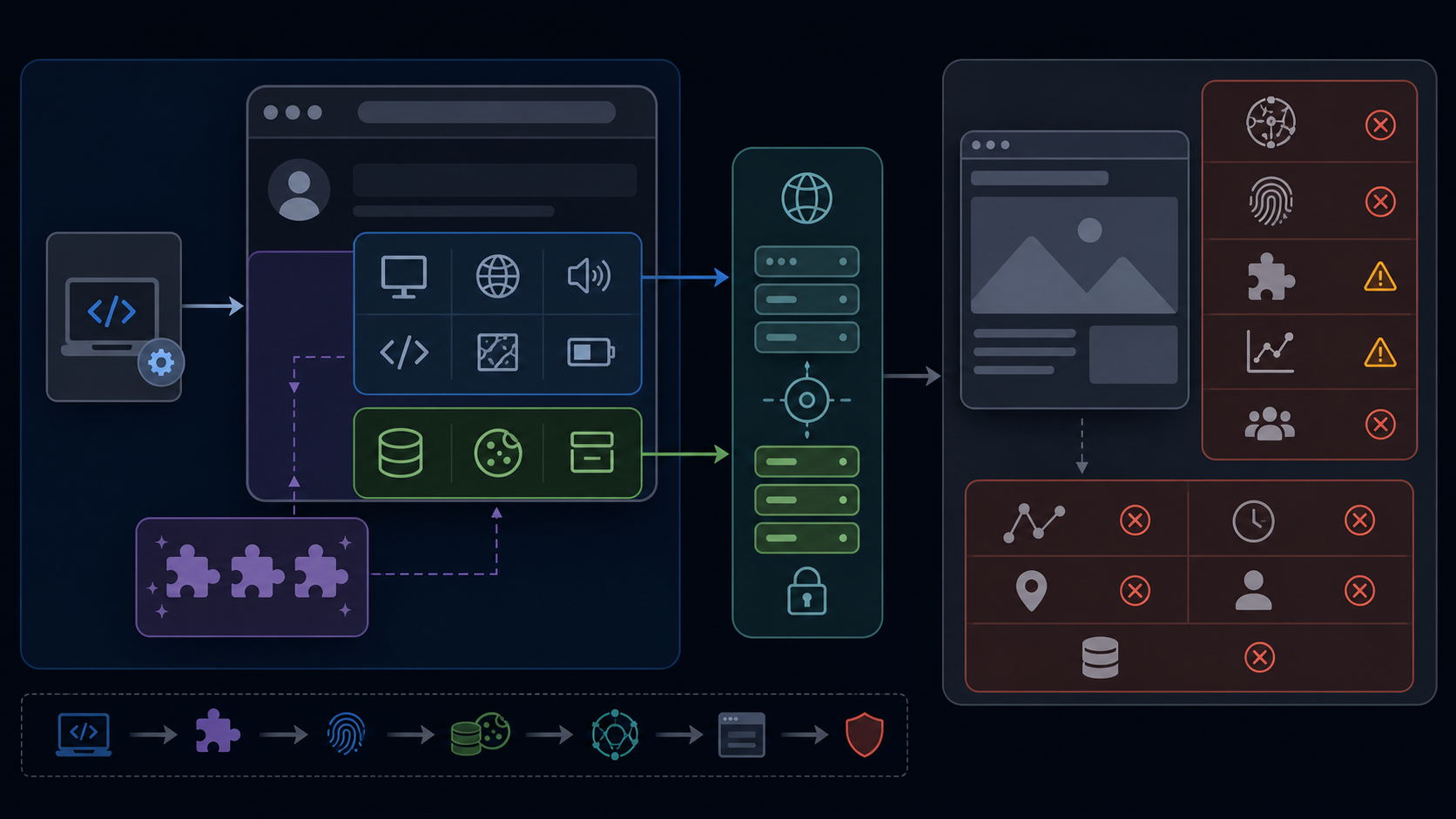
The community playwright-stealth package applies browser-side evasions; it is not an official Playwright feature. The official Playwright browser-context documentation is the reference for isolation, storage, and context lifecycle. Treat plugin behavior as version-specific and verify it against the installed package.
| Surface | Can a stealth patch affect it? | What to validate |
|---|---|---|
| JavaScript-visible browser properties | Sometimes | Patch coverage and contradictions |
| Cookies and storage | No automatic fix | Context isolation and reuse policy |
| IP and proxy session | No | Stable endpoint per logical session |
| TLS and HTTP behavior | Usually outside patch scope | Browser/network consistency |
| Interaction timing | No | Test design and application behavior |
For a broader signal model, review browser fingerprinting and bot detection. For framework choice, compare Puppeteer and Playwright stealth workflows.
Session isolation and proxy consistency
Create one browser context per logical user or test case. Decide explicitly whether cookies and storage are fresh, seeded, or reused. Keep locale, timezone, geolocation, language headers, and proxy region coherent with the test scenario. Rotating the proxy during an authenticated flow can create a stronger anomaly than using no stealth patch.
Use a sticky proxy session when the application expects continuity, and rotate only at a defined session boundary. Compare residential proxy use cases, ISP proxy sessions, and static proxy setup before choosing an endpoint model.
An authorized validation workflow
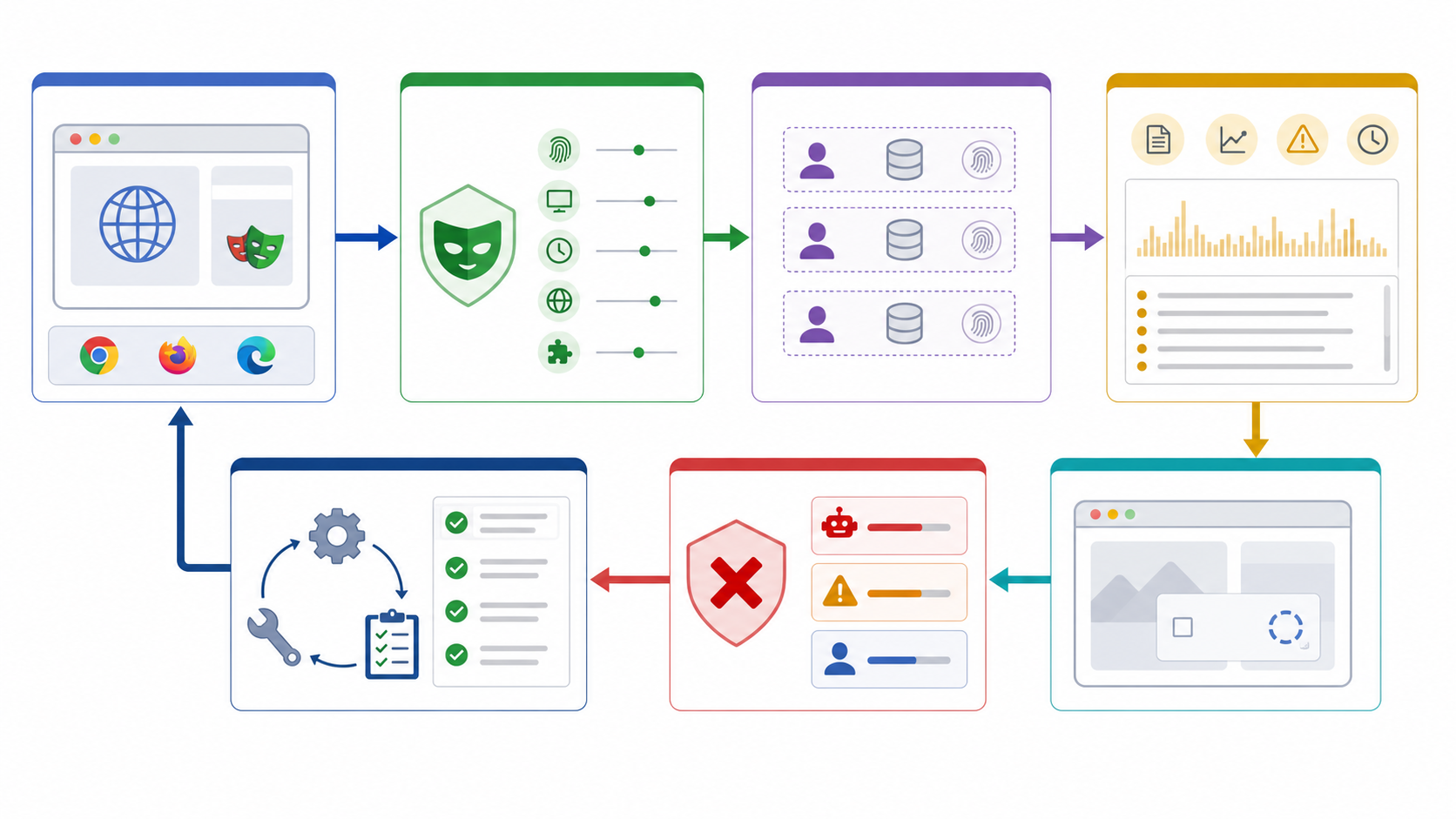
- Run an unpatched baseline in a test environment you control and capture browser console, network, challenge, and application logs.
- Add one stealth configuration without changing proxy, account, or interaction flow.
- Compare the exact failure stage: navigation, JavaScript challenge, authentication, application validation, or rate control.
- Inspect session continuity, headers, storage, and proxy identity before adding more patches.
- Repeat with clean contexts and a small matrix of supported browser versions.
- Document which change affected the outcome and remove patches that add no measurable value.
The Playwright detection workflow provides a deeper failure-classification sequence. Use these methods only for authorized automation, defensive validation, and applications you are permitted to test.
Minimal context and proxy baseline
Keep the first diagnostic script small enough to explain. This example creates one isolated context with explicit locale, timezone, and proxy configuration. It does not claim to bypass defenses; it creates a reproducible baseline for an application you are authorized to test.
from playwright.async_api import async_playwright

async def run_test(proxy_server, username, password):
    async with async_playwright() as p:
        browser = await p.chromium.launch(headless=True)
        context = await browser.new_context(
            locale="en-US",
            timezone_id="America/New_York",
            proxy={"server": proxy_server,
                   "username": username,
                   "password": password},
        )
        page = await context.new_page()
        await page.goto("https://your-authorized-test.example/")
        await context.close()
        await browser.close()
Run the baseline without stealth first, capture the failure stage, then add the package as one controlled change. Keep credentials outside source control, use a destination you own or are permitted to access, and avoid sharing storage state between unrelated identities.
Observability for Playwright failures
Capture navigation status, redirect chain, response headers, console errors, failed requests, challenge state, context identifiers, and the proxy session identifier. Do not log passwords, session secrets, or full personal data. Correlate the browser event with server-side application logs when you control the target. This separates transport failures, application validation, authentication problems, and rate controls more reliably than repeatedly adding patches.
Define a stop condition before testing. If authorization changes, the target leaves the approved environment, personal data appears unexpectedly, or the test begins affecting real users, stop and review scope. A technically reproducible workflow is only useful when its authorization and data-handling boundaries are equally clear.
Common workflow mistakes
- Changing browser version, stealth package, proxy, account, and timing in the same test.
- Reusing one context across unrelated identities.
- Rotating IP addresses inside a stateful session.
- Treating an HTTP 403 as proof of one specific detection signal.
- Testing only the final page instead of identifying the first failed stage.
- Assuming a passing public fingerprint test predicts every production defense.
Review proxy options for authorized browser automation
Frequently Asked Questions
What is Playwright stealth?
It is a community approach that patches selected JavaScript-visible automation signals. It is not a built-in guarantee from Playwright.
Does Playwright have an official stealth mode?
No. Playwright provides browser automation and isolated contexts, while stealth packages are community-maintained and version-specific.
What can Playwright stealth not fix?
It does not automatically fix IP reputation, proxy-session changes, TLS or HTTP mismatches, cookies, account history, rate limits, or unrealistic interaction patterns.
Should every test use a fresh browser context?
Use a fresh context for isolated identities or test cases. Reuse storage only when the scenario explicitly models a returning session.
Why does a stealth test still receive a 403?
A 403 is an outcome, not a diagnosis. Identify the first failing stage and compare browser, network, session, account, and rate-control evidence.
Is Playwright stealth appropriate for production scraping?
Use automation only where authorized and permitted. Validate legal, contractual, technical, and data-handling requirements before deployment.

Recommended Articles

SERP API Troubleshooting: Fix Empty, Wrong, or Inconsistent Search Results
SERP API failures are not limited to obvious HTTP errors. A request can return successfully and still produce empty, incomplete, geographically wrong, duplicated, or misinterpreted search data. Production troubleshooting therefore has to separate transport problems from provider processing, SERP differences, and downstream parsing errors.
View Details
SERP API Python: How to Build a Reliable Search Data Pipeline
This guide shows a provider-neutral workflow for building that pipeline. It does not rank SERP API vendors. Instead, it focuses on the implementation choices that make a Python integration easier to operate, test, and migrate.
View Details
SERP Scraping API: How to Choose the Right Provider
Recommended Meta Description: Compare SERP scraping APIs by data coverage, localization, reliability, workflow fit, and cost structure, then choose and validate the right provider.
View Details
Free Web Proxy vs VPN vs Rotating Proxy: Which Should You Use?
Compare free web proxies, VPNs, rotating proxies, static proxies, and datacenter proxies by scope, encryption, IP control, automation, streaming, and account workflows.
View Details
BlockAway Not Working? Fix Common Proxy, Video, and Access Problems
Troubleshoot BlockAway when pages are blocked, YouTube fails, JavaScript breaks, speed drops, sessions expire, or mobile access behaves differently.
View Details