
Best Minecraft Server IPs: How to Join and Troubleshoot
Minecraft server IPs: verify before you connect
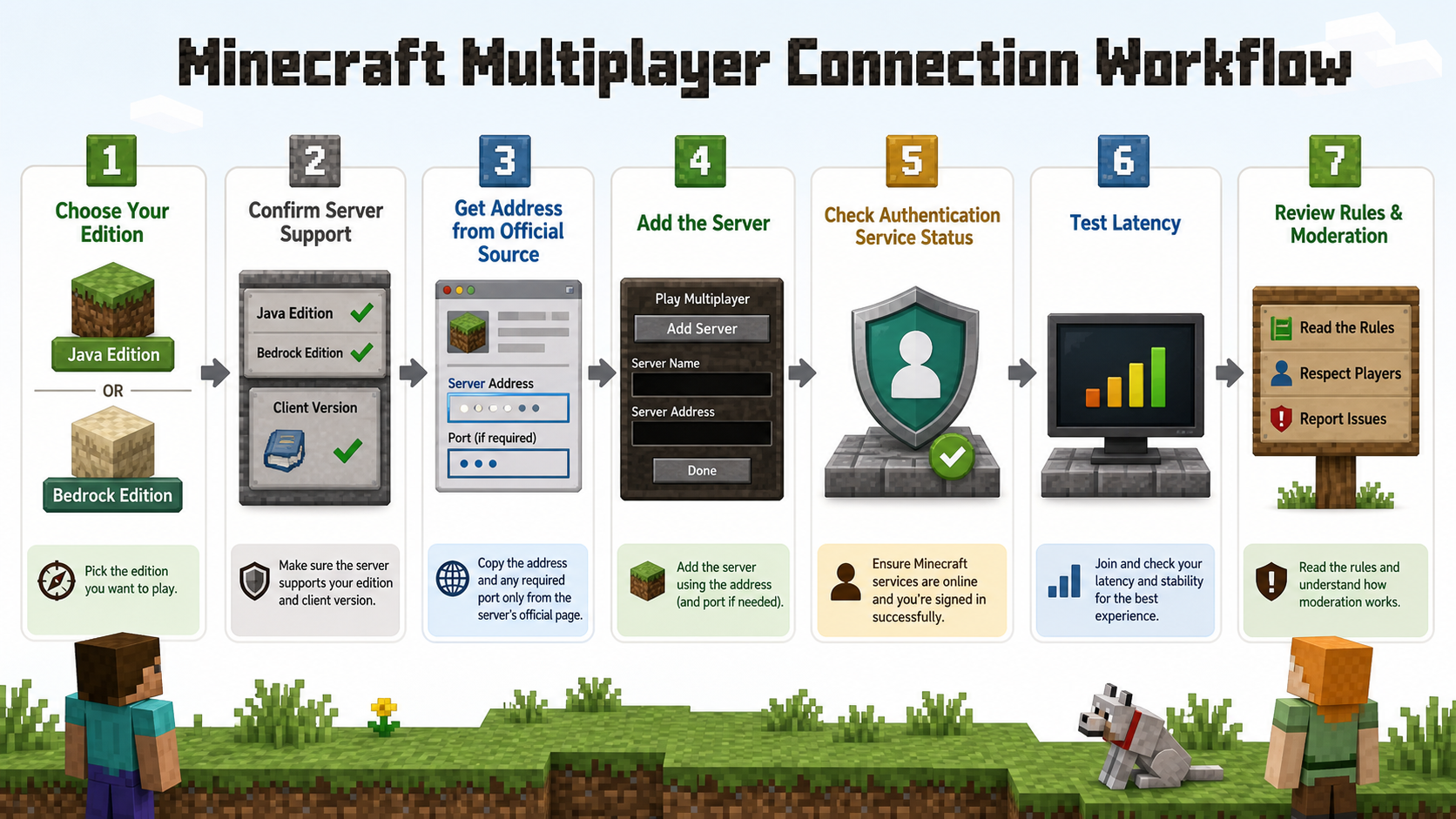
First choose Java or Bedrock Edition, then verify the server supports that edition and your client version. Copy the address and any required port from the server's official page. The official Minecraft server guide explains the normal connection flow. If a hostname fails to resolve, the Cloudflare DNS explanation explains the DNS layer involved.
Some communities support both editions through additional server software, but you must use the edition-specific address and instructions they publish. Never assume a Java address, default port, or old list entry will work for Bedrock.
A reliable server-selection checklist
| Check | Why it matters |
|---|---|
| Official address | Avoid stale list entries and lookalike domains |
| Edition and version | Java, Bedrock, and client versions can require different paths |
| Game mode | Survival, minigame, PvP, roleplay, and modded servers have different expectations |
| Rules and moderation | Clear enforcement and reporting affect community quality |
| Latency and location | Distance and route quality influence interaction |
| Capacity and access | Queues, allowlists, subscriptions, or a full server can block entry |
Troubleshoot Minecraft connection errors
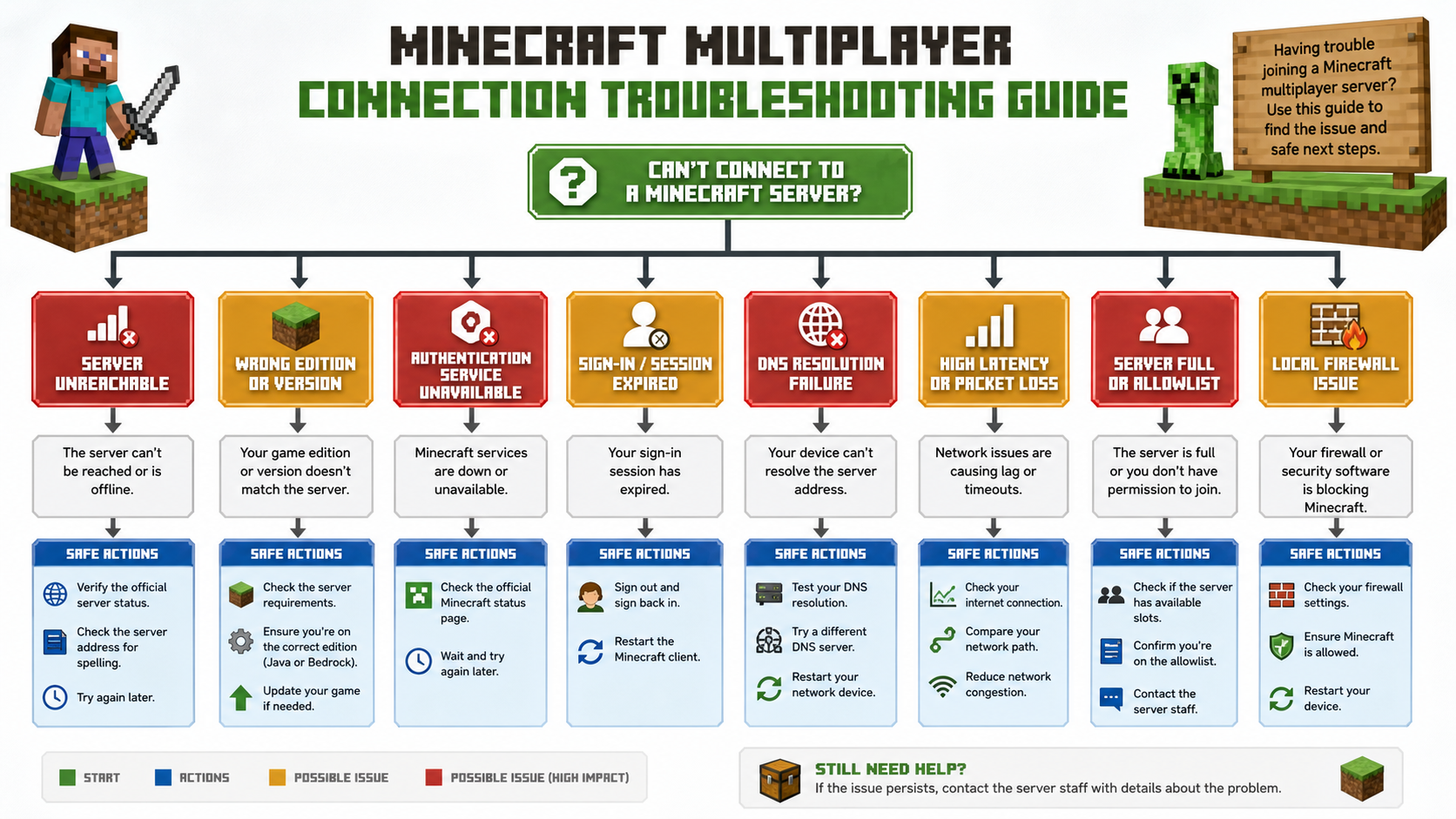
Authentication servers are unavailable
Check the official service-status channel, confirm the account is signed in, restart the client, and wait before changing unrelated network settings. Do not use unofficial launchers or bypass instructions to work around authentication.
Unknown host or DNS failure
Recheck spelling and the official address, then test name resolution. If the hostname does not resolve but other sites work, the server's DNS may be incorrect or stale.
Connection timed out
Confirm server status, edition, version, port if required, local firewall, and route. Compare another network only as a diagnostic and return to the original path to confirm the result.
High ping or packet loss
Test Ethernet or strong Wi-Fi, stop local transfers, compare time windows, and record route conditions. A region mismatch can also involve DNS or account settings, not only network distance.
When proxies or VPNs are relevant
A proxy is not a cure for a server outage, full queue, authentication failure, version mismatch, or ban. Network tools are relevant for authorized regional QA, server administration, or reproducing route-specific errors. Compare VPN and proxy scope, SOCKS5 application routing, Proxifier rules, and Android proxy limits.
Teams automating their own game-service tests can use Playwright, the Puppeteer comparison, and the controlled validation workflow for web control panels. If controlled regional endpoints are genuinely needed, evaluate residential routes, static proxy sessions, and datacenter infrastructure without claiming they guarantee game access.
These are the only Minecraft server addresses you need in 2026, from Hypixel to 2b2t.
The problem most players run into is simple: server lists go stale fast. Addresses change, servers shut down, player counts drop, and what was thriving in 2024 might be much quieter by 2026. Finding servers that are still active, still populated, and still worth your time takes more research than it should.
This guide cuts through that. Below you’ll find a curated list of some of the most consistently active and popular Minecraft servers to consider in 2026, organized by game mode, with server addresses and connection guidance for both Java and Bedrock editions.
A quick note before you join: many Minecraft “IPs” are actually domain-based server addresses, such as mc.hypixel.net, not numeric IP addresses. That is normal. You can still enter them in Minecraft’s server address field.
ACT 1: Top-Tier Servers Still Active in 2026
Not every server from five years ago is still running. The ones that survive tend to share a few qualities: dedicated ownership, consistent updates, recognizable communities, and enough active players to keep gameplay meaningful.
A good Minecraft server in 2026 is not just “online.” It should also feel alive. That means active chat, recent announcements, updated game modes, clear rules, and a community that still has momentum.
Here are the top-tier servers that remain worth knowing.
Hypixel
Hypixel is still the default recommendation for many Java Edition players because it offers a huge range of polished minigames in one place.
- Server address: mc.hypixel.net
- Edition: Java only
- Best for: Minigames, BedWars, SkyWars, SkyBlock
- Good fit for: Players who want fast matchmaking, polished modes, and a large community
Hypixel is especially strong for players who do not want to commit to one long survival world. You can join, play a few rounds of BedWars, try SkyWars, explore SkyBlock, or rotate through seasonal events.
It is also one of the easiest servers to recommend to beginners because the experience is structured. You are not dropped into a chaotic world with no direction. Menus, lobbies, NPCs, and game queues make it clear where to go next.
Best reason to join: You want the most polished Java minigame experience.
Possible downside: It is Java-only, so Bedrock players will need alternatives like The Hive or CubeCraft.
2b2t
2b2t, also known as 2builders2tools, is one of the most famous anarchy servers in Minecraft history. It is known for its long-running world, destroyed spawn region, player-made history, and harsh no-handholding culture.
- Server address: 2b2t.org
- Edition: Primarily known for Java gameplay
- Best for: Anarchy survival, exploration, community history
- Good fit for: Experienced players who want a difficult, unpredictable environment
2b2t is not a normal survival server. New players should expect a hostile spawn area, long travel, griefed landscapes, and very little protection. That is part of the appeal for some players, but it can be frustrating if you expect a friendly SMP.
It is also a server where patience matters. Queue times can be long during peak periods, and the early game may feel punishing until you escape spawn and find a safer place to establish yourself.
Best reason to join: You want to experience one of Minecraft’s most historically significant servers.
Possible downside: It is not beginner-friendly and should not be treated like a casual family server.
DonutSMP
DonutSMP became one of the more talked-about survival multiplayer servers in the mid-2020s because of its content creator visibility, community economy, and season-based activity.
- Server address: play.donutsmp.net
- Edition: Java and Bedrock support may vary by current setup
- Best for: Survival SMP, economy gameplay, community events
- Good fit for: Players who want a structured SMP with more activity than a private server
DonutSMP is better suited to players who want a modern survival community instead of pure anarchy. You can expect more structure, more social gameplay, and more economy-driven progression than you would find on a completely vanilla server.
Before investing a lot of time, check the server’s official announcements or Discord for the current season status, reset schedule, version requirements, and platform support.
Best reason to join: You want a more active SMP experience with social and economy layers.
Possible downside: Season resets may affect long-term builds and progression.
Other Notable Servers Worth Knowing
Not every good server needs to be the biggest server in the world. Some are worth joining because they specialize in a particular mode, platform, or community style.
Mineplex
- Server address: us.mineplex.com
- Edition: Java and Bedrock availability may vary
- Primary mode: Minigames
- Best for: Players who remember classic Minecraft minigame networks and want to check current activity
CubeCraft
- Server address: play.cubecraft.net
- Edition: Java and Bedrock
- Primary mode: Minigames
- Best for: Cross-play-friendly minigames and shorter sessions
The Hive
- Server address: play.hivebedrock.network
- Edition: Bedrock only
- Primary mode: Minigames
- Best for: Bedrock players who want a polished multiplayer experience
Wynncraft
- Server address: play.wynncraft.com
- Edition: Java only
- Primary mode: MMORPG and questing
- Best for: Players who want quests, classes, progression, and a more RPG-like experience
Purple Prison
- Server address: purpleprison.net
- Edition: Java only
- Primary mode: Prison
- Best for: Players who enjoy progression loops, ranks, PvP zones, and economy systems
Complex Gaming
- Server address: hub.mc-complex.com
- Edition: Java-focused
- Primary mode: Skyblock, factions, survival, Pixelmon-style experiences depending on current network setup
- Best for: Players who want several modes under one network
Mineville
- Server address: play.mineville.org
- Edition: Bedrock
- Primary mode: Survival and roleplay
- Best for: Bedrock players who prefer casual roleplay or city-style gameplay
How to Evaluate Whether a Server Is Still Worth Joining
A server can have a recognizable name and still feel inactive. Before committing to one, use this quick checklist:
- Check recent announcements. A server with active updates is usually safer than one with a silent website.
- Join during your actual play hours. A server may be busy in North America but quiet during your local evening.
- Confirm edition support. Java-only servers will not work for Bedrock players unless they officially support cross-play.
- Look for version guidance. Some servers support multiple versions; others require a specific Minecraft version.
- Read the rules before playing. Especially on PvP, prison, factions, and SMP servers.
- Check reset schedules. For survival servers, a reset can wipe or restart progress.
For players, this helps avoid wasted time. For developers and technical operators building server lists, uptime checks, or region-testing workflows, it also highlights why reliable network visibility matters. Infrastructure teams often need more than one home connection to test how platforms behave from different regions, which is where proxy and connectivity tooling from providers like LycheeIP’s proxy infrastructure can become relevant.
ACT 2: Servers Broken Down by Game Mode
Choosing a server based on the address alone is not enough. What matters is whether the game mode matches what you actually want to play.
Some players want short competitive rounds. Others want a persistent survival world. Some want chaos. Others want quests, towns, or roleplay. The best server for you depends less on popularity and more on fit.
Survival Servers
Survival servers let you build, mine, trade, and interact with a persistent world. The best ones add economy systems, land claiming, shops, ranks, or community events on top of vanilla gameplay.
Top picks:
- DonutSMP — Structured SMP with economy and community involvement
- Complex Gaming — Multiple survival-adjacent modes in one network
- 2b2t — Raw anarchy survival with minimal protection
What to look for in a survival server:
- Active player count during your time zone
- Land claim or grief protection if you care about builds
- Economy or trading systems if you enjoy market gameplay
- Clear rules around stealing, griefing, and PvP
- Season or reset schedule
- Server version compatibility
- Community moderation quality
Survival servers are best when the world feels alive. If you join and the chat is empty, shops are abandoned, and staff announcements are months old, the server may technically be online but socially inactive.
Best fit: Players who want longer-term progression and community interaction.
PvP Servers
PvP servers focus on combat, either in structured arena formats or open-world conflict. The experience can range from beginner-friendly minigames to harsh anarchy environments.
Top picks:
- Hypixel — BedWars and SkyWars remain strong competitive minigame options
- 2b2t — Open-world PvP with high risk and little protection
- Purple Prison — PvP layered into a prison progression system
If you are new to PvP, start with structured modes. Hypixel’s BedWars or SkyWars are easier to understand because matches have clear objectives, defined teams, and repeatable rounds.
Open-world PvP is different. On servers like 2b2t, combat is not always fair, balanced, or beginner-friendly. You may be attacked before you understand the environment.
What to check before joining a PvP server:
- Are hacked clients or macros banned?
- Does the server use anti-cheat?
- Are there safe zones?
- Is PvP always enabled or limited to certain areas?
- Are paid kits or ranks affecting balance?
- Is the community beginner-friendly or highly competitive?
Best fit: Players who enjoy competition, risk, and mechanical improvement.
Minigame Servers
Minigame servers offer short, self-contained game modes such as races, parkour, murder mystery, hide and seek, build battles, SkyWars, BedWars, and party games.
These are ideal if you want variety without long-term commitment.
Top picks:
- Hypixel — Wide Java minigame selection
- CubeCraft — Strong cross-play-friendly minigames
- The Hive — One of the best Bedrock-focused minigame options
- Mineplex — A recognizable legacy minigame network with a long history
Minigame servers are also good for groups. If your friends play on different devices, prioritize servers with official Bedrock support or cross-play compatibility.
What makes a good minigame server:
- Fast matchmaking
- Clear instructions
- Fair team balancing
- Active moderation
- Low downtime
- Frequent map or mode updates
- Strong performance during peak hours
Best fit: Players who want quick sessions, party play, or competitive variety.
Roleplay and MMORPG Servers
Roleplay servers create structured social or narrative environments. MMORPG servers go further by adding quest lines, leveling systems, classes, custom items, dungeons, and worldbuilding.
Top picks:
- Wynncraft — A full MMORPG-style Minecraft experience with quests and progression
- Mineville — Bedrock-friendly roleplay and casual city-style gameplay
Wynncraft deserves special mention because it does not feel like a normal Minecraft server. It plays more like a standalone RPG built inside Minecraft. You can explore, complete quests, level up, collect gear, and progress through a custom-designed world.
Roleplay servers, meanwhile, are usually more community-dependent. The quality of the experience depends heavily on rules, moderation, player maturity, and how active the roleplay community is.
What to look for:
- Clear roleplay rules
- Active staff
- Character or faction systems
- New-player onboarding
- Anti-grief protections
- Community guidelines
- Update history
Best fit: Players who want story, worldbuilding, social play, or RPG progression.
Quick Fit Guide by Player Type
Use this simple guide if you are not sure where to start:
- New Java player: Try Hypixel first.
- New Bedrock player: Try The Hive or CubeCraft.
- Survival SMP fan: Try DonutSMP or Complex Gaming.
- Anarchy-curious player: Try 2b2t, but expect a difficult start.
- RPG fan: Try Wynncraft.
- Short-session player: Choose minigame servers.
- Builder: Look for survival servers with land claiming.
- Competitive player: Start with Hypixel PvP modes before moving into harsher PvP environments.
For technical teams building tools around multiplayer availability, game-adjacent analytics, or location-aware testing, this segmentation also matters. A QA workflow for a Bedrock minigame server may need different regional checks than a Java-only MMORPG server, and a provider such as LycheeIP may be considered when teams need controlled proxy infrastructure for legitimate testing.
ACT 3: How to Connect on Java and Bedrock
Connecting to a Minecraft server works differently depending on whether you are using Java Edition or Bedrock Edition.
Java Edition is more flexible for custom multiplayer servers. Bedrock Edition is more platform-dependent, especially on consoles.
Connecting on Java Edition
Use these steps for Java servers such as Hypixel, 2b2t, Wynncraft, Purple Prison, and many Java-focused networks.
- Open Minecraft Java Edition.
- Click Multiplayer from the main menu.
- Click Add Server.
- Enter a server name. This can be any label you want.
- Enter the server address, such as mc.hypixel.net.
- Click Done.
- Select the server from your list.
- Click Join Server.
Java Edition servers typically use port 25565 by default. In most cases, you only need to enter the server address. If a server uses a custom port, it will usually provide the address in a format similar to example.server.com:25566.
Java Edition tips:
- Make sure your Minecraft version is compatible.
- Use a legitimate Microsoft/Mojang account.
- Disable incompatible mods if the server rejects your connection.
- Check whether the server requires a resource pack.
- If the server says it is full, try again later or check whether it uses a queue.
- If you see authentication errors, confirm that Minecraft’s login services are working.
The server address you type is resolved through DNS, which turns human-readable hostnames into network destinations. If you want the technical background, Cloudflare’s guide to how DNS works is a useful primer.
Connecting on Bedrock Edition
Bedrock Edition includes Windows, mobile, PlayStation, Xbox, and Nintendo Switch versions, but not every platform handles custom servers the same way.
On PC: Windows Bedrock
- Open Minecraft.
- Go to Play.
- Select the Servers tab.
- Scroll down and choose Add Server.
- Enter the server name.
- Enter the server address.
- Enter the port, commonly 19132 unless the server gives a different port.
- Click Save.
- Select the server and connect.
On Mobile: iOS and Android
- Open Minecraft.
- Tap Play.
- Go to Servers.
- Scroll down and tap Add Server.
- Enter the server name, address, and port.
- Tap Play.
Mobile is usually more flexible than console for adding third-party servers directly.
On Console: PlayStation, Xbox, and Nintendo Switch
Console Bedrock editions can be more restrictive with custom server connections. Some players use DNS-based workarounds to access third-party servers, but this depends on the platform, current Minecraft behavior, network settings, and the service used.
Use caution here. Only follow instructions from trusted sources, avoid entering account credentials into unknown services, and remember that platform behavior can change over time.
Quick Reference: Edition Compatibility
Here is a practical compatibility summary based on the server categories above:
Java-only or Java-focused options:
- Hypixel
- 2b2t
- Wynncraft
- Purple Prison
- Complex Gaming
Bedrock-friendly options:
- The Hive
- CubeCraft
- Mineville
- Some SMP networks depending on current support
Cross-play possibilities:
- CubeCraft
- Some modern SMP networks
- Some networks using cross-play bridge technology
Always verify current compatibility on the server’s official website, Discord, or in-game listing before assuming Java and Bedrock players can join together.
Troubleshooting Connection Issues
If you cannot connect, do not assume the server is dead immediately. Work through this list first:
- Check the address. One typo can break the connection.
- Check your edition. Java servers generally do not work on Bedrock unless cross-play is officially supported.
- Check your version. Some servers only support selected Minecraft versions.
- Restart the game. This fixes simple session and authentication issues.
- Disable conflicting mods. Mods can cause handshake or resource-pack issues.
- Try another network. School, office, or public Wi-Fi may block multiplayer traffic.
- Check server status channels. Discord or official status pages may mention maintenance.
- Wait if there is a queue. Some servers delay entry during peak times.
If the issue is latency rather than connection failure, the problem is usually distance, routing, congestion, or unstable Wi-Fi rather than the server address itself.
A Note on Network Conditions and Latency
For players outside North America or Europe, latency can be a significant issue when connecting to major servers. A server may be active and technically reachable, but still feel laggy if your route to it is slow or unstable.
Latency affects combat timing, block placement, knockback, inventory actions, and movement responsiveness. Even when your internet speed looks good, a poor route to the server can create a bad gameplay experience.
Why Server Distance Matters
Minecraft multiplayer is sensitive to delay because the client and server constantly exchange state updates. The farther your traffic has to travel, and the more congested or indirect the route is, the more likely you are to notice lag.
Common signs of latency problems include:
- Delayed hit registration
- Blocks reappearing after being broken
- Rubber-banding movement
- Inventory actions taking too long
- Sudden disconnects
- Chat messages appearing late
Latency is not the same as download speed. You can have fast internet and still experience poor ping to a specific server. For a deeper technical explanation, Cloudflare’s overview of network latency explains why distance and routing affect responsiveness.
When VPNs or Proxies Are Relevant
Some players use VPNs to route traffic differently, stabilize unstable routing, or connect through a location closer to the server’s infrastructure. This may help in some cases, but it is not guaranteed.
A VPN can also make performance worse if it adds distance, congestion, or packet loss. The only reliable way to know is to test.
For casual players, a standard VPN is usually the simpler option. For technical teams, proxies become more relevant when testing how platforms behave across locations, networks, or access environments.
Legitimate examples include:
- QA teams testing whether a game-related website loads correctly in different regions
- Data teams checking public server-list pages where permitted
- Growth teams validating localized landing pages or regional content
- Security teams testing authorized systems under approved scopes
- Infrastructure teams monitoring availability from multiple geographic perspectives
The key is intent and permission. Proxy infrastructure should be used for lawful, authorized, and policy-compliant work — not to evade bans, abuse services, scrape restricted data, or bypass rules.
Responsible Use for Testing and Automation
If your work involves automated checks, regional testing, or public-data collection, build responsibly:
- Review the target site’s Terms of Service.
- Respect robots.txt and rate limits where applicable.
- Avoid collecting personal data unless you have a lawful basis.
- Do not overload third-party services.
- Use clear user agents where appropriate.
- Keep logs for debugging and accountability.
- Separate testing environments from production environments.
- Get written authorization for security testing.
For security-related testing, the OWASP Web Security Testing Guide is a useful reference for keeping testing structured and authorized.
This matters because proxies are neutral infrastructure. Their value depends on how they are used. Responsible teams use them to improve QA, reliability, localization, monitoring, and research workflows — not to create harm.
Common Mistakes When Joining Minecraft Servers
Most connection problems come from a small set of mistakes. Fix those first before assuming the server is offline.
Using Outdated Server Addresses
Server addresses can change. A server can also migrate infrastructure, rebrand, or move players to a new domain.
Before joining, verify the address through one of these sources:
- Official website
- Official Discord
- Official X/Twitter account
- In-game featured server list
- Trusted server-status page
- Recent community announcements
Avoid random reposted lists that do not show when they were last updated.
Choosing the Wrong Edition or Version
This is one of the most common problems.
Java and Bedrock are different editions. A Java server will not automatically work for a Bedrock player. Some networks support cross-play, but that support must be intentional.
Version mismatch is another issue. If a server supports 1.20 but your client is on another version, you may see errors or fail to join.
Before connecting, check:
- Required Minecraft edition
- Supported client versions
- Whether mods are allowed
- Whether a resource pack is required
- Whether the server is in maintenance
- Whether the server has a separate Bedrock port
Ignoring Rules, Queues, and Platform Limits
Rules matter, even on servers that feel casual. Breaking them can get you muted, kicked, or banned.
Common rule areas include:
- Hacked clients
- Macros or automation
- Exploits
- Harassment
- Griefing
- Chat behavior
- Scamming
- Inappropriate builds or skins
Queues also matter. On servers like 2b2t, you may be waiting rather than failing to connect. Do not close the game immediately if the server uses a queue system.
Console limitations are another common frustration. Bedrock players on consoles may not be able to add custom servers as easily as Windows or mobile players. This is a platform limitation, not necessarily a server problem.
Quick mistake checklist:
- Did you type the address correctly?
- Are you using the right Minecraft edition?
- Are you on a supported version?
- Did you include the right port for Bedrock?
- Is the server currently under maintenance?
- Are you stuck in a queue?
- Is your network blocking multiplayer?
- Did you check the official server channels?
Fixing these simple issues will solve a large percentage of failed connection attempts.
Frequently Asked Questions
How do I find a Minecraft server IP?
Use the server's official website or verified community page and confirm the address, edition, version, and required port.
Why does a server address say unknown host?
The hostname may be misspelled, stale, or failing DNS resolution. Verify the official address and test DNS.
Can Java and Bedrock join the same server?
Only when the server explicitly supports both and publishes the correct edition-specific connection details.
Why do I see an authentication-server error?
Official authentication may be unavailable or the client session may have expired. Check status, sign in again, restart, and wait.
Will a VPN or proxy lower Minecraft ping?
Not reliably. An alternate route can be better or worse and cannot fix server load, Wi-Fi loss, distance, or authentication.
Is it safe to join a public server?
Review the official address, rules, moderation, privacy expectations, and community reputation. Never share account credentials.
Why can friends join when I cannot?
Compare edition, version, address, port, account state, allowlist, firewall, DNS, and route one variable at a time.
What should I record when reporting an error?
Include timestamp, edition, version, exact error, server address without credentials, network type, and steps already tested.

Recommended Articles

SERP API Troubleshooting: Fix Empty, Wrong, or Inconsistent Search Results
SERP API failures are not limited to obvious HTTP errors. A request can return successfully and still produce empty, incomplete, geographically wrong, duplicated, or misinterpreted search data. Production troubleshooting therefore has to separate transport problems from provider processing, SERP differences, and downstream parsing errors.
View Details
SERP API Python: How to Build a Reliable Search Data Pipeline
This guide shows a provider-neutral workflow for building that pipeline. It does not rank SERP API vendors. Instead, it focuses on the implementation choices that make a Python integration easier to operate, test, and migrate.
View Details
SERP Scraping API: How to Choose the Right Provider
Recommended Meta Description: Compare SERP scraping APIs by data coverage, localization, reliability, workflow fit, and cost structure, then choose and validate the right provider.
View Details
Free Web Proxy vs VPN vs Rotating Proxy: Which Should You Use?
Compare free web proxies, VPNs, rotating proxies, static proxies, and datacenter proxies by scope, encryption, IP control, automation, streaming, and account workflows.
View Details
BlockAway Not Working? Fix Common Proxy, Video, and Access Problems
Troubleshoot BlockAway when pages are blocked, YouTube fails, JavaScript breaks, speed drops, sessions expire, or mobile access behaves differently.
View Details