
How to Give AI Agents Reliable Real-Time Web Data

An AI agent does not become reliable simply because it can access the internet. The agent also needs to know:
A production-ready solution therefore needs more than a web scraper. It needs a web data layer that connects acquisition, validation, storage, retrieval, security, and observability. This guide explains how to design that layer.
What Does Real-Time Web Data Mean for an AI Agent?
“Real-time” does not always mean retrieving a webpage at the exact moment a user asks a question. The correct freshness level depends on the task. A sports-score agent may need updates every few seconds. A competitor-pricing system might refresh every hour. A regulatory research assistant may need to verify documents whenever a user requests an answer. A product documentation agent may only need to recrawl pages that have changed since its previous run. It is more useful to define freshness as a measurable service requirement. For example:
The objective is not to make every source live. It is to ensure that each answer uses information fresh enough for the decision being made.
For the LycheeIP implementation details behind this step, review LycheeIP proxy infrastructure.
For the LycheeIP implementation details behind this step, review AI-powered browser automation hub.
For the LycheeIP implementation details behind this step, review static residential proxies.
For the LycheeIP implementation details behind this step, review rotating residential proxies.
For the official technical reference behind this point, see MDN HTTP overview.
For the official technical reference behind this point, see Playwright documentation.
Five Ways to Connect an AI Agent to Current Web Information
The first architectural decision is how the application should obtain data.
1. First-party APIs
A first-party API is usually the most dependable option when the source provides one. APIs often return structured fields, explicit timestamps, stable identifiers, and predictable errors. They may also provide authentication, quotas, pagination, and webhook notifications. Use an official API when:
- The required data is available through it
- The API permits the intended use
- Its update frequency satisfies your freshness requirement
- Its fields contain enough information for the task
The limitation is coverage. Many websites expose only part of their information through an API, and some provide no public API at all.
2. Hosted web search
A web-search tool is appropriate when the agent needs to discover sources in response to an unpredictable question. For example, OpenAI’s web-search tooling allows models to retrieve current web information and produce answers with sourced citations. Its documentation distinguishes quick lookups from agentic searches that may conduct several retrieval steps. (developers.openai.com) Search is useful for:
- Open-ended research
- Current events
- Queries where the relevant domains are unknown
- Fact checking across multiple sources
- Questions that require source discovery
Search is less suitable when you need complete coverage of every page, stable schemas, guaranteed refresh intervals, or repeatable extraction of the same fields.
3. Scheduled crawling
A scheduled crawler discovers and retrieves pages before a user asks for them. This is effective when:
- The target sources are known
- The same domains must be monitored repeatedly
- The agent needs low-latency answers
- Historical versions are valuable
- You need control over cleaning, chunking, metadata, and indexing
The tradeoff is operational responsibility. Your team must manage crawl scope, retries, duplication, rendering, storage, website changes, and refresh schedules.
4. On-demand page retrieval
An agent can fetch a known page during a user request. This can work for a small number of fast, predictable sources. However, it introduces retrieval latency and makes the user-facing workflow dependent on the target website. A slow page, CAPTCHA, rendering failure, or network problem can delay or break the agent’s response. For this reason, on-demand retrieval should usually have:
- A strict timeout
- A cached fallback
- Retry limits
- A clear failure response
- An option to use previously verified data
5. Browser automation
Some information only appears after JavaScript execution, interaction, navigation, or authentication. Browser automation can render pages, click controls, wait for dynamic elements, and collect content from application-like websites. Playwright, for example, controls Chromium, Firefox, and WebKit through a single automation API. (playwright.dev) Browser automation is powerful but expensive compared with ordinary HTTP retrieval. It consumes more CPU and memory, takes longer, and introduces additional failure modes. Use it selectively rather than rendering every URL by default.
A Reference Architecture for an AI Web Data Pipeline
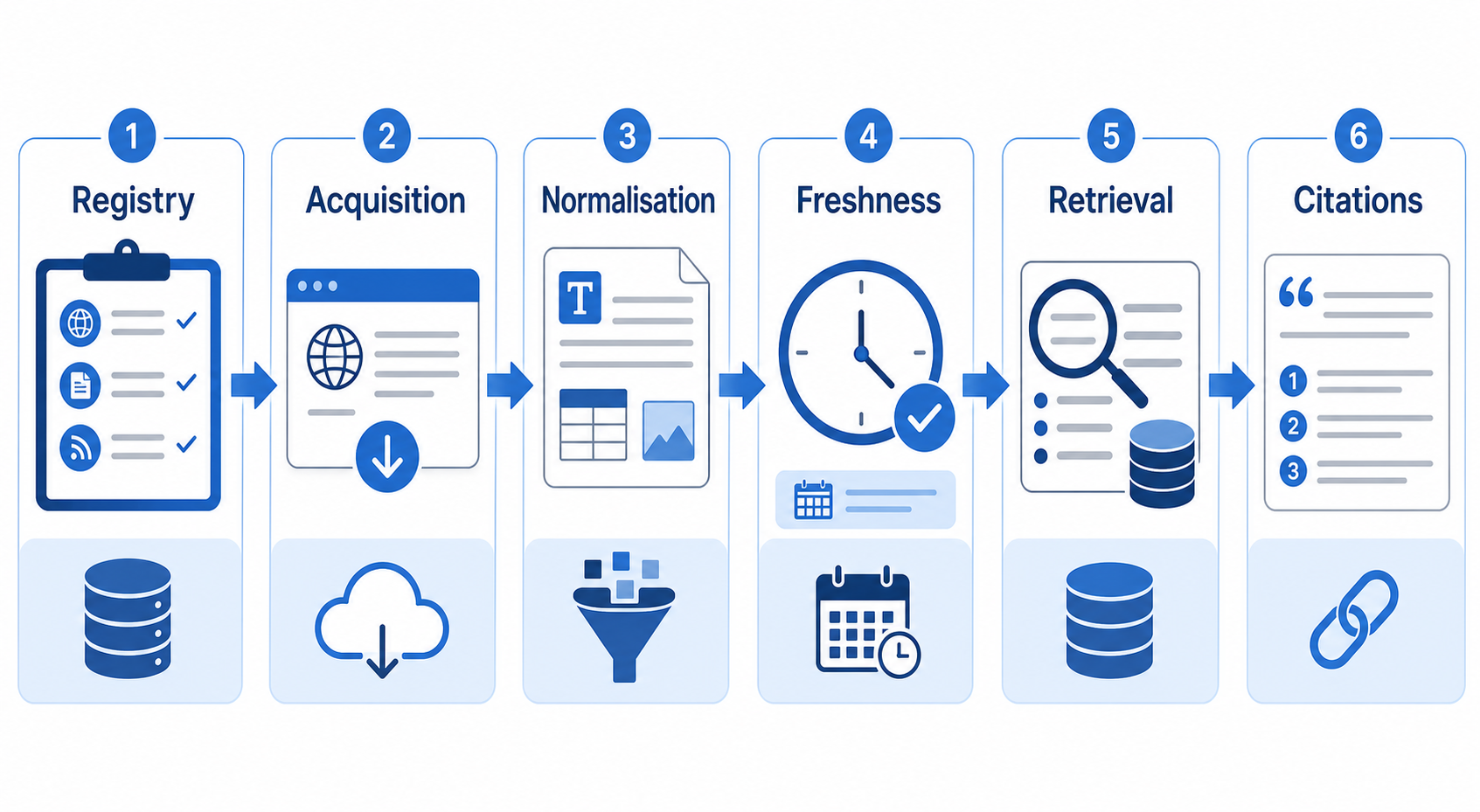
A robust system can be organised into seven layers.
1. Source Registry and Access Policy
Begin with a source registry rather than an unstructured list of URLs. Each source record should contain fields such as:
- Domain
- Source type
- Subject coverage
- Trust tier
- Retrieval method
- Refresh frequency
- Geographic requirements
- Allowed paths
- Disallowed paths
- Authentication method
- Expected language
- Content owner
- Terms or licensing notes
This registry gives the agent and data pipeline a shared policy layer. It also prevents a research agent from treating every website as equally authoritative.
2. Discovery and Acquisition
The acquisition layer determines which URLs should be retrieved. Possible inputs include:
- Official APIs
- Search results
- XML sitemaps
- RSS feeds
- Known category pages
- Link discovery
- User-provided URLs
- Previously stored pages scheduled for recrawling
Sitemaps can provide URL and modification information that helps crawlers prioritise changed content, although a lastmod value should still be verified rather than blindly trusted. (sitemaps.org) The crawler should enforce:
- Domain allowlists
- URL-pattern filters
- Maximum crawl depth
- Page limits
- Request concurrency
- Per-domain delays
- Retry ceilings
- Response-size limits
3. Content Normalisation
Raw HTML is rarely ready for an AI model. A normalisation pipeline may need to remove:
- Navigation menus
- Cookie notices
- Promotional banners
- Repeated footers
- Related-post modules
- Tracking parameters
- Hidden elements
- Duplicate mobile and desktop content
- Scripts and styles
The pipeline should retain information that helps the model interpret and cite the page:
- Canonical URL
- Page title
- Main heading
- Author
- Publication date
- Last updated date
- Section headings
- Main text
- Tables
- Image captions
- Structured-data fields
- Retrieval timestamp
- HTTP status
- Content language
Do not reduce the page to an anonymous block of text. The metadata often determines whether the information is usable.
4. Validation and Security Screening
Retrieved content is untrusted input. A malicious or compromised webpage can contain instructions intended to manipulate an AI agent, such as telling it to reveal secrets, ignore its policy, call a tool, or send data elsewhere. OWASP identifies indirect prompt injection from webpages, documents, emails, and other external sources as a material risk for AI agents. It recommends limiting tool permissions, separating data from instructions, validating outputs, and requiring human approval for sensitive actions. (cheatsheetseries.owasp.org) At minimum:
- Treat retrieved content as data, never as system instructions.
- Remove scripts, invisible text, and suspicious instruction-like blocks where appropriate.
- Do not expose credentials to the model.
- Restrict each agent tool to the minimum required permissions.
- Validate tool arguments outside the model.
- Require approval before destructive, financial, administrative, or external communication actions.
- Log which retrieved passages influenced each action.
Content security is especially important when the same agent can both browse and act.
5. Deduplication and Freshness Management
Duplicate pages waste storage, embedding capacity, and model context. Use several levels of deduplication:
- Normalised URL matching
- Canonical URL matching
- Redirect resolution
- Exact content hashing
- Near-duplicate similarity
- Document-version comparison
For recurring crawls, avoid downloading unchanged pages unnecessarily. HTTP conditional requests can use validators such as ETags to determine whether a stored representation is still current. (rfc-editor.org) A practical version record might contain: sourceurl canonicalurl retrievedat publishedat modifiedat contenthash httpetag httplastmodified parserversion document_version This allows the system to identify what changed, when it changed, and whether reprocessing is necessary.
6. Structured Storage and Retrieval
Different information should be stored in different forms.
Relational or document storage
Use structured storage for:
- Source metadata
- Dates
- Prices
- Product identifiers
- Categories
- Entities
- Crawl status
- Content versions
- Access policies
JSON Schema is a standard way to define and validate the expected structure, constraints, and data types of JSON documents. (json-schema.org) Schema validation should happen before records enter downstream systems.
Full-text index
Use a lexical index when exact terms matter, including:
- Model numbers
- Legal references
- Error codes
- Names
- Product SKUs
- Technical phrases
Vector index
Use embeddings when users may express the same idea with different wording. Vector search can help locate semantically related passages, but it should not automatically replace metadata filters or exact search. A strong retrieval pipeline often combines:
- Source filters
- Date filters
- Keyword search
- Vector similarity
- Reranking
- Authority weighting
7. Answer Generation and Provenance
The final answer should remain connected to the evidence used to produce it. Each retrieved passage should carry:
- Source URL
- Document title
- Publication or update date
- Retrieval date
- Passage identifier
- Content version
- Source authority tier
The application can then produce citations, show supporting passages, and trace disputed claims back to the relevant source version. Provenance also helps engineers diagnose whether a bad answer came from:
- An unreliable source
- A retrieval error
- Stale content
- Poor chunking
- Incorrect ranking
- Model interpretation
- A missing source
Build the Pipeline Around Freshness Policies
Do not recrawl every source at the same frequency. Instead, assign an update policy based on:
- How often the source changes
- The business impact of stale data
- Crawl cost
- Page importance
- Historical change patterns
- Source-provided timestamps
- User demand
For example:
- Tier 1: Check every 5 minutes
- Tier 2: Check every hour
- Tier 3: Check every day
- Tier 4: Check weekly
- Tier 5: Refresh only when requested
You can make this adaptive. A page that changes frequently can be checked more often. A page that remains unchanged for months can gradually move to a slower schedule.
A Practical Implementation Workflow
A sensible production rollout looks like this:
Step 1: Define the agent’s decisions
List the questions the agent must answer and the actions it may take. This determines the required data, precision, latency, and risk controls.
Step 2: Define source authority
Separate:
- Primary sources
- Official documentation
- Trusted secondary sources
- Discovery sources
- Unverified community content
The system may use weaker sources for discovery while requiring stronger sources for final claims.
Step 3: Choose the least complex acquisition method
Prefer:
- Official API
- Feed or sitemap
- Search retrieval
- Static HTTP crawling
- Browser rendering
- Interactive browser automation
Move down the list only when the simpler option cannot provide the required data.
Step 4: Define a data contract
Specify required fields, types, accepted values, timestamp rules, and validation behaviour. Reject or quarantine incomplete records instead of silently accepting them.
Step 5: Create a small representative test set
Include:
- Static pages
- JavaScript pages
- Redirects
- Missing pages
- Duplicate URLs
- Long articles
- Tables
- Non-English content
- Rate-limited responses
- Pages containing suspicious instructions
Step 6: Add storage and versioning
Store both the cleaned representation and enough raw evidence to investigate parser errors.
Step 7: Add retrieval evaluation
Create test questions with expected sources and required facts. Measure whether the correct documents and passages are retrieved before evaluating the final answer.
Step 8: Add monitoring and alerts
Only then should the pipeline run continuously.
Metrics That Reveal Whether the System Works
Track the full path from retrieval to answer.
Acquisition metrics
- Request success rate
- Response status distribution
- CAPTCHA or block rate
- Average retrieval latency
- JavaScript-rendering rate
- Bytes downloaded
- Pages retrieved per domain
Data-quality metrics
- Extraction completeness
- Missing-title rate
- Missing-date rate
- Duplicate rate
- Language-detection errors
- Schema-validation failures
- Percentage of pages with usable main content
Freshness metrics
- Time since last successful retrieval
- Time between source change and system update
- Percentage of answers using data within the required freshness window
- Recrawl yield, meaning how often a recrawl finds a meaningful change
Retrieval and answer metrics
- Relevant-document recall
- Citation correctness
- Source-authority distribution
- Unsupported-claim rate
- Conflicting-source rate
- Answer refusal rate
- Human correction rate
Monitoring only scraper success is not enough. A pipeline can retrieve every page successfully and still provide poor answers.
Common Failure Modes
Scraping during every user request
This increases latency and makes the application dependent on external websites. Use cached or pre-ingested content for predictable sources, with live retrieval reserved for questions that require it.
Storing error pages as valid content
A CAPTCHA, login screen, or access-denied page may still return HTML. Validate page type, text length, title patterns, and expected structural elements before accepting the record.
Trusting every publication date
Some pages omit dates, reuse template dates, or change their displayed timestamp after minor edits. Store publication, modification, retrieval, and first-seen dates separately.
Sending an entire webpage to the model
This wastes context and may introduce navigation text, irrelevant links, advertisements, or malicious instructions. Extract focused passages with provenance.
Using vector search alone
Semantic similarity does not guarantee authority, recency, or factual relevance. Combine vector retrieval with metadata, lexical search, and source policies.
Allowing crawled text to trigger tools
External content should never independently authorise an action. Tool permissions and approvals must be enforced by application code.
Build Reliable AI Web Data Pipelines on LycheeIP Infrastructure
Legal, Ethical, and Operational Boundaries
Before collecting data, review:
- The website’s terms
- Applicable contractual restrictions
- Authentication boundaries
- Copyright and database rights
- Privacy obligations
- Personal-data minimisation
- Data-retention policies
- Geographic restrictions
- Licensing requirements
The Robots Exclusion Protocol gives website owners a standard way to communicate crawler access preferences. It is not an authentication or security mechanism, but responsible crawlers should interpret and follow applicable rules. (rfc-editor.org) Use a clear crawler identity where appropriate, limit request rates, and provide a contact method for operators of substantial crawling systems.
Frequently Asked Questions
Do AI agents need a web scraper to access current data?
Not always. An official API, web-search tool, feed, sitemap, database, or licensed dataset may be more appropriate. Scraping is one acquisition method, not the complete architecture.
Is live search better than RAG?
They solve different problems. Live search discovers current external sources. RAG usually retrieves from a controlled collection that has already been indexed. Many applications use both.
How frequently should web data be refreshed?
Refresh frequency should reflect how quickly the source changes and how harmful stale information would be. There is no universal interval.
Should an AI agent crawl websites during a conversation?
Only when the workflow can tolerate the latency and failure risk. Predictable sources are often better collected in the background.
How do you prevent a webpage from manipulating an AI agent?
Treat all retrieved content as untrusted data, isolate instructions from evidence, restrict tools, validate actions outside the model, and require approval for high-impact operations.
How can an agent cite crawled information?
Store source metadata and passage identifiers with every extracted chunk. Preserve this metadata through retrieval and answer generation. Conclusion Reliable real-time web data comes from an engineered system, not a single scraper or prompt. Start by defining how fresh the data must be. Choose the simplest permitted acquisition method. Validate and version every record. Preserve provenance. Treat external text as untrusted input. Monitor retrieval quality as closely as crawling success. When these controls are in place, an AI agent can use the web as a governed evidence source rather than an unpredictable stream of text.
Related LycheeIP Guides and Resources
