
Agentic Browser: How AI Browsers Work, Where They Help, and What Can Go Wrong
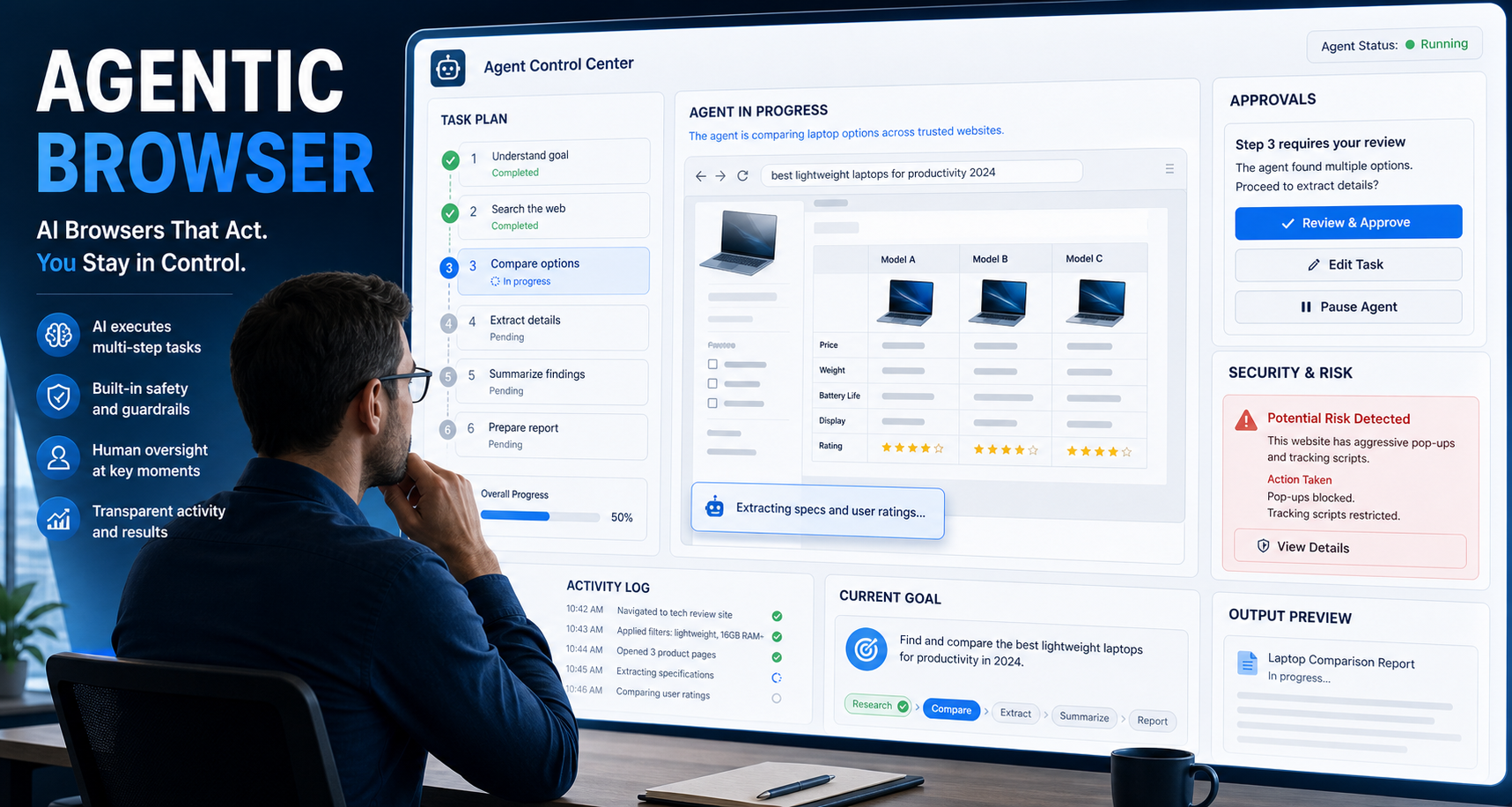
This guide explains:
An agentic browser is a web browser or browser-based system that uses an AI agent to interpret a goal, plan the necessary steps, navigate websites, and take actions on the user’s behalf. Instead of manually opening tabs, comparing information, clicking buttons, and filling in forms, the user describes the desired outcome and supervises the agent as it works.
The practical advantage is delegation. An agentic browser can reduce repetitive browsing and coordinate tasks across several pages or applications. The central limitation is that it can misunderstand instructions, misread webpages, encounter malicious content, or take an inappropriate action. It should therefore be treated as supervised automation, especially when accounts, personal information, purchases, or business systems are involved.
What Is an Agentic Browser?
An agentic browser is a browser environment in which an AI agent can pursue a user-defined objective by reading webpages, deciding what to do next, and performing browser actions such as opening pages, clicking elements, entering information, comparing results, and moving between tabs.
The defining feature is not the presence of an AI chatbot. It is the ability to act toward a goal.
A conventional browser waits for the user to navigate. An AI-assisted browser can explain or summarize the page. An agentic browser can decide that the next step is to open another page, apply a filter, complete a field, or ask the user for approval.
Current implementations demonstrate this distinction. Google describes Gemini in Chrome’s auto browse as an agentic feature for multi-step tasks, while Microsoft says Browse with Copilot can select, type, scroll, and navigate within browser tabs. tional Browsers, AI Browsers, and Agentic Browsers
These terms are related, but they are not interchangeable.
| Technology | What it primarily does | Who decides each step? | Typical example |
|---|---|---|---|
| Traditional browser | Renders websites and responds to user input | The user | Manually searching, clicking, and completing forms |
| AI-assisted browser | Summarizes, explains, compares, or drafts from page context | Mostly the user | Asking an assistant to summarize the current tab |
| Agentic browser | Plans and executes multi-step browser tasks | The AI agent, within user-defined limits | Researching options across sites and preparing a comparison |
| Scripted browser automation | Runs predetermined browser instructions | The developer who wrote the script | A Playwright test that follows fixed selectors |
| Web API integration | Exchanges structured data directly with a service | The application logic | Retrieving authorized product data through an API |
An AI browser becomes agentic when it can move beyond answering questions and begin selecting and performing actions.
Scripted browser automation is different. Frameworks such as Playwright let developers define explicit browser actions, assertions, timeouts, and retries. The script generally does what its code specifies. An agentic browser uses an AI model to interpret the situation and choose the next action dynamically. oes an Agentic Browser Work?
Most agentic browsing systems use a repeating goal, observation, decision, action, and verification process.
1. The user provides a goal
The instruction may be simple:
> Compare three project-management platforms for a 20-person marketing team.
It may also include conditions:
> Use official pricing pages, exclude enterprise-only plans, and ask before submitting any form.
Good instructions define the objective, acceptable sources, constraints, approval points, and expected output.
2. The agent interprets the task
The system converts the request into a working plan. It may determine that it needs to:
- Identify suitable platforms.
- Open official product pages.
- collect pricing and feature information.
- Normalize the findings.
- Compare the options.
- Return a recommendation without purchasing anything.
The plan may be created upfront or revised as the agent encounters new information.
3. The browser observes the webpage
The agent needs a representation of the current page. Depending on the system, it may use:
- The document object model
- Accessibility information
- Screenshots
- Visible text
- Page metadata
- Browser events
- A combination of visual and structured page signals
This observation allows the agent to identify links, buttons, form fields, navigation menus, warnings, and other interactive elements.
4. The agent chooses an action
The AI decides which action is most likely to advance the task. Common actions include:
- Open a page
- Switch tabs
- Scroll
- Click an element
- Type into a field
- Select an option
- Download or inspect a document
- Extract information
- Ask the user for clarification
- Pause for approval
5. The browser executes the action
The browser-control layer translates the selected action into an actual browser interaction.
Some systems perform actions in the user’s local browser. Others use an isolated cloud browser or a managed remote session. Microsoft states that Browse with Copilot performs browser interactions locally and lets users observe and interrupt the work, while ChatGPT can use supported cloud-browser workflows and pause when the user must take control for authentication. he agent checks the result
After acting, the agent observes the page again and asks:
- Did the page change as expected?
- Did the requested information appear?
- Was there an error?
- Is the task complete?
- Does the next action require approval?
The process repeats until the task is completed, blocked, or handed back to the user.
For the LycheeIP implementation details behind this step, review LycheeIP proxy infrastructure.
For the LycheeIP implementation details behind this step, review static residential proxies.
For the LycheeIP implementation details behind this step, review rotating residential proxies.
For the official technical reference behind this point, see MDN HTTP overview.
The Main Layers of an Agentic Browsing System
An agentic browser is not a single AI model controlling everything. It is a stack of separate layers.
| Layer | Responsibility | Common failure |
|---|---|---|
| Goal and instruction layer | Defines the desired outcome and constraints | Ambiguous or conflicting instructions |
| Planning layer | Breaks the goal into steps | Poor sequencing or unnecessary actions |
| Browser-control layer | Clicks, types, scrolls, and navigates | Wrong element selected |
| Page-understanding layer | Interprets text, structure, images, and forms | Misreading dynamic or visually confusing content |
| Session and identity layer | Manages cookies, logins, accounts, and permissions | Wrong account or expired session |
| Network layer | Handles connectivity, IP address, routing, and geography | Incorrect location, unstable connection, or blocked traffic |
| Extraction and validation layer | Collects and checks information | Missing, duplicated, or incorrectly interpreted data |
| Monitoring layer | Records steps, errors, approvals, and outcomes | Insufficient audit trail |
| Governance layer | Limits permissions and sensitive actions | Excessive autonomy or access |
This separation matters during troubleshooting. Changing a proxy will not correct a faulty instruction, a hallucinated conclusion, a broken selector, or an expired login. Similarly, rewriting the prompt will not repair a network connection that is routing through the wrong country.
For the official technical reference behind this point, see OpenAI developer documentation.
Examples of Agentic Browsers and Browser Agents in 2026
The category changes quickly. Product availability, names, subscription requirements, operating-system support, and agent capabilities should be checked before adoption.
Gemini in Chrome
Google has integrated Gemini into Chrome for tasks such as summarizing pages, working across tabs, interacting with Google applications, and completing supported multi-step workflows through auto browse. Google says sensitive actions can require confirmation, and feature availability varies by platform, market, device, and subscription. lexity Comet
Perplexity describes Comet as a Chromium-based, AI-powered browser that combines search, reasoning, page context, and browser actions. Its assistant can work across tabs and automate supported browser tasks. Perplexity also provides controls for site permissions and the domains on which the assistant may read or control content. a Neon
Opera introduced Neon as an agentic browser designed to interpret intent, perform web tasks, and support customizable AI workflows. Opera opened public access to Neon in December 2025 after an earlier closed release phase. se with Copilot in Microsoft Edge
Microsoft’s Browse with Copilot can navigate, click, type, and scroll within supported Edge workflows. Users can observe the actions and interrupt the agent. Availability remains dependent on account type, subscription, market, and organizational controls. Microsoft warns that the feature can make mistakes or be influenced by malicious instructions on webpages. GPT browser-based agentic work
OpenAI launched Atlas as a browser with ChatGPT and an Agent mode, but Atlas is scheduled to stop working on August 9, 2026. OpenAI is moving browser-based agentic capabilities into ChatGPT and its desktop experience, including improved navigation, multiple tabs, downloads, and supported account-login workflows. Atlas should therefore not be treated as a stable long-term browser choice. ic Browser vs Browser Agent
A browser agent is the AI system that reasons about and controls browser interactions.
An agentic browser is the complete browser product or environment in which that agent operates.
The distinction is similar to the difference between a driver and a vehicle. The agent decides what actions to take. The browser provides the environment, tabs, cookies, storage, page access, and interaction mechanisms.
Browser agents can operate through:
- A dedicated AI-native browser
- An extension added to an existing browser
- A cloud-hosted browser
- A browser automation framework
- A remote browser controlled through an API
- An enterprise browser with managed policies
Some developer platforms separate the agent and browser resources explicitly. For example, Browser Use distinguishes between an AI agent that runs a task and a raw browser session accessed through the Chrome DevTools Protocol. ic Browser vs Scripted Browser Automation
The best choice depends on whether the task is goal-driven or procedure-driven.
| Consideration | Agentic browser | Scripted automation |
|---|---|---|
| Input | Natural-language objective | Code and predefined instructions |
| Page changes | Can sometimes adapt | Often requires selector or logic updates |
| Predictability | Lower | Higher when the environment is stable |
| Setup | Often lower for basic tasks | Requires development and testing |
| Repeatability | May vary between runs | Usually consistent |
| Judgment | Can compare context and choose among options | Limited to programmed rules |
| Auditing | Depends on the product | Can be designed into logs and tests |
| Cost control | Model and browser usage may vary | Infrastructure use is more predictable |
| Best use | Variable, research-heavy workflows | Stable, repetitive, high-volume processes |
Use an agentic browser when the task is easier to describe as a goal than as a fixed sequence.
Use scripted automation when the process must produce the same controlled behavior repeatedly. Playwright, for example, supports browser isolation, assertions, retries, tracing, parallel execution, and multiple browser engines, making it more appropriate for deterministic testing and repeatable workflows. system can use an agent to interpret unfamiliar pages or handle exceptions while relying on deterministic code for validation, storage, approvals, and high-risk actions.
Practical Use Cases for Agentic Browsers
Multi-source research
An agent can open several authorized sources, compare information, identify disagreements, and organize findings into a table.
The result still needs source verification. A fluent comparison does not prove that the agent captured the correct plan, date, price, or limitation.
Product and service comparison
Agentic browsing can help compare public information such as features, availability, documentation, and pricing structures.
The user should specify preferred sources and require the agent to distinguish official product information from reviews or affiliate content.
Internal browser workflows
Organizations may use controlled browser agents for repetitive tasks involving approved internal systems, such as:
- Moving information between permitted web applications
- Preparing draft records for review
- Collecting status updates
- Organizing information from dashboards
- Completing low-risk administrative steps
These workflows require clear permission limits, account separation, activity logging, and approval gates.
Website and localization quality assurance
A browser agent can inspect pages across supported screen sizes, languages, or geographic contexts and report:
- Missing content
- Incorrect localization
- Broken navigation
- Regional pricing differences
- Form errors
- Inconsistent page elements
The agent’s report should be validated against screenshots, logs, and known expected results.
Authorized public-web data collection
Browser agents may assist with small-scale, permitted collection when websites require browser rendering or interaction.
Before collecting data, teams should consider whether an official API, licensed dataset, structured feed, or direct partnership is more reliable. They should also review applicable terms, robots directives, rate limits, privacy requirements, copyright, data licensing, and contractual obligations.
How to Decide Whether to Use an Agentic Browser
Use the Goal, Risk, and Repeatability framework.
1. Is the task goal-driven?
Agentic browsers are useful when the browser must interpret information and decide among several reasonable next steps.
A fixed script is usually better when every step is already known.
2. What happens if the agent makes a mistake?
Classify the consequence:
- Low: It opens an irrelevant page or produces an incomplete draft.
- Moderate: It enters incorrect data that can be reviewed before submission.
- High: It sends a message, changes a record, publishes content, or creates a commitment.
- Critical: It handles money, medical records, legal decisions, credentials, confidential data, or irreversible actions.
The higher the consequence, the more important deterministic controls and human approval become.
3. How repeatable is the workflow?
A browser agent may be appropriate for occasional tasks with changing page structures.
A tested script or API is generally more appropriate for stable workflows repeated hundreds or thousands of times.
4. Does the agent need sensitive access?
Consider whether it will see:
- Calendars
- Customer information
- Internal dashboards
- Saved sessions
- Business documents
- Payment information
- Personally identifiable information
Grant only the minimum access needed for the task.
5. Can the output be independently verified?
A suitable workflow should have a clear way to confirm that the result is correct.
| Task profile | Recommended approach |
|---|---|
| Variable, low-risk research | Agentic browser |
| Stable and repetitive browser process | Scripted automation |
| Structured data available through an authorized interface | API |
| High-stakes subjective decision | Human-led process |
| Variable workflow with high-risk final action | Agent plus mandatory human approval |
| Large-scale data collection | API, licensed source, or controlled extraction pipeline |
| Unverified or unauthorized activity | Do not proceed |
Security and Privacy Risks of Agentic Browsers
Agentic browsers expand the traditional browser threat model because they can interpret untrusted content and act with the user’s access.
Indirect prompt injection
A webpage, email, document, advertisement, or hidden element may contain instructions intended for the agent rather than the human visitor.
For example, a malicious page might tell the agent to disregard the user’s task, open another account, reveal information from a different tab, or submit data elsewhere.
Anthropic describes prompt injection as one of the most significant challenges for browser-based AI agents because legitimate content and malicious instructions can appear in the same context. OWASP similarly explains that prompt injection exploits the difficulty of separating instructions from untrusted natural-language data. ssive permissions
An agent that can read every tab, control every website, use logged-in sessions, and access connected services has a much larger impact if it misinterprets a task or is manipulated.
Prefer:
- Per-site permissions
- Read-only access where possible
- Dedicated browser profiles
- Separate work and personal accounts
- Temporary sessions
- Explicit approval before writes or submissions
- Clear organizational allowlists and blocklists
Microsoft and Perplexity both document controls that limit where browser agents can operate or what they can access. s-site data exposure
Traditional browsers enforce boundaries that restrict one website from accessing another site’s data. Agentic browsers complicate those boundaries because the agent may be able to observe and act across multiple tabs or origins.
University of Washington researchers reported significant differences in how seven agentic browsers handled cross-origin access. In less restrictive designs, a successful prompt injection could potentially use the browser agent as a channel for accessing or acting on information from another site. rrect or irreversible actions
An agent may:
- Select the wrong item
- Misread a date
- Use the wrong account
- Submit a form prematurely
- Send a draft instead of saving it
- Repeat an action after a timeout
- Interpret a page confirmation incorrectly
Confirmation screens reduce risk, but users should review the underlying values rather than approve a generic summary.
Sensitive-data exposure
A browser agent may process page text, screenshots, uploaded files, cookies, or account context. The exact handling depends on the provider, deployment model, data controls, and organizational plan.
Before adoption, review:
- What information leaves the device
- What is stored
- How long it is retained
- Whether data may be used for model improvement
- Who can access logs
- How browser memories work
- Whether administrators can restrict access
- How data deletion is handled
Hallucinated or incomplete results
An agent may complete the browser interactions successfully but still produce an inaccurate conclusion.
It might omit an option, confuse monthly and annual pricing, use outdated information, misread a disabled button, or combine facts from different products.
Successful navigation does not guarantee accurate research.
A Safe Eight-Step Agentic Browser Pilot
Step 1: Define an authorized task
Write down the objective, systems involved, acceptable sources, prohibited actions, and expected output.
Do not begin with broad instructions such as “handle everything.”
Step 2: Check for a better data source
Determine whether the task can be completed through:
- An official API
- A licensed dataset
- A structured export
- An application integration
- A conventional browser script
- A direct manual workflow
Do not introduce an AI browser when a simpler, more reliable method already exists.
Step 3: Use a separate browser profile
Create a profile that contains only the accounts and permissions required for the pilot.
Avoid exposing unrelated email, saved passwords, payment methods, personal browsing history, or confidential tabs.
Step 4: Limit accessible domains
Allow only the websites needed for the task where the browser supports domain-level controls.
Use read-only access for research tasks that do not require form submission.
Step 5: Require approval for consequential actions
The agent should pause before:
- Sending messages
- Publishing content
- Submitting forms
- Changing records
- Accepting terms
- Making purchases
- Uploading private files
- Deleting information
Step 6: Test with a small sample
Start with one low-risk workflow. Observe every action and record:
- The instruction
- Pages visited
- Information extracted
- Errors
- Approval requests
- Final result
- Time and resources used
Step 7: Validate the output independently
Compare the result against the underlying pages, official records, screenshots, or a manually completed sample.
Check both the extracted facts and the actions performed.
Step 8: Scale gradually
Increase volume only after the workflow demonstrates acceptable accuracy, recoverability, monitoring, and policy compliance.
A successful demonstration is not enough evidence for unsupervised production use.
Where Proxies Fit Into Agentic Browsing
A proxy belongs to the network layer of an agentic browsing system. It routes traffic through another server and can affect the source IP address, geographic location, connection path, and session routing.
A proxy does not:
- Interpret the task
- Improve the agent’s reasoning
- Correct inaccurate summaries
- Repair browser-control logic
- Fix a broken page selector
- Prevent prompt injection
- Validate extracted data
- Guarantee that a website will accept the session
- Automatically change every browser or device signal
Proxies may be relevant for legitimate workflows such as:
- Authorized geographic quality assurance
- Regional search-result verification
- Localization testing
- Ad-placement verification
- Public-web research where regional representation is required
- Controlled data collection with explicit permission
- Testing how an application behaves from approved locations
Choosing the network setup
The network configuration should match the task:
- A rotating residential pool may fit distributed, authorized public-web collection where requests should not remain tied to one address.
- A sticky residential session may fit a workflow that must preserve network continuity while navigating several pages.
- A static residential address may fit permitted workflows that require a consistent residential network identity.
- A datacenter proxy may fit high-throughput, cost-sensitive tasks where residential network attribution is unnecessary.
LycheeIP offers dynamic residential proxies with rotating and configurable sticky sessions, HTTP, HTTPS, and SOCKS5 support, and geographic coverage across more than 200 countries and regions according to its current product page. Its static residential proxies and static datacenter proxies are designed for fixed-IP use cases and support mainstream proxy protocols. These options should be evaluated only after confirming that the browser workflow genuinely has a network-layer requirement. est the browser, agent, proxy, target website, and session configuration together. A proxy that works in a basic connection test may still fail in a complete browser workflow because of DNS behavior, authentication, cookies, geography, browser settings, or target-site policies.
Common Agentic Browser Failure Modes
| Symptom | Likely cause | First check | Recommended next step |
|---|---|---|---|
| Agent clicks the wrong element | Ambiguous page layout or inaccurate page interpretation | Review the screenshot and selected element | Narrow the instruction or require confirmation before clicking |
| Agent repeatedly returns to the same page | Planning loop or failed completion detection | Inspect recent actions and page state | Stop the run, restate the completion condition, and retry |
| Login disappears during the task | Expired cookie, isolated browser context, or session reset | Confirm the active profile and session | Reauthenticate manually and verify session-persistence settings |
| Agent uses the wrong account | Multiple active profiles or ambiguous account context | Check the account shown on the page | Use a dedicated browser profile and name the required account |
| Results come from the wrong region | Incorrect proxy, IP geolocation, account location, or site personalization | Verify the visible IP and target location | Align IP, account, cookies, language, and regional settings |
| Agent reports facts not shown on the page | Model inference or extraction error | Compare each claim with the source page | Require source-level evidence and remove unsupported conclusions |
| Works manually but not through the agent | Unsupported interaction, hidden state, or security control | Watch the exact failing action | Complete that step manually or use deterministic automation |
| Works once but fails at scale | Rate, concurrency, session, or page-variation issue | Review logs by task and target page | Reduce concurrency and introduce controlled retries |
| Unexpected instructions appear in the agent’s plan | Possible prompt injection or contaminated content | Stop the task and inspect the current page | Close the session, revoke unnecessary permissions, and restart safely |
| Form is submitted twice | Retry after an uncertain response | Check server-side records before retrying | Use idempotency controls or require manual confirmation |
For the LycheeIP implementation details behind this step, review AI-powered browser automation hub.
Agentic Browser Validation Checklist
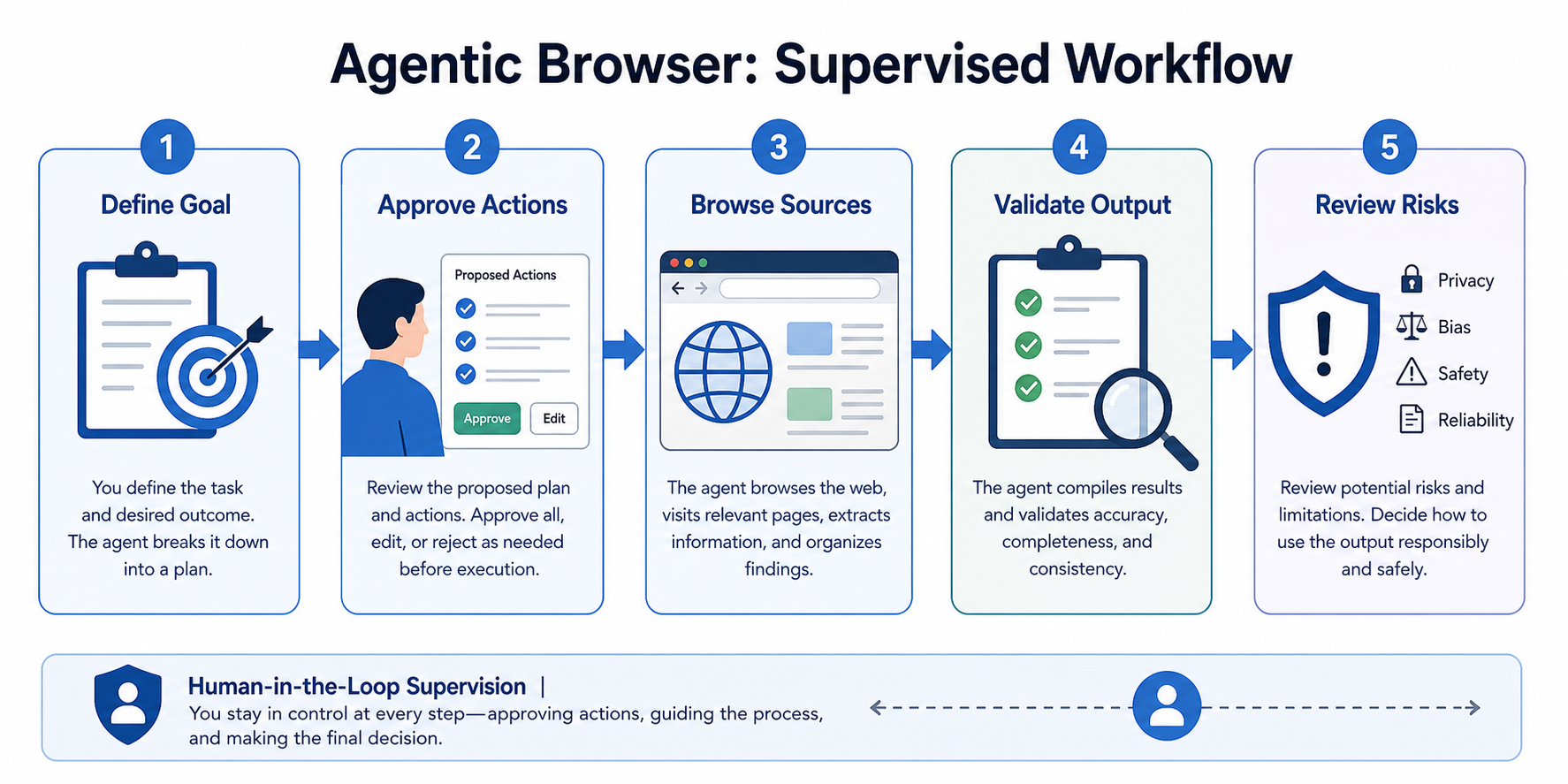
Before treating a workflow as successful, confirm:
- The agent used the intended websites.
- The active account was correct.
- The geographic location matched the requirement.
- Every extracted fact can be traced to a source.
- Dates, currencies, units, and plan periods were normalized.
- No required options were omitted.
- The agent stopped at the defined completion point.
- Consequential actions received explicit approval.
- No duplicated submission or transaction occurred.
- Logs and screenshots are sufficient to reconstruct the run.
- Retry behavior did not create unintended actions.
- The result remains accurate when checked manually.
- The workflow follows applicable policies and authorization requirements.
When Not to Use an Agentic Browser
Do not use an agentic browser merely because it is convenient.
A different approach is preferable when:
- A stable official API provides the required data.
- The process is deterministic and can be scripted reliably.
- The task involves an unauthorized system or private data.
- The workflow requires legal, medical, financial, or safety-critical judgment.
- A mistake could create an irreversible commitment.
- The agent would need unrestricted access to confidential accounts.
- The task cannot be independently validated.
- The target website prohibits the intended activity.
- The workflow cannot support adequate logs or approval controls.
- The expected volume makes browser execution inefficient.
- The user cannot supervise sensitive actions.
- The organization has not completed a security and privacy review.
Agentic browsing should support human decision-making, not remove accountability for consequential decisions.
Assumptions and Limitations
Agentic browser performance may vary based on:
- The browser and agent version
- Operating system
- Product plan and regional availability
- Target website structure
- Accessibility and document-object-model quality
- Visual complexity
- Browser permissions
- Open tabs and page context
- Cookies and session history
- Account status
- Network conditions
- Proxy type and configuration
- Geographic alignment
- Website security controls
- Request frequency
- Tool integrations
- Model behavior
- Product updates
- Policies and legal requirements
A workflow that works today may fail after a browser, model, website, or authentication update. Maintain version records, test important workflows regularly, and retain a manual fallback.
Explore LycheeIP Proxy Infrastructure for Agentic Browser Workflows
Agentic Browsing Is Delegation, Not Autopilot
An agentic browser changes browsing from a sequence of manual actions into a supervised, goal-based workflow. It can reduce repetitive work, organize multi-source research, and navigate unfamiliar web processes, but it also introduces risks that traditional browser automation does not fully address.
The safest approach is to choose the least complex tool that solves the task:
- Use an API for structured access.
- Use scripted automation for deterministic repetition.
- Use an agentic browser for variable, goal-driven work.
- Keep humans responsible for sensitive, consequential, or subjective decisions.
When a legitimate workflow also requires geographic routing, session continuity, or controlled public-web access, review the network requirements separately from the AI and browser layers. Explore the available proxy categories on the LycheeIP homepage and test a small, authorized workflow before scaling.
Frequently Asked Questions
What is an agentic browser?
An agentic browser is a browser or browser-based system that uses an AI agent to understand a goal, plan steps, navigate webpages, and take supported actions for the user. Unlike a basic browser assistant, it can decide what to do next instead of only answering questions about the current page.
What is a browser agent?
A browser agent is the AI component that interprets instructions and controls browser actions. It may operate inside a dedicated AI browser, an extension, a cloud browser, or a developer-controlled browser environment.
Is an AI browser the same as an agentic browser?
Not necessarily. An AI browser may provide search, summarization, writing assistance, or page explanations without taking autonomous actions. It becomes agentic when it can pursue a goal through multiple browser steps.
Can an agentic browser fill out forms?
Many agentic browsers can enter information into supported web forms. Users should review every field and require confirmation before submission, especially when the form creates a legal, financial, medical, employment, or contractual consequence.
Are agentic browsers safe?
They can be useful when permissions are limited, actions are visible, and consequential steps require approval. They still face risks such as prompt injection, excessive access, data leakage, incorrect actions, and cross-site exposure, so sensitive workflows require stronger controls.
Can an agentic browser replace Playwright or Selenium?
Not for every workflow. Agentic browsers are useful for variable tasks that require interpretation, while scripted frameworks are generally better for deterministic testing and repeatable automation. A hybrid system can use an agent for exceptions and code for controlled execution.
Do agentic browsers need proxies?
Not by default. A proxy is relevant only when the authorized workflow requires a different network route, geographic location, source IP, or session-routing model. It does not improve the agent’s reasoning or guarantee successful access.
Can an agentic browser scrape websites?
A browser agent can extract information from webpages, but technical capability does not establish authorization. Teams should evaluate official APIs, website terms, robots directives, rate limits, data licensing, privacy, copyright, contractual restrictions, and applicable law before collecting data.
How should a company evaluate an agentic browser?
Start with a low-risk workflow, limit the accessible accounts and domains, require approval for consequential actions, and compare the output with a manually verified result. The evaluation should measure accuracy, recoverability, security controls, logging, cost, and consistency rather than relying on a successful demonstration.
What happened to the ChatGPT Atlas browser?
OpenAI announced that Atlas is being deprecated and is scheduled to stop working on August 9, 2026. Browser-based agentic capabilities are being moved into ChatGPT and its desktop experience, so current buyers and researchers should verify OpenAI’s latest product documentation rather than relying on older Atlas comparisons.
Related LycheeIP Guides and Resources
