
Jio and Airtel APN Settings: Fix Slow Mobile Data Safely
APN settings: the answer first
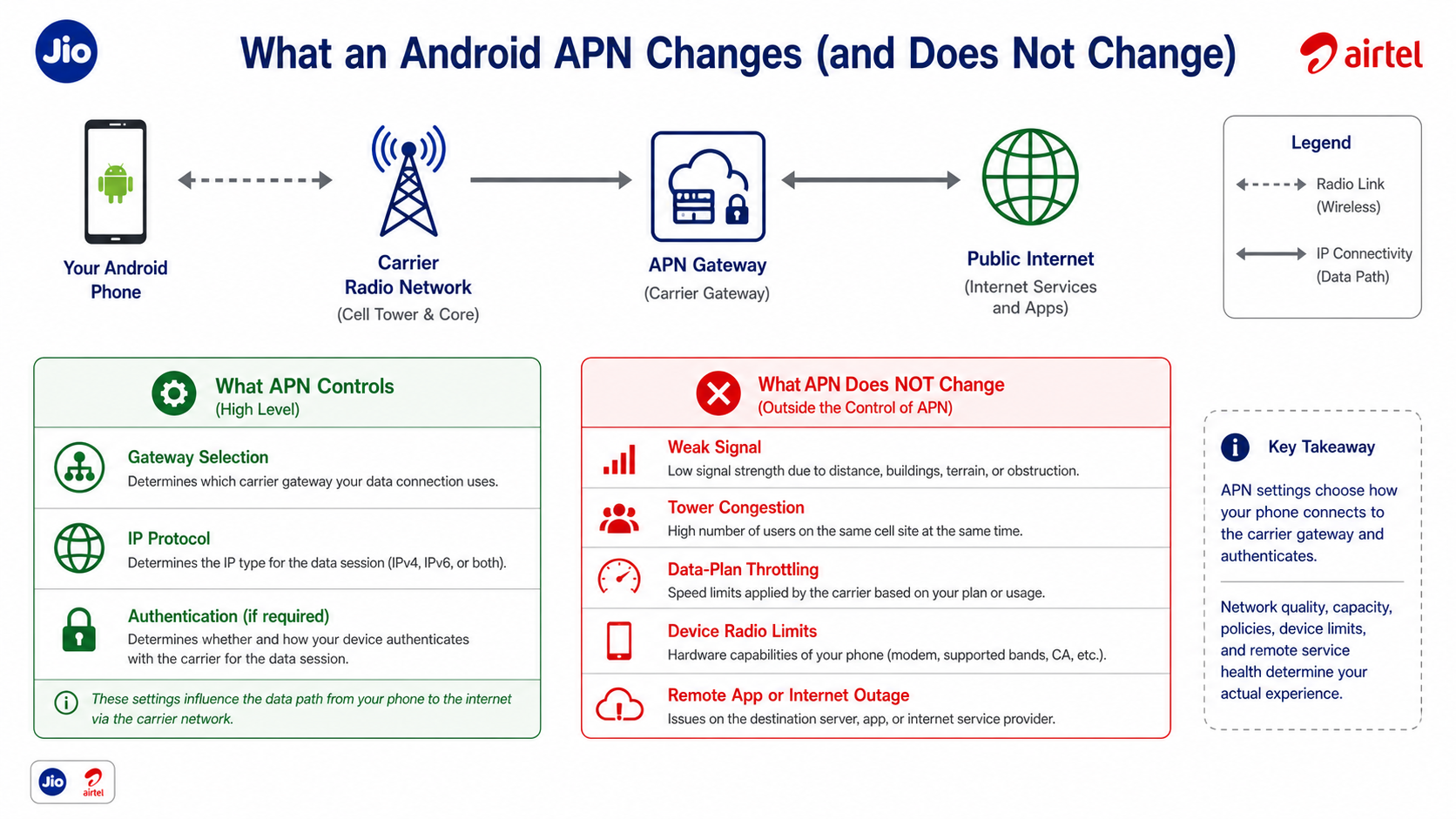
Use the APN profile supplied by the carrier for the SIM and plan. On most Android devices, open the selected SIM under Mobile network, choose Access Point Names, and use Reset to default. Restart mobile data, then test more than one site or app. Do not enter a proxy, MMSC, username, password, authentication method, or custom DNS value unless the carrier explicitly requires it for that plan.
The operating-system path varies by vendor and Android release. The Android connectivity guidance explains the platform's network model, while the IETF IPv6 specification is the protocol reference for IPv6. Neither source promises that changing an APN will increase radio capacity.
What an APN changes
An access point name identifies a carrier data-service configuration. It can affect gateway selection, IP protocol, roaming behavior, and authentication when the carrier requires it. A missing or malformed value can prevent data, multimedia messaging, or tethering from working. A valid APN does not create a stronger radio signal or reserve tower capacity.
If the phone connects but websites fail by name, treat DNS separately. If calls and texts work but data does not, verify the correct SIM is selected for data, the plan is active, roaming is configured appropriately, and the preferred network mode is supported in that location.
A safe Jio and Airtel reset procedure
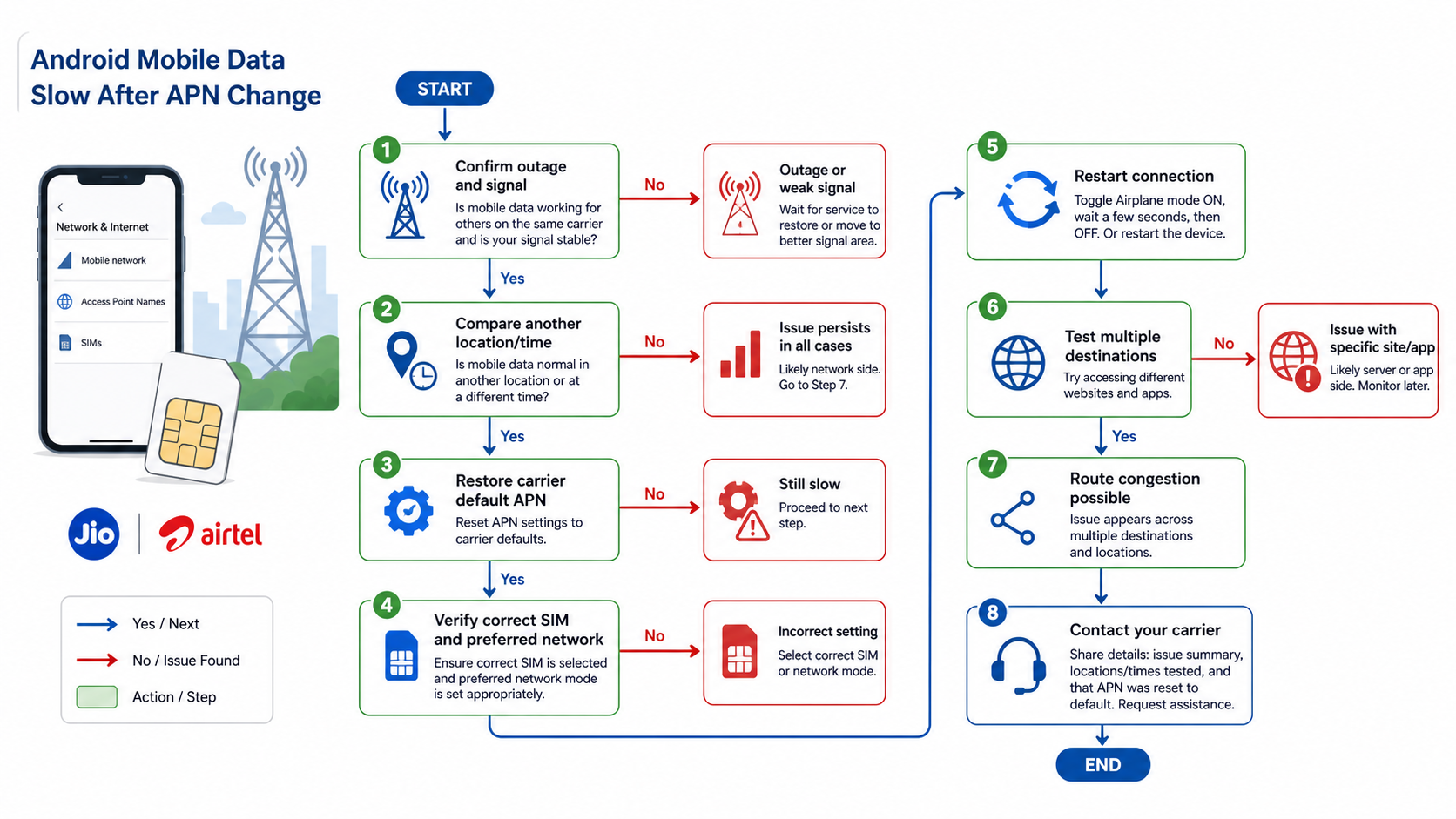
- Take screenshots of the current APN and note which profile is selected.
- Use the device's Reset to default command. Avoid deleting carrier-managed profiles unless support instructs you to.
- Confirm the correct Jio or Airtel SIM is selected for mobile data.
- Toggle airplane mode once or restart the phone.
- Test a normal HTTPS website and a second unrelated app.
- Repeat the test in another location or time window before blaming the APN.
For Android routing beyond the carrier APN, the Android proxy setup guide explains application and Wi-Fi proxy scope. A VPN, VPS, and proxy comparison helps distinguish device tunnels from carrier configuration, and the WireGuard setup guide covers a self-managed encrypted tunnel.
Diagnose slow mobile data without guessing
Compare signal and congestion
Test near a window or outdoors, then repeat during a quieter period. If every app slows at the same place and time, radio conditions or congestion are more likely than an APN syntax problem. Capture the network type, signal indicator, time, location, and test destination.
Compare the SIM and device
Where permitted, test the SIM in another compatible device or another known-good SIM in the same phone. This separates account or carrier provisioning from device radio, firmware, or SIM-slot problems.
Check the application layer
If only one service is slow, inspect that service's status and try another destination. A region mismatch can involve account, device, resolver, or network signals; use the region mismatch checklist rather than repeatedly changing APNs.
When proxy infrastructure is relevant
APN repair is a carrier-support task. Proxy infrastructure is relevant later when a developer needs authorized regional QA or controlled application routing. Compare residential proxy use cases, SOCKS5 behavior, and per-application Proxifier rules. For automated browser tests, combine stable routing with browser-state diagnostics and the Playwright workflow; a proxy does not repair mobile radio service.
Change these three critical APN parameters to eliminate mobile data bottlenecks.
If you are struggling with a frustratingly slow mobile internet connection despite your device displaying full signal bars, the underlying issue is rarely hardware failure, it is almost always your Access Point Name (APN) configuration. Most smartphone users and even technical operators rely on default carrier configurations. However, these auto-provisioned settings are frequently outdated, poorly prioritized, or mismatched with modern 4G/5G radio layers.
Whether you are a developer testing API responses, a data analyst querying remote databases on the go, or simply trying to stream without buffering, misconfigured APN parameters will throttle your IP traffic to a crawl.
The good news is that resolving this routing bottleneck takes less than five minutes and requires no root access. This comprehensive guide details the mechanics of APN routing, provides the exact configurations for India's major telecom networks (Jio, Airtel, Vi, and BSNL), and isolates the three specific settings that dictate your true network capacity.
What APN Settings Are and Why They Affect Your Speed
Understanding Access Point Names (APN)
An Access Point Name (APN) is the critical network gateway between your mobile device's modem and the carrier's public internet infrastructure. It is essentially the routing address your device uses to negotiate an IP address and establish a secure data connection.
When you insert a SIM card, the operating system reads the Integrated Circuit Card Identifier (ICCID) and automatically pulls a default APN profile. However, this automatic handshake prioritizes basic connectivity over peak performance. Your APN profile contains several technical directives:
- The specific carrier server handling your data requests.
- The authentication protocol required by the network.
- The IP routing protocol (IPv4, IPv6, or dual-stack).
- Traffic prioritization tags (e.g., separating standard internet data from MMS or carrier billing services).
Why Default Settings Cause Slow Speeds
Relying on out-of-the-box APN settings can cripple your bandwidth for several reasons:
- Outdated Configurations: If you have migrated a legacy SIM card across multiple device upgrades, your APN profile may be locked to outdated 3G routing parameters, failing to leverage modern LTE/5G carrier aggregation.
- Auto-Configuration Errors: Unlocked devices or custom ROMs frequently misidentify regional carrier bands, applying generic, unoptimized fallback settings.
- Protocol Mismatches: Forcing legacy IPv4 routing when the carrier infrastructure is optimized for native IPv6 will introduce severe Network Address Translation (NAT) overhead, increasing latency and reducing throughput.
- Poor APN Type Priority: If the profile fails to explicitly prioritize default internet traffic over supplementary services, background tasks can choke your active web sessions.
Common Symptoms of APN Issues
You are likely experiencing an APN routing issue rather than physical tower congestion if you observe the following:
- Extremely slow download and upload speeds despite a strong radio signal indicator.
- Consistent, intermittent TCP connection drops or API timeouts.
- Voice over LTE (VoLTE) and SMS work flawlessly, but HTTP/HTTPS packet data fails entirely.
- Your device displays a 4G/5G data icon, but there is zero actual internet throughput.
Troubleshooting Steps If Speed Doesn't Improve
Advanced Network Mode Configuration
If applying carrier-specific APNs yields no improvement, your device's radio resource control might be misconfigured:
- Android: Go to Settings > Network & Internet > Mobile Network > Preferred Network Type. Ensure it is set to 4G (LTE) / 5G Auto. Locking a device to 3G/2G will artificially cap your speed regardless of APN settings.
- iOS: Navigate to Settings > Cellular > Cellular Data Options > Voice & Data and select LTE or 5G Auto.
Clear Network Cache
Corrupted network sockets and lingering DNS caches can persistently degrade speed. To understand how Android handles network states and active socket connections, technical users can review the Android Developer documentation on network operations.
- Android Method: Go to Settings > System > Reset Options and select Reset Wi-Fi, mobile & Bluetooth.
- iOS Method: Go to Settings > General > Transfer or Reset iPhone > Reset and select Reset Network Settings (Note: This wipes saved Wi-Fi passwords).
Check for Carrier Settings Updates
Carriers frequently push silent OTA (Over-The-Air) updates to update baseband profiles.
- iOS: Go to Settings > General > About and wait 30 seconds on a Wi-Fi connection. A prompt will appear if an update is available.
- Android: Check Settings > System > System Update.
SIM Card Issues
Physical degradation of the SIM card's copper contacts can introduce micro-disconnects, simulating APN failure. If your SIM card is older than three years, the cryptographic chips may struggle to authenticate rapidly on modern 5G networks. Request a physical replacement or upgrade to an eSIM if your device supports it.
Network Congestion vs. APN Issues
If your speeds only tank during the evening (7 PM to 11 PM), you are experiencing ISP-level bandwidth shaping and tower congestion, not a localized APN error. Test your connection at 3 AM; if speeds are blazing fast, your APN is perfectly fine, and the tower is simply overcrowded during peak hours.
When to Contact Your Carrier
Escalate the issue to telecom support if:
- Speeds are permanently throttled well below your SLA/plan limits across multiple different devices.
- Setting the correct APN fails to restore standard HTTP traffic.
- The degradation began immediately following a localized cell tower upgrade.
Be prepared to provide your exact geolocation, speed test metrics, active APN parameters, and device baseband version to expedite tier-2 support.
Frequently Asked Questions
What is the correct APN for Jio or Airtel?
Use the carrier-provisioned default for your SIM and plan. Reset the APN and confirm current values with official carrier support instead of copying an old profile.
Can an APN increase mobile-data speed?
It can repair a wrong gateway or protocol configuration, but it cannot add signal strength, tower capacity, data allowance, or remote-server performance.
Why did data stop after I edited the APN?
A required field may be missing or incompatible. Restore the default profile, select it, restart mobile data, and contact the carrier if service does not return.
Should I enter a proxy or MMSC value?
Only when the carrier's current instructions for the specific plan require it. Do not copy unrelated proxy or MMSC values.
Why is one app slow while other sites work?
That points toward the app, its server, DNS, or a route to that destination rather than a general APN failure.
When should I contact the carrier?
Escalate after a default reset, restart, cross-location test, and SIM/device comparison still show a repeatable problem.
